Spreadsheet Formula Engine
Asked of: Software Engineer
Last updated
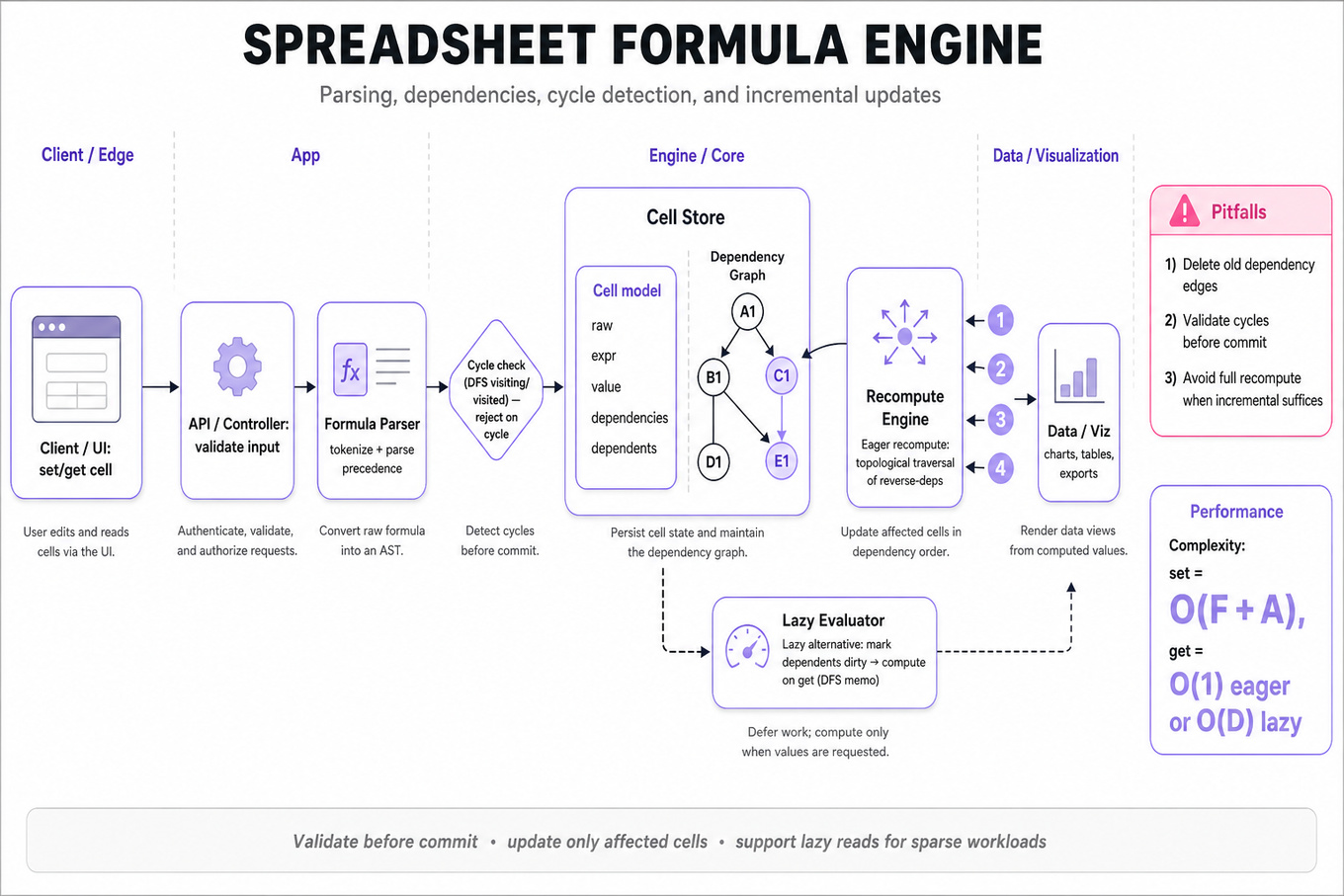
What's being tested
These problems test stateful data structure design for an in-memory spreadsheet: parsing formulas, resolving cell references, maintaining a dependency graph, and updating values incrementally. Interviewers are looking for clean APIs, correct invalidation order, and robust handling of cycles and stale cached values.
Patterns & templates
-
Cell model: store
rawinput, parsedexpr, cachedvalue,dependencies, anddependents; separates user state from computed state. -
Expression parsing: implement recursive descent or token scan for
+,-,*,/, parentheses, numbers, and cell refs; define precedence explicitly. -
Dependency graph: on
set(cell, formula), remove old edges, add newcell -> referencedCelledges, then update reverse dependents for propagation. -
Cycle detection: run DFS with
visiting/visitedstates before committing formula; rejectA1 = B1 + 1,B1 = A1 + 1. -
Incremental recomputation: after a leaf update, traverse reverse dependencies with topological DFS/BFS; recompute only affected cells in dependency-safe order.
-
Lazy evaluation alternative: mark dependents dirty and compute on
get(cell)via DFS memoization; simpler for sparse reads, worse for repeated hot reads. -
Complexities:
setisO(F + A)whereFis formula size andAaffected cells;getisO(1)eager orO(D)lazy.
Common pitfalls
Pitfall: Forgetting to delete old dependency edges means cells keep depending on references from previous formulas.
Pitfall: Detecting cycles only during
getcan leave the spreadsheet in an invalid committed state; validate before committing updates.
Pitfall: Recomputing every cell after each update is correct but usually fails the intended incremental-evaluation signal.
Practice these
The practice cards below cover the canonical variants — solve all of them and time yourself.