Front-End System Design Interview: The Step-by-Step Guide (2026)
Quick Overview
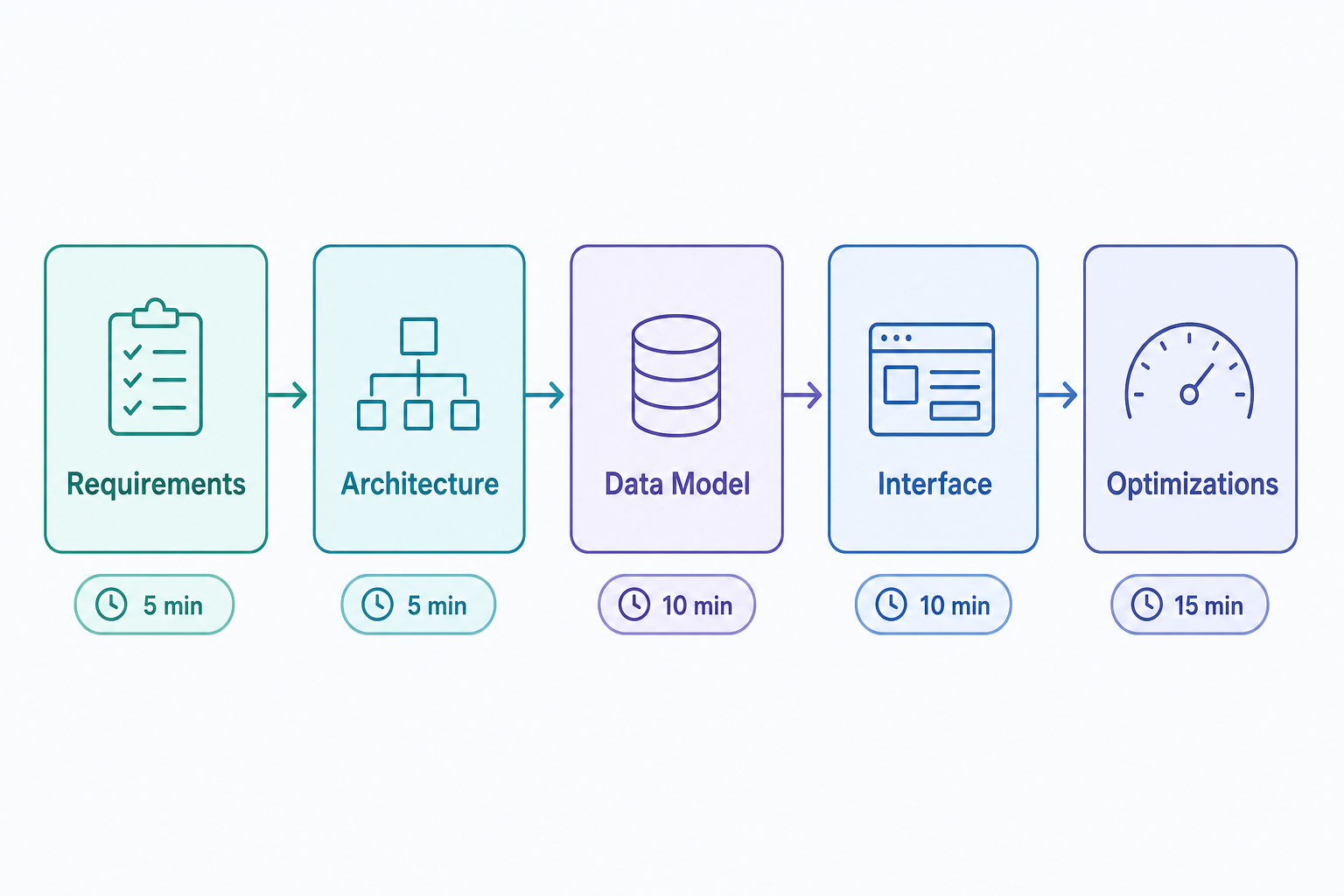
This step-by-step guide details front-end system design interview concepts and the RADIO framework—Requirements, Architecture, Data Model, Interface, and Optimizations—covering component architecture, state management, network resilience, perceived performance (Core Web Vitals), accessibility, and techniques for efficient large DOM updates.
The most reliable way to pass a front-end system design interview is to structure your answer with the RADIO framework: Requirements, Architecture, Data Model, Interface, and Optimizations. Unlike back-end system design, which centers on database scaling, sharding, and distributed consensus, front-end system design centers on component architecture, state management, network resilience, and perceived performance (Core Web Vitals).
By 2026, several major tech companies, including Meta, Netflix, and Amazon, run dedicated front-end system design rounds for UI-focused roles at the senior level, and increasingly for mid-level engineers as well. Interviewers expect you to design complex, client-heavy applications that hold up on poor networks, manage large DOM updates efficiently, and meet real accessibility standards.
This guide gives you a 45-minute pacing strategy, the 5-step RADIO framework, a scoring rubric so you know what "strong" looks like, a fully worked News Feed example, and the core front-end concepts you need to demonstrate to get a Hire.
Watch a senior engineer work through a full front-end system design interview:
Table of Contents
- The 5-Step RADIO Framework
- 45-Minute Pacing Guide
- What Interviewers Actually Score
- Example: Designing a News Feed
- Critical Front-End Concepts to Mention
- Common Mistakes (and What to Do Instead)
- How to Practice
- FAQ
The 5-Step RADIO Framework
RADIO gives your interviewer a predictable structure and keeps you from rambling or skipping the parts that actually earn the offer. Walk through the five steps in order, narrating as you go so the interviewer can follow your reasoning.
1. Requirements (5 minutes)
Never start drawing components immediately. Clarify exactly what you are building first.
- Functional requirements: What does the user actually do? For example: "Users can upload a photo, apply a filter, and post it to a feed."
- Non-functional requirements: What are the constraints? For example: "Must remain usable on slow networks," "Must meet WCAG 2.1 AA accessibility," "Must support an offline read-only mode."
- Scope and scale: Roughly how many items render at once? Is this read-heavy (a feed) or write-heavy (a collaborative editor)? Confirm what is explicitly out of scope so you don't waste time.
Write these down where the interviewer can see them. You will reference this list again in the Optimizations step, and an interviewer who watches you close the loop on your own requirements reads that as senior behavior.
2. Architecture & High-Level Design (5 minutes)
Outline the broad architectural approach and the separation of concerns between client and server.
- Decide on a rendering strategy: Server-Side Rendering (SSR) for SEO and fast first paint, Client-Side Rendering (CSR) for highly interactive apps, Static Generation (SSG) for content that rarely changes, or a hybrid approach (Next.js, Remix).
- Sketch the boundaries: the client application, your API gateway or BFF (Backend-for-Frontend), the CDN, and any external services.
- Name the transport you expect: REST, GraphQL, or a real-time channel (WebSocket / Server-Sent Events) if the feature needs live updates.
3. Data Model & State Management (10 minutes)
This is where many candidates lose points. Explain clearly how data flows through the application, and be deliberate about the distinction between server state and client state, since they have different lifecycles and tools.
- Server state: How do you fetch, cache, and mutate data from the API? (For example, React Query, SWR, or Apollo for GraphQL.) How do you handle pagination, background refetching, and stale data?
- Client state: How do you manage global UI state? (For example, Redux, Zustand, Jotai, or the React Context API for low-frequency updates.) Be explicit that Context is fine for theme or auth but a poor fit for high-frequency updates, because every consumer re-renders.
- URL state: Filters, tabs, and pagination cursors often belong in the URL so views are shareable and survive a refresh.
- Write out the JSON payload you expect to receive from the server so the data shape is concrete. A vague data model is the single most common reason strong candidates stall.
4. Interface & Component Tree (10 minutes)
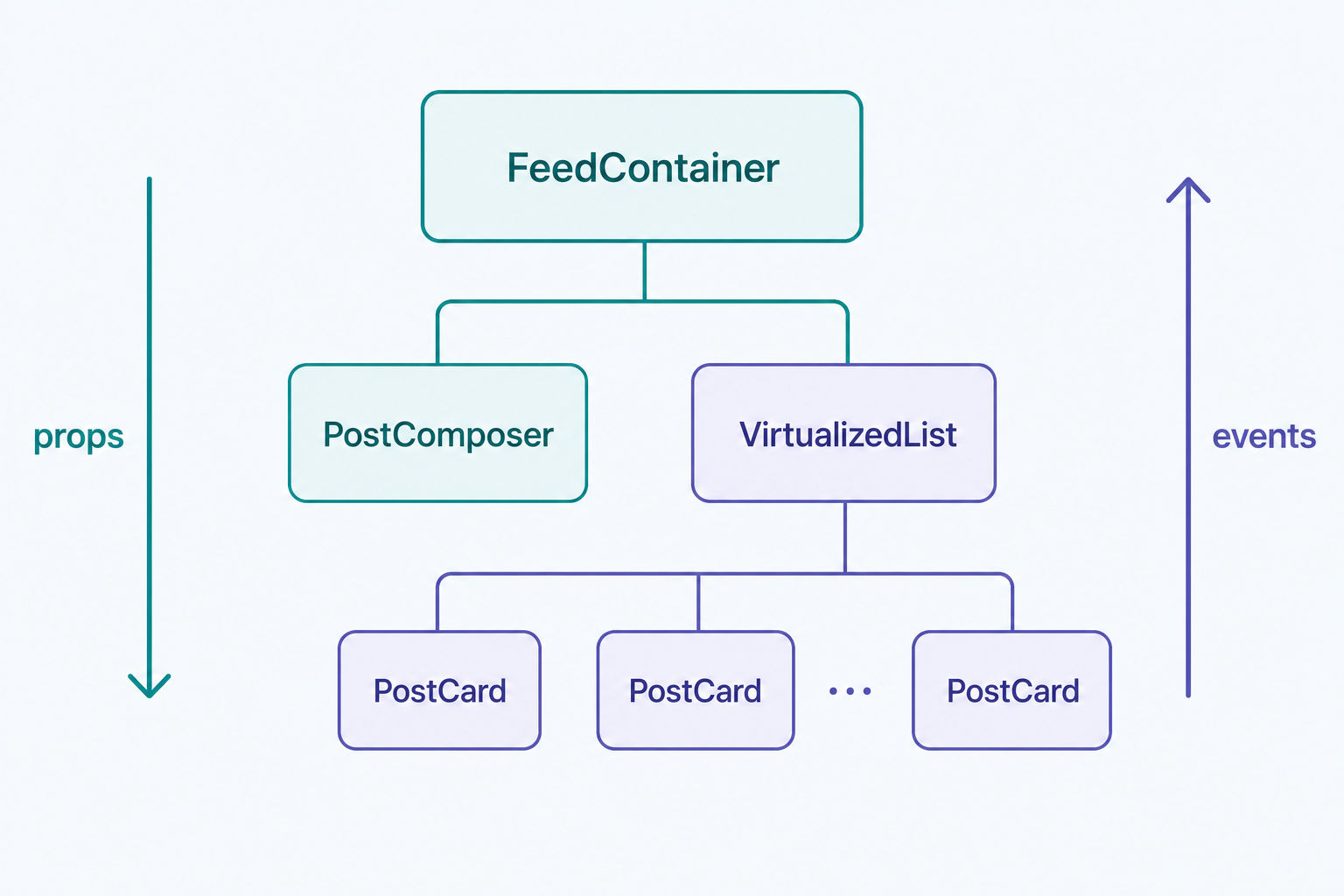
Draw the UI as a component tree. Don't write CSS or production code. Draw labeled boxes and show how they nest.
- Identify the container ("smart") components and the presentational ("dumb") components.
- Show props flowing downward and event callbacks flowing upward.
- Describe the rendering strategy. If a deeply nested component updates, how do you stop the whole tree from re-rendering? Name the levers: memoization, state colocation, and splitting context providers.
5. Optimizations & Edge Cases (15 minutes)
This section is what separates senior candidates from mid-level ones. Return to the non-functional requirements from Step 1 and address each one explicitly.
- Performance: Code splitting, lazy loading, image optimization, and virtualized lists for infinite scroll.
- Network resilience: Optimistic UI updates, offline caching, retry with backoff, and graceful handling of API timeouts.
- Accessibility: Semantic HTML, ARIA attributes, keyboard navigation, and focus management in modals and overlays.
45-Minute Pacing Guide
Time management makes or breaks this interview. Stick to the schedule below so you reach Optimizations, the part that demonstrates seniority, with time to spare.
| Phase | Time | Key Deliverable |
|---|---|---|
| 1. Requirements | 5 min | A written list of functional and non-functional constraints. |
| 2. Architecture | 5 min | A high-level diagram (client vs. server vs. CDN). |
| 3. Data Model | 10 min | Core JSON shapes, HTTP methods, and state-management choices. |
| 4. Interface Tree | 10 min | A labeled component wireframe showing data flow. |
| 5. Optimizations | 15 min | Concrete discussion of Web Vitals, pagination, and resilience. |
If you only have 45 minutes, treat the first 10 (Requirements + Architecture) as a hard cap. Candidates who over-invest in early diagrams routinely run out of time before they can show depth. If the interviewer interrupts to push you somewhere specific, follow them. They are usually steering you toward the signal they need to score.
What Interviewers Actually Score
Most front-end design rounds are graded across a handful of dimensions rather than a single "right answer." Knowing the rubric lets you spend your minutes where the points are. The table below describes what weak, average, and strong responses tend to look like on each axis.
| Dimension | Weak signal | Strong signal |
|---|---|---|
| Requirements gathering | Jumps straight to components | Separates functional from non-functional, confirms scope and scale out loud |
| Data flow | Hand-waves "we fetch the data" | Writes a concrete JSON payload, names server vs. client vs. URL state |
| Component design | One giant component | Clear container/presentational split, props down and events up |
| Performance | Mentions "make it fast" | Names specific levers: virtualization, code splitting, CLS/LCP reservations |
| Resilience | Assumes the happy path | Handles offline, optimistic updates with rollback, timeouts, empty/error states |
| Communication | Silent while drawing | Narrates trade-offs, invites the interviewer in, manages the clock |
Use this as a self-check during mock practice. If you can't point to a moment where you showed the "strong signal" version of each row, that is your highest-leverage thing to fix.
Example: Designing a News Feed
Suppose the interviewer asks: "Design the front-end for a Twitter/X-style news feed." Here is how RADIO applies. Treat the answers below as one reasonable example, not the only correct design. Interviewers reward defensible trade-offs over memorized scripts.
Requirements
- Functional: View a feed of text and image posts, scroll infinitely, like a post, and compose a new post.
- Non-functional: Fast Time-to-Interactive (TTI), smooth scrolling with thousands of items, and optimistic UI when liking posts.
Architecture
- Use SSR for the initial shell to get a fast First Contentful Paint (FCP), then hydrate into a CSR app for fluid feed interactions. New posts arrive via polling or a WebSocket if true real-time is required.
Data Model
- State management: React Query for server state (background refetching, caching, cursor pagination) and local component state for the post composer's text input.
- Payload: As an example, each post object includes
id,author_meta,content,timestamp,like_count, andhas_liked_status, and the list response returns anext_cursorfor pagination.
Interface
FeedContainer- fetches data and owns the infinite-scroll listener.PostComposer- an uncontrolled input to avoid re-rendering the feed on every keystroke.VirtualizedList- uses windowing to render only the posts in the viewport.PostCard- memoized so it re-renders only when its own like status changes.
Optimizations
- Virtualization: Rendering thousands of DOM nodes at once is a non-starter. Use a windowing library (for example,
react-window) to render only the posts currently on screen plus a small buffer. - Optimistic updates: When a user taps "Like," increment the counter in local UI state immediately, before the request resolves. If the request fails, revert the state and show an error toast.
- Image optimization: Serve avatars and post images in a modern format (for example, WebP or AVIF) from a CDN, with native
loading="lazy"on below-the-fold images and explicit width/height to avoid layout shift.
Want to rehearse on the real prompts? The same RADIO flow applies to most UI-heavy questions. Browse the full question bank for feed, checkout, and autocomplete prompts, or look at the Software Engineer role hub for what each company tends to ask.
Critical Front-End Concepts to Mention
To earn a "Strong Hire," weave the following concepts naturally into your Optimizations section. You do not need to lecture on all of them. Reach for the two or three most relevant to the prompt.
1. Core Web Vitals
Show that you care about real user performance metrics. Explain how your design minimizes Cumulative Layout Shift (CLS) by reserving width and height for skeleton loaders and media. Explain how you improve Largest Contentful Paint (LCP) by preloading critical hero images and deferring non-critical JavaScript. Mention Interaction to Next Paint (INP) for input responsiveness on interaction-heavy UIs.
2. Network Resilience and Optimistic UI
Assume networks are unreliable. Reflect user actions locally and immediately (optimistic update) while the request runs in the background. Address what happens if the user drops connection mid-action, for example queueing requests in IndexedDB and replaying them via a Service Worker's background sync. Always name the rollback path: an optimistic update without a rollback is a bug, not a feature.
3. Security (XSS and CSRF)
Front-end security matters. Sanitize all user-generated content (comments, rich text, anything rendered as HTML) to prevent Cross-Site Scripting (XSS). Mention storing session tokens in secure, HttpOnly cookies to limit theft, and protecting state-changing requests against Cross-Site Request Forgery (CSRF) with same-site cookies or anti-CSRF tokens.
4. Accessibility as a Design Constraint
Accessibility is a scored requirement, not a bonus. Use semantic HTML first and reach for ARIA only when a native element can't express the pattern. Call out keyboard navigation, visible focus states, and focus trapping inside modals. For an infinite feed, mention an ARIA live region so screen-reader users are told when new content loads.
Common Mistakes (and What to Do Instead)
Most rejections in this round come from a small set of repeatable mistakes. Watch for these.
| Common mistake | Do this instead |
|---|---|
| Drawing components before clarifying requirements | Spend the first 5 minutes on functional + non-functional scope |
| Putting all state in global Context | Colocate state; use a dedicated server-state library for API data |
| One monolithic component | Split into container and presentational components early |
| Ignoring the empty, loading, and error states | Sketch all three. Interviewers probe them on purpose |
| Rendering an entire long list | Virtualize and paginate from the start |
| Going silent while you draw | Narrate trade-offs. Your reasoning is the thing being graded |
| Running out of time before Optimizations | Hard-cap the early phases and protect the last 15 minutes |
How to Practice
Knowing the framework isn't enough if you freeze under pressure. Build the muscle memory.
- Whiteboard component trees. Practice drawing labeled component hierarchies on paper or a whiteboard until it's automatic.
- Think out loud. The interviewer grades your reasoning, not just your final diagram. If you're choosing between Redux and Context, say the trade-offs aloud.
- Drill the same prompt three ways. Design a feed with REST, then GraphQL, then with offline support. Re-running one prompt under new constraints builds flexible instincts faster than touching ten prompts once.
- Run mock interviews. Use PracHub for AI-driven front-end system design mocks. The AI is calibrated to push you to defend your API shapes and accessibility choices under a strict 45-minute timer. Pair it with the resource library and the broader interview guide to round out behavioral and coding prep.
How to Use This Page as a Prep Plan
Do not treat this as passive reading. Convert the ideas in this page into a short weekly loop: learn one idea, practice it under interview conditions, then write down what changed. That is the fastest way to turn advice into visible interview behavior.
| Prep area | What you need to prove | Practice artifact |
|---|---|---|
| Requirements | Clarify the problem before drawing boxes. | Functional and non-functional checklist. |
| Architecture | Map data flow before naming technologies. | One end-to-end diagram. |
| Tradeoffs | Explain why the design fits the constraints. | Latency, consistency, cost, and operability notes. |
| Failure handling | Show how the system behaves under stress. | Backpressure, retries, monitoring, and rollback plan. |
For Front-End System Design Interview: The Step-by-Step Guide (2026), the strongest candidates usually do three things well: they make their assumptions explicit, they use concrete examples instead of vague claims, and they review mistakes quickly enough that the next practice rep is better than the last one.
FAQ
What is a front-end system design interview?
A front-end system design interview is a roughly 45-minute technical round where you architect the client side of a complex web application, such as an e-commerce checkout flow or a news feed. The interviewer evaluates how you design component hierarchies, manage global and local state, optimize web performance, and handle edge cases like network failures and accessibility requirements.
How is front-end system design different from back-end system design?
Back-end system design focuses on data persistence, database sharding, horizontal scaling, load balancing, and distributed consensus. Front-end system design assumes the back-end API already exists and focuses on the client: rendering strategies, perceived performance (Core Web Vitals), bundle size, state management, and user-experience resilience.
What framework should I use for front-end system design?
Use the RADIO framework: Requirements, Architecture, Data Model, Interface, and Optimizations. The five steps make you clarify constraints before designing, define data flow explicitly, and leave enough time to show seniority through performance and security trade-offs.
Do I need to write code in a front-end system design interview?
Usually not. You typically don't write executable code. You're expected to draw architecture diagrams, whiteboard component-tree wireframes, and write out JSON payload schemas. The goal is to evaluate architectural decision-making, not syntax recall. A small snippet to illustrate a hook or a data shape is fine if it clarifies your point.
How long should I spend on each part of the answer?
A common split for a 45-minute round is about 5 minutes on requirements, 5 on architecture, 10 on the data model and state, 10 on the component tree, and 15 on optimizations and edge cases. Protect the final block. Optimizations is where senior signal lives, so don't let early diagramming eat it.
What are the most common front-end system design questions?
Frequently asked prompts include: design a news feed (Twitter/Facebook), design an e-commerce checkout flow (Amazon), design a collaborative text editor (Google Docs), design a photo-sharing app (Instagram), and design an autocomplete/typeahead search component. You can practice these and more in the PracHub question bank.
Is RADIO specific to React?
No. RADIO is framework-agnostic. The data-model and component-tree steps map naturally to React, Vue, Svelte, or Angular. Use whichever framework you know best and explain your choices in its terms. The interviewer cares about your reasoning about state, rendering, and resilience, not about one library's syntax.
Related Articles
From Non-CS Major to Software Engineer: A Practical Guide to Cracking the Technical Interview
Prepare for technical interviews with a practical guide to DSA practice, live coding, mock interviews, communication, and interview mindset.
From Non-CS Major to Software Engineer: A Practical Guide to Cracking the Technical Interview
Prepare for technical interviews with a practical guide to DSA practice, live coding, mock interviews, communication, and interview mindset.
Design WhatsApp: the presence and receipt problems most candidates ignore
Design WhatsApp-style chat with WebSockets, offline inboxes, Kafka partitions, presence TTLs, receipts, and reliable delivery.
I Pinned Our Autoscaler for a Month to See What Would Break. Nothing Did.
Learn when Kubernetes autoscaling helps, when CPU-based HPA wastes money, and how capacity planning can cut cloud costs safely.
Comments (0)