LLMs Document Q&A — PDF Parsing Key Issues (16)
Quick Overview
The guide covers PDF parsing challenges for LLM-based document question answering, including why parsing is foundational, PDFs as rendering instructions, layout detection and reading-order reconstruction, OCR and text extraction, table and figure handling, and trade-offs between rule-based and AI-based parsing pipelines.
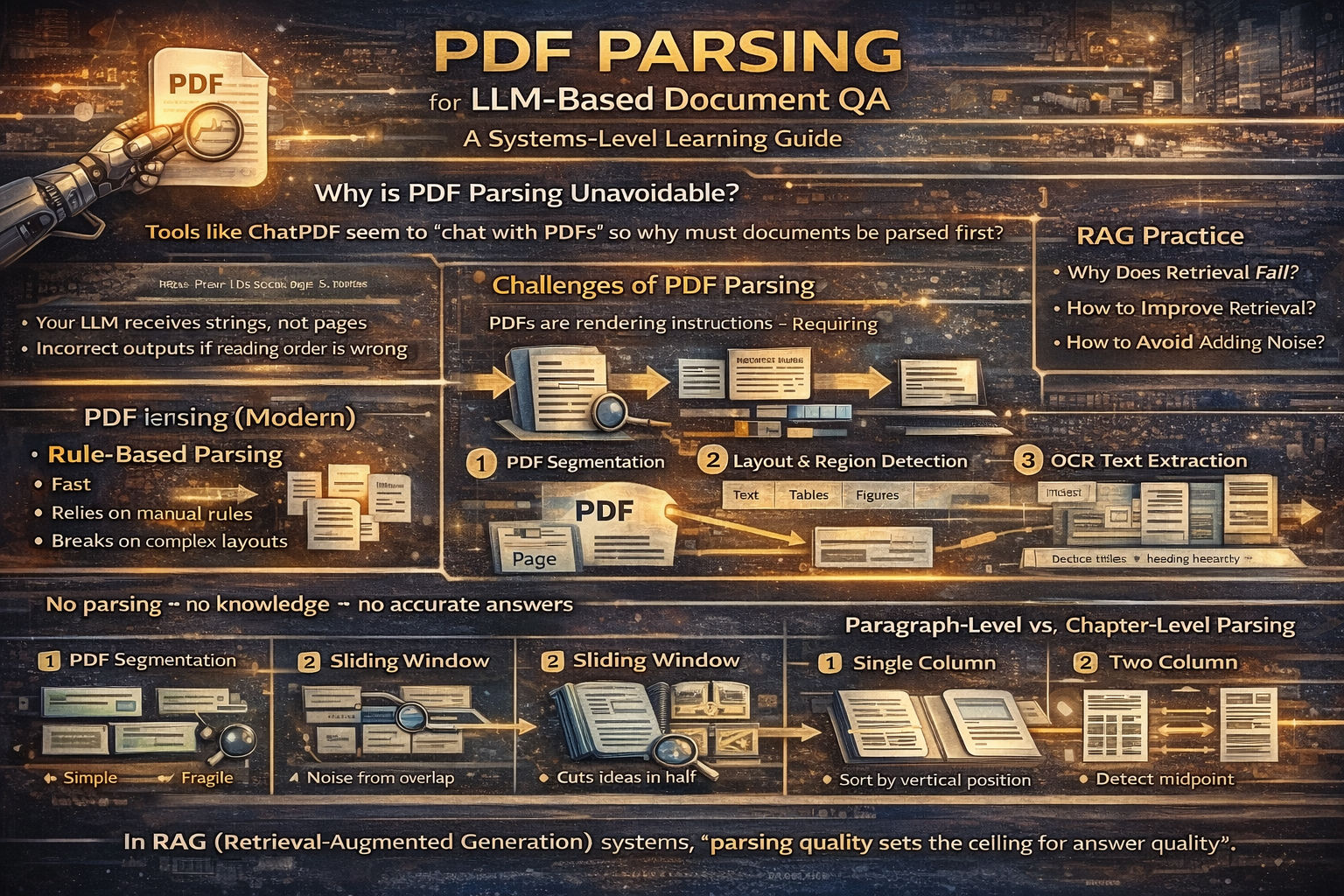
PDF Parsing for LLM-Based Document QA
A Systems-Level Learning Guide for RAG and ChatPDF-Style Applications
I. Why PDF Parsing Is Unavoidable
Tools like ChatPDF and ChatDoc appear to “chat with PDFs,” but the real work happens before the LLM ever sees a question. PDF parsing is not an optional preprocessing step—it is the foundation of document-based QA.
LLMs cannot reason over raw PDFs. They can only reason over text and structure. If a PDF is not parsed correctly, the model has nothing reliable to work with. In that case, the best LLM in the world will either say “I don’t know” or hallucinate.
In short:
No parsing → no knowledge → no accurate answers.
II. Why PDF Parsing Is Hard by Nature
PDFs are not documents in the semantic sense. They are rendering instructions.
A PDF describes where text, images, and shapes appear on a page—not what they mean. Paragraphs, tables, headings, and reading order are implicit, not explicit. This is why parsing is difficult and brittle.
When an LLM performs document QA, it needs:
- Correct text
- Correct reading order
- Correct structure (chapters, sections, tables)
PDF parsing must reconstruct all three.
III. Two Fundamental Parsing Approaches
1. Rule-Based Parsing
Rule-based parsing relies on handcrafted heuristics: font size, spacing, coordinates, and fixed templates.
It is fast and simple, but fundamentally fragile. PDF layouts vary wildly across publishers, domains, and time. Maintaining rules quickly becomes unmanageable, especially for academic papers and reports.
Rule-based parsing works only when formats are highly standardized.
2. AI-Based Parsing (The Modern Approach)
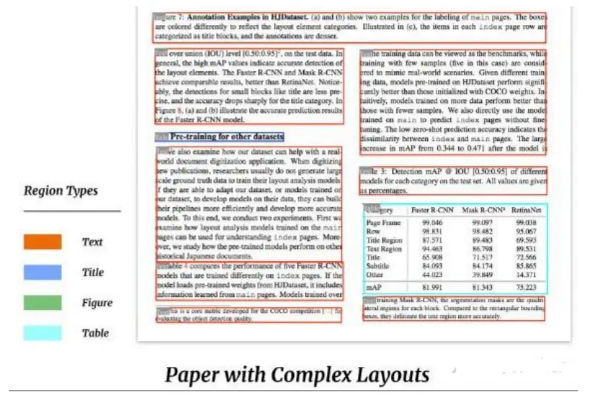
AI-based parsing treats PDFs as a document understanding problem, not a string extraction problem.
A typical pipeline looks like this:
PDF → Page Images → Layout Detection → Region Classification
→ OCR → Text
→ Heading Recognition → Structure Reconstruction
This approach is slower and more resource-intensive, but it generalizes far better across document types.
IV. Why Text Parsing Alone Is Not Enough
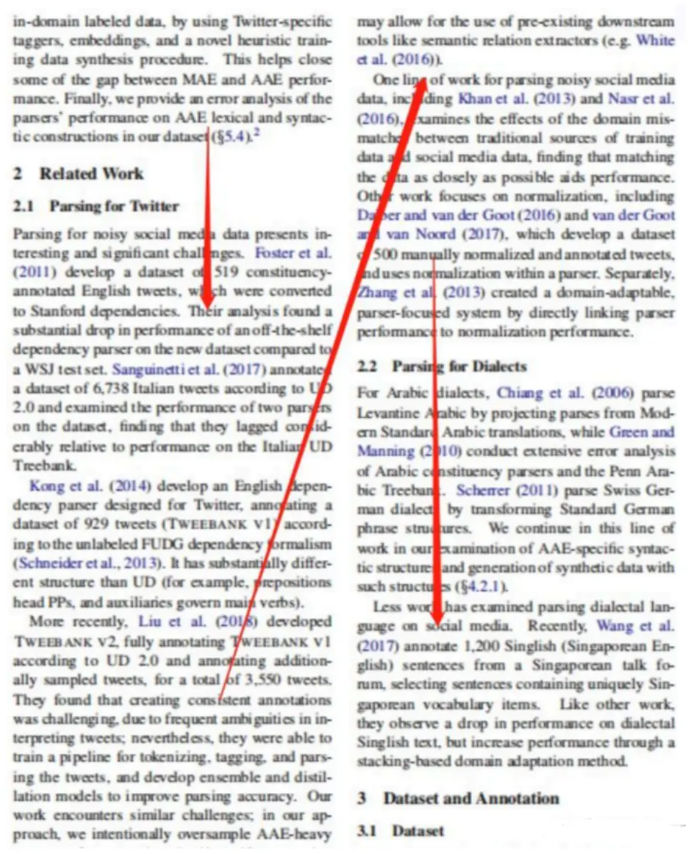
Many beginners assume that extracting text is sufficient. In practice, this fails for real documents.
Academic papers, financial reports, and technical manuals contain:
- Multi-column layouts
- Tables
- Figures
- Mathematical formulas
- Footnotes and captions
If you only extract text:
- Reading order breaks
- Tables become meaningless text blobs
- Section boundaries disappear
Effective PDF parsing must combine:
- Text extraction
- Layout structure parsing
OCR is often unavoidable.
V. Paragraph-Level vs. Chapter-Level Parsing
Long documents require multi-level parsing.
Paragraph-Based Segmentation
Splitting documents into paragraphs and storing them in a vector database is easy to implement. However, paragraph boundaries often break semantic continuity. Long paragraphs also degrade embedding quality and retrieval precision.
This approach works for short, simple documents, but struggles with books and papers.
Sliding Window Chunking
Sliding windows introduce overlap to reduce context loss, but semantic units rarely align with fixed windows. Chunks may cut ideas in half or mix unrelated content.
This improves recall but often introduces noise.
Semantic Segmentation with Chapter Structure (Recommended)
The most robust approach is hierarchical:
- Parse the document’s chapter and section structure
- Segment content within each chapter
- Preserve parent–child relationships
This preserves semantic hierarchy and enables both:
- High-level summary questions
- Fine-grained factual questions
The tradeoff is higher parsing complexity and stronger dependence on layout and heading recognition.
VI. Why Multi-Level Heading Recognition Matters
Without structure, an LLM cannot reliably answer:
- “Summarize chapter 3”
- “What are the main conclusions?”
- “How many key points does this notice emphasize?”
Effective document QA requires:
- High-level structure (chapters, sections)
- Mid-level structure (subsections)
- Low-level content (paragraphs, sentences)
Only then can retrieval support cross-section and multi-granularity reasoning.
VII. A Practical PDF Parsing Pipeline
Step 1: PDF Segmentation
Convert each PDF page into an image. This allows layout models to operate in a vision-based manner, which is far more robust than text-only heuristics.
Step 2: Layout and Region Recognition
Common tools include:
-
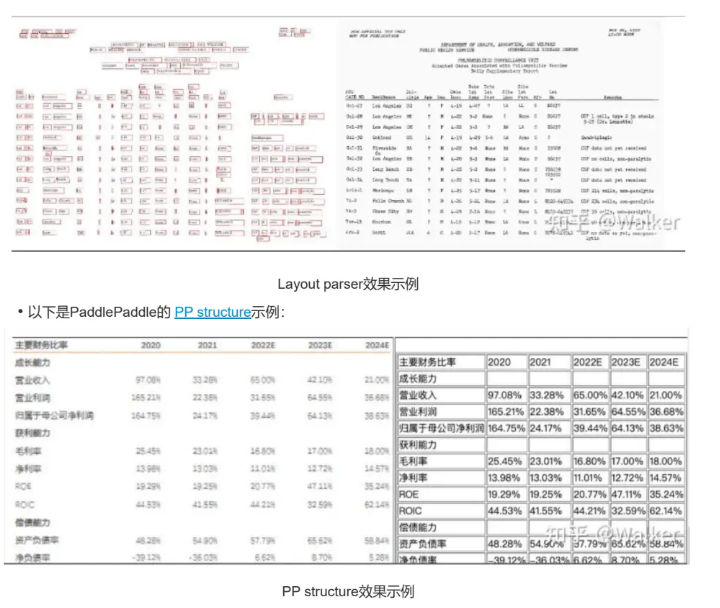
LayoutParser
High accuracy, large models, slower inference. -
PaddlePaddle PP-Structure
Faster, smaller models, suitable when GPU resources are limited. -
Unstructured
Fast, but weak on tables and complex academic layouts.
Tool choice depends on document complexity and performance constraints.
Step 3: OCR and Text Recognition
Text is extracted from detected regions. OCR output must be combined with layout metadata; OCR alone is insufficient.
Most errors at this stage propagate downstream, so accuracy matters more than speed.
Step 4: Heading and Structure Reconstruction
Detected text blocks are analyzed to identify:
- Titles
- Headings
- Subheadings
These are used to rebuild the document’s hierarchical structure, which is critical for high-quality retrieval.
VIII. Reading Order: Single-Column vs. Two-Column PDFs
Layout models often return regions in arbitrary order. Reading order must be reconstructed manually.
Single-Column Documents
Simple case: sort text blocks by vertical (Y-axis) position from top to bottom.
Two-Column Academic Papers
More complex and extremely common.
A practical method:
- Compute the X-axis center of all regions
- Measure the spread of X-center values
- Large spread → two-column layout
- Compute a vertical midline
- Split regions into left and right columns
- Sort each column top-to-bottom
- Merge left column first, then right
This single step dramatically improves downstream QA accuracy.
IX. Extracting Tables and Figures
Tables and figures are first-class knowledge, not decorations.
Both LayoutParser and PaddleOCR provide table-detection models. Extracted tables can be:
- Converted to structured formats (e.g., Excel)
- Passed to the LLM with table-aware prompts
Since LLMs do not inherently “see” tables, prompt design is required to guide interpretation.
X. Tradeoffs of AI-Based Document Parsing
AI-based parsing offers strong generalization and accuracy across diverse PDFs. However, it is slower and more resource-intensive.
In practice:
- Most time is spent on object detection and OCR
- GPU acceleration helps significantly
- Multi-process and multi-threading are recommended
Parsing strategy should vary by document type. Academic papers, financial reports, books, and slides all benefit from specialized handling.
Final Takeaway
PDF parsing is not a preprocessing detail—it is a core system design problem in RAG.
If parsing fails:
- Retrieval fails
- Generation fails
- LLMs hallucinate
Strong document QA systems succeed not because the LLM is powerful, but because the document representation is correct.
In RAG systems, parsing quality sets the ceiling for answer quality.
Comments (0)