Top 50 SQL Interview Questions with Answers (2026)
Quick Overview
This guide compiles the top 50 SQL interview question types for data and analytics roles, covering joins, window functions (ROW_NUMBER, RANK, LAG/LEAD, running totals), CTEs including recursive patterns, aggregation, conditional/pivot reshaping, and worked SQL answers for the most common patterns.
SQL interviews reward pattern recognition. Most questions are variations on a handful of moves: joining tables, ranking rows with window functions, breaking logic into CTEs, aggregating, and reshaping data. This guide lists the 50 question types that come up most often for data and analytics roles, and gives you a worked SQL answer for the highest-leverage ones so you can see exactly what a clean solution looks like.
It is written for data scientists, data analysts, and data/analytics engineers prepping for a SQL screen. Use it as a checklist: if you can solve every category below from memory, you are ready.

How to use this list
The questions are grouped by topic and roughly ordered by difficulty within each group. If you are short on time, start with joins and window functions: they appear in almost every SQL interview, and a stumble on either is the fastest way to fail a screen.
For each category you get the full question list plus worked answers for the patterns interviewers lean on most. Read the answer, close the page, then re-derive it on a blank editor. Recognition is not the same as recall.
Map the question to a pattern first
Before you type, name the family. Most prompts announce themselves once you know the tells.
| Question signal | Likely pattern | First move |
|---|---|---|
| "Who has never / who is missing" | LEFT JOIN + IS NULL | Outer join, filter on the null side |
| "Top N per group", "rank within" | Window function | ROW_NUMBER/RANK with PARTITION BY |
| "Compared to previous/next period" | Window function | LAG/LEAD over an ordered set |
| "Running total", "moving average" | Window function | SUM/AVG OVER (ORDER BY ...) |
| "Step by step", "then using that..." | CTE | Chain named WITH blocks |
| "Hierarchy", "longest streak" | Recursive CTE / gaps-and-islands | Anchor + recursive member |
| "Per group totals with a condition" | Aggregation + HAVING | GROUP BY then filter groups |
| "Pivot rows into columns" | Conditional aggregation | SUM(CASE WHEN ...) |
Joins (questions 1-10)
These are table stakes. If you cannot write a LEFT JOIN without thinking, drill here until it is automatic.
- Find all customers who have never placed an order (LEFT JOIN + NULL check)
- Find the second highest salary in each department
- Join users and orders to find total spend per user
- Find employees whose salary is above their department average
- Self-join: find all pairs of employees in the same department
- Find customers who placed orders in both January and February
- Show each product and its most recent order date
- Left join three tables: users, orders, and products
- Find users who signed up but never activated their account
- Find all orders placed within 7 days of signup (date-range join)
Worked answer (Q1) - customers with no orders. The pattern is an outer join, then keep only the rows where the right side did not match.
SELECT c.customer_id, c.name
FROM customers AS c
LEFT JOIN orders AS o
  ON o.customer_id = c.customer_id
WHERE o.customer_id IS NULL;
Worked answer (Q4) - above department average. A correlated subquery reads cleanly here; a window function (AVG(salary) OVER (PARTITION BY department_id)) is the scalable alternative.
SELECT e.employee_id, e.name, e.salary, e.department_id
FROM employees AS e
WHERE e.salary > (
  SELECT AVG(e2.salary)
  FROM employees AS e2
  WHERE e2.department_id = e.department_id
);
A common pitfall: using INNER JOIN for "who is missing" questions. An inner join can never return the missing rows because they have nothing to match.
Window Functions (questions 11-20)
Window functions separate junior from senior SQL candidates. Interviewers use them to test whether you can compute a per-row value relative to a group without collapsing the rows.
- Calculate a running total of sales by date
- Find the top 3 products by revenue in each category
- Calculate month-over-month revenue growth using LAG
- Find the 7-day moving average of daily active users
- Rank employees by salary within their department
- Find the difference between each row and the previous row
- Calculate cumulative percentage of total sales
- Find the first and last order per customer (FIRST_VALUE/LAST_VALUE)
- Sessionize: group events within 30 minutes of each other
- Calculate 7-day retention after signup
Worked answer (Q11) - running total. Add an ORDER BY inside OVER to turn an aggregate into a cumulative one.
SELECT
  sale_date,
  amount,
  SUM(amount) OVER (ORDER BY sale_date) AS running_total
FROM sales
ORDER BY sale_date;
Worked answer (Q12) - top 3 per category. Number the rows inside each partition, then filter in an outer query. You cannot filter on a window function in WHERE, so it has to be wrapped.
SELECT product_id, category, revenue
FROM (
  SELECT
    product_id,
    category,
    revenue,
    ROW_NUMBER() OVER (
      PARTITION BY category
      ORDER BY revenue DESC
    ) AS rn
  FROM product_revenue
) AS ranked
WHERE rn <= 3;
Worked answer (Q13) - month-over-month growth. LAG pulls the previous row's value into the current row so you can compare periods.
SELECT
  month,
  revenue,
  revenue - LAG(revenue) OVER (ORDER BY month) AS mom_change,
  ROUND(
    100.0 * (revenue - LAG(revenue) OVER (ORDER BY month))
    / NULLIF(LAG(revenue) OVER (ORDER BY month), 0)
  , 1) AS mom_pct
FROM monthly_revenue
ORDER BY month;
Note the NULLIF(..., 0) guard: dividing by the previous month's revenue blows up if it is ever zero. Interviewers notice when you handle that.
Which ranking function?
ROW_NUMBER, RANK, and DENSE_RANK look interchangeable until ties appear. Pick deliberately.
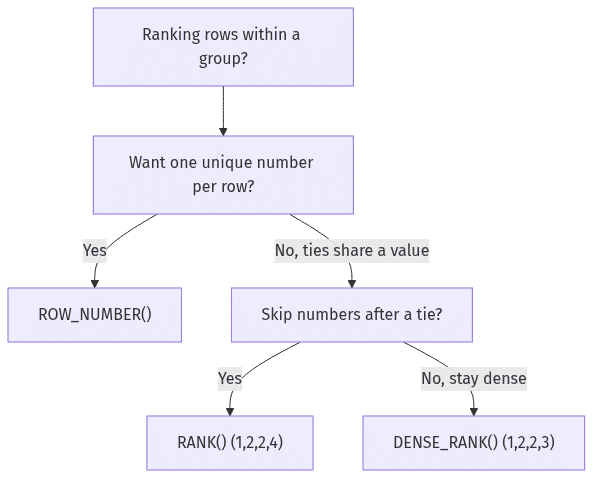
| Function | Ties get | Sequence after a tie | Use when |
|---|---|---|---|
ROW_NUMBER() | Distinct numbers | Continues 1,2,3,4 | You need exactly one row per group (dedupe, "latest") |
RANK() | Same number | Skips (1,2,2,4) | Leaderboard where gaps are meaningful |
DENSE_RANK() | Same number | No gaps (1,2,2,3) | "Top 3 distinct values" regardless of how many rows tie |
CTEs and Subqueries (questions 21-30)
Common Table Expressions make complex queries readable and let interviewers see that you can decompose a problem into steps instead of nesting six subqueries.
- Rewrite a nested subquery as a CTE
- Recursive CTE: build an employee hierarchy from manager_id
- Find the longest streak of consecutive login days per user
- Calculate a funnel: signup to activation to first purchase
- Find duplicate records and keep only the most recent
- Build a cohort retention table by signup month
- Chain multiple CTEs to compute a metric step by step
- Find users whose spend rose for 3 consecutive months
- Correlated subquery: orders above their category average
- Pivot rows into columns without a PIVOT clause
Worked answer (Q25) - dedupe, keep the latest. Rank duplicates by recency inside each key, then keep rank 1. This is the single most reused CTE pattern in interviews.
WITH ranked AS (
  SELECT
    *,
    ROW_NUMBER() OVER (
      PARTITION BY email
      ORDER BY created_at DESC
    ) AS rn
  FROM users
)
SELECT *
FROM ranked
WHERE rn = 1;
Worked answer (Q22) - recursive hierarchy. A recursive CTE has an anchor (the roots) and a recursive member that walks down the tree.
WITH RECURSIVE org AS (
  -- anchor: top-level managers
  SELECT employee_id, manager_id, name, 1 AS depth
  FROM employees
  WHERE manager_id IS NULL

  UNION ALL

  -- recursive member: everyone reporting up the chain
  SELECT e.employee_id, e.manager_id, e.name, org.depth + 1
  FROM employees AS e
  JOIN org ON e.manager_id = org.employee_id
)
SELECT employee_id, name, depth
FROM org
ORDER BY depth, employee_id;
Aggregation (questions 31-40)
Basic GROUP BY is expected. What trips people up is HAVING, conditional aggregation, and knowing the logical order operations actually run in.
- Find the top 5 customers by total order value
- Count unique products ordered per month
- Average order value, excluding the top 1% as outliers
- Find months where revenue exceeded a threshold
- Group by multiple columns: category + region + month
- HAVING: departments with >10 staff and avg salary > 100k
- Count users who took at least 3 actions in one day
- Find the mode (most frequent value) of a column
- Conditional aggregation: SUM(CASE WHEN ...) for pivot output
- Calculate the median without a percentile function
Worked answer (Q36) - filter groups with HAVING. WHERE filters rows before grouping; HAVING filters groups after aggregating. Mixing them up is the classic mistake.
SELECT
  department_id,
  COUNT(*)    AS headcount,
  AVG(salary) AS avg_salary
FROM employees
GROUP BY department_id
HAVING COUNT(*) > 10
   AND AVG(salary) > 100000;
Worked answer (Q39) - conditional aggregation (a pivot in disguise). Wrap a CASE inside an aggregate to turn rows into columns without any special pivot syntax.
SELECT
  region,
  SUM(CASE WHEN status = 'completed' THEN amount ELSE 0 END) AS completed_revenue,
  SUM(CASE WHEN status = 'refunded'  THEN amount ELSE 0 END) AS refunded_revenue,
  COUNT(*) FILTER (WHERE status = 'completed')               AS completed_orders
FROM orders
GROUP BY region;
(COUNT(*) FILTER (WHERE ...) is the cleaner Postgres-flavored form of the same idea; fall back to SUM(CASE WHEN ...) if the dialect lacks FILTER.)
Know the logical execution order
A surprising number of bugs and "why can't I reference my alias here" questions disappear once you internalize the order SQL evaluates clauses, which is not the order you write them.

Because SELECT runs after WHERE and GROUP BY, you cannot reference a SELECT alias in WHERE (it does not exist yet), but you can in ORDER BY (it does). That single fact answers a whole cluster of interview gotchas.
Data Manipulation and Optimization (questions 41-50)
These come up more in data engineering screens, but data scientists get a lighter version too. Expect at least one "what is the difference between..." conceptual question here.
- UPDATE a column using values from another table
- Delete duplicate rows while keeping one copy
- Insert rows from one table into another with transformation
- Write a MERGE / UPSERT
- Explain DELETE vs TRUNCATE vs DROP
- Add an index and explain when it helps vs hurts
- Rewrite a slow query to avoid a full table scan
- Read a query execution plan: what to look for
- Partition a large table by date and explain the tradeoff
- Handle NULLs correctly in comparisons and aggregations
Worked answer (Q45) - DELETE vs TRUNCATE vs DROP. Conceptual, but precise wording matters.
| Command | Removes | Keeps table structure? | Logged per row? | Can filter with WHERE? |
|---|---|---|---|---|
DELETE | Selected rows | Yes | Yes (slower, rollback-friendly) | Yes |
TRUNCATE | All rows | Yes | Minimal (fast, resets identity) | No |
DROP | The whole table | No | n/a | No |
Worked answer (Q50) - NULL-safe logic. NULL is unknown, not zero, and any comparison with it returns unknown. The fixes: IS NULL, COALESCE, and remembering that aggregates skip NULLs except COUNT(*).
SELECT
  COUNT(*)              AS total_rows,        -- counts every row
  COUNT(discount)       AS rows_with_discount,-- skips NULL discounts
  COALESCE(SUM(discount), 0) AS total_discount,
  AVG(COALESCE(discount, 0)) AS avg_treating_null_as_zero
FROM orders;
A frequent trap: WHERE discount != 10 silently drops rows where discount IS NULL. If you want those rows, write WHERE discount IS DISTINCT FROM 10 (or add OR discount IS NULL).
Common mistakes that fail SQL screens
| Do | Don't |
|---|---|
| State your assumptions about the schema out loud | Silently assume column names and join keys |
Use LEFT JOIN ... IS NULL for "who is missing" | Reach for NOT IN with a nullable subquery (returns nothing if any value is NULL) |
| Name CTEs after what they produce | Nest five subqueries no one can read |
Guard division with NULLIF(denominator, 0) | Let a zero denominator crash the query |
| Verify row counts after each join | Assume the join is one-to-one and ship a fan-out |
Pick ROW_NUMBER/RANK/DENSE_RANK on purpose | Default to RANK and get surprised by gaps |
Where to practice
Reading answers builds recognition; writing them builds recall. PracHub has a large bank of real SQL interview questions with an in-browser SQL editor that runs your query against a live Postgres backend, so you get the same "wrong row count" feedback you would in the actual screen. The questions come from interviews at companies like Google, Meta, and Amazon, and you can filter by company and difficulty to match your target role.
If you are interviewing for an analytics-heavy role, pair this with the Data Scientist question set and the broader interview guides for case and behavioral prep.
How to use this page as a prep plan
Do not treat this as passive reading. Convert it into a short weekly loop: learn one pattern, practice it under interview conditions, then write down what changed.
| Prep area | What you need to prove | Practice artifact |
|---|---|---|
| Pattern matching | Name the family before you type | One sentence: "this is a top-N-per-group problem" |
| Join correctness | Right join type, right keys, no fan-out | A query with a row-count check after each join |
| Window fluency | Partition, order, and frame chosen on purpose | A ROW_NUMBER dedupe and a LAG comparison from memory |
| Communication | Turn a result into a recommendation | One concise business interpretation of the output |
The strongest candidates do three things well: they make assumptions explicit, they write readable CTEs instead of deeply nested subqueries, and they sanity-check intermediate row counts so a silent join error never reaches the final answer.
FAQ
What are the most common SQL interview topics?
Joins (especially LEFT JOIN with a NULL check), window functions (ROW_NUMBER, RANK, LAG, running totals), CTEs and recursion, GROUP BY with HAVING, and conditional aggregation. Window functions and joins show up in nearly every screen, so prioritize them.
Do SQL interviews expect me to memorize syntax?
You need fluent recall of the core patterns, not obscure functions. Interviewers care that you choose the right approach (for example, ROW_NUMBER vs RANK), structure the query readably, and reason about edge cases like NULLs and zero denominators. Minor syntax slips are usually forgiven if your logic is sound.
How long should I prepare for a SQL interview?
It depends on your starting point, but most people can get interview-ready by drilling one topic per day for a couple of weeks: joins, then window functions, then CTEs, then aggregation, then DML and tuning. Practicing on a live SQL editor that reports row counts is far more effective than reading answers.
What is the difference between WHERE and HAVING?
WHERE filters individual rows before grouping; HAVING filters groups after aggregation. Use WHERE to drop rows you never want counted, and HAVING for conditions on aggregates like COUNT(*) > 10.
Which is better in an interview, a subquery or a CTE?
For anything beyond a trivial filter, a CTE. Named WITH blocks read top-to-bottom, make your steps obvious to the interviewer, and are easy to extend. Reserve correlated subqueries for cases where they genuinely read more clearly than a join or window function.
Related Articles
Python vs SQL in Data Science Interviews: When to Use Which (2026)
This comparison guide explains when to use Python versus SQL in data science interviews, covering topics such as query writing, joins and filters......
Data Engineer Interview Preparation: Complete Roadmap (2026)
This roadmap guide covers SQL (with emphasis on speed and accuracy), Python data processing, data pipeline design, typical interview structure......
Meta Data Scientist Interview Guide: Updated 2025 Preparation
This guide covers Meta Data Scientist interview topics including the hiring and application process, interview structure and rounds, SQL and product......
PracHub Is a Better Free Alternative to 一亩三分地 / 1p3a
一亩三分地 (yimusanfendi) is 1point3acres, a Chinese tech-career forum. Read its 面经 interview reports, or practice the same questions free in English.
Comments (0)