Browser Client Performance
Asked of: Software Engineer
Last updated
What's being tested
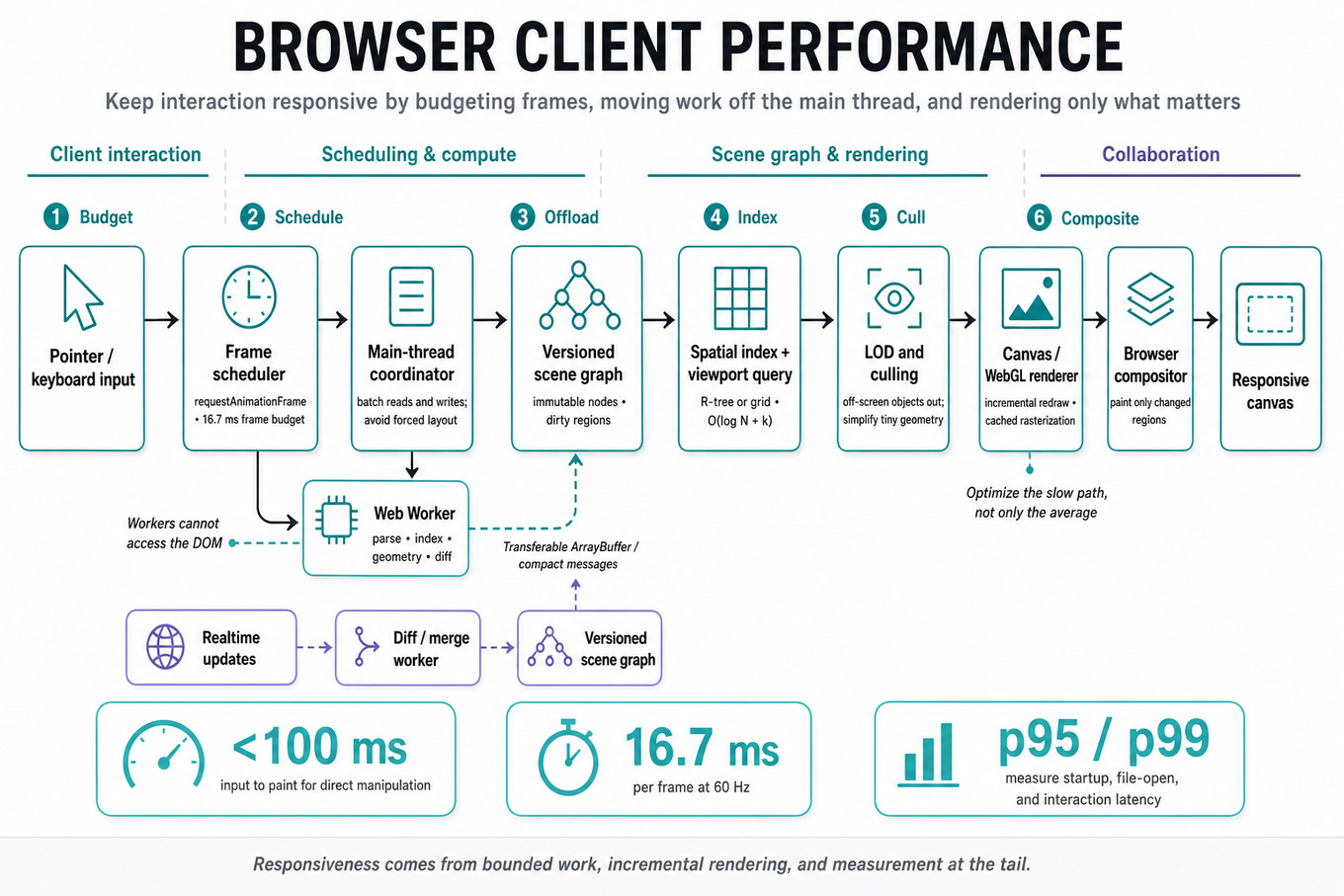
Browser client performance tests whether you can turn a vague “make the editor faster” goal into measurable latency budgets, an architecture, and an implementation plan. For a Figma-like application, the interviewer is probing your understanding of rendering pipelines, JavaScript scheduling, network and memory behavior, and how large interactive documents change those tradeoffs. Figma cares because a design file can contain millions of objects, frequent collaborative updates, and demanding interactions such as pan, zoom, selection, and text editing; a strong Software Engineer preserves responsiveness without sacrificing correctness.
Core knowledge
-
Performance budgets convert “fast” into targets: input-to-paint under 100 ms for direct manipulation, animation frames near 16.7 ms at 60 Hz, and explicit
`p95`/`p99`targets for startup, file-open, and interaction latency. Optimize the slow path, not only the average. -
The browser’s critical rendering path is roughly DOM/CSS/style/layout/paint/composite, while a canvas or
WebGLeditor can bypass much of DOM painting. Avoid forcing synchronous layout through interleaved reads and writes such as`getBoundingClientRect()`followed by style mutation in a loop. -
Frame-budget scheduling matters more than raw throughput. At 60 Hz, each frame has about 16.7 ms; reserve time for input, rendering, and browser work, then split expensive tasks across
`requestAnimationFrame`,`requestIdleCallback`, chunked timers, or workers rather than blocking the main thread. -
Use Web Workers for parsing, indexing, geometry preparation, and diff computation, transferring results with structured cloning or Transferable
`ArrayBuffer`s. Workers cannot directly access the DOM, and excessive message frequency or copying can erase the benefit. -
A scene graph should support incremental rendering: maintain spatial bounds, dirty regions, and immutable or versioned nodes so a small edit does not traverse and redraw the entire document. Spatial indexes such as an R-tree or uniform grid make viewport queries approximately rather than .
-
Level of detail prevents off-screen and tiny objects from consuming equal work. Cull objects outside the viewport, simplify geometry when zoomed out, cache rasterized results where appropriate, and avoid rendering objects whose projected area is below a meaningful pixel threshold.
-
For GPU rendering, batch compatible draw calls, reduce state changes, reuse buffers and textures, and distinguish CPU preparation time from GPU execution time. A
`WebGL`/`WebGPU`pipeline can still stutter if JavaScript spends too long building command data or if uploads repeatedly trigger synchronization. -
Virtualization applies beyond lists: keep only visible or relevant panels, layers, thumbnails, and metadata active. Be careful with accessibility, keyboard navigation, hit testing, and focus restoration; removing an element from the DOM must not make interaction state disappear.
-
Network performance requires separating critical from noncritical resources. Use compressed, versioned assets, HTTP caching, streaming where useful, request prioritization, and incremental file loading. A large document should open progressively, while edits and viewport-critical data receive higher priority than hidden thumbnails.
-
Memory management is a latency concern because excessive allocations increase garbage-collection pauses and can cause tab eviction or crashes. Reuse typed-array buffers and object pools selectively, bound caches with an LRU policy, and account for decoded images, GPU textures, worker heaps, and duplicated document representations.
-
Instrumentation should connect user actions to browser work:
`PerformanceObserver`for long tasks and layout shifts, User Timing marks around file open and first interactive frame, Chrome tracing for main-thread/GPU activity, and production`p50`/`p95`/`p99`measurements segmented by document size and device class. -
Correctness under concurrency is part of performance design in a collaborative editor. Apply remote updates incrementally, preserve ordering or version checks, make rendering tolerant of intermediate states, and ensure cancellation prevents stale worker results from overwriting newer document versions.
Worked example
Representative prompt: “Design a high-performance browser client for a large collaborative design file.” In the first 30 seconds, clarify file-size distributions, target devices, supported browsers, startup versus interaction goals, and whether visual fidelity or edit latency has priority. Declare an initial target such as “the visible viewport should remain interactive at 60 Hz on a mid-range laptop, while opening progresses incrementally.” Organize the answer around document loading, an indexed scene representation, viewport-aware rendering, main-thread scheduling, and measurement. Describe a pipeline in which the network streams chunks, a worker parses and indexes them, and the renderer consumes only visible or dirty objects. Explicitly call out the tradeoff between caching rasterized layers for lower redraw cost and consuming memory that may trigger eviction or garbage collection. Explain that collaboration updates should be versioned and coalesced without delaying local input or allowing stale worker output to render. Close with: “If I had more time, I’d define device-specific budgets, add trace-based regression tests, and test worst-case files with simultaneous remote edits.”
A second angle
Representative prompt: “Why does panning a large canvas stutter even though average CPU usage is low?” The framing shifts from architecture to diagnosis: first determine whether the bottleneck is main-thread long tasks, layout, GPU command submission, texture upload, memory pressure, or synchronization. Compare input latency, frame time, dropped-frame intervals, and visible-object counts rather than relying on overall CPU percentage. A likely fix might be viewport culling and draw-call batching, but a trace could instead reveal repeated synchronous layout or expensive worker-message copies. The answer should emphasize a measurement sequence and a reversible optimization, not immediately recommend “use WebGL.”
Common pitfalls
Pitfall: Treating average frame time as sufficient. A design editor can feel broken because of occasional 200 ms pauses even when its mean is excellent; discuss tail latency, long tasks, and interaction-specific measurements.
Pitfall: Saying “move everything to a worker” without addressing ownership and transfer costs. Workers cannot render ordinary DOM, and copying large object graphs every frame can be slower than carefully scheduled main-thread work.
Pitfall: Listing optimizations without a bottleneck model. “Use virtualization, caching, and
WebGL” is weaker than identifying the measured critical path, proposing one change, and explaining its correctness, memory, and invalidation costs.
Connections
The interviewer may pivot to distributed collaboration, conflict-free or versioned update handling, and offline recovery. They may also ask about observability, browser security and sandbox constraints, cache invalidation, or algorithmic choices for spatial indexing and hit testing.
Further reading
-
RAIL performance model — practical response, animation, idle, and load budgets for interactive browser applications.
-
Chrome DevTools Performance panel — trace main-thread, rendering, network, and GPU-adjacent behavior.
-
Web Workers API — worker isolation, messaging, and data-transfer constraints.
Related concepts
- Real-Time Collaboration SystemsSystem Design
- Adobe Creative Cloud Real-Time Collaboration And Offline Sync
- Design File Storage, Snapshots, And Versioning
- Adobe Document Cloud real-time collaboration and offline sync
- Production System Design TradeoffsSystem Design
- Adobe Creative Cloud Offline Sync And Conflict Resolution