curl Interview Questions: HTTP, APIs & Debugging Answers
Quick Overview
This guide covers curl commands and techniques for HTTP and API debugging, including diagnosing DNS, TCP, TLS, and backend failures, one-line investigative commands, worked Q&A answers, and network troubleshooting workflows.
curl Interview Questions: HTTP Debugging, APIs, and Network Troubleshooting (with Worked Answers)
When an interviewer asks about curl, they're rarely testing whether you memorized flags. They're testing whether you can reach for the right tool when an API call fails, a request hangs, or a deploy gate silently passes a broken service. The question behind every curl question: can you take a stalled HTTPS request and say, in one short command, whether the problem is DNS, TCP, TLS, or the backend? Here's the one-liner that cashes that out - keep it in mind through everything below:
curl -w "@curl-format.txt" -o /dev/null -s https://api.example.com/slow
That single invocation, with the format file shown later, splits a slow request into DNS, connect, TLS, and time-to-first-byte. The rest of this guide builds the vocabulary to read its output, plus the surrounding questions that come up in real screens, grouped the way interviewers group them, with examples you can run yourself.
What Interviewers Actually Test With curl
curl questions surface inside four kinds of rounds, and the signal each one is fishing for differs:
- HTTP and API testing - backend and web-fundamentals screens probe verb semantics, request bodies, and status codes. The trap answer treats curl as a syntax quiz; the signal is whether you know what each flag does to the request on the wire.
- Network and latency troubleshooting - SRE and systems rounds ask you to diagnose a slow or failing request. The junior failure mode is blaming the application immediately, or reaching for
tcpdumpbefore a two-second-wrun has ruled out DNS and TLS. The senior answer narrows the layer first, then drills. - Linux shell fluency - Unix-tooling screens treat curl as one stage in a pipe, composed with
grep,jq,xargs, and loops. - CI/CD and health checks - DevOps and platform rounds ask you to write a readiness probe or deploy gate that fails correctly, which is harder than it sounds.
Every section below ends with the signal, not just the syntax. That's the difference between an interview answer and a man-page recitation.
curl Fundamentals and the Output Flags
curl URL defaults to a GET. -X METHOD forces the method. -H adds a header. -d/--data attaches a body and implicitly switches to POST.
The output-control flags trip people up, so be precise:
| Flag | Effect |
|---|---|
-i | Include response headers in the output, followed by the body |
-I | Send a HEAD request - headers only, no body |
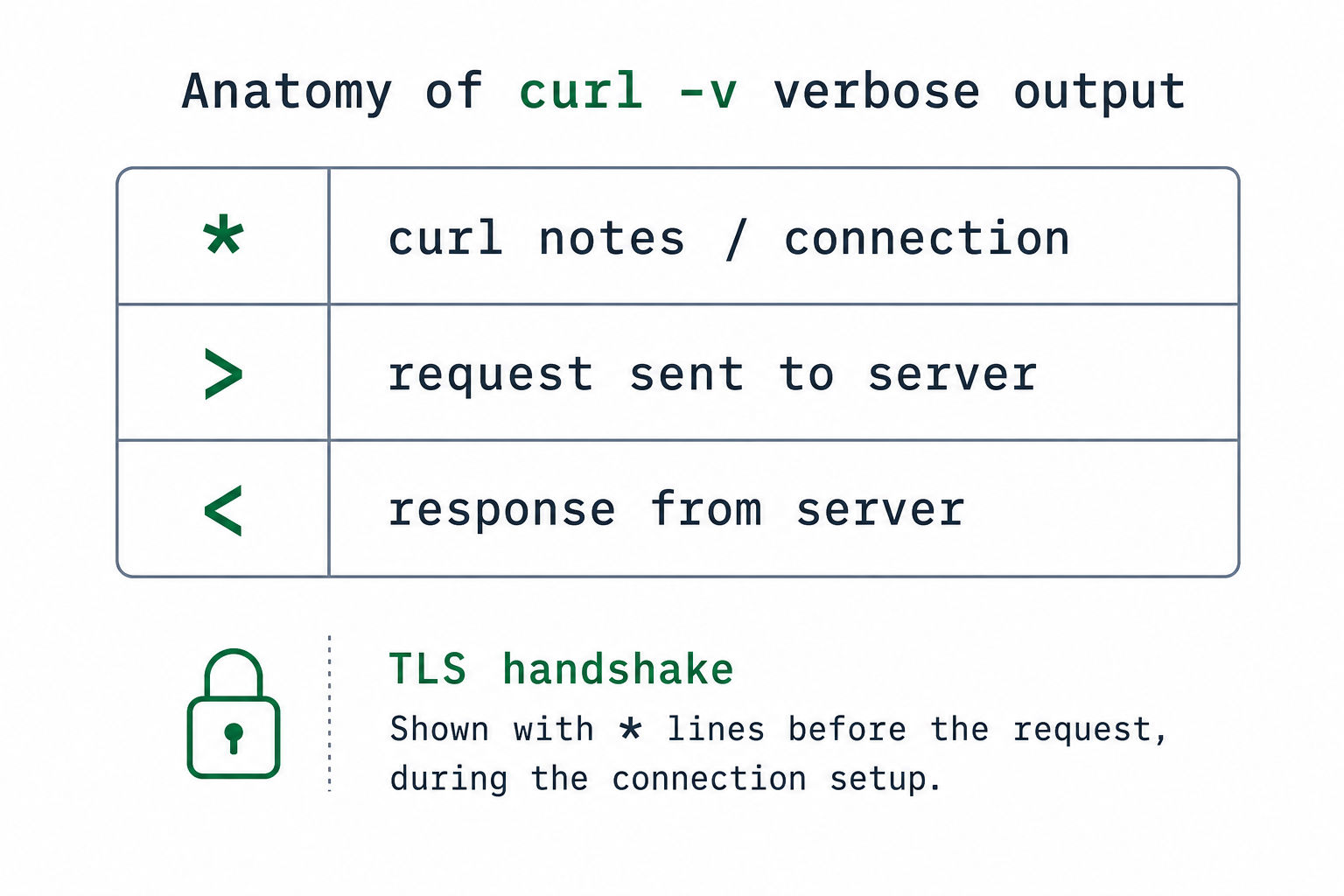
-v | Verbose: request line, TLS handshake, and both sent (>) and received (<) headers |
-s | Silent - suppress the progress meter and the error message on failure |
-S | Restore the error message even when -s is set (use as -sS) |
The -s/-S pairing has an interview point hiding in it. Naked -s in a script swallows curl's error text, so a failed health check prints nothing and you can't tell why it failed. Always write -sS in scripts - quiet on success, but still tells you what broke.
The --data family, stated correctly
This is where shaky candidates get caught, because the common mental model is wrong. The axis curl actually behaves differently on is inline string vs @file, not "newlines vs no newlines."
| Flag | Inline -d 'string' | -d @file |
|---|---|---|
--data | Sent exactly as provided | Reads file, strips CR and LF |
--data-binary | Sent exactly as provided | Reads file, preserves every byte including newlines |
--data-raw | Sent exactly as provided, and a leading @ is literal, not a filename | n/a - @ is never special |
--data-urlencode | URL-encodes the value | Can read and encode from a file |
Read the table carefully, because three myths die here:
--datadoes not strip newlines from an inline string.curl -d $'a\nb'sends the newline. Stripping happens only when-dreads from a file with@.--data-binarydiffers from--dataonly in file mode (it keeps the bytes the file has;--datastrips CR/LF). For an inline string the two are identical.--data-raw's only documented difference from--datais@handling. Reach for it when your literal payload starts with@or-and you don't want curl to interpret it.
So the honest one-sentence answer in an interview: "inline data is passed verbatim by all of them; the differences only show up when you read from a file, where --data strips line endings and --data-binary keeps them."
Reading a curl -v exchange
Live-reading verbose output is a common exercise. The prefixes are the whole point - * is curl's own commentary, > is what curl sent, < is what the server returned:
* Trying 93.184.216.34:443...
* Connected to example.com (93.184.216.34) port 443
* ALPN: curl offers h2,http/1.1
* TLSv1.3 (OUT), TLS handshake, Client hello (1):
* TLSv1.3 (IN), TLS handshake, Server hello (2):
* SSL connection using TLSv1.3 / TLS_AES_256_GCM_SHA384
* Server certificate:
* subject: CN=example.com
* issuer: C=US; O=DigiCert Inc; CN=...
* ALPN: server accepted h2
* using HTTP/2
> GET /api/users HTTP/2
> Host: example.com
> user-agent: curl/8.4.0
>
< HTTP/2 200
< content-type: application/json
<
(Trace abbreviated - real curl 8.x prints more TLSv1.3 (IN/OUT) lines.) If you can point at the line where things break, you've answered most network questions before the interviewer finishes asking.
HTTP Verbs and REST API Testing
A full CRUD cycle against a JSON API is the bread-and-butter exercise:
# CREATE - idiomatic modern form: --json sets Content-Type AND Accept to application/json
curl --json '{"name":"Ada","role":"engineer"}' https://api.example.com/users

# The longhand the --json shortcut replaces (curl < 7.82):
curl -X POST https://api.example.com/users \
 -H "Content-Type: application/json" \
 -H "Accept: application/json" \
 -d '{"name":"Ada","role":"engineer"}'

# READ
curl https://api.example.com/users/42

# UPDATE (full replace) - note the body file pattern
curl -X PUT https://api.example.com/users/42 \
 --json @user.json

# PATCH (partial)
curl -X PATCH https://api.example.com/users/42 \
 --json '{"role":"staff-engineer"}'

# DELETE
curl -X DELETE https://api.example.com/users/42
Knowing --json (curl 7.82+) is a freshness tell - it's the modern one-flag way to do JSON, and --json @user.json reads the body from a file, the pattern most real scripts use rather than inlining a blob. Three things interviewers fish for here:
-dsilently flips the method to POST.curl -d '{}' URLsends a POST with no-X. People who don't know this writecurl -X GET -d '...'and get confused results. To use a body with another method you must say-X PUT/-X PATCH.- Safety and idempotency. GET is safe (no state change). PUT and DELETE are idempotent - N calls leave the same end state as one. POST is neither; two POSTs create two resources. PATCH isn't guaranteed idempotent.
- The follow-up: "so how do you make a POST safe to retry?" The senior answer is an idempotency key - a client-generated unique token the server uses to dedupe:
curl --json '{"amount":500}' \
-H "Idempotency-Key: $(uuidgen)" \
https://api.example.com/charges
The server records the key; a retry with the same key returns the original result instead of charging twice. Setting up the idempotency question without delivering this answer is the most common way candidates leave signal on the table.
Read a status code without parsing the body:
curl -o /dev/null -s -w "%{http_code}\n" https://api.example.com/users/42
# 200
That %{http_code} write-out is the seed of every health check later, and one of many -w variables worth knowing.
The -w Write-Out Variables Worth Memorizing
-w exposes the request's internals as variables, far beyond timings. These come up directly as "how would you assert X in a script" questions:
| Variable | Answers the question |
|---|---|
%{http_code} | What status did the final request return? |
%{http_version} | Did we actually negotiate HTTP/2 or /3? |
%{num_redirects} | How many hops did -L follow? |
%{url_effective} | What URL did we end up at after redirects? |
%{size_download} | How many bytes came back? |
%{ssl_verify_result} | Did certificate verification pass? (0 = OK) |
%{json} | Dump all write-out vars as a JSON object (curl 7.70+) |
Worked example - "assert the final URL after following redirects" and "check cert verification in a script":
curl -sL -o /dev/null \
 -w 'final=%{url_effective} verify=%{ssl_verify_result} ver=%{http_version}\n' \
 https://example.com/login
# final=https://example.com/dashboard verify=0 ver=2
Protocol Negotiation: HTTP/2 and HTTP/3
Senior network rounds ask which protocol a request actually used and how it was chosen:
# Offer HTTP/2 (over TLS via ALPN); --http3 attempts QUIC/HTTP-3
curl --http2 https://api.example.com
curl --http3 https://api.example.com

# Pin to HTTP/1.1 when a buggy intermediary mishandles h2
curl --http1.1 https://api.example.com

# Confirm what was negotiated - don't guess
curl -s -o /dev/null -w '%{http_version}\n' https://api.example.com
The mechanism to be able to explain: over TLS, curl and the server pick the protocol through ALPN during the handshake (you can see ALPN: server accepted h2 in the -v trace above). HTTP/3 runs over QUIC (UDP, not TCP), so a network that blocks UDP/443 will fail --http3 while --http2 succeeds - a concrete "why does /3 hang here" answer.
Authentication, Headers, and Sessions
# Basic auth
curl -u alice:s3cret https://api.example.com/private

# Bearer token
curl -H "Authorization: Bearer eyJhbGci..." https://api.example.com/me

# API key in a header (preferred over query string - query strings leak into logs)
curl -H "X-API-Key: $API_KEY" https://api.example.com/data
A login-then-call flow with a cookie jar is a frequent multi-step exercise:
# Step 1: log in, save the session cookie to a file
curl -c cookies.txt -X POST https://app.example.com/login \
 -d 'user=alice&pass=s3cret'

# Step 2: send the saved cookies on an authenticated endpoint
curl -b cookies.txt https://app.example.com/dashboard
The distinction to state cleanly: -c/--cookie-jar writes received cookies to a file; -b/--cookie sends cookies. One gotcha worth a clause - -b accepts either a file path or an inline name=value string (-b "session=abc123"), and -c - / -b - use stdout/stdin, handy for chaining without a temp file.
The security point earns the round. -u alice:s3cret puts the password in your shell history and in ps aux, where any other user on the box can read it. Name that risk and reach for --netrc (credentials in a permission-locked ~/.netrc) or a header file instead of hardcoding secrets on the command line. The signal is that you think about credential exposure unprompted.
Debugging Slow Requests: the -w Timing Breakdown
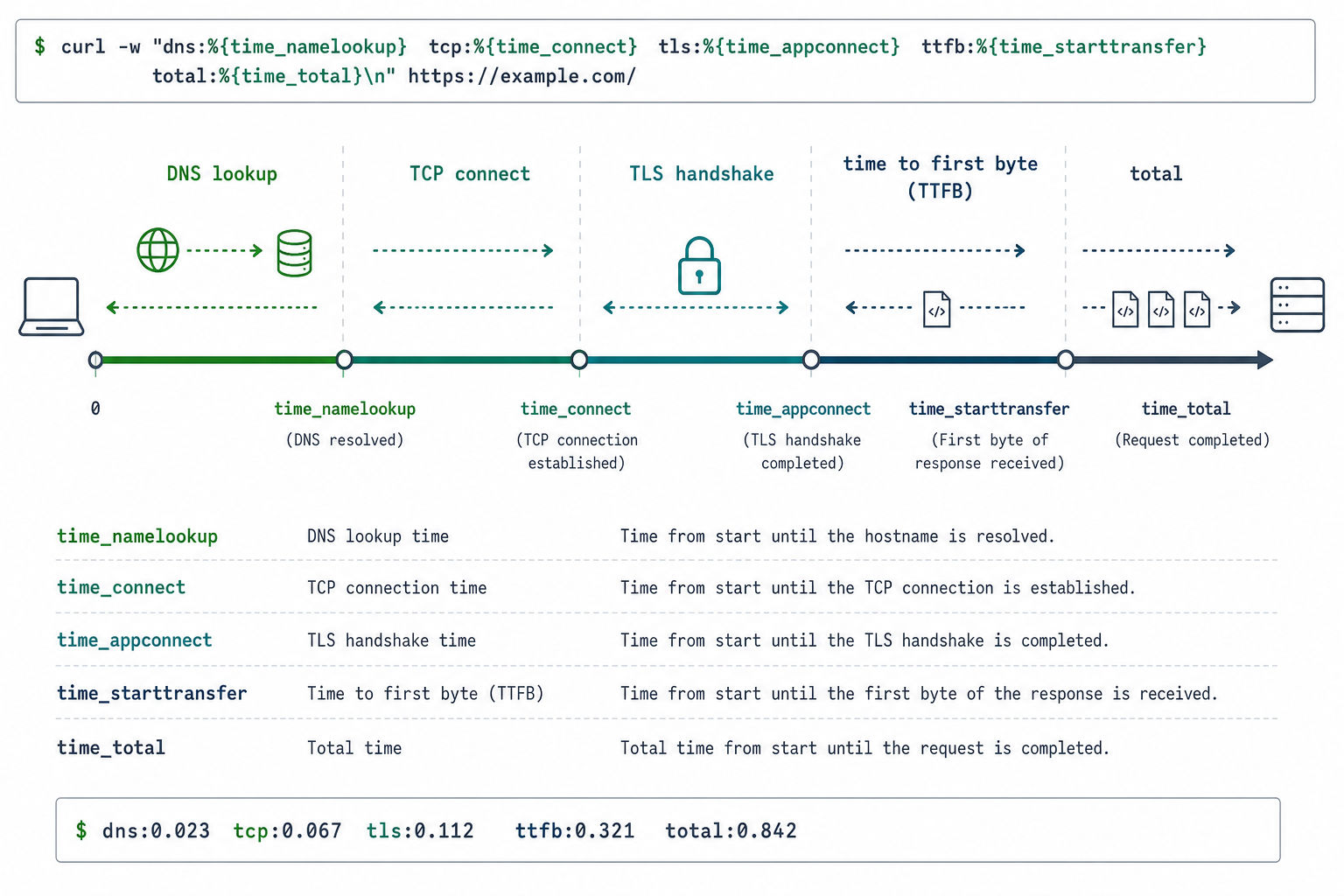
This is the section that separates senior candidates. The setup: "a request is slow - find where the time goes." Create curl-format.txt:
 time_namelookup: %{time_namelookup}s\n
 time_connect: %{time_connect}s\n
 time_appconnect: %{time_appconnect}s\n
 time_pretransfer: %{time_pretransfer}s\n
 time_starttransfer: %{time_starttransfer}s\n
 ----------\n
 time_total: %{time_total}s\n
Run it against a discarded body so only timings print:
curl -w "@curl-format.txt" -o /dev/null -s https://api.example.com/slow
The timings are cumulative from the start, so you read the gaps between them. This table folds the spoken decision tree into its last column, so you can scan straight to the next command:
| Phase | Finished when… | A spike here means… | Next move |
|---|---|---|---|
time_namelookup | DNS resolved | Slow/failing resolver | --resolve to pin the IP; test a different DNS server |
time_connect | TCP handshake done | Network path, firewall, distance | traceroute; check security groups |
time_appconnect | TLS handshake done | Extra RTT (no resumption, TLS 1.2 vs 1.3), OCSP/revocation check, large cert chain, slow server key ops | Compare with --tlsv1.3; check session resumption |
time_starttransfer | First byte received (TTFB) | Backend is slow - network is cleared | Profile the app; curl is no longer the suspect |
time_total | Last byte received | Large payload / slow link | Check %{size_download}; try --compressed |
Say the discriminator out loud: if everything is fast until time_starttransfer, the network is innocent and the backend is slow. That single fork, network vs app, is the entire point of the exercise. Note what is not on the appconnect list - "weak entropy" is folklore. Modern servers seed from getrandom()/RDRAND, and TLS latency is RTT and crypto cost, not entropy starvation. Naming entropy as a cause is a tell that you're reciting rather than reasoning.
Bound the request so it can't hang forever:
curl --connect-timeout 3 --max-time 10 https://api.example.com/slow
--connect-timeout caps time to establish the connection; --max-time caps the whole operation.
DNS, Connectivity, and TLS Troubleshooting
# Pin a hostname to a specific IP - bypasses DNS, preserves SNI, tests one backend
curl --resolve api.example.com:443:10.0.0.5 https://api.example.com/health

# Force IPv4 or IPv6 when one stack is broken
curl -4 https://api.example.com
curl -6 https://api.example.com

# Request gzip/brotli and have curl decode it
curl --compressed https://api.example.com/data
--compressed answers a real "why is my payload garbage / why doesn't Content-Length match what I see" question: the server is sending gzip and, without --compressed, curl neither advertises Accept-Encoding nor decodes the response.
For the leaf certificate, curl -v prints the Server certificate: block (subject, issuer, dates, SANs) - but be precise about its limit. That's the leaf only, not the full chain. To inspect the chain, use OpenSSL:
# Full chain + SNI handling, the honest way to inspect certs
openssl s_client -connect api.example.com:443 -servername api.example.com -showcerts </dev/null
The classic question - "it works in the browser but fails in curl, why?" - has real answers and folklore answers. Give the real ones:
- The browser follows redirects; curl does not without
-L. - The browser sends
User-Agent,Accept, andCookieheaders curl omits. - Missing intermediate certificate. The server sent an incomplete chain; the browser silently fetches the missing intermediate via the AIA extension, curl does not, so curl reports an unverified cert. This is the single most common real cause.
- Old curl/OpenSSL or a different CA bundle. The browser ships its own trust store and modern TLS; an old curl may lack TLS 1.3 or a current cipher, or the system CA bundle differs from the browser's.
What is not the answer: "your curl build didn't negotiate SNI." curl sends SNI by default for any HTTPS hostname. The one real SNI trap is connecting by IP - https://10.0.0.5/ sends no hostname, so a server hosting multiple certs picks the wrong one; --resolve or --connect-to keeps the hostname (and thus SNI) intact while still steering to a chosen IP.
TLS flags worth knowing, and the right way to discuss -k:
# Trust a specific CA instead of disabling verification
curl --cacert internal-ca.pem https://internal.example.com

# Mutual TLS (client cert + key)
curl --cert client.pem --key client.key https://mtls.example.com
When asked about -k/--insecure, don't reach for it reflexively. State the risk first: it disables certificate verification, so you can no longer distinguish the real server from a machine-in-the-middle. It's fine for throwaway debugging against a known self-signed cert in a safe environment; otherwise --cacert to trust the right CA is the correct answer. Naming the risk before using the flag is the signal.
Proxies and the "curl works but the app doesn't" Trap
A classic SRE question: a service call fails from the app but curl to the same URL succeeds (or the reverse). The usual cause is proxy environment variables.
# Explicit proxy and proxy auth
curl -x http://proxy.corp:3128 https://api.example.com
curl -x http://proxy.corp:3128 --proxy-user bob:pw https://api.example.com

# curl honors HTTPS_PROXY / HTTP_PROXY / NO_PROXY from the environment
HTTPS_PROXY=http://proxy.corp:3128 NO_PROXY=.internal curl https://api.example.com
The trap to name: the application reads HTTPS_PROXY from its environment and routes through a proxy that blocks the destination, while your interactive curl ran in a shell without those vars set - so curl succeeds and the app fails for reasons that have nothing to do with the code. NO_PROXY (matching by domain suffix) is how internal hosts bypass the proxy; a missing entry there is a frequent culprit. Reproduce the app's behavior by exporting the same proxy vars before your curl test.
Redirects and Method Changes
-L follows redirects, but the method semantics are the sharp senior question:
curl -L -X POST --json '{"x":1}' https://api.example.com/old-endpoint
By default, on a 301 or 302, curl changes the method from POST to GET when following the redirect - so your request body silently disappears and the write never happens. "I POSTed, got a 301, and the write vanished - why?" is the trap. The fixes:
# Keep POST as POST across 301/302/303 respectively
curl -L --post301 --post302 --post303 -X POST --json '{"x":1}' https://api.example.com/old
A 307 or 308 redirect preserves the method by spec, so a server that wants to redirect a write without losing it should return those instead of 301/302. Knowing curl's default POST→GET behavior - and that it's correct per the older spec - is the whole point.
curl in CI/CD, Health Checks, and Shell Scripting
The single highest-value insight here is -f:
# WRONG - exits 0 even on a 500, silently passing a broken deploy gate
curl -s http://service/healthz

# RIGHT - -f makes curl exit non-zero on HTTP >= 400
curl -fsS http://service/healthz
Without -f, curl treats "I successfully received a 500" as success and exits 0, so if curl ...; then deploy; fi ships on top of a broken service. -fsS means fail on HTTP errors, stay quiet on success, still print the error if something breaks.
A bounded readiness loop:
until curl -fsS --max-time 5 http://service/healthz; do
 echo "not ready, retrying..."
 sleep 2
done
echo "service is up"
Built-in retries, with the caveat that gets candidates:
curl -fsS --retry 5 --retry-delay 2 --retry-max-time 60 http://service/healthz
The caveat to volunteer: by default --retry only retries transient failures - timeouts, connection resets, and 5xx-ish responses. It does not retry a 4xx. "Why isn't my --retry retrying the 404?" - because a 404 is a definitive answer, not a transient fault. To retry on any error use --retry-all-errors (curl 7.71+). Stating that boundary unprompted is the signal.
Assert on a JSON field, the shell-fluency staple:
status=$(curl -fsS http://service/status | jq -r '.state')
[ "$status" = "ready" ] || exit 1
And flag the supply-chain red flag if it surfaces: curl URL | bash pipes unknown remote code straight into a shell with no chance to inspect it. Download, read, then run.
Shell Composition, Globbing, and Parallel Requests
curl rarely runs alone in a Unix round - it's one stage in a pipe, and it has its own URL expansion:
# Extract one header, case-insensitively
curl -sI https://api.example.com | grep -i '^content-type:'

# Built-in numeric globbing - fetch 1..100 without a shell loop
curl -s "https://host/item/[1-100]" -o "item_#1.json"

# Run those in parallel
curl -sZ "https://host/item/[1-100]" -o "item_#1.json"

# Loop over a host list and check each
while read -r host; do
 printf '%s %s\n' "$host" "$(curl -fsS -o /dev/null -w '%{http_code}' "https://$host/healthz")"
done < hosts.txt

# Fan out with xargs for many independent URLs
xargs -P8 -n1 curl -fsS -o /dev/null -w '%{url_effective} %{http_code}\n' < urls.txt
Two specifics interviewers like: [1-100] and {a,b,c} are curl's own globbing (the #1, #2 in the output template reference each glob), and -Z/--parallel runs them concurrently. The gotcha - when a URL legitimately contains brackets, like an IPv6 literal http://[::1]:8080/, you must disable globbing with -g or curl tries to expand the brackets and fails.
File Transfer, Downloads, and Uploads
# Save to a named file
curl -o report.json https://example.com/data

# Save using the remote filename
curl -O https://example.com/archive.tar.gz

# Follow redirects (NOT default - a download often 3xx's to a CDN)
curl -L -O https://example.com/latest

# Resume an interrupted download
curl -C - -O https://example.com/big.iso

# Multipart form upload (like an HTML file input)
curl -F "file=@photo.png" -F "title=vacation" https://example.com/upload

# Raw PUT upload of a file
curl -T backup.sql https://example.com/backups/backup.sql
The recurring trap is -L: curl doesn't follow redirects by default, so a download that 302s to a CDN yields an empty file unless you add -L. The signal in "curl or wget?" is knowing the fit - wget follows redirects by default and can mirror a whole site recursively, while curl is the better single-request, scriptable, API-testing tool.
curl vs wget vs Postman vs httpie
| Tool | Scriptable / no GUI | On a bare server by default | Handles mTLS | Best for |
|---|---|---|---|---|
| curl | Yes | Almost always | Yes (--cert/--key) | API testing, scripts, debugging, CI |
| wget | Yes | Often | Limited | Bulk/recursive downloads, mirroring |
| Postman | No (GUI; CLI via newman) | No | Yes (via settings) | Exploratory testing, sharing collections |
| httpie | Yes | Rarely preinstalled | Yes | Human-friendly interactive JSON calls |
curl is the lingua franca: it ships on virtually every server, needs no GUI, handles mTLS, and scripts cleanly - which is exactly why interviewers default to it. Postman is friendlier for exploration but you can't drop it into a deploy script; httpie is pleasant for ad-hoc JSON but isn't guaranteed to be installed. curl is the one you can always assume is there.
How to Prepare: a Reproducible Failure Lab
Don't memorize flag lists. Build the muscle of diagnosis by making each timing phase spike on purpose, then narrating where it lives. A concrete bench:
# 1. A backend that returns 500 on demand (TTFB / -f practice)
python3 -c "import http.server,socketserver; \
 H=type('H',(http.server.BaseHTTPRequestHandler,),{'do_GET':lambda s:(s.send_response(500),s.end_headers())}); \
 socketserver.TCPServer(('',8000),H).serve_forever()" &

# 2. Inject network latency to inflate time_connect / time_starttransfer (Linux)
sudo tc qdisc add dev lo root netem delay 200ms
# undo with: sudo tc qdisc del dev lo root netem

# 3. Poison DNS to spike time_namelookup / force the --resolve fix
echo "10.255.255.1 broken.local" | sudo tee -a /etc/hosts

# 4. Watch each phase move
curl -w "@curl-format.txt" -o /dev/null -s http://localhost:8000/ # 500 + slow TTFB
curl -w "@curl-format.txt" -o /dev/null -s http://broken.local/ # namelookup then connect timeout
Run each break, read the -w breakdown, say out loud which layer owns the spike and the next command you'd run. Rehearsing against real, recently-asked questions with full written solutions - the kind of bank PracHub maintains - beats drilling trivia, because the interview is a narrated diagnosis, not a flag quiz.
How to Use This Page as a Prep Plan
Do not treat this as passive reading. Convert the ideas in this page into a short weekly loop: learn one idea, practice it under interview conditions, then write down what changed. That is the fastest way to turn advice into visible interview behavior.
| Prep area | What you need to prove | Practice artifact |
|---|---|---|
| Understand | Turn the prompt into a concrete goal. | Clarifying questions and success criteria. |
| Practice | Use realistic constraints and timed reps. | Worked examples with edge cases. |
| Explain | Make reasoning visible. | Tradeoffs, assumptions, and test strategy. |
| Improve | Review misses quickly. | A short feedback log and next action. |
For curl Interview Questions: HTTP, APIs & Debugging Answers, the strongest candidates usually do three things well: they make their assumptions explicit, they use concrete examples instead of vague claims, and they review mistakes quickly enough that the next practice rep is better than the last one.
FAQ
Does curl -X POST send a POST without -d?
Yes. -X forces the method regardless of body, and -d alone also switches GET to POST. Using both is redundant; -X POST with no body sends an empty POST, which can confuse APIs expecting a payload.
What's the real difference between --data, --data-binary, and --data-raw?
For an inline string, all three send it verbatim. The differences are in file mode: --data @f strips CR/LF, --data-binary @f keeps every byte. --data-raw only differs from --data in that a leading @ is treated literally instead of as a filename.
How do you measure where time goes in a slow curl request?
-w with a format file printing time_namelookup, time_connect, time_appconnect, time_starttransfer, and time_total, plus -o /dev/null -s. The gaps between phases isolate DNS vs TCP vs TLS vs backend. If everything is fast until starttransfer, the backend is the problem and the network is cleared.
Why does a POST's body vanish after a redirect?
By default curl changes POST to GET when following a 301 or 302, dropping the body. Use --post301/--post302/--post303 to keep the method, or have the server return 307/308, which preserve the method by spec.
When is -k/--insecure acceptable, and what should you say instead?
Only for throwaway debugging against self-signed certs in a known-safe environment. Name the risk - it disables cert verification, exposing you to a machine-in-the-middle - and prefer --cacert to trust a specific CA. Reaching for -k reflexively is a red flag.
Why does a request work in the browser but fail with curl?
Most often a missing intermediate certificate the browser fetches via AIA and curl does not, or an old curl/CA-bundle lacking modern TLS. Also check redirects (-L), missing cookies/headers, and - only when connecting by raw IP - SNI selecting the wrong cert. "curl didn't send SNI" is not the answer; it sends SNI by default for hostnames.
Related Articles
From Non-CS Major to Software Engineer: A Practical Guide to Cracking the Technical Interview
Prepare for technical interviews with a practical guide to DSA practice, live coding, mock interviews, communication, and interview mindset.
From Non-CS Major to Software Engineer: A Practical Guide to Cracking the Technical Interview
Prepare for technical interviews with a practical guide to DSA practice, live coding, mock interviews, communication, and interview mindset.
Design WhatsApp: the presence and receipt problems most candidates ignore
Design WhatsApp-style chat with WebSockets, offline inboxes, Kafka partitions, presence TTLs, receipts, and reliable delivery.
I Pinned Our Autoscaler for a Month to See What Would Break. Nothing Did.
Learn when Kubernetes autoscaling helps, when CPU-based HPA wastes money, and how capacity planning can cut cloud costs safely.
Comments (0)