Microsoft Explore Internship 2027: Application Timeline, Interviews, and How to Prepare
Quick Overview
A current, evidence-based guide to Microsoft Explore 2027 eligibility, application timing, interview stages, resume preparation, coding practice, and the difference between confirmed facts and recruiting-season rumors.
Microsoft's regular Summer 2027 internships started appearing in August, but many first- and second-year students are still asking the same question: when does Microsoft Explore 2027 open? The anxiety is understandable. Explore has a narrow eligibility window, applications are competitive, and old timelines circulate online as if they were current deadlines.
Here is the useful answer as of August 20, 2026: Microsoft still lists Explore as an active program, but no official source reviewed for this guide publishes one universal 2027 opening date or deadline. Current candidate discussions from August 13 and August 18 said applicants were still waiting for the U.S. posting to appear.
This guide separates what Microsoft has confirmed from what past candidates experienced. You will learn who qualifies, how to monitor the opening, what the interviews may test, and how to prepare before the application goes live. Start early with Microsoft Software Engineer questions on PracHub so an interview invitation does not become the day you begin learning the basics.
Prepare the resume, stories, and coding foundation before the Microsoft Explore 2027 posting appears.
Microsoft Explore 2027: Quick Answer
| Question | Best current answer |
|---|---|
| Is Explore still an active Microsoft program? | Yes. Microsoft's current university internship and Explore pages still describe the program. |
| Who is it for? | In the U.S., first- and second-year full-time bachelor's students who will return to school for a full academic term after the internship. |
| Is the Summer 2027 application open? | No official 2027 Explore posting was confirmed in the sources reviewed on August 20, 2026. Current candidates reported that they were still waiting. |
| When should applicants watch? | Now. Broader Microsoft 2027 internship recruiting began in August, while historical Explore openings have appeared in late summer or fall. |
| What is the interview format? | Microsoft confirms an initial interview and, if selected, a final interview. Exact technical, product, and behavioral objectives vary. |
| Does everyone receive an OA? | Microsoft does not publish a guarantee. Follow the instructions attached to your application rather than assuming every candidate receives the same screen. |
Do not wait for a rumored date. Create your Microsoft Careers profile, prepare the application materials, and monitor the official Explore page and job alerts. The correct goal is to be ready when the listing appears, not to predict the hour it will appear.
What Is the Microsoft Explore Internship?
Explore Microsoft is an early-college internship designed to let students experience multiple parts of software development. Microsoft describes the U.S. program as a 12-week summer internship for first- and second-year students. The program emphasizes the product development cycle and exposure to different software engineering roles.
The dedicated Explore page also describes an eight-week version in India. Do not combine U.S. and India requirements: locations, academic-year definitions, duration, and job postings can differ. Always follow the qualifications in the specific role you submit.
Explore is built for students early in their degree, so preparation should emphasize learning ability, clear fundamentals, and projects you genuinely understand.
Who Is Eligible for Microsoft Explore?
Microsoft's current U.S. eligibility page says Explore participants must be first- or second-year, full-time bachelor's students during the academic term immediately before the internship. Candidates must return to school for one full academic term after the internship and be at least 16 years old.
The same page says candidates cannot take classes while interning and cannot complete two back-to-back Microsoft internships. These rules matter more than labels such as “freshman” or “sophomore,” especially for students with transfer credits, accelerated degrees, or unusual graduation dates.
First year versus second year
Microsoft has historically used separate first-year and second-year Explore applications in some markets. If 2027 listings are separated, choose the one that matches the posting's academic and graduation-date rules. Do not submit based only on how your university labels you.
What if your graduation date is unusual?
Read the live job description. If transfer credits or an accelerated degree make your year ambiguous, ask Microsoft Careers support rather than changing dates to fit a category.
Do you need a referral?
No. Microsoft's university internship FAQ says referrals are not required and referred candidates receive equal consideration and prioritization. A clear resume submitted early is more useful than spending the opening week searching for a referral.
Microsoft Explore 2027 Application Timeline
The biggest SEO trap around Explore is presenting last year's date as this year's deadline. Microsoft has not published one universal Explore 2027 calendar in the official pages reviewed for this guide.
A University of Chicago recruiting page says Microsoft's broader 2027 U.S. summer internships open in mid-August. Meanwhile, an August 18 candidate discussion specifically asked when the second-year Explore application would open, and participants were still waiting. That means regular Microsoft internship activity is not proof that Explore is already open.
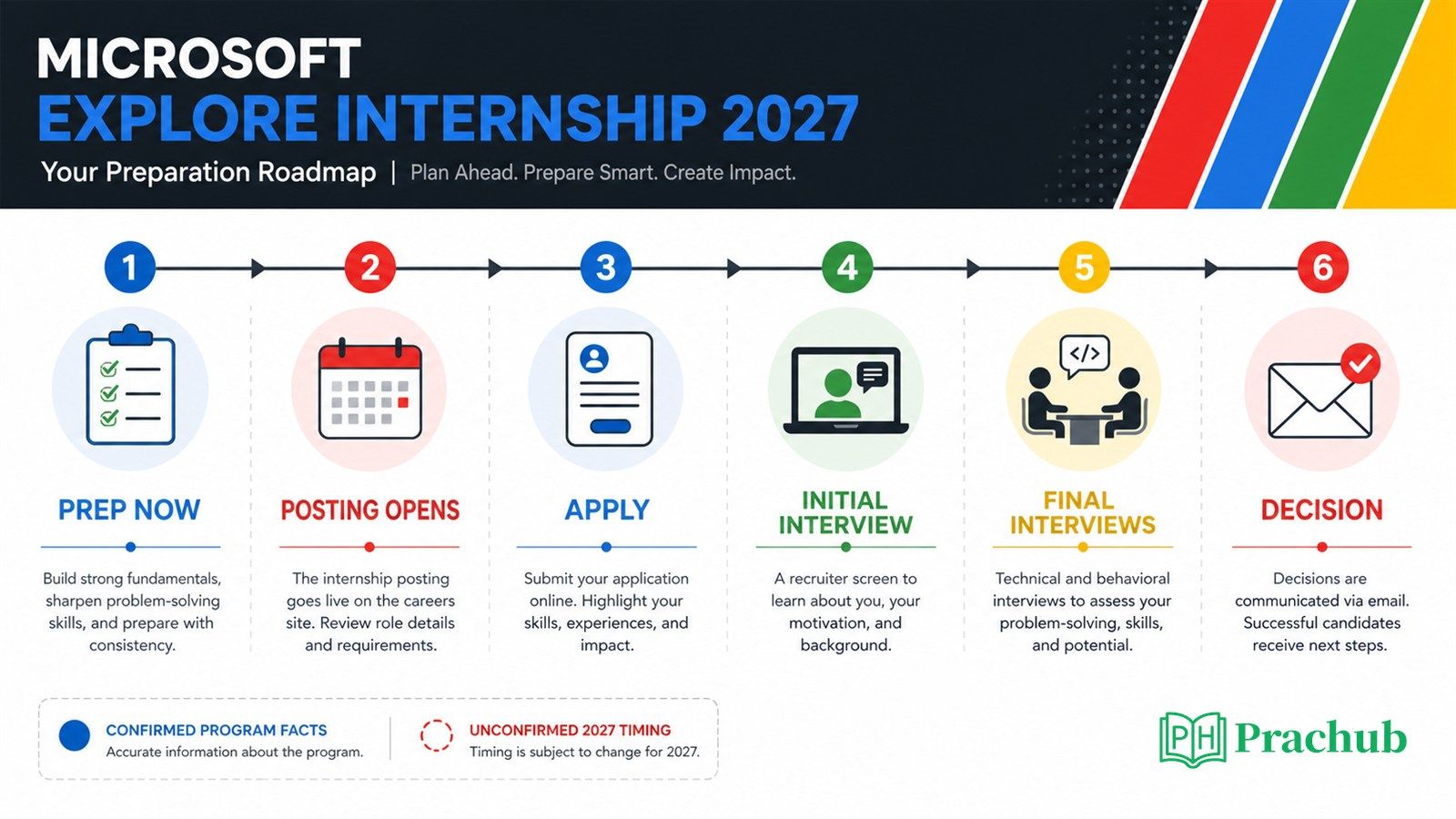
Use the waiting period to finish the assets you will need once the official Explore listing appears.
| Period | What is known | What you should do |
|---|---|---|
| August 2026 | Broader Microsoft 2027 internships began opening; current applicants were still watching for Explore. | Create alerts, finish your resume, and check the official page regularly. |
| Late summer to fall | Historical Explore applications have appeared during this window, but the exact 2027 date is unconfirmed. | Apply promptly when the correct first- or second-year listing appears. |
| After application | Microsoft reviews applications individually; interview timing varies. | Track the Action Center and continue coding and behavioral preparation. |
| Interview stage | Microsoft confirms an initial interview and a final interview for advancing students. | Follow recruiter instructions and practice both technical and behavioral communication. |
| Decision | Your recruiter communicates the decision timeline; delays are possible. | Keep other applications moving instead of treating silence as a result. |
How to avoid missing the opening
Bookmark the official Explore page and Microsoft's job search, create a Careers profile, and subscribe to Early in Profession updates. Check consistently, but do not refresh every hour. A short daily check is enough when your documents are already finished.
When the role appears, verify the location, student-year category, graduation window, work authorization language, and application instructions. Save the job ID and a copy of the description because the public listing may close before your interview.
What the Application Should Show
Explore is designed for early-college students, so your resume does not need to imitate a senior engineer's resume. It should show evidence that you can learn, build, collaborate, and explain technical choices.
Lead with one or two projects you genuinely understand. A small application with users, tests, and thoughtful decisions is more persuasive than a long list of technologies you cannot discuss. For each project, be ready to explain the problem, your contribution, the hardest bug, a trade-off, and what you would improve.
Coursework, hackathons, tutoring, student organizations, research, open source, and part-time work can demonstrate initiative. Replace “Built a weather app using React” with evidence such as cached searches, error states, tests, users, or a measurable improvement.
Microsoft Explore Interview Process
Microsoft's current student interviewing page says early-in-profession candidates have an initial interview and, if selected, a second final interview. All interviews are virtual. The company evaluates base knowledge, critical thinking, problem solving, and the ability to learn.
Microsoft also warns that the process varies by role. Some candidates may code, discuss projects, or answer product and behavioral questions. Historical Explore reports describe a first screen followed by two virtual final interviews, sometimes mixing technical and product questions. Treat that as preparation context, not a guaranteed 2027 schedule.
| Stage | Likely evaluation | How to prepare |
|---|---|---|
| Application review | Eligibility, learning trajectory, projects, and evidence of interest in technology | Use a focused one-page resume and verify every requirement. |
| Initial interview | Motivation, resume depth, communication, and potentially foundational problem solving | Prepare “Tell me about yourself,” “Why Microsoft?” and one project walkthrough. |
| Final interviews | Technical reasoning, product thinking, collaboration, and learning ability | Practice coding aloud, test examples, and answer behavioral questions with STAR or STARR. |
| Decision | Overall evidence and team or role fit | Send concise follow-up information when requested and keep alternatives active. |
What Technical Questions Should You Practice?
Explore preparation should prioritize fundamentals and communication. Be comfortable with arrays, strings, hash maps, linked lists, stacks, queues, trees, sorting, and basic runtime analysis. You do not need to begin with obscure dynamic programming or advanced distributed systems.
For each problem, clarify the input, work through an example, code a simple approach, test edge cases, and explain complexity. When stuck, state what you know and ask a precise question.
Practice with Microsoft Questions from PracHub
These Microsoft question-bank records are not predictions of your exact Explore 2027 interview. They are useful practice for the foundational coding and explanation skills early-career interviews may evaluate. Each complete title in the first column links directly to the question and written solution.
| PracHub question | Level | Practice focus |
|---|---|---|
| Solve Four Classic Algorithm Problems | Easy | Trees, strings, binary search, base conversion, and explaining multiple approaches |
| Solve Binary-Tree Reverse Printing and LPS | Easy | Breadth-first traversal, dynamic programming foundations, and edge cases |
| In-Memory URL Shortener: Encode and Decode | Medium | Classes, hash maps, state, round-trip correctness, and simple object design |
| Identify the Extra Directed Edge | Medium | Graph invariants, cycles, parent constraints, and structured reasoning |
Attempt the easy questions without a timer first. Then repeat them in 30 to 40 minutes while explaining every decision aloud. Use the medium questions to stretch your reasoning, not as a reason to skip the fundamentals.
Behavioral and Product Preparation
Explore interviews can reward curiosity and reflection as much as polished experience. Prepare five adaptable stories: learning something quickly, collaborating through disagreement, recovering from a mistake, taking initiative, and building for a user.
Use STAR or STARR: situation, task, action, result, and optional reflection. Keep the context short and spend most of the answer on what you did. Then connect the lesson to how you would work in an unfamiliar Microsoft team.
For product questions, define the user, identify one problem, prioritize an improvement, discuss trade-offs, and propose a success metric. The goal is structured thinking, not guessing Microsoft's roadmap.
Use PracHub's behavioral and leadership practice to make your examples concise without making them sound memorized.
A Seven-Day Microsoft Explore Preparation Plan
| Day | Focus | What to do |
|---|---|---|
| Day 1 | Eligibility and application | Read the official rules, create your Careers profile, and finish a one-page resume. |
| Day 2 | Project depth | Prepare a five-minute walkthrough of one project, including a bug and a trade-off. |
| Day 3 | Arrays and strings | Solve two foundational problems and test empty, duplicate, and boundary cases. |
| Day 4 | Trees and hash maps | Practice one traversal and one stateful implementation while explaining complexity. |
| Day 5 | Behavioral stories | Draft five STAR or STARR examples and reduce each answer to two minutes. |
| Day 6 | Product thinking | Improve a familiar Microsoft product for one user group and define a success metric. |
| Day 7 | Mock interview | Combine a project discussion, one coding problem, and two behavioral questions. |
Common Mistakes to Avoid
Do not invent a deadline from an old post. Use the live listing. Do not delay a ready application while hunting for a referral, list tools you cannot explain, or prepare only coding while ignoring projects and behavioral questions.
Frequently Asked Questions
Is Microsoft Explore 2027 open yet?
No official Summer 2027 Explore listing was confirmed in the sources reviewed on August 20, 2026. Microsoft's Explore program pages remain active, and current applicants were monitoring them for the opening.
When will Microsoft Explore 2027 open?
Microsoft has not published one universal date. Broader 2027 U.S. internships began opening in August, while historical Explore listings have appeared in late summer or fall. Watch the official page and job alerts rather than relying on a rumored day.
Is Microsoft Explore only for freshmen?
No. Microsoft's U.S. eligibility page says it is for first- and second-year full-time bachelor's students who will return to school for a full academic term after the internship.
Does Microsoft Explore require LeetCode?
Microsoft does not prescribe a specific practice website. Foundational coding practice is useful because interviews may include technical problem solving, but project discussion, behavioral communication, and product thinking also matter.
Does everyone get a Microsoft Explore OA?
No official source promises an OA to every applicant. Assessment steps can vary. Treat only your Microsoft or assessment-provider invitation as authoritative.
How many interviews are there?
Microsoft's current student guidance describes an initial interview and a second final interview for candidates who advance. Historical Explore candidates have reported two sessions in the final stage, but the exact 2027 schedule can vary.
Final Takeaway
The strongest Microsoft Explore 2027 strategy is readiness without rumor. The program is still described on Microsoft's official pages, and the eligibility rules are clear. The exact opening date and deadline are not.
Prepare the resume, project story, coding fundamentals, and behavioral examples now. Apply promptly when the correct listing appears, then keep preparing while each application status moves on its own timeline.
Use Microsoft Software Engineer questions to turn general advice into practice. Start with easy fundamentals, explain your reasoning, and use harder questions only after your core process is reliable.
Sources and Further Reading
- Microsoft Careers: University Internships
- Microsoft Careers: Explore Microsoft Program
- Microsoft Careers: Internship Eligibility and Qualifications
- Microsoft Careers: Student Interviewing
- University of Chicago: Microsoft 2027 Recruiting Timeline
- Current Candidate Discussion: When Does Microsoft Explore 2027 Open?
- Current Candidate Discussion: Explore 2027 Opening Status
- University of Toronto Alumni Guide: First-Year Explore
- University of Toronto Alumni Guide: Second-Year Explore
Research note: This guide was checked on August 20, 2026. Microsoft can change openings, eligibility language, interview stages, locations, and deadlines. Treat the live job description, Microsoft Careers Action Center, and recruiter instructions as authoritative.
Comments (0)