Sierra AI-Native Software Engineer Interview Guide 2026: Agentic Coding, Product Framing, and Build Review
Quick Overview
An evidence-aware 2026 guide to Sierra's AI-native software engineer interview: Plan, Build, Review, agentic coding, product framing, debugging, and production judgment.
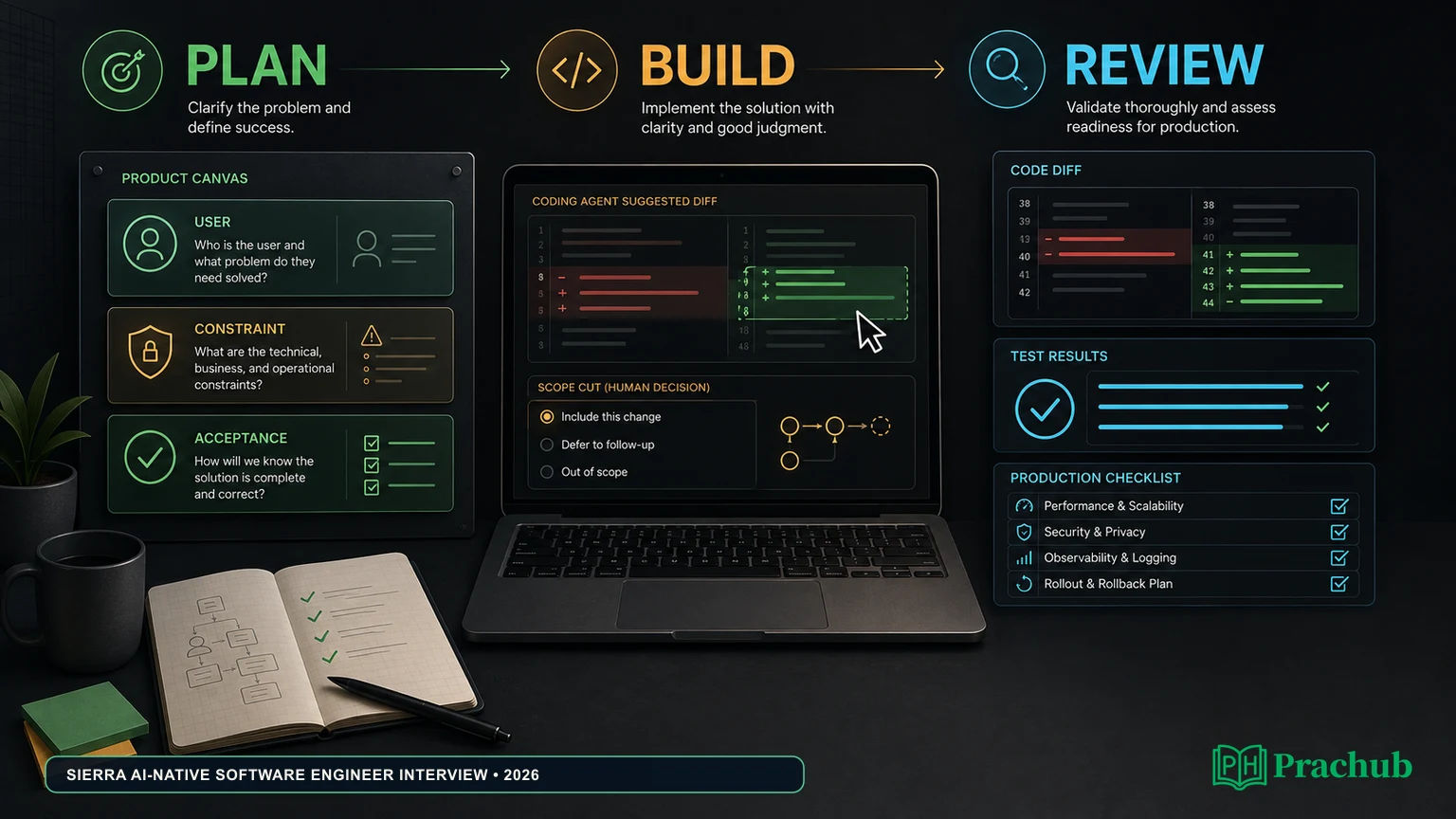
Sierra’s 2026 software-engineer interview is designed around a different question: can you turn an ambiguous customer problem into a small, working product and then defend the decisions around it? Sierra’s official description calls the AI-native onsite Plan, Build, and Review. It describes a two-hour Build with AI tooling and frameworks of the candidate’s choice, followed by a demo, product discussion, code review, and a path-to-production conversation.
That published format is not a promise that every role or office uses the same loop. Sierra also says its coding phone screen was replaced with system design and that a debugging interview is being piloted. Recent candidates report other round-specific rules, including live coding without LLMs, take-home work, and practical debugging. Use the invitation and interviewer instructions as the binding source of truth. For practice, start with the Sierra Software Engineer questions; the drills below are preparation material, not leaked prompts.
The preparation loop: frame a valuable slice, build with disciplined agent use, and review the evidence.
Quick answer: what Sierra officially changed
Sierra’s April 2026 post is unusually explicit, but it describes an evolving process rather than a universal scorecard. Read the evidence at the right level:
| Evidence level | What it supports | What it does not prove |
|---|---|---|
| Official Sierra interview post | The AI-native onsite is a Plan working session, a two-hour Build with tooling/framework choice, and a Review of product flows, code, production path, and AI use. | That every software-engineer candidate receives the same onsite, timer, stack, or rubric. |
| Official Sierra process update | Coding and algorithms interviews were removed from the redesigned onsite; the coding phone screen was replaced with system design; a debugging format is being piloted. | A guarantee that your invitation has already adopted every change. |
| Candidate reports (2026) | Recruiter screens, practical coding/debugging, take-homes, system design, and different AI restrictions have appeared in recent rounds. | A single standard loop, cutoff, question list, or tool policy. |
| Your invitation and live instructions | The round, duration, permitted tools, submission rules, and location that apply to you. | That a third-party replica predicts your exact interview. |
The useful target is a closed loop: a clear problem statement, a thin slice that works, and an honest explanation of what remains before production.
How the AI-native loop works
Plan: define the product with the interviewer
Sierra says the Plan is a working session in which you drive ideation while interviewers ask questions that strengthen the idea. The company focuses on an idea in your domain so it can observe product thinking rather than a rehearsed architecture.
Name one user, one job-to-be-done, and one observable success condition. Then make the boundary visible: what the first version will not do, which risk is unacceptable, and what evidence will tell you that the slice works.
Build: create a thin, demonstrable slice
The official post describes the interviewer stepping out while you build for two hours with AI tooling and frameworks of your choice. It also says you are free to pivot or adjust scope. Sierra explicitly tells candidates that cutting scope and skipping boilerplate such as CRUD or auth can be the right decision when it protects the unique value.
Treat an agent as an implementation accelerator, not the product owner. Work in checkpoints: inspect the repository, state the next change, ask for a narrow diff, run it, test the behavior, and record what you accepted or rejected. Keep the application demonstrable even if the final feature list is smaller than your opening idea.
Review: make decisions inspectable
The Review includes a demo, debate over product flows and choices, a code review covering data models, abstractions, and extensibility, and a path-to-production discussion. Sierra also asks how you used AI along the way.
Show one happy path and one failure path. Point to a changed decision, a rejected generated suggestion, and the test or observation that justified it. Be precise about what is production-ready, what is a shortcut, and what you would measure next.
Plan: a product-framing worksheet
Use this worksheet before writing code. It is an interview aid, not an official Sierra rubric.
| Plan field | Candidate answer to prepare | Acceptance check |
|---|---|---|
| User and job | “A support agent needs to answer refund-status questions without exposing account data.” | Can a teammate identify the user and desired outcome in one sentence? |
| Smallest valuable flow | One authenticated lookup, one clear response, one escalation path. | Can you demo it end to end with a seeded case? |
| Risk boundary | No payment mutation; uncertain records become a human handoff. | Does the system fail closed when confidence or authorization is missing? |
| Must have | Lookup, grounded response, audit event, and a visible fallback. | Do tests cover success, missing data, and an unauthorized request? |
| Cut line | Defer multi-language support, bulk exports, and polished admin UI. | Can you remove these without breaking the demo? |
| Evidence | A repeatable fixture, latency log, and transcript of tool calls. | Can another person reproduce the result and inspect the evidence? |
Write the cut line before the clock starts. If the agent generates an attractive but nonessential feature, you can point to the plan and defer it without appearing indecisive.
Build: use agents without giving up ownership
The official Build description permits the candidate to choose AI tooling and frameworks. That does not mean every other round permits them. One recent InterviewDB account describes a CoderPad technical round with no AI assistance; an Exponent candidate describes a live coding round with no LLMs but syntax lookup allowed. Those accounts may describe older or different rounds, not a contradiction in the official onsite.
Confirm the live rule before the round. During an allowed agent session:
- Inspect first. Give the tool the smallest relevant file set and restate the product invariant in your own words.
- Ask for a bounded change. Request one function, test, or adapter at a time; avoid a giant “build the app” prompt.
- Run evidence immediately. Execute the narrow test or demo after each meaningful change. Save the output that supports your claim.
- Review the diff. Look for accidental API changes, authorization gaps, unbounded retries, missing timeouts, and data leakage in logs.
- Checkpoint the scope. If the unique flow works, stop adding features. Use the remaining time for tests, failure handling, and a clear demo.
Never use an assistant to evade a stated restriction or hide authorship. The signal Sierra is seeking is your ability to direct, verify, and improve a system under uncertainty.
Worked example: narrow a refund-status support agent
Imagine the Plan conversation produces a customer-support agent for refund status. This is a hypothetical practice case, not a reported Sierra prompt.
Must have: accept an authenticated order ID, retrieve a read-only refund record, explain the status in plain language, and offer a human handoff when the record is missing or ambiguous. Defer: proactive notifications, multi-order summaries, and a multilingual UI. Non-goal: changing a refund or issuing a payment.
The agent loop can be deliberately small: classify the request, call a deterministic get_refund_status tool, ground the response in the returned record, and emit an audit event. The tool checks the caller’s account before returning data; the model never decides authorization. A fixture covers pending, completed, missing, and unauthorized cases.
During Review, demonstrate one successful lookup and one refusal. Show that a timeout does not trigger a duplicate action, that the transcript records the tool result without sensitive payloads, and that the user sees a useful escalation. Then name production work: rate limits, redaction, latency and cost dashboards, evaluation sets for incorrect explanations, and a rollback switch for a bad prompt or tool version.
This example earns its value from the decisions around the model. A larger feature list would create more code but less evidence that you can choose and protect the highest-value path.
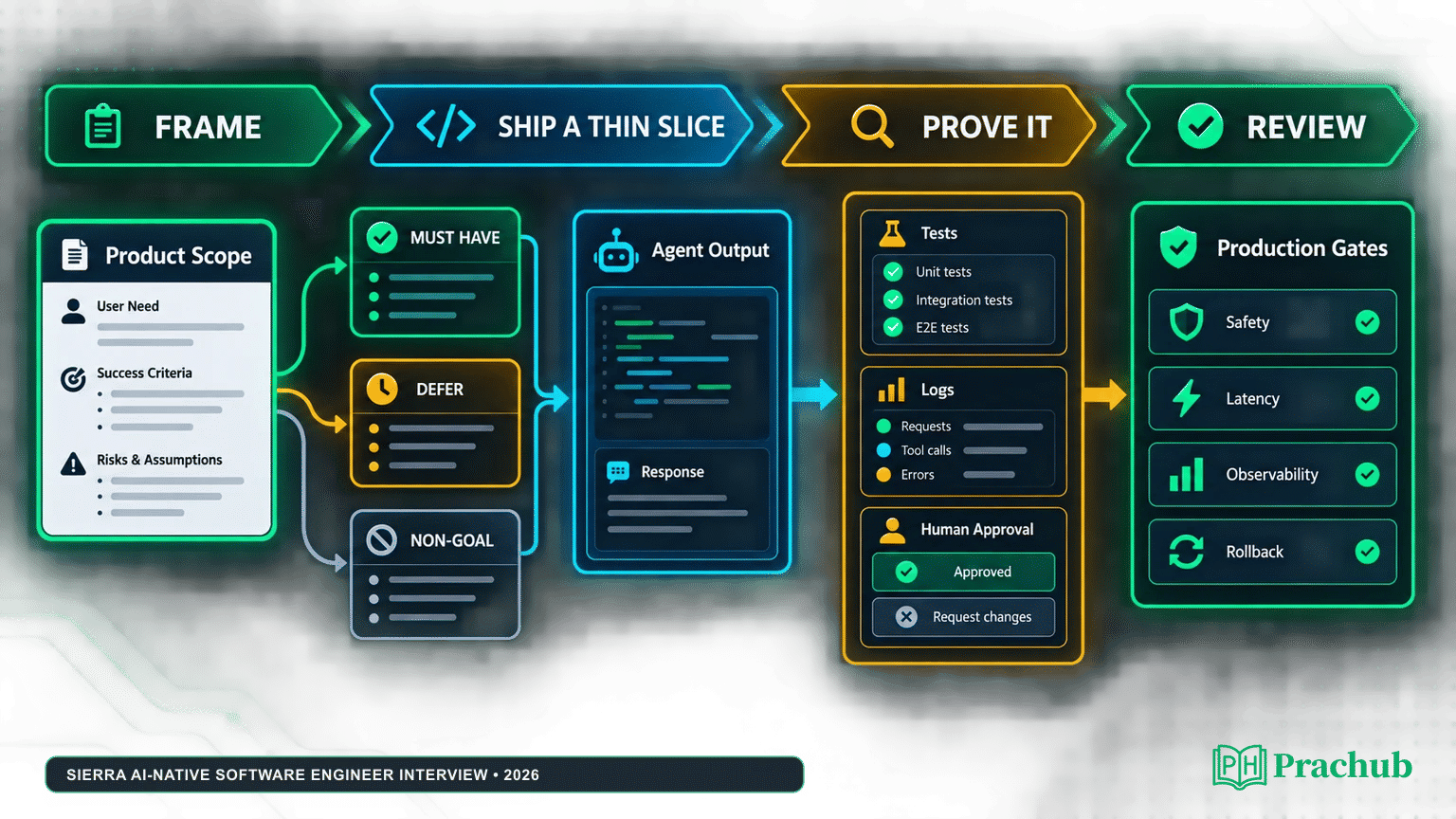
A practical map from product scope to tests, human review, and production gates.
Review: move from prototype to production
Use a compact review narrative:
- Product flow: What does the user see on success, delay, or refusal?
- Data model: Which record is authoritative, immutable, versioned, or cacheable?
- Abstractions: What boundary lets you replace a model, tool, or store safely?
- Extensibility: Which next feature is easy, and which needs a new invariant?
- Verification: Which tests and fixtures prove the unique behavior?
- Operations: Which traces, latency/cost signals, and alerts expose a bad run?
- Safety and recovery: Where are permissions, timeouts, retries, approvals, and rollback enforced?
When reviewing agent-generated code or a draft PR, cite the diff, test output, and user impact. If a shortcut is acceptable for the prototype, label it and explain the migration step.
System design and debugging variants
Sierra says the no-AI coding phone screen was replaced with system design because the harder problem is taking work into production. Prepare an agentic service answer covering requirements, state, tool authorization, idempotency, evaluation, observability, and recovery.
The company is also piloting a debugging interview with a medium-sized codebase and a colleague’s cross-cutting draft PR. Candidates inspect output and iterate with coding agents; Sierra says the AI level is still being determined. Recent accounts add Python/TypeScript debugging, flowcharts, command-line output, and customer-impact questions.
Until your recruiter confirms the round, rehearse both modes. For system design, draw the smallest dependable architecture and name the invariant first. For debugging, reproduce the failure, gather evidence, make a minimal fix, and explain the user impact.
What the interview is likely to evaluate
Sierra’s description names initiative, ownership, judgment, system understanding, and product thinking. Show initiative by proposing a useful problem and asking clarifying questions; ownership by explaining every important diff, including rejected generated code; judgment by cutting scope and protecting the highest-risk behavior; system understanding by naming state, boundaries, dependencies, and failure behavior; and product thinking by connecting a bug or feature choice to a user outcome. These are preparation inferences from official signals, not a published numeric scorecard.
Practice with Sierra and related PracHub questions
PracHub currently lists two Sierra-specific coding records. The other three links are cross-company practice records selected because they exercise the agent evaluation, safety, and generated-code review skills relevant to this guide; none is presented as a Sierra prediction.
| PracHub question | Practice focus | Why it helps |
|---|---|---|
| Split Markdown Into Header-Aware Chunks | Parsing and boundaries | State invariants and preserve behavior in a real utility. |
| Process time intervals and detect overlaps/gaps | Debugging and intervals | Test edge cases and explain failures in user terms. |
| Design a RAG system with evaluation | Grounding and quality | Connect agents to traces, evals, and release gates. |
| Design a Scalable and Safe Agentic System | Tool safety and recovery | Practice permissions, budgets, state, approvals, and recovery. |
| Validate AI-Generated Code Safely | Diff review and verification | Check generated behavior, security, tests, and rollback. |
A five-day preparation plan
| Day | Focus | Deliverable |
|---|---|---|
| Day 1 | Product framing | Three one-sentence user problems, each with a success metric, risk, and cut line. |
| Day 2 | Agent build loop | A small tool-calling prototype with fixtures, a timeout, and a human-readable trace. |
| Day 3 | System design and debugging | One agent-service diagram plus one unfamiliar-codebase bug investigation. |
| Day 4 | Timed Plan → Build → Review | A thin-slice build in a strict timebox, followed by a five-minute demo and diff review. |
| Day 5 | Narrative and setup | Practice explaining a rejected agent change, a scope pivot, and a production next step; verify the invitation and environment. |
Replace the rehearsal timer, language, and tooling with whatever your invitation specifies.
Assessment-day checklist
- Re-read the invite for round type, duration, location, and AI/tool permissions; confirm the language and environment before the timer starts.
- Say the user, success condition, risk, and cut line out loud during Plan.
- Keep a working happy path and one failure path demonstrable; test after each meaningful agent-generated change and inspect the complete diff.
- Use remaining time for data handling, timeouts, observability, and rollback—not cosmetic breadth.
- In Review, separate prototype shortcuts from production requirements and connect each to evidence.
- Follow the stated rules; never use tools to bypass an explicit restriction.
FAQ
Is Sierra’s coding interview gone?
Sierra’s official post says coding and algorithms interviews were removed from the redesigned AI-native onsite and that the coding phone screen was replaced with system design. It also describes a debugging pilot. Because the process is evolving across roles and cycles, prepare for the round named in your invitation rather than assuming coding is impossible.
Is AI allowed in the interview?
The official AI-native Build description allows tooling and frameworks of your choice. Candidate reports for other rounds describe no LLM assistance, sometimes with syntax lookup allowed. Ask which round the rule applies to and follow the live instruction exactly.
Does every candidate get a two-hour Build?
Sierra’s published description says the Build lasts two hours for the AI-native onsite. It does not state that every role, level, office, or candidate receives that onsite. Treat the duration as an official description of that format, not a universal guarantee.
What does the Review focus on?
Expect discussion of the product flow, the choices you made, the data model and abstractions, extensibility, the production path, and how you used AI. Bring evidence: tests, a trace, a scope decision, and a failure-handling explanation.
Final takeaway
Prepare for Sierra as a builder who can make the control surface around generated code visible. Frame one valuable user problem, ship a narrow slice, verify every important behavior, and review the path to production with the same care as the prototype. Use the Sierra Software Engineer questions on PracHub and the related drills above to rehearse that loop, then let your invitation—not a generalized internet checklist—set the live rules.
Sources and Further Reading
- Sierra — The AI-native interview (official, 22 April 2026)
- Sierra Careers and current role listings
- InterviewDB: Sierra AI Agent Engineer interview experience
- Exponent: Sierra AI interview experience
- Exponent: Sierra agent engineer interview guide
- Glassdoor: Sierra interview questions and 2026 candidate reports
- Nora AI: Sierra Agent Engineer Interview Guide
- PracHub Sierra interview questions
Research note: This guide was checked on September 4, 2026. Sierra’s process and tool policy can vary by role, level, location, and recruiting cycle; the current invitation and interviewer instructions control.
Comments (0)