CoderPad Screen Assessment: What to Expect from Take-Home Projects
Quick Overview
CoderPad Screen assessments vary by employer and may include knowledge questions, coding exercises, recorded responses, or realistic multi-file projects. This guide explains the difference between CoderPad Screen and CoderPad Interview, what the project environment looks like, what reviewers may inspect, how to prepare your browser and tools, and a six-step workflow for completing a take-home project. It also shows how PracHub can help candidates practice real company questions before the timer starts and prepare for the interview rounds that follow.
A CoderPad Screen invitation can look like a coding test, but the assessment may actually ask you to enter an unfamiliar codebase, fix a bug, build a feature, run tests, and submit before the timer ends.
That changes how you should prepare. Memorizing one list of "CoderPad questions" is less useful than practicing how to understand requirements, work through existing files, test your changes, and explain the decisions you made.
Before you open the assessment link, use PracHub's real interview questions with written solutions and company-specific interview prep to identify the skills your target role is most likely to test. The goal is to diagnose your gaps before a real timer starts.
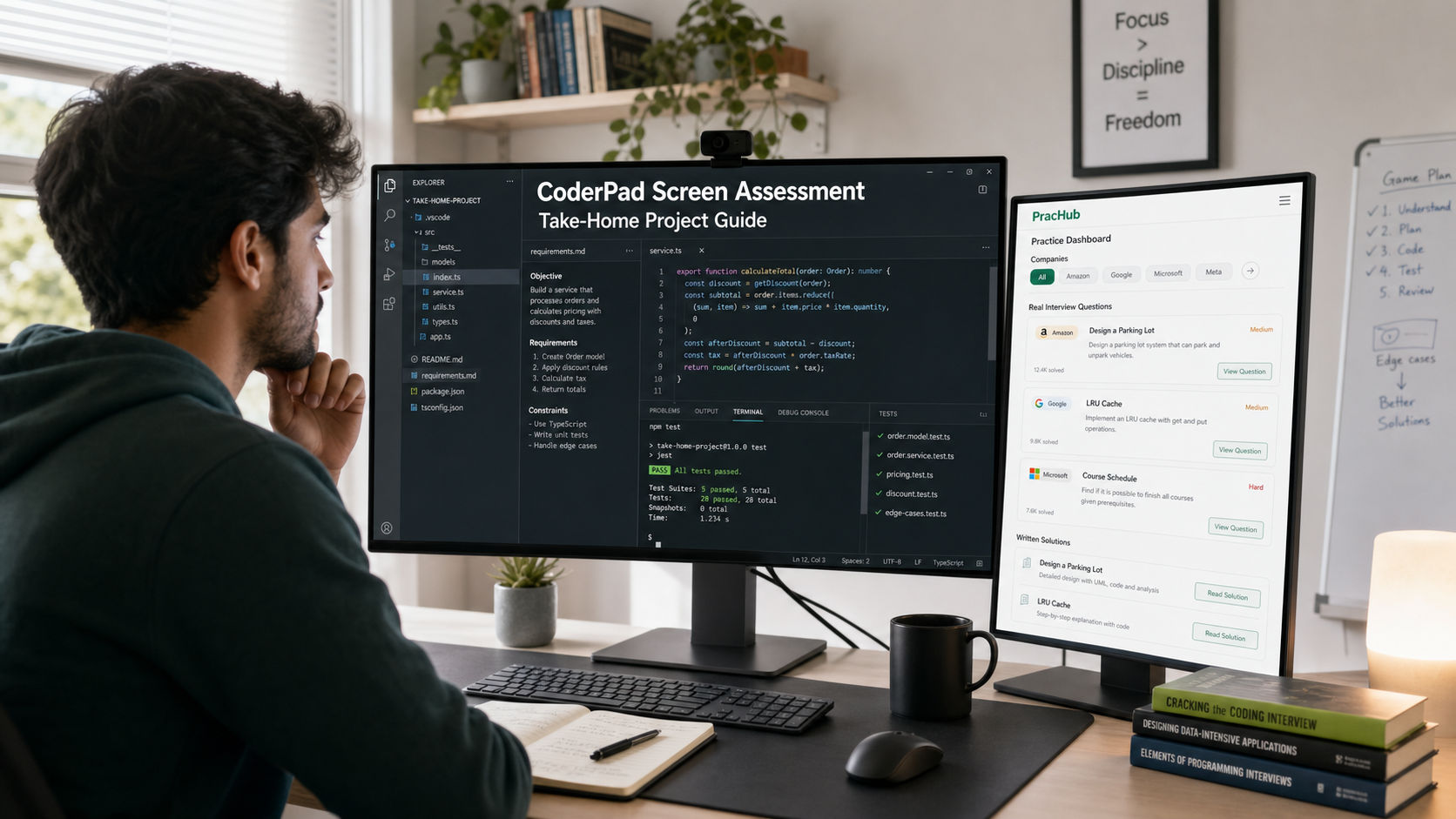
Prepare for the project format before the assessment timer begins: requirements, existing code, tests, and a final review all matter.
Quick Verdict: What Should You Expect?
Expect an employer-configured assessment, not one universal CoderPad Screen test. CoderPad's candidate guide says a Screen can include multiple-choice, text, programming, gaming, project, and audio or video questions. The company chooses the technologies, question mix, time limit, and rules.
For a project exercise, CoderPad provides a complete VS Code environment with a file tree, terminal, dependencies, tests, and an instructions.md file. You may need to build a feature, debug an issue, or work inside an existing application rather than solve a single algorithm from scratch.
Your best preparation is therefore two-part: sharpen the role-specific skills the employer may test, then rehearse a calm project workflow that leaves time to save, test, and review your work.
CoderPad Screen vs CoderPad Interview
Candidates often use "CoderPad interview" to describe every assessment on the platform, but CoderPad separates two products. Knowing which one appears in your invitation helps you choose the right practice format.
| Feature | CoderPad Screen | CoderPad Interview |
|---|---|---|
| Typical use | Asynchronous technical screening | Live collaborative interview or Interview-hosted take-home |
| Possible format | Knowledge questions, coding exercises, projects, or recorded responses | Shared coding pad, discussion, or a timed take-home project |
| Human present | Usually no | Usually yes for a live round |
| Best preparation | Timed independent work and project execution | Coding plus clear real-time communication |
Read the invitation carefully. If the recruiter simply says "CoderPad," ask whether the round is a Screen assessment, a live Interview, or a take-home hosted in Interview.
What Can Appear on a CoderPad Screen Assessment?
The invitation screen shows the number of questions and the maximum expected time. CoderPad also provides a tutorial that can be repeated without affecting the assessment result. Use it to learn the interface rather than clicking through quickly.
Short knowledge questions
Multiple-choice and text questions can test language or framework knowledge under a short time limit. Some multiple-choice questions have more than one correct answer, so read the selection instructions closely.
Programming exercises
These usually provide a problem and starter code. Passing the visible checks is not proof that hidden validation will pass, so test edge cases and avoid coding only to the examples.
Realistic project exercises
This is the format most candidates mean by a CoderPad take-home project. The current Projects experience can include a complete file tree, frameworks, dependencies, an integrated terminal, test suites, and a running application. The work may resemble a small slice of day-to-day engineering.
Audio or video answers
A company can also ask for a recorded response to a written prompt. Prepare to explain a technical choice or relevant project in a concise, structured way.
What Reviewers May Look For
There is no universal CoderPad scoring rubric. CoderPad supports automated checks and manual review criteria, while each employer decides what matters for the role.
Automated signals may include correctness, passing tests, and completed requirements. A human reviewer may also inspect readability, sensible structure, trade-offs, and whether your submission is easy to understand. Treat those as common engineering signals, not a guaranteed scoring formula.
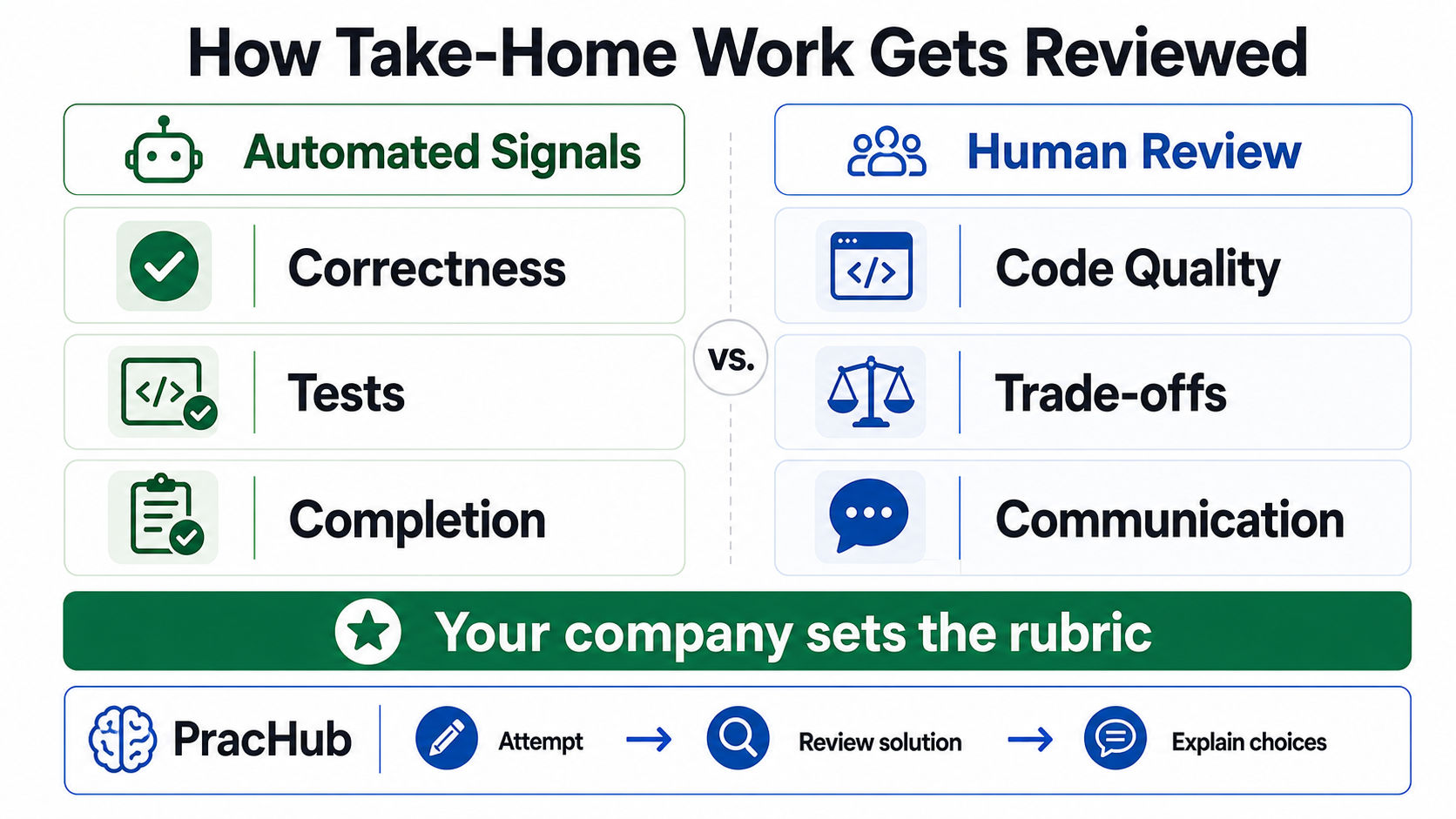
The platform can support automated and manual review, but the employer defines the actual rubric.
For multi-file projects, CoderPad can also provide a timeline of edits and test runs to reviewers. Work honestly, follow the stated rules, and submit code you can explain in a follow-up conversation.
Before You Start the Timer
Do not open the link casually just to look around. First read the recruiter message, confirm the deadline, reserve uninterrupted time, and clarify any unclear rules about documentation, search, AI tools, or outside editors.
Use a desktop browser. CoderPad recommends a full-size device, warns that phone-size devices are unsupported, and notes that some browser plugins can interfere. If the tutorial behaves strangely, try an incognito window, another supported browser, or disabling extensions before the real assessment.
If the project offers a built-in AI Assistant, that means the employer enabled it. Use it only within the visible rules and review every suggestion. Do not assume an external AI tool is allowed merely because CoderPad supports AI in some configurations.
A Six-Step CoderPad Take-Home Strategy
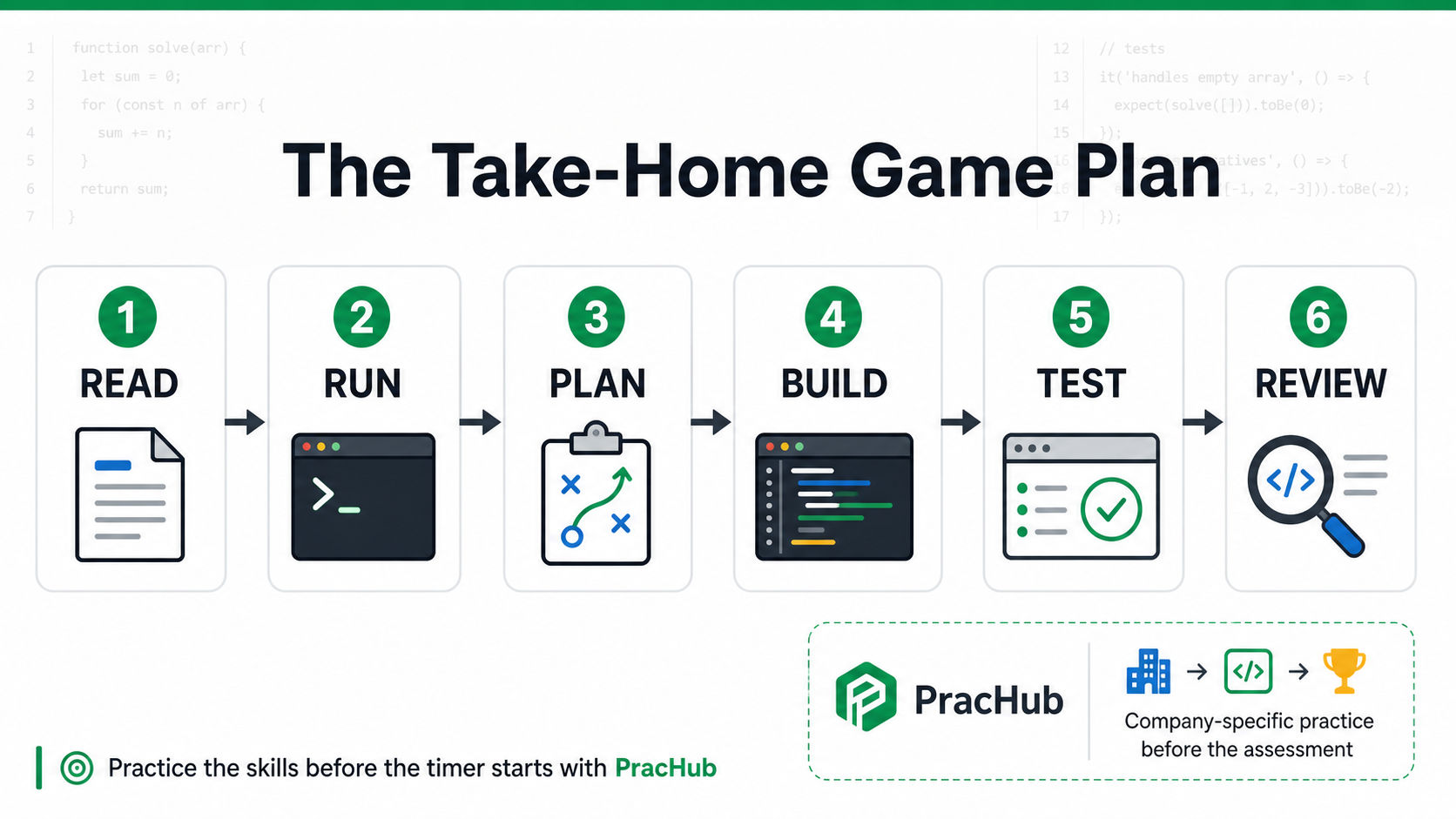
Read, run, plan, build, test, and review. This sequence protects both correctness and submission quality.
1. Read the instructions twice
Open instructions.md first. Translate every requirement into a small checklist and mark constraints, expected behavior, and explicit non-goals. Do not start coding while the task is still ambiguous.
2. Run the project before changing it
Use the terminal to install what the instructions require, run the existing tests, and start the application when relevant. A baseline tells you whether a failure came from the starter project or from your change.
3. Plan the smallest complete solution
Identify the files you need to touch and choose a simple end-to-end path. A working, testable implementation is usually more valuable than an ambitious redesign left unfinished.
4. Build in small checkpoints
Implement one requirement at a time and rerun the relevant checks. Preserve existing conventions unless the task specifically asks for refactoring.
5. Test behavior, not just the happy path
Cover boundaries that matter to the prompt: empty input, invalid state, duplicates, missing data, failure responses, or concurrency as appropriate. Hidden checks often expose assumptions that sample cases do not.
6. Review and save everything
CoderPad's project guide states that only saved files are included in the submission. Save all files, check for unsaved-change indicators, rerun the project, compare your work with every requirement, and then submit intentionally.
How to Practice Before a CoderPad Take-Home
CoderPad is the assessment environment; PracHub is where you can build the interview skill before entering it. Start with an unfamiliar company-relevant prompt, solve it without a solution open, then compare your approach with the written explanation and practice defending your choices.
For project-style screens, prioritize questions involving debugging, APIs, data transformation, object design, validation, and software engineering fundamentals. Filter by your target employer on PracHub company pages so the practice reflects the role instead of a generic question list.
Passing the screen may lead directly to broader rounds. Senior candidates should add system design interview practice, while every candidate should prepare concise examples with behavioral and leadership questions.
Common Mistakes to Avoid
The biggest mistake is spending most of the assessment coding before understanding the repository. Other costly errors include ignoring the tutorial, changing too much starter code, trusting only visible tests, using tools that were not authorized, and polishing architecture while core requirements remain incomplete.
One final mistake is surprisingly easy to make: finishing the solution but leaving files unsaved. Reserve the last few minutes for a deliberate submission check.
Frequently Asked Questions
Are all CoderPad Screen assessments take-home projects?
No. CoderPad Screen can include multiple-choice, text, programming, gaming, project, and audio or video questions. The employer chooses the format. The invitation screen and tutorial give the best preview of the assessment you will receive.
Can I practice exact CoderPad Screen test questions?
There is no universal candidate question set because companies configure their own tests and technologies. Prepare for the likely role skills and practice the project workflow instead of relying on leaked prompts.
Can I use Google, documentation, or AI?
Follow the employer's instructions. CoderPad says general web resources may be available for some programming questions, and a built-in AI Assistant may appear when enabled. Those product capabilities do not override company-specific rules.
What happens when time runs out?
CoderPad's Screen guide says timed-out question code is submitted immediately, and working partial attempts may still contribute points. Do not rely on that safety net. Save frequently and reserve time for a final check.
Can I request a retake?
Some employers enable retake requests. If available, the test-results email can include a request button, but the test administrator decides whether to approve it. Report genuine technical problems promptly and provide specific details.
Final Takeaway
A strong CoderPad Screen submission is not just code that appears to work. It shows that you can understand an unfamiliar task, navigate a realistic project, make focused changes, test your assumptions, follow the rules, and finish cleanly under time pressure.
Use the tutorial to remove interface surprises. Use the six-step workflow to protect your time. Most importantly, use PracHub's real interview questions and written solutions before assessment day so the technical reasoning itself already feels familiar.
Sources
Platform details were checked against CoderPad's official candidate preparation guides, Screen preparation guide, Projects exercise guide, and CoderPad Projects announcement. Employers can configure assessments differently, so the invitation and recruiter instructions remain authoritative for your test.
Related Articles
Software Engineer Take-Home Assignment Guide 2026: Scope, Tests, and Submission
Software engineer take-home assignment guide for 2026: control scope, choose useful tests, document trade-offs, and submit a project reviewers can run.
AlgoMap Review 2026: Free DSA Roadmap or Paid Bootcamp?
AlgoMap review 2026: compare the free 100-problem DSA roadmap with $4K-$15K paid plans, who each option fits, and a 14-day test before paying for prep.
CodeSubmit vs CoderPad Screen: Which Take-Home Format Should You Expect?
CodeSubmit vs CoderPad Screen explained for 2026: compare repo setup, browser IDEs, timing, review signals, and how to prepare for either take-home test.
Big Interview Review 2026: Is AI Video Practice Useful for Technical Candidates?
Big Interview review for technical candidates: see 2026 pricing, VideoAI limits, where it helps, and how to pair it with real technical interview practice.
Comments (0)