CodeSubmit vs CoderPad Screen: Which Take-Home Format Should You Expect?
Quick Overview
CodeSubmit and CoderPad Screen can both deliver realistic take-home projects, but the candidate workflow is different. This 2026 comparison explains local Git repos versus browser-based VS Code, timing, review signals, submission risks, and a PracHub practice plan for either format.
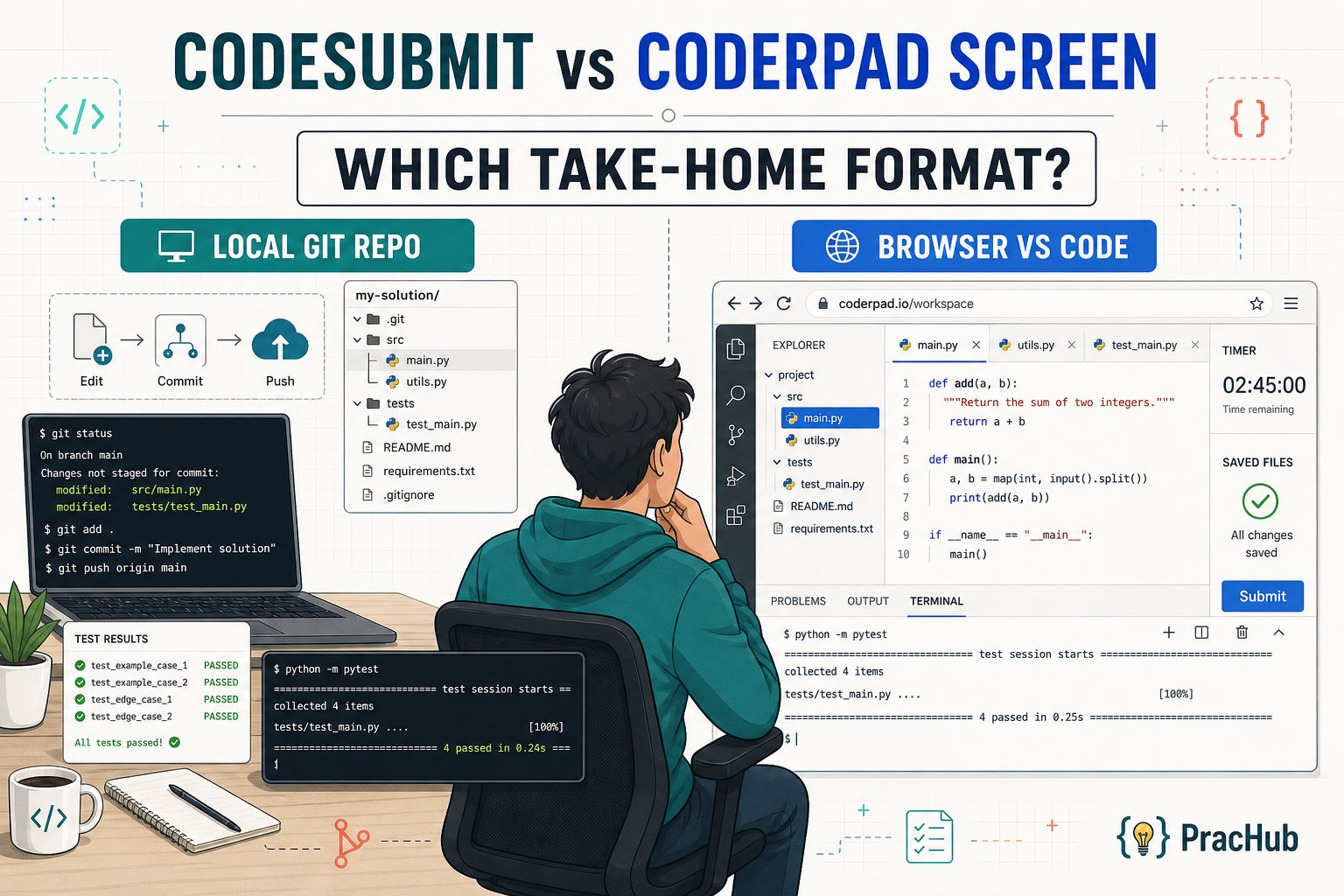
"Take-home coding assessment" sounds like one format. In practice, CodeSubmit usually means cloning a repository and working locally, while CoderPad Screen Projects place a repository-like task inside a browser-based VS Code workspace.
Before opening either timed assessment, use PracHub's company-specific interview prep to identify the likely skills and then attempt a few real interview questions with written solutions. The platform changes your workflow, but the employer still decides what technical judgment it wants to see.
Quick Verdict
Expect CodeSubmit when the company wants a reviewable Git work sample created in your normal local setup. Expect CoderPad Screen when it wants a standardized browser environment, automated assessment signals, or a detailed record of how you completed the project.
Employers can customize the stack, prompt, time rules, tests, review criteria, and AI policy. Your invitation is more authoritative than any general guide, but the practical distinction remains: CodeSubmit emphasizes repository delivery; CoderPad Screen adds browser-environment and timer discipline.
CodeSubmit vs CoderPad Screen at a Glance
Workspace. CodeSubmit runs on your computer with your preferred IDE and terminal. CoderPad Screen Project exercises run inside a browser-based VS Code environment.
Submission. CodeSubmit expects a commit and push to the provided Git repository. CoderPad Screen expects saved files followed by the Submit button.
Timing. A CodeSubmit invite may use a due date, active time limit, or both. CoderPad Screen shows the expected test length, while questions or the full assessment may be timed.
Review trail. CodeSubmit can expose the repository, diff, commits, tests, documentation, and rubric. CoderPad Screen can expose answers, test results, source changes, and a detailed Project activity playback.
AI. CodeSubmit's local-tool policy comes from the employer, while the product can provide AI-supported review. CoderPad Screen can show a built-in AI Assistant when the recruiter enables it.
Biggest preventable mistake. On CodeSubmit, it is failing to push or committing generated files. On CoderPad Screen, it is submitting with unsaved files, which are not included.
The Core Format Difference
CodeSubmit is a local repository workflow
CodeSubmit's current Take-Home Challenges page describes a clone, code, commit, and push workflow using your own editor, terminal, Git installation, and debugging tools. That familiarity transfers setup, environment, repository cleanliness, and final-push responsibility to you.
The assignment may come from a library or be customized with company files, frameworks, and prompts. Do not assume every CodeSubmit challenge uses the same tests or review method.
CoderPad Screen Projects use a managed browser IDE
CoderPad's Projects candidate guide says Project exercises open in a complete VS Code environment with multiple files, a terminal, tests, debugging, and optional previews. You avoid most local setup, but must learn the assessment environment before the timer matters.
Most importantly, CoderPad states that only saved files are submitted. Complete the tutorial and make saving part of your routine.
What Your Invitation Is Telling You
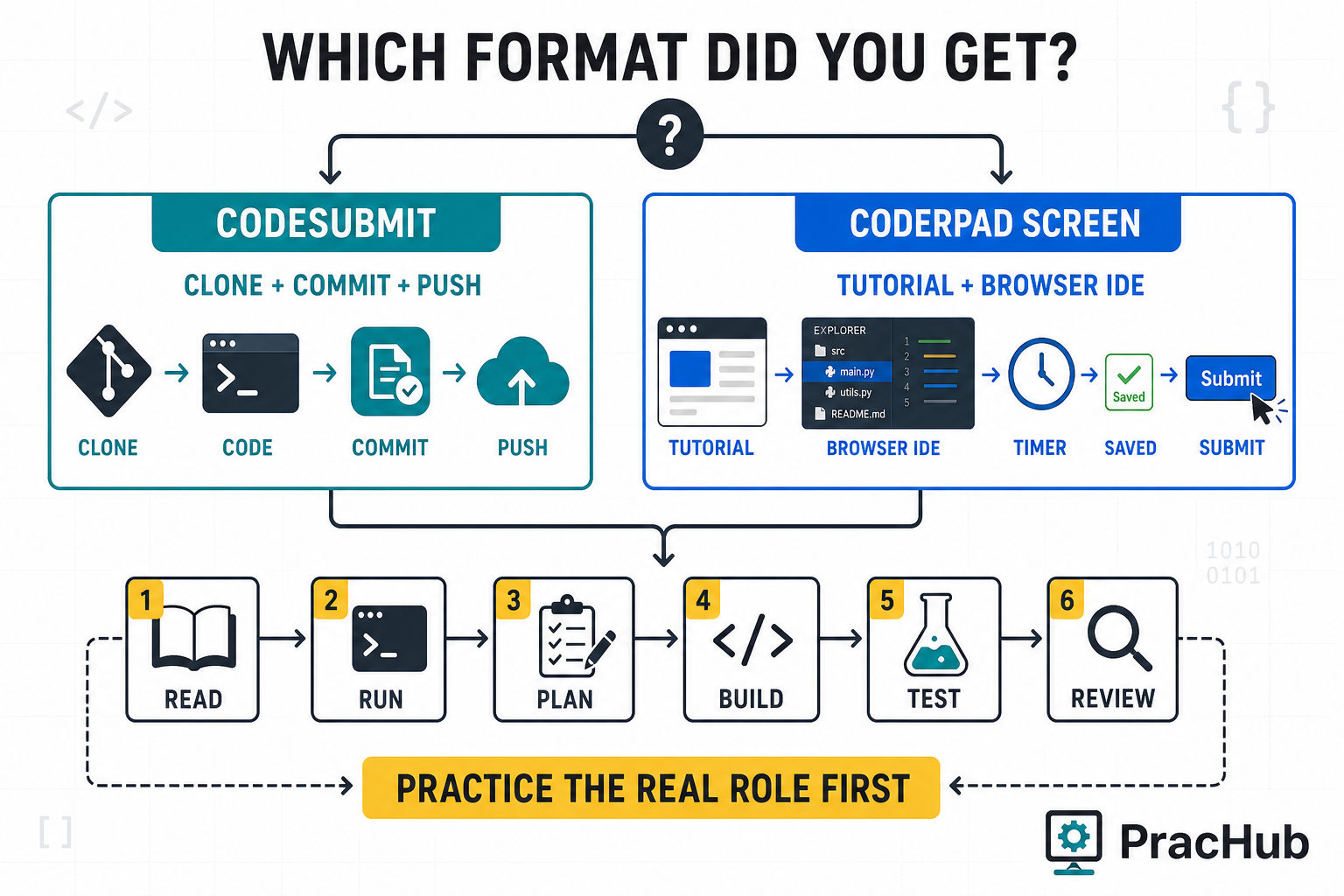
If the email includes a clone command, temporary Git credentials, and a repository URL, prepare for CodeSubmit. Its Git troubleshooting guide calls out credential mistakes, expired windows, VPN or proxy interference, and accidentally committed directories such as node_modules.
If the invitation opens with a tutorial, question count, expected duration, and an in-browser workspace, prepare for CoderPad Screen. If the recruiter only says "CoderPad," ask whether it is asynchronous Screen, live Interview, or Interview's separate take-home mode.
How Review Signals Differ
CodeSubmit leaves a Git-centered review trail
A reviewer can inspect what changed, how the project is organized, whether tests were added, and whether the submission is easy to run. CodeSubmit also supports rubrics and AI summaries that may surface structure, testing gaps, and follow-up topics while leaving the hiring decision with people.
Assume you may discuss the same work later. CodeSubmit can open a take-home submission in CodePair, allowing an interviewer to ask why you chose a boundary, how you would extend the solution, or what you would fix with another hour.
CoderPad Screen can combine scores with process evidence
CoderPad Screen can mix a project with shorter programming, knowledge, text, or recorded-response questions. Its current candidate reports documentation describes comparative or point scores and criteria such as design, language knowledge, problem solving, and reliability.
For Projects, reviewers can inspect source changes and may have playback of navigation, debugging, and built-in AI activity. Do not perform for the recording; simply use a clean process: read, test assumptions, make focused changes, and verify.
A Preparation Plan That Works for Both
1. Map the role before practicing the platform
Start with the job description and the company's recent question patterns on PracHub. Map the likely signals, such as API contracts and reliability for backend roles or state, accessibility, and component boundaries for frontend roles.
2. Rehearse an unfamiliar repository
Use a small existing codebase instead of a blank algorithm editor. Read the README, build files, nearby implementations, and tests, then write acceptance criteria before changing code.
3. Practice visible and hidden-case thinking
Run the existing suite first and derive edge cases from the prompt. PracHub's guide to coding assessment hidden test cases covers common boundaries that break plausible submissions.
4. Review your own diff like an interviewer
Inspect accidental scope, errors, fragile tests, and secrets. The code review interview guide provides a useful correctness-to-trade-off order.
5. Explain the final solution aloud
Prepare a two-minute walkthrough: what the task required, what you changed, what you tested, the main trade-off, and what you would improve with more time. This protects you in a CodePair continuation or any later project deep dive.
The CodeSubmit Submission Workflow
- Confirm timing before pressing Start. A CodeSubmit invite can use a due date, active time limit, or both. Follow the recruiter's deadline even if the platform labels the due date as soft.
- Clone and establish a baseline. Run the documented install, test, lint, type-check, and application commands before editing.
- Implement and review. Follow existing patterns, time-box optional refactors, add focused tests, inspect the diff, and remove generated files or secrets.
- Push and verify. Confirm the intended branch and final commit exist on the remote. Local work that never reaches the repository is not a submission.
The CoderPad Screen Project Workflow
- Use the tutorial first. Learn the file explorer, terminal, Quick Access area, and submission flow before assessment day.
- Read
instructions.mdand run the baseline. Turn requirements into a checklist and separate starter-project failures from your own regressions. - Work in saved, verified increments. Rerun focused checks and use the built-in AI Assistant only when enabled and allowed, validating its output yourself.
- Save all, test, review, submit. Check every unsaved-file indicator and reread the requirements before the timer expires.
Which Take-Home Format Is Harder?
CodeSubmit is harder when local setup, Git, or scope control is your weak point. You have more freedom, but you also own every dependency, service, commit, and push.
CoderPad Screen is harder when a fixed environment or visible timer disrupts your process. You avoid local setup surprises, but must learn the interface quickly, save deliberately, and work within the tools the assessment provides.
For experienced engineers, the technically harder task may be identical on either platform. The platform mainly changes where operational mistakes happen.
Common Mistakes That Hurt on Both Platforms
Starting before understanding the task can produce a polished solution to the wrong requirement. Read first, define the contract, and test the boundary and failure cases implied by it.
Overengineering leaves core behavior unfinished. Prefer the smallest complete change that fits the codebase, and use a short note for improvements you did not implement.
Using unauthorized tools or submitting code you cannot explain creates a credibility problem. Follow the written policy and expect the repository, diff, or project timeline to return in a live follow-up.
Frequently Asked Questions
Is CoderPad Screen the same as a live CoderPad interview?
No. Screen is primarily asynchronous. CoderPad Interview is designed for live collaboration, although it also supports take-homes. Ask which product and format your link uses.
Can I use my own IDE for both platforms?
CodeSubmit is built around your local tools. CoderPad Screen Projects use browser-based VS Code, while other Screen question types may use a simpler editor.
Does CodeSubmit use hidden tests?
There is no universal setup. The company decides which tests are visible, automated, or used during review. Build from the specification and realistic edge cases instead of guessing secret inputs.
Can I use AI during a take-home assessment?
Only when the employer allows it. CoderPad may show an enabled AI Assistant; CodeSubmit's local environment does not make external AI automatically permissible. Follow the invitation and keep the work explainable.
How should I prepare if I do not know which platform the company uses?
Practice one realistic repository task twice: locally with Git, then in a browser IDE under a timer. Use the same read, run, plan, implement, test, review, and explain sequence.
Final Takeaway
The useful question is not whether CodeSubmit or CoderPad Screen is better. It is where your submission risk moves.
CodeSubmit gives you familiar tools and expects disciplined Git delivery. CoderPad Screen gives you a standardized browser workspace and expects disciplined time, save, and environment management. In both cases, the winning preparation is the same at its core: practice real problems, test deliberately, control scope, and explain your decisions.
For a deeper walkthrough, read the dedicated CodeSubmit take-home assessment guide and CoderPad Screen assessment guide. Then turn the advice into a timed PracHub practice run before the real invitation opens.
Sources
- CodeSubmit Take-Home Challenges
- CodeSubmit assessment format guide
- CodeSubmit invitation timing guide
- CoderPad candidate preparation guides
- CoderPad Screen preparation guide
- CoderPad Projects candidate guide
Research note: This documentation-led comparison was checked on August 5, 2026. Platform capabilities and employer configurations can change; follow the instructions in your own invitation.
Related Articles
Software Engineer Take-Home Assignment Guide 2026: Scope, Tests, and Submission
Software engineer take-home assignment guide for 2026: control scope, choose useful tests, document trade-offs, and submit a project reviewers can run.
AlgoMap Review 2026: Free DSA Roadmap or Paid Bootcamp?
AlgoMap review 2026: compare the free 100-problem DSA roadmap with $4K-$15K paid plans, who each option fits, and a 14-day test before paying for prep.
Big Interview Review 2026: Is AI Video Practice Useful for Technical Candidates?
Big Interview review for technical candidates: see 2026 pricing, VideoAI limits, where it helps, and how to pair it with real technical interview practice.
Grind 75 vs Blind 75 vs NeetCode 150: Which List Should You Finish?
Compare Grind 75 vs Blind 75 vs NeetCode 150 by difficulty, timeline, and coverage. Pick the right list and know when to start real interview practice.
Comments (0)