How to Find Newly Posted Software Engineer Jobs with LandOffer
Quick Overview
Find newly posted software engineer jobs with LandOffer. Use time filters, check employer dates and availability, and build a relevant application shortlist. Current official evidence and original worked examples explain the workflow and its review boundaries. Shared LandOffer–PracHub team disclosed.
Finding newly posted software engineer jobs is easier when you separate discovery from qualification. LandOffer gives you a feed to search, time filters to narrow it, and job details that help you decide whether an opening deserves an application. Start with a relevant role and location, select a recent window, then check the employer's original application page before spending time tailoring your materials.
LandOffer is built by the team behind PracHub. This walkthrough combines current public product information with a read-only browser check on October 29, 2026. It does not claim that applying earlier guarantees an interview. Once you find a suitable position, use PracHub's Software Engineer questions to turn its technical requirements into practice.

Start with a search narrow enough to review
Open LandOffer's job feed and enter the work you want to do. The checked page exposes Search roles and Location fields, a Company selector, an Experience level selector, and Date posted buttons for Any time, 24h, 3 days, and 7 days. These are useful controls because a fresh job outside your level or working location is still a poor application target.
In our browser check, searching for software engineer and then selecting 24h produced a filtered results address containing both the role query and the recent-time parameter. Apply the role search first, then the time window, and inspect the resulting page before treating it as your saved search. A control you clicked before a new search should not be assumed to have persisted.
Begin with one meaningful title family. A backend candidate might also search platform engineer or software engineer, data infrastructure in separate passes. A frontend candidate may need frontend engineer and product engineer. These are search strategies, not claims about a hidden semantic matching rule. Read the actual responsibilities rather than relying on a title match alone.
Location deserves the same care. Remote can still mean a particular country, time zone, or employment arrangement. Entering remote does not establish permission to work anywhere. Check the location text and the employer's description together. If you cannot meet an explicit requirement, record that reason and move on instead of letting a new timestamp overrule the fit decision.
Use the experience filter to reduce noise, but keep reading the qualifications. An employer may combine multiple levels in one posting. The results are a starting shortlist; the underlying role determines whether your experience is relevant.
Understand what the three freshness signals tell you
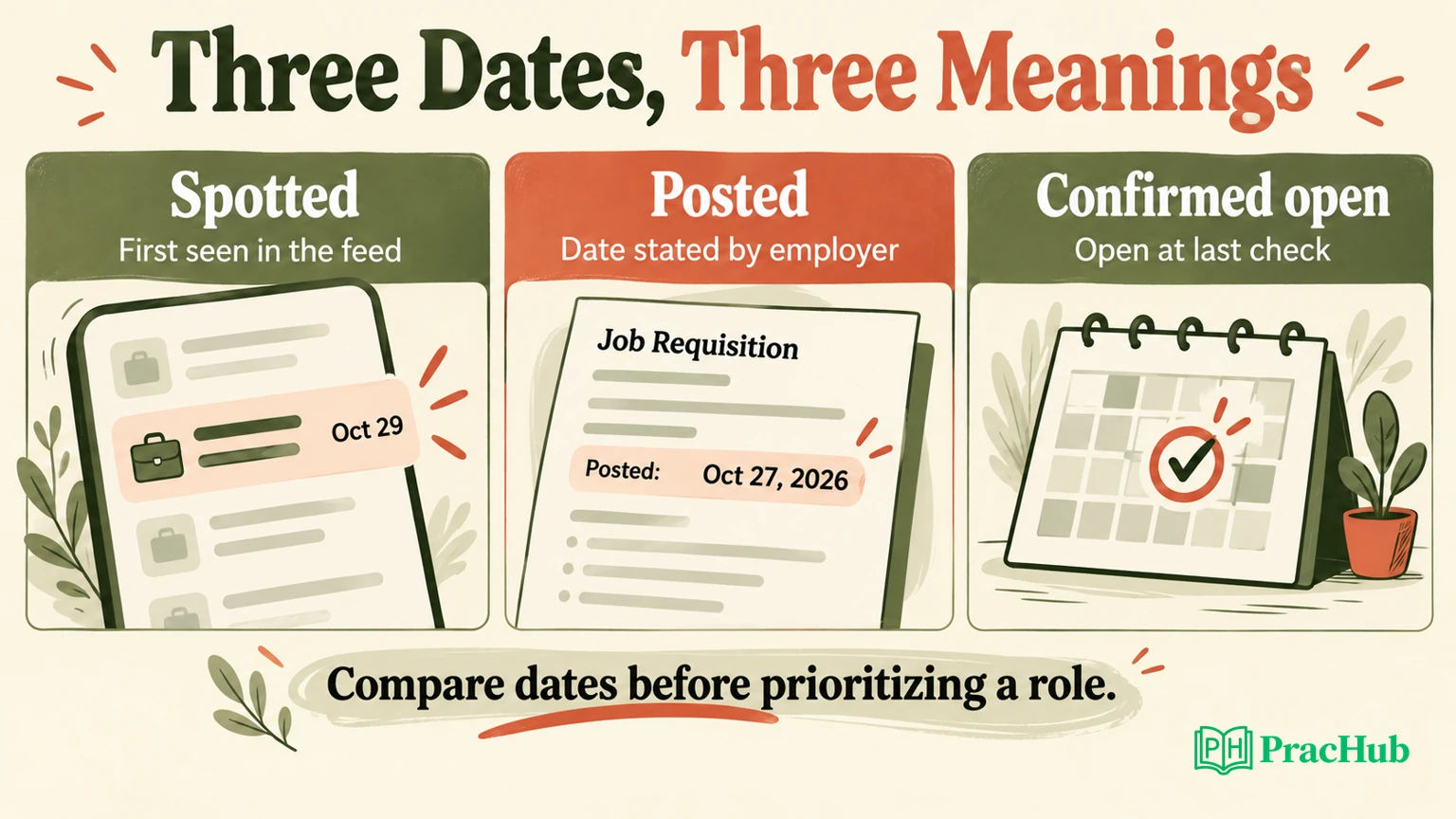
A recent card can reflect discovery, employer publication, or a later availability check. LandOffer's checked detail page separated Spotted, Posted, and Last confirmed open. These signals answer different questions, and using them together is more useful than treating the largest recent label as a promise about the original vacancy.
Spotted describes discovery in the feed. Posted is the displayed posting date. Last confirmed open describes the site’s last recorded availability check. The employer's own page remains the place to verify whether you can apply now. Our observation establishes what the page displayed, not an independent audit of every timestamp in the collection pipeline.
For example, a role can be discovered today even though the employer originally opened it earlier. That is still useful if it is a good opportunity you had not found. It simply belongs in a different category from a newly opened requisition. Likewise, an older posting confirmed open today may be worth considering when its scope matches your background.
The following examples are fictional and illustrate the decision, rather than describe particular employers:
| What you find | What the evidence supports | Useful next action |
|---|---|---|
| Spotted today, employer says posted today, active application | A recently discovered role with corroborating posting information | Review requirements and prepare the application |
| Spotted today, employer says posted two weeks ago | A newly discovered opportunity, with an older original date | Assess fit without calling it a brand-new vacancy |
| Same requisition appears again with a newer card date | Potential repeat or refreshed listing | Compare employer requisition and your application history |
| Recent card, employer says no longer available | Discovery information is insufficient to apply | Stop using that application link and check the employer's current openings |
This distinction makes LandOffer more useful as a discovery tool. You can benefit from a broad feed while using each timestamp for the question it can answer.
Walk one role back to its original application
During the October 29 browser check, the feed led to Bayesian Health's Software Engineer, Data & Analytics Platform detail page. It displayed Remote - US Only, a Senior level, a requirement for at least five years of relevant experience, and separate posting and confirmation dates. Its description emphasized Python, SQL, data infrastructure, and product-performance analytics.
The detail page offered an Apply with Autofill link and an employer application link. Following the latter opened an Ashby application for the same role. This check followed the complete inspection path: search result, detailed requirements, original application. No candidate details were entered and no application was submitted.
The role is an illustrative observation, not a recommendation that every reader should apply or a promise that it remains open. If it interests you, recheck the LandOffer detail page and follow its employer link again. Job availability can change after publication.
Notice what the title alone would have missed. Someone seeking a junior generalist software role might find the phrase software engineer attractive, but the data-platform responsibilities and experience requirement change the fit decision. A senior candidate with production Python and SQL evidence may find the same description much more relevant. Filtering helps you find the role; interpreting the work helps you choose.
Keep a shortlist that prevents repeat work
A useful shortlist should let you explain why each application exists. Record the employer, role title, original application URL, requisition identifier when available, location restriction, the three available dates, and your own current status. Add one sentence linking the work to a project you can defend.
For a fictional backend candidate, that sentence might be: “My ingestion service required idempotent retries and operational monitoring, which relates to this team's pipeline ownership.” It should point to actual experience. It is not a license to add a technology you have only read about to the submitted résumé.
When two cards look similar, compare the employer requisition and the actual work. Two openings with the same title can belong to different teams or locations. Two differently formatted URLs can also lead to the same requisition. Avoid deleting useful opportunities just because the title repeats, and avoid submitting twice just because the URL has changed.
A short decision record also improves follow-up. You should be able to distinguish found, reviewing, ready to apply, submitted, and awaiting clarification. These are suggested personal workflow states, not asserted LandOffer interface labels. An open browser tab is a weak substitute for knowing which résumé and answers you actually sent.
Prioritize relevance before speed
A practical order is eligibility, evidence, then freshness. First establish whether the role's explicit location and employment conditions fit. Next identify whether your experience supports its central responsibilities. Then use recency to decide which suitable application deserves attention first.
Suppose you have three fictional possibilities. A new role requires a location you cannot accept. A three-day-old role matches a system you helped operate. A role discovered today has vague duties and no clear employer application. The second can be your strongest immediate choice. You can still investigate the third, but the newest visible label should not determine the whole queue.
This approach preserves the advantage of a current feed: less time hunting across unrelated pages and more time evaluating the openings you would seriously consider. It also gives you a useful stopping rule. Once you have enough suitable roles for the application time you actually have, stop gathering more cards and prepare the best candidates.
Keep the shortlist small enough that you can name the most important requirement for each opening. If every entry looks interchangeable, revise the search. A shorter set of credible applications gives you clearer material for recruiter conversations and later interview preparation.
Use matches and Autofill for the next repeated steps
LandOffer's official product description says résumé-based matching and alerts can help surface relevant roles. Think of that as another discovery input. Review the profile and preferences behind a match, then compare the suggested job with the employer's requirements. A match score is not an employer decision about your candidacy.
For supported application forms, LandOffer Autofill can reduce repeated entry while you retain the final review and Submit action. The current extension listing describes an unlimited core Autofill workflow, saved answers, and editable drafts. These are documented capabilities; this article did not measure completion time or test every application portal.
The distinction matters when moving from finding a role to applying. An extension that fills your browser form is separate from optional cloud Agent Apply. You do not need to enable a delegated submission mode to use this discovery workflow. Begin with the mode that lets you inspect the material you intend to send.
Before submitting, verify the attached résumé version, profile links, required written answers, and employer-specific questions. Afterward, preserve the employer's confirmation. For the extension's Applied tab, its listing instructs users to confirm the application in the panel; a filled form alone does not prove submission.
Turn a promising role into focused engineering practice
Save the description you applied against and identify the two technical responsibilities most likely to require evidence. A data platform role may call for a pipeline reliability story. A product backend role may require an API design explanation. These are preparation choices based on the description, not predictions of an employer's exact interview questions.
The following PracHub records connect application requirements to general engineering practice. They are candidate-reported material from their respective contexts and do not establish the interview process for the example employer above.
| PracHub question | What to practice |
|---|---|
| Design a Common Data Class to Normalize Different API Responses | Connect data-platform responsibilities to API representation choices. |
| Design API that aggregates three downstream APIs | Explain partial failure and latency when composing services. |
| Testing a New Feature: Planning Test Cases and Handling Flaky Tests | Prepare a concrete test plan for a production change. |
| Discuss Complex Systems and Failure Examples | Discuss operational failure with a specific system example. |
| Resume Project Deep Dive: Tech Stack Choices, Trade-offs, Business Logic and Ownership | Defend the ownership and trade-offs stated in your application. |
For each selected exercise, answer out loud, explain a decision, and identify what evidence would change your approach. Keep a link between the application and your practice notes: requirement, relevant experience, question to rehearse, and uncertainty to clarify with the recruiter. That is a practical way to make job discovery contribute to interview readiness.
Start your next search in LandOffer's software engineer job feed, verify one suitable opening, and save the exact description before applying. Then choose one relevant problem from PracHub's Software Engineer questions and practice defending the engineering decisions behind your application.
Comments (0)