Mobile System Design Interview Guide 2026: iOS, Android, Offline Sync, and Trade-Offs
Quick Overview
Prepare for a mobile system design interview with a practical framework for client-server boundaries, local state, offline-first reads and writes, sync queues, conflict resolution, background work, push notifications, and platform-specific iOS and Android trade-offs. Includes a worked offline task-list design, common prompts, failure modes, and a focused practice plan.
A mobile system design interview is not a backend design round squeezed onto a smaller screen. The device can lose connectivity, run out of storage, suspend your process, delay background work, and retry the same mutation after the user has already moved on.
That is why a strong answer goes beyond screens and APIs. It explains where state lives, what works offline, how writes synchronize, how conflicts are resolved, and what changes between iOS and Android.
Start with PracHub's real interview questions with written solutions, then use company-specific interview prep to identify the mobile and system design formats in your target loop. This guide gives you a repeatable framework for turning those prompts into a defensible design.
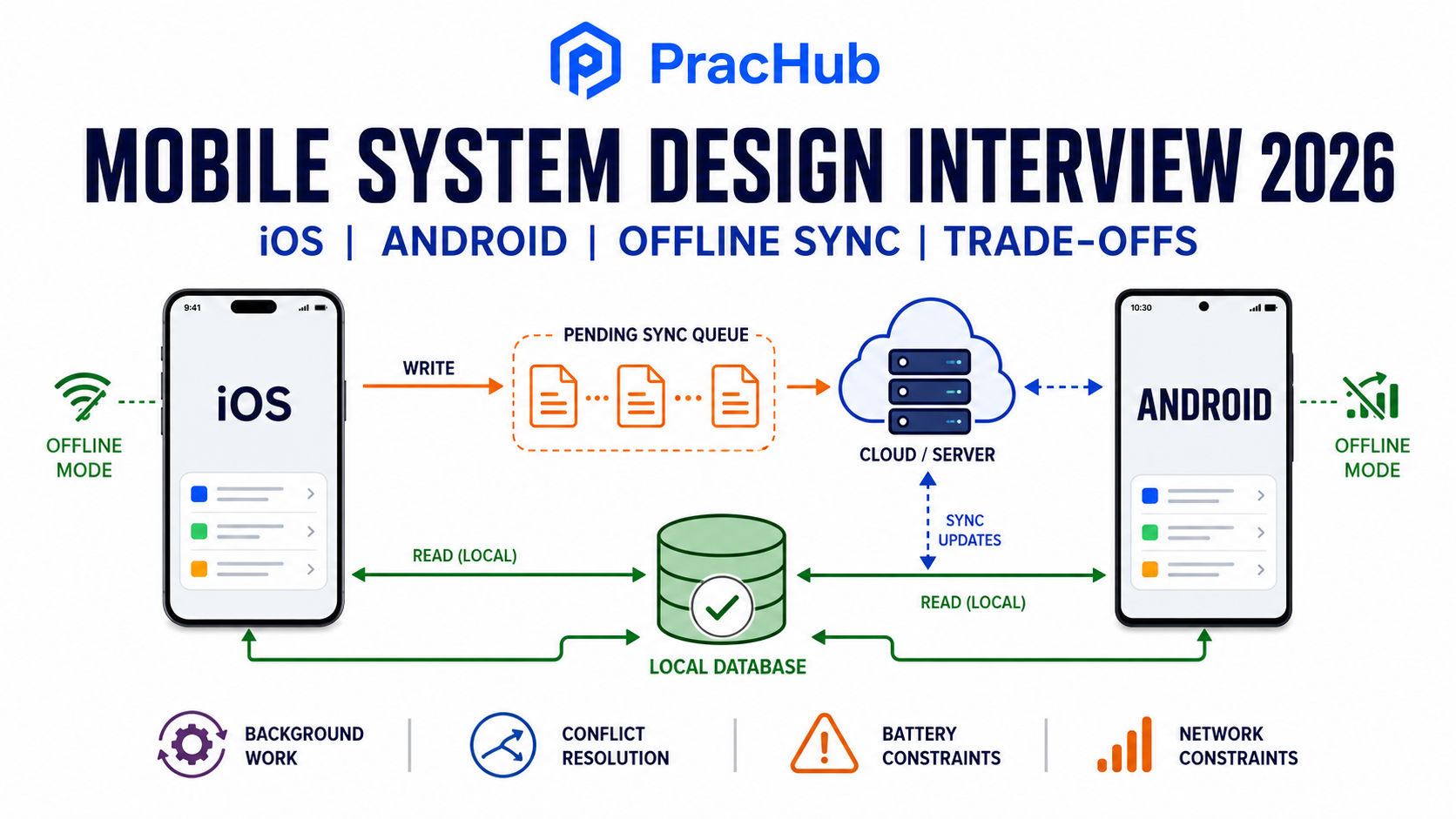
Mobile design connects the UI, local state, synchronization, and a shared backend under unreliable device conditions.
Quick Answer: How Do You Approach a Mobile System Design Interview?
Use seven steps: scope the product, define the client-server boundary, model state, design offline behavior, specify synchronization, choose background mechanisms, and test the trade-offs. Keep one user journey running through the entire answer so each component earns its place.
The key distinction is authority. A local database can be the source that the UI reads, making the app fast and usable offline. The server can still be the authority for shared account state, permissions, ordering, and conflict decisions across devices.
Mobile System Design vs. Backend System Design
| Design pressure | Backend-focused answer | Mobile-focused answer |
|---|---|---|
| Availability | Service redundancy and failover | Useful behavior with no or weak connectivity |
| State | Databases, caches, and distributed consistency | UI state, memory cache, durable local data, and server state |
| Execution | Workers can usually run when capacity exists | The OS may suspend, kill, or defer the app |
| Resources | Compute, storage, and network cost at service scale | Battery, cellular data, disk, memory, and thermal limits |
| Delivery | Deploy services independently | Support old app versions and staged store releases |
You still need backend fundamentals. The difference is translating them into a client experience that survives lifecycle changes and unreliable networks.
What Interviewers Can Evaluate
A mobile design discussion can reveal whether you clarify product behavior, separate responsibilities, understand device constraints, protect data integrity, and communicate trade-offs. Senior candidates should also connect technical choices to user impact: stale content, duplicate actions, battery drain, confusing pending states, or data loss.
There is no universal rubric. Confirm the platform, scope, and expected deliverable before committing to an architecture.
A Seven-Step Mobile System Design Framework
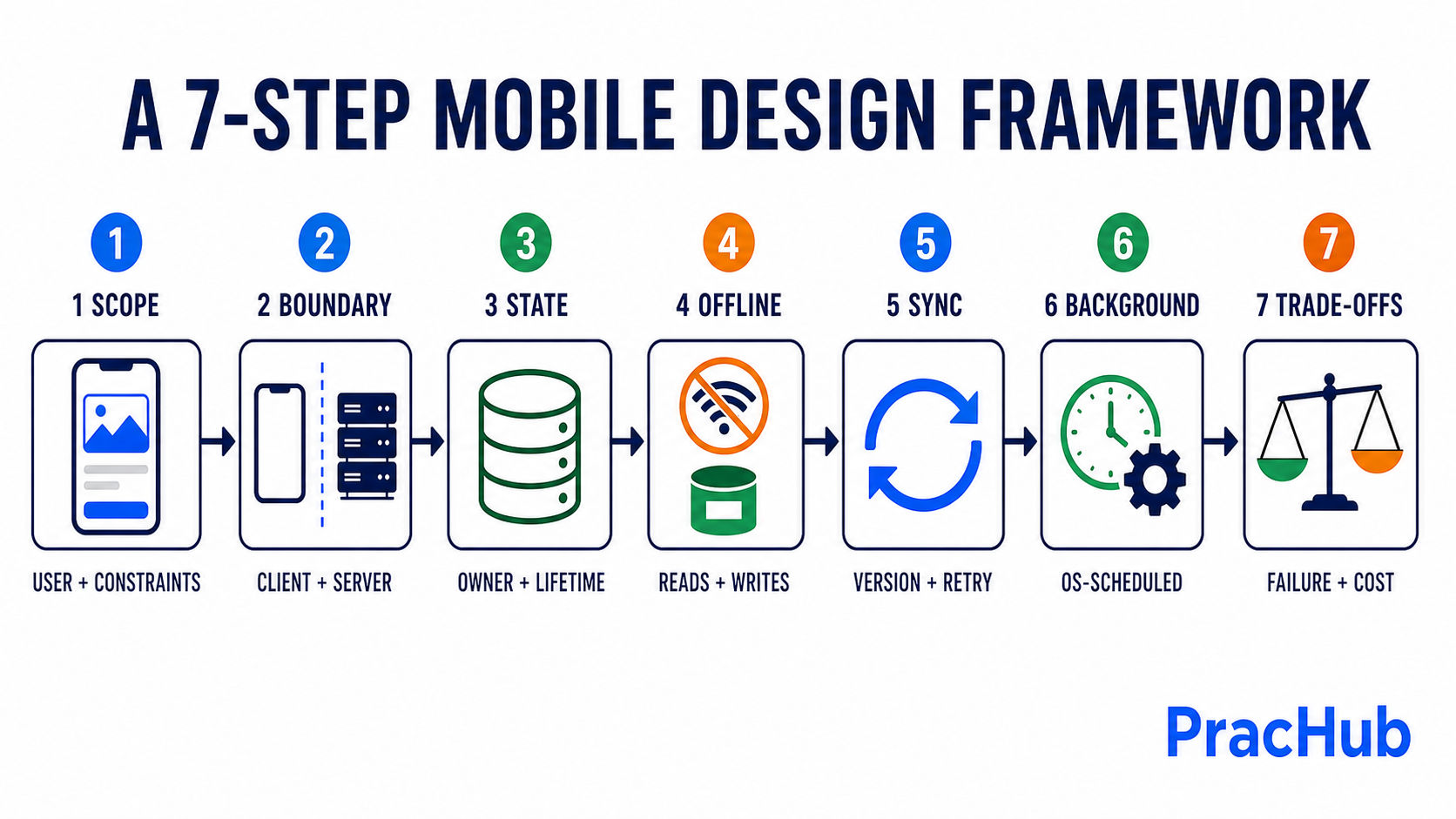
Move from product constraints to a failure-tested design instead of starting with a framework name.
1. Scope the Product and Device Constraints
Define the core user journey, supported platforms, expected data volume, freshness requirements, security sensitivity, and offline promise. Ask whether the app must support multiple devices, collaboration, media, real-time updates, or older OS versions.
2. Draw the Client-Server Boundary
State what belongs on-device and what requires server authority. Presentation, interaction state, local persistence, and queued mutations usually live on the client. Identity, access control, shared ordering, cross-device coordination, and durable multi-user state usually require the backend.
3. Model State Before Naming Frameworks
Separate transient UI state from durable domain data. Define which component owns each state, how changes flow to the UI, and what survives process death. MVVM, unidirectional data flow, or another pattern can help, but the pattern is a means rather than the answer.
4. Design Offline Reads and Writes
Specify what the user can view and change without a network. Decide whether a write is online-only, queued for later, or applied locally first. Show visible states such as pending, synced, and failed instead of pretending every tap reaches the server immediately.
5. Define the Synchronization Contract
Name the mutation identifier, record version, retry behavior, and delta-fetch mechanism. A client-generated mutation ID or idempotency key lets the server recognize a retried operation. A cursor or change token can fetch only updates since the last successful sync.
6. Choose Background Work and Push Responsibilities
Use background mechanisms for work that can tolerate OS scheduling. Treat push notifications as hints that data may be stale, then fetch authoritative changes. Do not make correctness depend on a push arriving or a background task running at an exact time.
7. Stress-Test the Trade-Offs
Walk through airplane mode, app termination, two-device edits, an expired token, a partial batch failure, and an old client version. Explain what the user sees, what is retried, what is recorded, and which component makes the final decision.
A Reference Mobile Architecture and Offline Data Flow
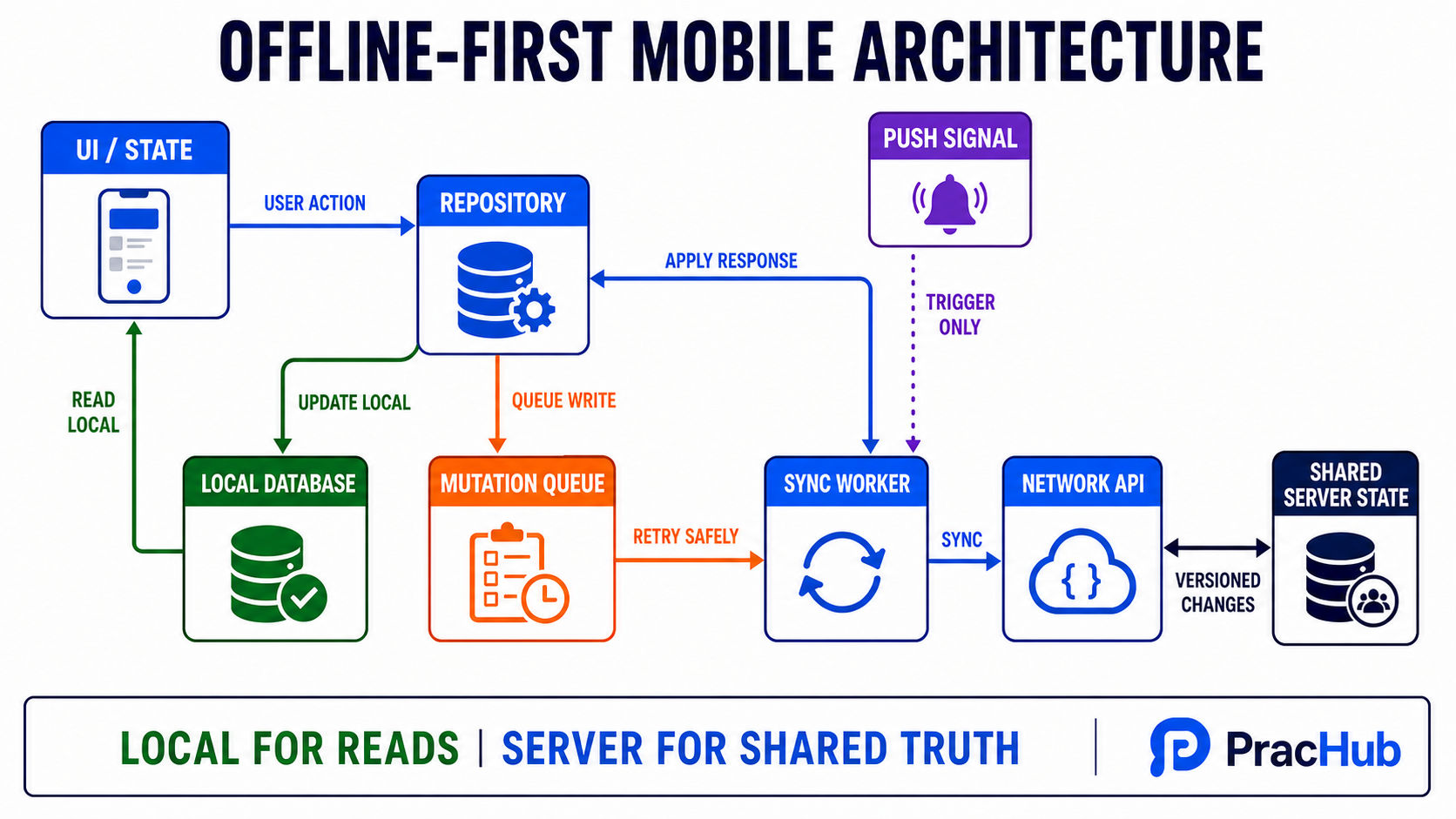
The UI reads local state; repositories coordinate local and network sources; queued mutations synchronize with server-side authority.
A practical design has presentation, repository, durable local storage, mutation queue, sync coordinator, and remote API boundaries. The UI observes local data; network responses update that store and produce a new UI state.
Reads: Fast Local State, Explicit Freshness
Local reads avoid a blank screen while the network responds. Refresh can happen on launch, navigation, user action, push invalidation, or a scheduled opportunity. Expose freshness when stale data matters.
Writes: Choose by Product Risk
A bank transfer may require an online confirmation before the UI claims success. A draft note can be written locally first and synchronized later. Analytics can often enter a best-effort queue. The write policy follows the cost of delay, duplication, and loss.
Retries: Make Operations Idempotent
Connectivity can disappear after the server commits but before the response arrives. Store a stable mutation ID, use bounded exponential backoff, and distinguish retryable failures from authentication or validation errors.
Offline Sync and Conflict Resolution
Synchronization is not just "call the API when online." It is a protocol for reconciling local intent with shared state. Version records, preserve pending operations until acknowledged, and select a conflict policy based on the meaning of the data.
| Conflict strategy | Good fit | Main risk |
|---|---|---|
| Last write wins | Low-value fields where one final value is acceptable | A valid concurrent edit can disappear; device clocks are unreliable |
| Optimistic concurrency | Records with a server version or ETag | The client must handle rejection and retry or resolution |
| Field-level merge | Independent fields changed on different devices | Fields may not be semantically independent |
| Operation log or CRDT | Selected collaborative domains with mergeable operations | More metadata, complexity, and domain-specific rules |
| User resolution | High-value conflicts where intent cannot be inferred safely | Interrupts the user and needs a clear comparison UI |
Last write wins is simple, not automatically correct. Prefer server-assigned versions over trusting device timestamps, and say what information the chosen strategy can lose. That sentence often demonstrates more judgment than naming a sophisticated algorithm.
iOS vs. Android Background Work
| Need | Representative iOS option | Representative Android option |
|---|---|---|
| Short opportunistic refresh | BGAppRefreshTask, scheduled by the system | WorkManager when the work must persist |
| Longer deferrable processing | BGProcessingTask, subject to system conditions | WorkManager with appropriate constraints |
| Background file transfer | Background URLSession upload or download tasks | Task-specific transfer APIs or WorkManager, depending on urgency and duration |
| Server says data changed | Remote notification can trigger a refresh opportunity | FCM can signal that the client should synchronize |
These are representative tools, not one-to-one equivalents. Both operating systems control background execution to protect battery and resources. A correct design persists the work, tolerates delays, resumes safely, and never promises an exact run time the platform does not guarantee.
Worked Example: Design an Offline Collaborative Task List
Scope the first version to creating, renaming, completing, and deleting tasks across two devices. It opens from local data, accepts ordinary offline edits, and converges after reconnection. Shared permissions remain server-authoritative.
Each edit updates the local task and appends a mutation with clientMutationId, taskId, baseVersion, and operation. The UI shows a pending state while a sync worker sends queued operations.
The server deduplicates by mutation ID, checks the base version, and returns the authoritative version. The client commits it locally, removes the acknowledged mutation, and requests changes after its last sync cursor.
Completion can use a server version check and limited retry. Concurrent title edits should preserve the rejected draft or ask the user to choose. Push requests an earlier sync; launch, foreground, manual refresh, and scheduled work provide recovery paths.
Common Mobile System Design Questions and Follow-Ups
Useful prompts include an offline news reader, photo uploader, chat client, maps download, collaborative notes app, ride tracker, payment flow, and cross-device task manager. Each exposes a different pressure: freshness, transfer, ordering, storage, security, or merging.
Expect follow-ups such as: What happens after the process is killed? How do you avoid duplicate uploads? Which data is encrypted locally? What if the device is offline for thirty days? How does an old app version coexist with a new API? What changes when one account uses three devices?
Use the Object-Oriented Design Interview Guide for client components and the Machine Coding Round Guide when the round requires a working slice.
Trade-Offs to Say Aloud and Mistakes to Avoid
A strong candidate states the cost of each choice: "Local-first reads improve startup and offline use, but the UI may show stale data." "Optimistic updates feel fast, but failures need a visible rollback or pending state." "Delta sync reduces bandwidth, but the server must retain an ordered change history or issue stable cursors."
Common mistakes include drawing only backend boxes, promising immediate background execution, using push as guaranteed delivery, retrying writes without idempotency, and choosing last write wins without naming possible data loss. Share domain concepts across iOS and Android, but acknowledge platform differences where they affect correctness.
A Focused Seven-Day Mobile System Design Prep Plan
Days 1-2: scope two products. Identify transient UI state, durable local data, shared server state, and the offline promise.
Days 3-4: design reads, writes, queues, idempotency, delta sync, and two conflict policies. Trace reconnection, process death, and a duplicate retry.
Days 5-6: compare iOS and Android background mechanisms. Implement or pseudocode one repository and pending-mutation queue.
Day 7: run a 45-minute mock. Spend five minutes clarifying, twenty-five minutes designing, ten minutes on failures and trade-offs, and five minutes summarizing the final architecture.
Frequently Asked Questions
Is mobile system design the same as system design?
It uses many of the same fundamentals, including APIs, data modeling, reliability, and security. Mobile system design adds device state, offline behavior, lifecycle changes, battery and network constraints, app-version compatibility, local persistence, and platform-controlled background execution. A complete answer connects both sides.
Should I choose MVVM in every mobile interview?
No. MVVM can create a clear separation between UI state and data access, but it is not a universal requirement. First define ownership, data flow, test boundaries, and lifecycle behavior. Then choose the architecture pattern that supports those requirements without unnecessary layers.
What should be the source of truth in an offline-first app?
A durable local store is often the source the client UI reads, because it provides consistent behavior across connection states. The server may still be authoritative for shared data, permissions, and conflict resolution. State both meanings explicitly so "source of truth" does not hide an unresolved ownership decision.
Do I need to know both iOS and Android APIs?
Know your primary platform deeply and understand the cross-platform principles. If the role is platform-specific, use its concrete APIs. If it is broader, explain the required capability first, then give representative iOS and Android mechanisms while acknowledging that their scheduling and lifecycle rules are not identical.
Final Takeaway
A strong mobile system design answer follows the user's action from the screen to local persistence, across an unreliable network, through server validation, and back into a trustworthy UI state. It explains not only the happy path but also duplicates, conflicts, stale data, process death, and delayed background work.
Use PracHub's real interview question library to rehearse that reasoning with current prompts and written solutions. Make the offline contract explicit, keep authority clear, and say the cost of every important trade-off.
Sources and Methodology
This guide uses Android's current offline-first architecture guidance, data-layer recommendations, and WorkManager task-scheduling documentation to verify local data, synchronization, and persistent-work concepts. Apple's Background Tasks documentation and URLSession documentation anchor the iOS background-work discussion. Firebase Cloud Messaging documentation supports the use of push as a signal that data is available to synchronize. The seven-step framework, worked example, practice prompts, and preparation plan are PracHub recommendations, not a universal company rubric.
Related Articles
Software Engineer Project Deep Dive Interview Guide: Architecture, Impact, and Follow-Ups
Prepare for a software engineer project deep dive interview: choose the right project, explain architecture, prove impact, and handle technical follow-ups.
NeetCode Pro Review 2026: Is the Paid Upgrade Worth It?
NeetCode Pro review for 2026: compare free vs paid features, $119 annual and $297 lifetime pricing, courses, company tags, AI tools, and alternatives.
AlgoMaster.io Review 2026: DSA Patterns, System Design, and AI Mocks
AlgoMaster.io review for 2026: compare DSA patterns, system design, AI mocks, current pricing, limitations, and a practice-first PracHub workflow for engineers.
Object-Oriented Design Interview Guide: Framework, UML, and Common Questions
Prepare for an object-oriented design interview with a six-step framework, practical UML, common OOD questions, follow-ups, and a focused practice plan.
Comments (0)