React Native Interview Questions: New Architecture, Performance, and Native Modules
Quick Overview
Practice 20 senior React Native interview questions covering the New Architecture, JSI, Fabric, TurboModules, Codegen, performance diagnosis, FlatList, startup, memory, native API design, security, offline sync, testing, and safe releases. Updated for React Native 0.87 and focused on production trade-offs rather than framework trivia.
A React Native screen can feel smooth in a simulator and still drop frames, exhaust memory, or fail at the native boundary on a real device. Senior interviews are designed to find out whether you can explain why.
These React Native interview questions focus on the decisions behind production mobile apps: the New Architecture, JSI, Fabric, TurboModules, Codegen, rendering performance, native APIs, offline behavior, security, and testing.
Use PracHub to turn each concept into a spoken, timed answer. Start with real interview questions with written solutions, then use company-specific interview prep to match your practice to the mobile stack and interview loop of your target company.
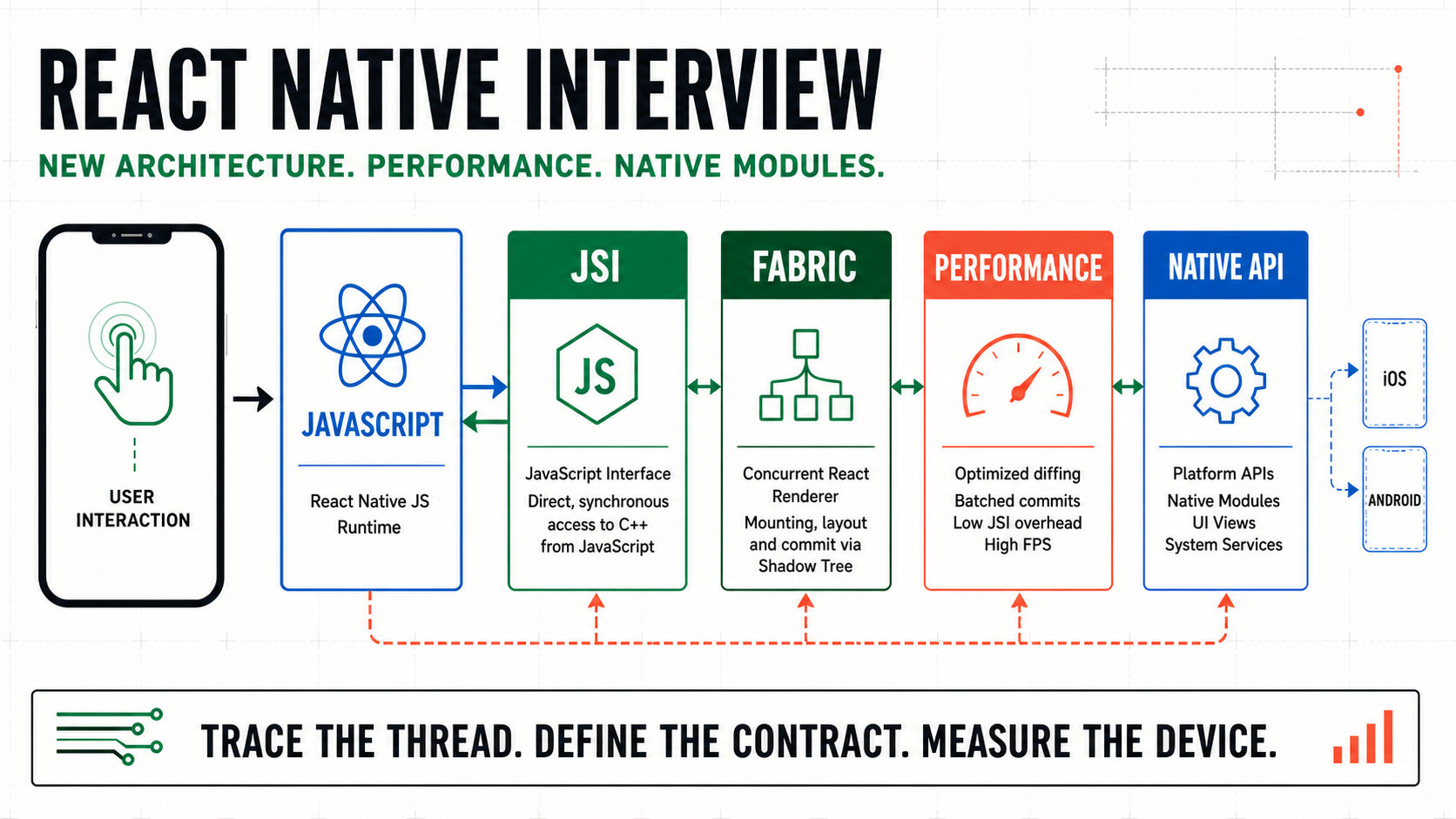
A senior React Native answer traces work from JavaScript through the typed native boundary to the frame a user sees.
Quick Verdict
In 2026, treating the New Architecture as an optional preview is outdated. React Native 0.82 made it the only runtime architecture, and React Native 0.87 removed the useTurboModules flag because TurboModules are always enabled.
The strongest answers do not promise that a new architecture automatically makes every screen fast. They identify the user-visible symptom, locate the expensive work, explain the JS-native contract, choose an appropriate fix, and prove the result on a release build.
| # | What a senior answer should demonstrate |
|---|---|
| 1 | Architecture: JSI, Fabric, TurboModules, Codegen, and scheduling as connected systems. |
| 2 | Diagnosis: distinguish JS-thread, UI-thread, native, network, and memory bottlenecks. |
| 3 | Boundaries: design small, typed, lifecycle-aware native APIs. |
| 4 | Production judgment: measure on devices, test critical flows, and roll out changes safely. |
New Architecture Interview Questions
1. What Changed in React Native's New Architecture?
The New Architecture rewrites how React Native schedules work, renders native views, and communicates between JavaScript and platform code. Its main pieces are JSI for the runtime interface, Fabric for rendering, TurboModules for native capabilities, and Codegen for typed contracts.
A current answer should mention version context. React Native 0.82 and later run only on the New Architecture, while 0.81 was the last release that could use the Legacy Architecture.
2. How Is JSI Different from the Old Bridge?
The old bridge queued asynchronous, serialized messages between JavaScript and native code. JSI is a C++ interface that lets the JavaScript runtime interact directly with native capabilities and objects, removing that serialization layer and permitting synchronous access when the API requires it.
That capability is not permission to make every call synchronous. A slow disk read, image operation, or database query still blocks whichever thread executes it. Senior candidates separate lower boundary overhead from the cost of the underlying work.
3. What Does Fabric Do?
Fabric is the New Architecture renderer. It uses an immutable C++ view tree, supports multiple in-progress trees, and lets React coordinate work at different priorities across threads. It also enables synchronous layout reads for cases that genuinely require them.
Fabric improves the rendering model, but it cannot rescue an app that repeatedly renders an expensive subtree or decodes oversized images. Explain both the architectural benefit and the application-level responsibility.
4. What Is a TurboModule?
A TurboModule exposes native functionality to JavaScript through a typed specification and generated platform interfaces. TurboModules are lazily loaded by default, so an unused module does not need to be initialized at startup.
Good examples include secure key access, Bluetooth, camera processing, or an existing native SDK. The module should expose a product capability, not leak every platform implementation detail into JavaScript.
5. What Does Codegen Generate?
Codegen reads a Flow or TypeScript specification and creates the platform interfaces and binding boilerplate used by Android and iOS implementations. The specification defines the methods and data types that may cross the native boundary.
Codegen catches contract mismatches earlier, but it does not design the contract for you. You still need deliberate nullability, error semantics, event shape, cancellation, and backward compatibility.
6. When Is a Synchronous Native Call Appropriate?
Use a synchronous call only when the value is immediately available, the work is bounded, and the caller truly needs it before continuing. Reading a tiny in-memory platform value can fit; networking, storage scans, image processing, and unpredictable SDK work should remain asynchronous.
In an interview, state which thread runs the work and what happens if it stalls. That turns a feature answer into an engineering answer.
React Native Performance Interview Questions
7. How Would You Diagnose a Janky Screen?
First reproduce the problem on a representative physical device in a release build. Record the exact interaction and determine whether the symptom is delayed input, dropped JS frames, slow native frames, blank list cells, long startup, or a network wait.
Then collect evidence with React Native DevTools, system traces, and the platform profilers. Change one suspected bottleneck, compare the same scenario, and keep the fix only when the trace and user-visible behavior improve.
8. What Is the Difference Between JS and UI Frame Rate?
React state updates and much application logic run on the JavaScript thread. If that thread is busy, presses, JS-driven animations, and new render work can be delayed. Native scrolling or a native-stack transition can remain smooth because it runs on the main UI thread.
This distinction changes the remedy. Memoizing a React subtree may help JS work; reducing overdraw or view creation addresses native rendering. Start with the thread that missed its frame budget.
9. How Would You Optimize a Large FlatList?
Keep row components light, use stable keys, avoid unnecessary row updates, and provide getItemLayout when item dimensions are fixed. Tune window and batch settings only against a measured device scenario.
A larger render batch can reduce blank areas but occupy the JS thread longer, hurting responsiveness. That trade-off is more valuable in an interview than reciting a list of props.
10. How Do You Reduce Unnecessary Re-Renders?
Localize state, keep props stable where it matters, split expensive subtrees, and avoid recreating large derived values on every render. Use memo, useMemo, or useCallback when profiling shows they remove meaningful work.
Memoization also has comparison and complexity costs. A strong answer explains the measured render path instead of proposing hooks as a blanket rule.
11. How Would You Improve App Startup?
Measure cold and warm startup separately, then divide time among native initialization, JavaScript loading, module evaluation, data hydration, and the first usable screen. Hermes compiles JavaScript to bytecode ahead of time, while TurboModules and lazy-loaded screens can defer work that is not required immediately.
React Native 0.84 made Hermes V1 the default. Even so, app-specific initialization, SDKs, synchronous storage, and large imports can dominate startup, so use traces rather than attributing every result to the engine.
12. How Do You Keep Animations Responsive?
Prefer transform and opacity changes, avoid expensive layout work on every frame, and keep interactive animation state close to the UI execution path. If an animation depends on the JS thread, explain how concurrent network responses or rendering could interrupt it.
Profile both frame rates and memory. Rasterization or hardware layers may reduce repeated drawing, but overuse can trade frame time for excessive memory.
13. How Would You Investigate a Memory Leak?
Reproduce a repeatable lifecycle, such as opening and closing a media screen, then compare JS and native heap growth. Look for retained listeners, timers, subscriptions, closures, native references, image buffers, and caches that do not release after the screen disappears.
Also test backgrounding and low-memory conditions. A React Native app has more than one memory domain, so a stable JavaScript heap does not rule out a native leak.
Native Module Interview Questions
14. When Should You Build a Custom Native Module?
Build one when the app needs a platform API or native SDK that React Native and maintained libraries do not expose, or when measured work belongs more naturally in platform code. First evaluate maintenance, upgrade compatibility, testing, and whether iOS and Android can share the same product-level contract.
Do not cross the native boundary merely because code is computationally inconvenient in JavaScript. Prove the requirement and keep the public surface small.
15. How Would You Design a TurboModule API?
Start from the caller's task. Define a narrow typed spec, choose asynchronous methods for unpredictable work, return stable error codes, and model permissions or unavailable hardware explicitly.
For long operations, include cancellation and progress semantics. Avoid exposing a stream of tiny calls when one cohesive native operation would reduce coordination and inconsistent partial state.
16. Native Module or Native Component?
Use a native module for capabilities without their own rendered view, such as storage, cryptography, sensors, or SDK services. Use a native component when the platform owns visual content and interaction, such as a map, camera preview, or specialized media view.
Some features need both. A camera component can render the preview while a module coordinates permissions or background processing, but their contracts and lifecycle ownership should remain explicit.
17. How Should a Native Module Handle Threads and Lifecycle?
Document which methods may run on which threads, move CPU or I/O work away from the main thread, and dispatch UI operations to the required platform thread. Cancel or detach work when the host, activity, view, or React instance is destroyed.
Guard callbacks and events against stale consumers. Many production crashes come from a correct feature running after its owner no longer exists.
18. Where Should Authentication Tokens Be Stored?
Do not put authentication tokens in Async Storage; the official React Native security guide describes it as unencrypted. Use the platform's protected facilities, such as iOS Keychain or Android Keystore-backed storage, through a carefully reviewed native wrapper.
Keep secrets out of logs, analytics payloads, persisted global state, and deep-link parameters. Storage is only one part of the threat model.
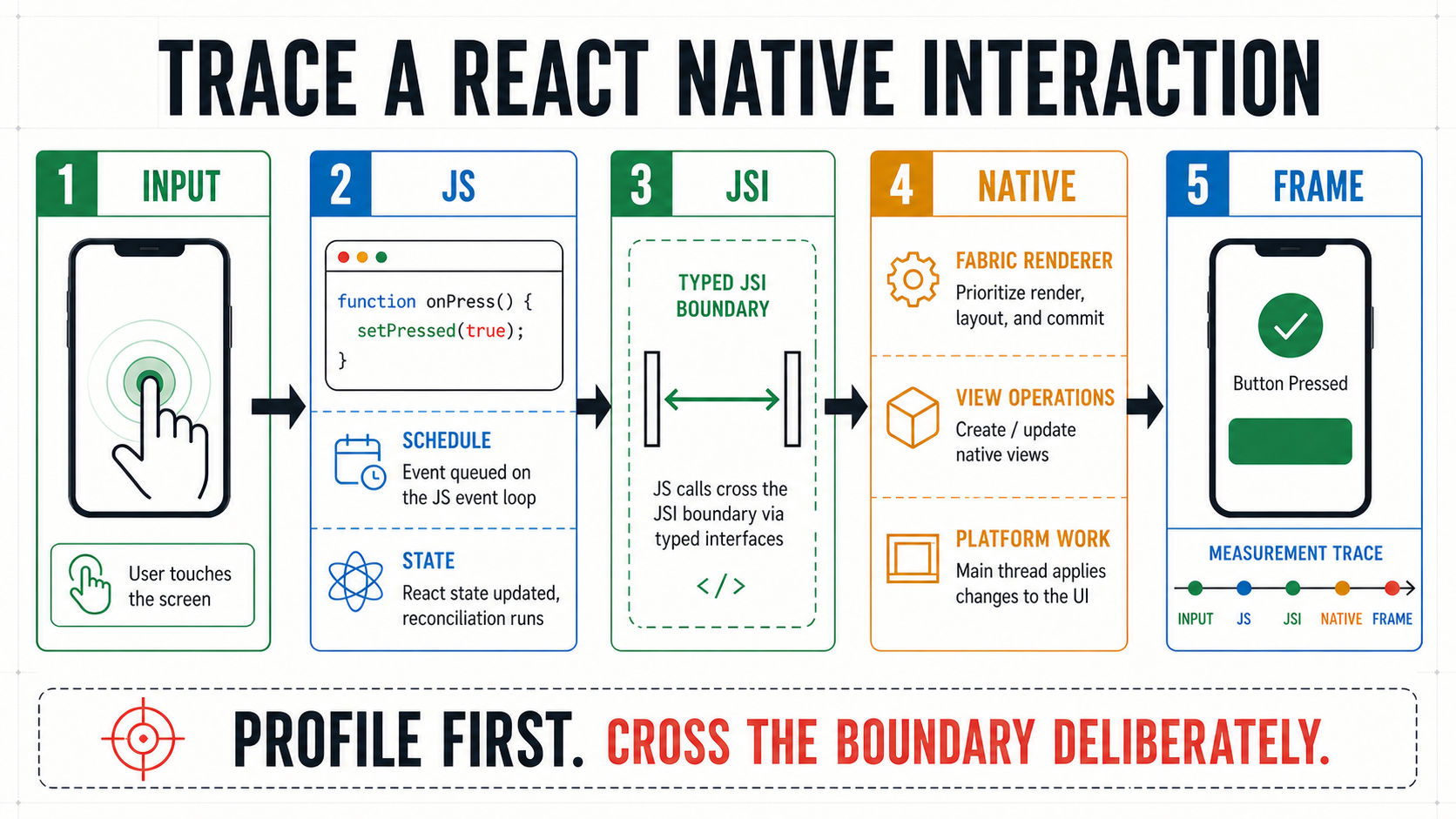
Trace one interaction from input to frame, identify the busy boundary, and validate the fix on a release build.
Production and System Design Questions
19. How Would You Design Offline Sync?
Define the local source of truth, queue writes with stable operation IDs, make retries idempotent, and choose a conflict policy for each data type. Connectivity changes should trigger controlled reconciliation, not blind replay.
Expose pending, failed, and conflicted states to the UI so users understand what is durable. PracHub's system design questions can help you practice the API, storage, consistency, and failure trade-offs behind this answer.
20. How Would You Migrate and Release a New Architecture Change?
Inventory native dependencies and custom modules, read each library's compatibility notes, establish crash and performance baselines, and upgrade in a controlled branch. Test startup, navigation, gestures, accessibility, background work, and the native features most likely to cross architecture boundaries.
Use unit and component tests for fast feedback, then run critical journeys on devices with E2E tests. Roll out gradually, watch crash-free sessions and performance traces, and preserve a rollback path for the application release.
Worked Scenario: An Offline Photo Upload Screen
Suppose users can capture several photos, edit captions, and submit them from poor connectivity. Start by defining the user contract: captured media must survive app restarts, progress must be visible, duplicate submissions must not create duplicate records, and users must be able to retry or cancel.
Keep metadata and upload state in a local database, store media in managed files rather than JavaScript memory, and queue idempotent upload operations. A native module may be justified for background transfer or platform media APIs, but its typed contract should expose jobs, progress, cancellation, and stable errors rather than transport internals.
To diagnose a stutter during capture, trace the interaction before changing code. Image decoding, list rerenders, file I/O, or an event flood can produce similar symptoms while requiring different fixes.
How Interviewers Evaluate Senior Answers
Interviewers listen for concrete boundaries: what runs where, who owns state, which failures are recoverable, and how the change is measured. They also expect platform awareness without two completely different product designs.
Senior signals include asking about target devices, React Native version, Expo or bare workflow, native dependencies, release constraints, and observability. Use PracHub's behavioral and leadership interview questions to prepare migration, incident, disagreement, and cross-platform ownership stories.
A Five-Step Answer Framework
First, name the symptom and constraint. Second, trace the interaction across JavaScript, the native boundary, platform APIs, and the UI frame. Third, identify the owner of state, lifecycle, and failure handling.
Fourth, choose the smallest justified change and explain its trade-offs. Fifth, prove it with release-build measurements, device coverage, tests, observability, and a rollout plan.
Frequently Asked Questions
Is the New Architecture Optional in React Native 2026?
Not on current React Native releases. Version 0.82 was the first release that ran only on the New Architecture, and 0.87 states that TurboModules are always enabled. Teams on older versions may still discuss migration, but current interview answers should not describe the architecture as an experimental toggle.
Does JSI Automatically Make Every React Native App Faster?
No. JSI removes constraints and overhead at the JavaScript-native boundary, but expensive renders, large images, slow I/O, poor list configuration, and main-thread work can still cause bad performance. A senior answer measures the actual bottleneck instead of claiming a universal speedup.
Should Every TurboModule Method Be Synchronous?
No. Synchronous access is useful for small, bounded values that must be returned immediately. Any operation with unpredictable latency should be asynchronous so it does not block a critical thread. The API's latency and lifecycle matter more than the fact that synchronous calls are technically possible.
Do Expo Developers Need to Understand Native Modules?
Yes, especially for senior roles. Expo can remove much setup and provides maintained native capabilities, but engineers still need to evaluate native dependencies, understand development builds, reason about permissions and lifecycle, and know when a custom module or config change affects the native application.
What Should I Practice for a Senior React Native Interview?
Practice explaining the New Architecture, diagnosing a real performance trace, designing a typed native API, handling offline and secure data, testing critical device flows, and planning a safe release. Pair each conceptual answer with one production example and one trade-off the interviewer can challenge.
Final Takeaway
The best React Native interview answers connect architecture to a visible product outcome. They do not stop at defining JSI, Fabric, or TurboModules; they explain where work runs, how the boundary is designed, what can fail, and how performance is verified.
Practice tracing one complete interaction at a time. That habit makes architecture questions, debugging questions, and mobile system design questions much easier to answer clearly.
Sources
This guide was researched against the official React Native 0.87 release notes, React Native 0.82 New Architecture announcement, New Architecture overview, Turbo Native Modules guide, performance overview, FlatList optimization guide, JavaScript loading guide, security guide, testing overview, and profiling guide.
Related Articles
Design System Interview Questions for Frontend Engineers: Tokens, APIs, Accessibility, and Governance
Practice design system interview questions on tokens, component APIs, accessibility, testing, versioning, adoption, and governance.
Frontend Testing Interview Questions: Unit, Integration, E2E, and Flaky Tests
Practice frontend testing interview questions on unit, integration, E2E, accessibility, mocks, CI, and diagnosing flaky tests.
Next.js Interview Questions for Senior Engineers: App Router, RSC, Caching, and Deployment
Practice senior Next.js interview questions on App Router, RSC, caching, Server Actions, streaming, security, and production deployment.
React Server Components Interview Questions: Boundaries, Streaming, Caching, and Trade-Offs
Practice React Server Components interview questions on boundaries, streaming, caching, security, and trade-offs with senior-level answers and examples.
Comments (0)