Apache Iceberg Interview Questions: Snapshots, Schema Evolution, and Concurrent Writes
Quick Overview
Prepare for Apache Iceberg interview questions with verified explanations of snapshots, field IDs, schema and partition evolution, and concurrent writes. Follow a pinned PyIceberg experiment that exposes stale commit failures and explains safe recovery boundaries.
Apache Iceberg interview questions become more interesting when the interviewer changes one condition: a column is renamed, a second writer commits first, or an old snapshot expires. Knowing that Iceberg supports schema evolution and concurrent writes is only the starting point. Explain which identity stays stable, what readers can see, and which assumption must hold before a commit succeeds.
This guide separates official software behavior from original experiments and preparation advice. The questions below are practice prompts, not candidate reports or a claim about any employer's interview loop. For related exercises, use PracHub's Data Engineer interview questions.
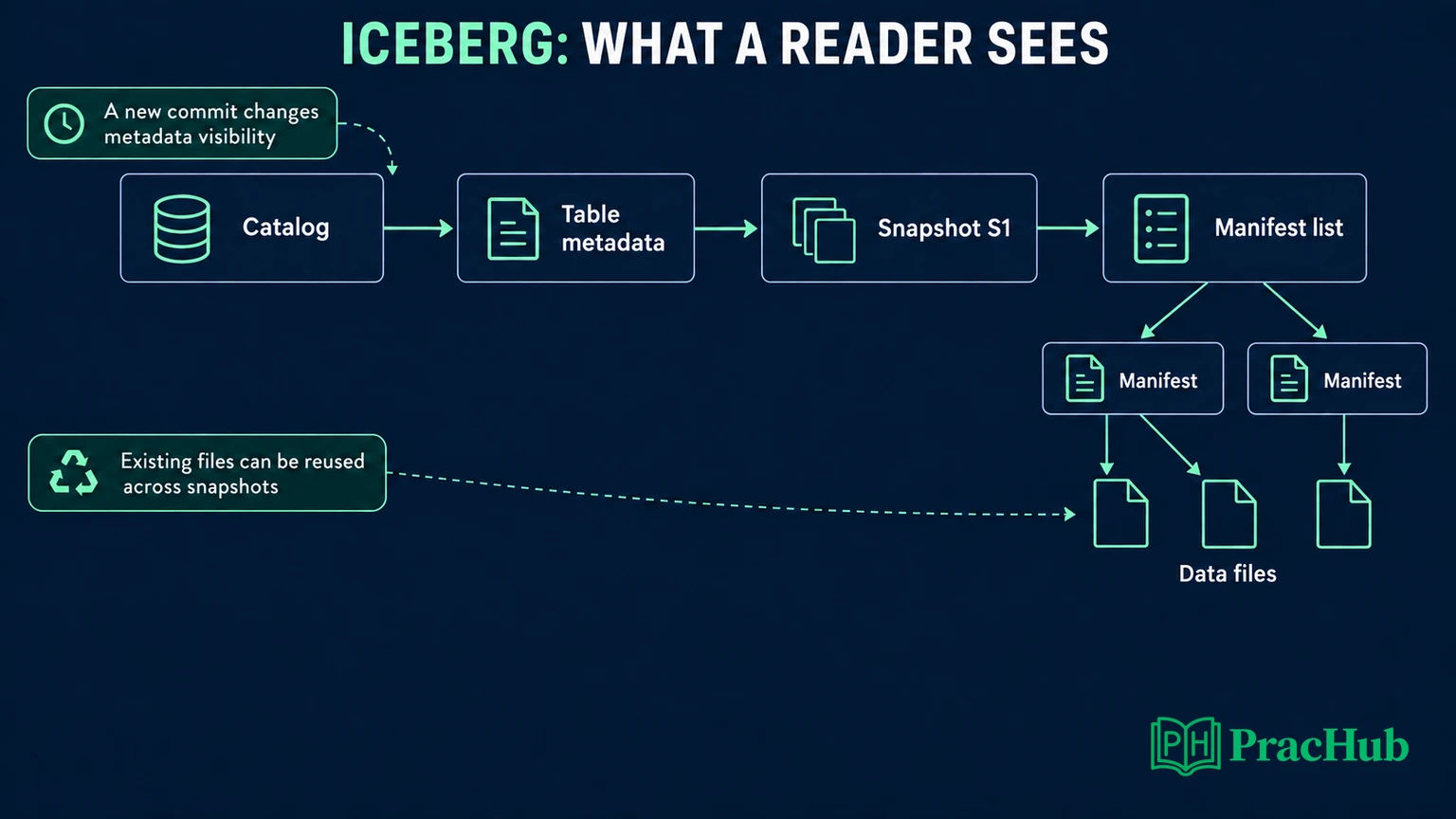
What Does an Iceberg Snapshot Actually Contain?
Official fact: Iceberg's table metadata tracks snapshots and the current snapshot reference. A snapshot references a manifest list; manifests describe data or delete files. This metadata structure identifies a table state without copying every data file whenever the table changes. Table format version and client implementation version are separate compatibility questions. Apache Iceberg specification
Try this interview prompt: “A table contains 1,000 files. I append one file. Does the next snapshot contain only that new file, or does Iceberg copy all 1,001?”
Your answer should reject both shortcuts. The new snapshot represents the complete visible table state through metadata. Existing files can remain part of that state without being physically copied. Explain the distinction between a snapshot's logical contents and the storage work needed to create it.
Then ask what the interviewer means by “latest.” A reader that selected an earlier snapshot should not silently change its result midway through the operation. A newly planned read may select a newer committed state. In an answer, name the selected snapshot instead of using “latest” as though it were a permanent identifier.
A useful follow-up is: “Does renaming a column necessarily create a new data snapshot?” Our experiment below changed the table metadata location while keeping the current snapshot ID unchanged. That observation makes the distinction concrete: a metadata commit and a new data snapshot are not interchangeable terms.
Pin the Environment Before Explaining the Result
Original experiment: We ran the examples with PyIceberg 0.10.0, PyArrow 20.0.0, SQLAlchemy 2.0.52, Iceberg table format v2, a SqlCatalog backed by SQLite, and local Parquet files. These are Python API experiments, not Spark SQL results.
The writer experiment prepares two transactions from the same state and commits them sequentially. It creates a controlled stale-writer interleaving; it is not a multiprocess stress test. Official limitation: PyIceberg documents SQLite as suitable for exploratory or development use, not as a production concurrency backend. PyIceberg catalog configuration
For an interview using Spark, Flink, or a managed catalog, identify the engine version, Iceberg integration, catalog, operation, and isolation settings before predicting exact retry behavior. Our preparation recommendation is to state those assumptions aloud. “Two appends” and “two overlapping overwrites” are different cases even when both involve two writers.
Why Is Rename Different From Drop and Add?
Official fact: Iceberg tracks fields with IDs rather than relying only on names or ordinal positions. Renaming a field preserves its identity; adding a field assigns a new identity. Reusing a deleted name therefore does not mean recovering the old field. Supported schema evolution can change metadata without rewriting existing files. Apache Iceberg evolution
Original experiment: Our starting table has optional id with field ID 1 and optional name with field ID 2. Its first row is (1, 'alpha'). We rename name to label, inspect the schema, and read the row again.
| Change in the experiment | Observed evidence |
|---|---|
Rename name to label | Field ID remains 2; the value reads as alpha. |
| Inspect storage after rename | Metadata location changes; snapshot ID and data-file paths remain unchanged. |
Drop label, then add optional string label | The new field receives ID 3. |
| Read the original row after that addition | The new label reads as null, not alpha. |
The last result is specific to this format-v2 example with a newly added optional field. Do not extend it into a claim that every schema addition across every format version and default configuration behaves identically.
An interview follow-up might ask: “Our application still sends the old column name. Is the rename harmless?” Storage correctness and application compatibility are separate. Ask which readers, writers, generated schemas, and downstream queries refer to that name. Stable field identity does not update application code for you.
Distinguish a rename from a type change, too. Before approving a proposed conversion, check whether the particular promotion is supported by the table format and writer. Do not summarize schema evolution as permission to convert any type into any other type.
Does Partition Evolution Rewrite Historical Data?
Official fact: After partition evolution, old data can retain its old layout while new writes use the new specification. Iceberg retains the relevant partition metadata and plans across those layouts. Changing the specification does not itself reorganize all historical files. Apache Iceberg partition evolution
Original experiment: We begin with an unpartitioned table, then add identity partitioning on id. Immediately after the specification change, the original snapshot and data-file path are unchanged. After appending a second row, the planned files include partition spec IDs 0 and 1. Both rows remain readable.
Identity partitioning on a tiny integer ID is a teaching fixture, not a recommendation for a high-cardinality production key. The point is to make two layouts easy to inspect.
Consider this practice prompt: “We switched from daily to hourly partitioning. Why are historical queries still scanning large daily files?” Explain that the new specification governs subsequent writes; the historical layout did not automatically become hourly. If old files need a different layout, that requires a separate rewrite operation supported by the chosen engine.
Before recommending a rewrite, ask which queries are slow, how much history they scan, and whether pruning or file sizing is the actual problem. Our preparation advice is to compare evidence before and after: planned files, bytes scanned, task distribution, and representative query latency. A partition change is a hypothesis about access patterns, not proof of a performance improvement.
What Happens When Two Writers Start From the Same Snapshot?
Official fact: Iceberg uses optimistic concurrency: writers prepare changes and attempt an atomic metadata commit. A competing commit may require refreshing metadata and validating assumptions before retrying. The validity of those assumptions matters; a retry is not permission to ignore a conflicting change. Apache Iceberg reliability
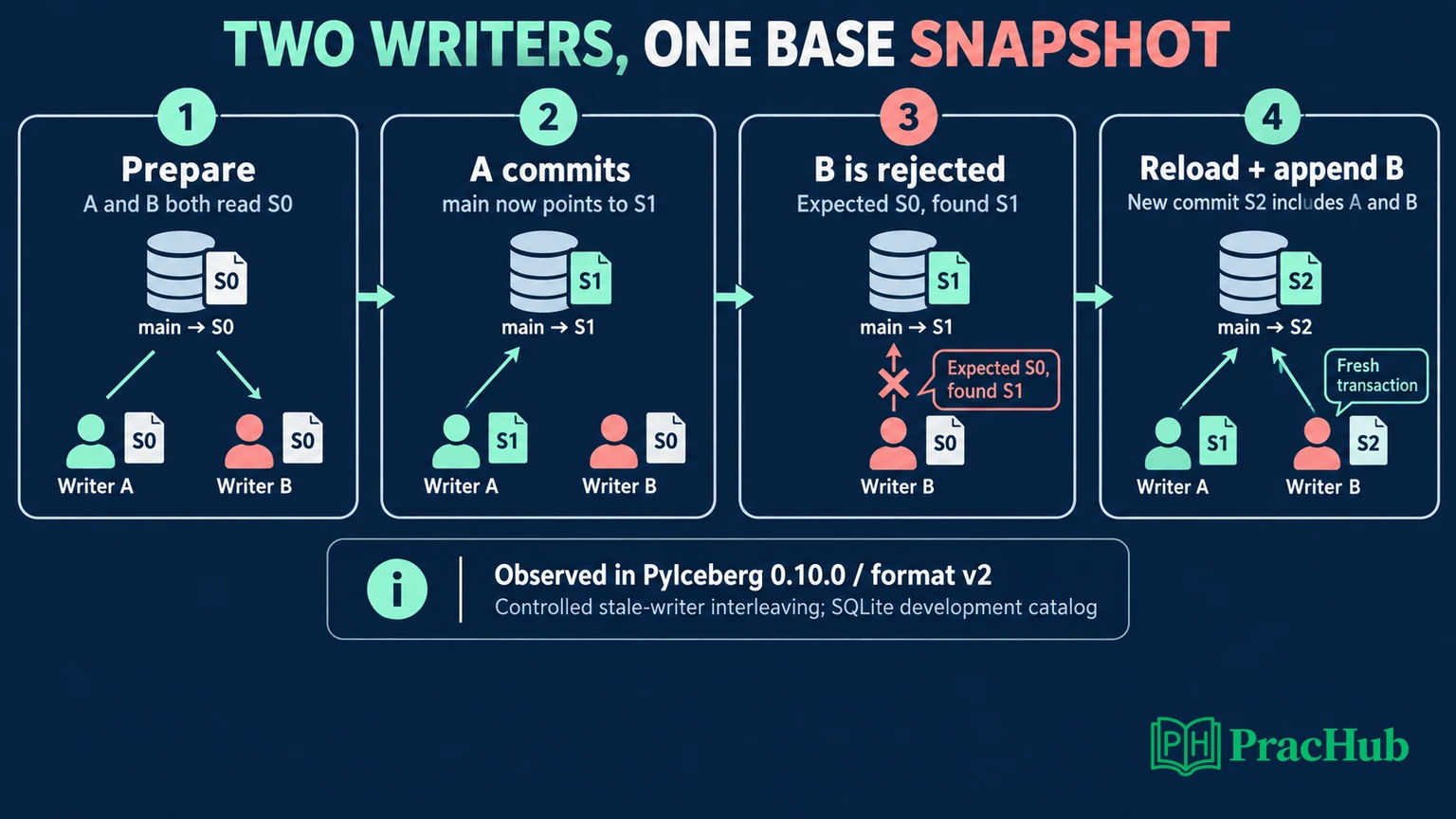
Original experiment: A separate table begins with row ID 0 at snapshot S0. Writer A prepares an append of ID 1; writer B prepares an append of ID 2. Both transactions are created before either commits.
- A commits successfully, producing S1.
- B attempts its prepared commit and raises
CommitFailedExceptionbecausemainno longer matches its expected snapshot. - A fresh table load returns IDs
[0, 1]; B's row is not visible. - We append B's row through a fresh transaction, producing S2 with IDs
[0, 1, 2]. - A scan explicitly pinned to S0 still returns only
[0].
The following excerpt captures the transaction order. It assumes the pinned environment above, an existing demo.writers table in catalog, and compatible one-row Arrow tables batch_a and batch_b. It is not standalone setup code.
from pyiceberg.exceptions import CommitFailedException

a = catalog.load_table("demo.writers").transaction()
b = catalog.load_table("demo.writers").transaction()
a.append(batch_a)
b.append(batch_b)
a.commit_transaction()

try:
    b.commit_transaction()
except CommitFailedException:
    fresh = catalog.load_table("demo.writers")
    fresh.append(batch_b)
This observed failure is narrower than “Iceberg cannot support concurrent appends.” It demonstrates the stale snapshot requirement in this PyIceberg API path. Other engines or operations may refresh and retry internally. Our fresh append is explicit application recovery, not evidence of automatic rebasing.
Before copying the recovery pattern into a service, add one more distinction: a definite rejected commit differs from an uncertain response after a possible successful commit. Blindly resubmitting a batch after an unknown outcome could duplicate logical events. The fixture deliberately tests a known requirement failure, not network ambiguity or end-to-end exactly-once delivery.
When Is Retrying the Wrong Answer?
Official example: Iceberg's reliability documentation describes a compaction operation that replaces two input files. Retrying is safe only while the necessary input files still exist in the relevant table state. If a competing operation removes one of those inputs, the original assumptions no longer hold. Apache Iceberg concurrent writes
Preparation inference: When asked about a conflict, explain the operation before proposing a retry budget. Identify its input snapshot, files or predicate, intended output, and validation condition. Then distinguish retrying a still-valid metadata update from recomputing work against a changed table.
For example, suppose A compacts files F1 and F2 while B rewrites F2 to remove invalid records. A must not publish its old merged output merely because another commit attempt is available. That could reintroduce records B removed. This is an original reasoning scenario, not a claim that our local fixture executed concurrent deletes.
Name what recovery must refresh and revalidate. It also states the business invariant: no accepted event is lost, no rejected event is resurrected, and a retried batch does not create duplicate business records. An atomic table commit alone does not establish every one of those application guarantees.
Can You Delete Old Files Once a New Snapshot Exists?
Official fact: Snapshot expiration removes historical snapshots from time-travel availability. Files can remain necessary because retained snapshots still reference them. Orphan-file cleanup is a separate maintenance concern; deleting files too aggressively can interfere with in-progress writes. Apache Iceberg maintenance
Use the writer experiment to reason about retention: S2 is current, but S0 is still a valid historical read in our test. “Not newly written” does not mean “unused.” Nor does a file left by a rejected transaction automatically become safe to delete immediately.
Our preparation recommendation is to ask about required rollback history, long-running jobs, snapshot references, and the cleanup tool's safety interval. Explain how you would establish that a file is unreferenced before discussing storage savings. The local experiment did not run expiration or orphan deletion, so its passing assertions establish read behavior, not a production cleanup policy.
Practice These Follow-Ups on PracHub
These verified questions exercise adjacent reasoning. They are not labeled as Iceberg-specific candidate reports; the adaptations below are original preparation suggestions.
| PracHub question | Iceberg follow-up to practice |
|---|---|
| Design a schema for server engagement | Explain a rename's effect on field identity and downstream queries. |
| Design Sensor Data Processing With AI-Assisted Implementation | Separate an atomic append from deduplicating sensor events. |
| Reason About Concurrency, CAP Trade-Offs, and Kubernetes Scaling | Identify the shared metadata state and a failed commit assumption. |
| Data Pipeline Reliability, Backfills, and Spark Optimization | Explain how backfills interact with historical partition layouts. |
| Diagnose data quality and pipeline performance issues | Choose evidence that separates incorrect data from inefficient scans. |
The sensor and concurrency questions are Software Engineer and Software Engineer II exercises. Use their system reasoning alongside the Data Engineer question collection. Finish each practice answer by naming the state that changed, the invariant you preserved, and the observation that would prove you wrong.
Comments (0)