Azure Data Factory Interview Questions: Integration Runtimes, Retries, and Pipeline Recovery
Quick Overview
Diagnose an original partial-load case, compare ADF error-handling branches, and explain why a green pipeline is not proof of complete data.
Azure Data Factory interview questions often start with an integration runtime choice and end with a recovery decision. Suppose Copy writes two rows, loses its connection, and fails. The logging activity succeeds, so the pipeline turns green. Would you advance the watermark, rerun everything, or inspect the destination first?
The strongest answer follows the evidence from runtime to activity to committed data. This guide uses official Microsoft documentation for ADF behavior and original practice scenarios for the data and decisions. Expected ADF branch states are documentation-derived, not captured Azure runs. Local SQL checks validate the example's counts and totals; they do not test a live ADF service.
This is about Azure Data Factory, not a fixed employer interview process. Microsoft's documentation now also points readers toward Data Factory in Fabric; confirm which product your interviewer means before transferring a feature or configuration rule. Start with Diagnose data quality and pipeline performance issues, then work through the concrete incident below.
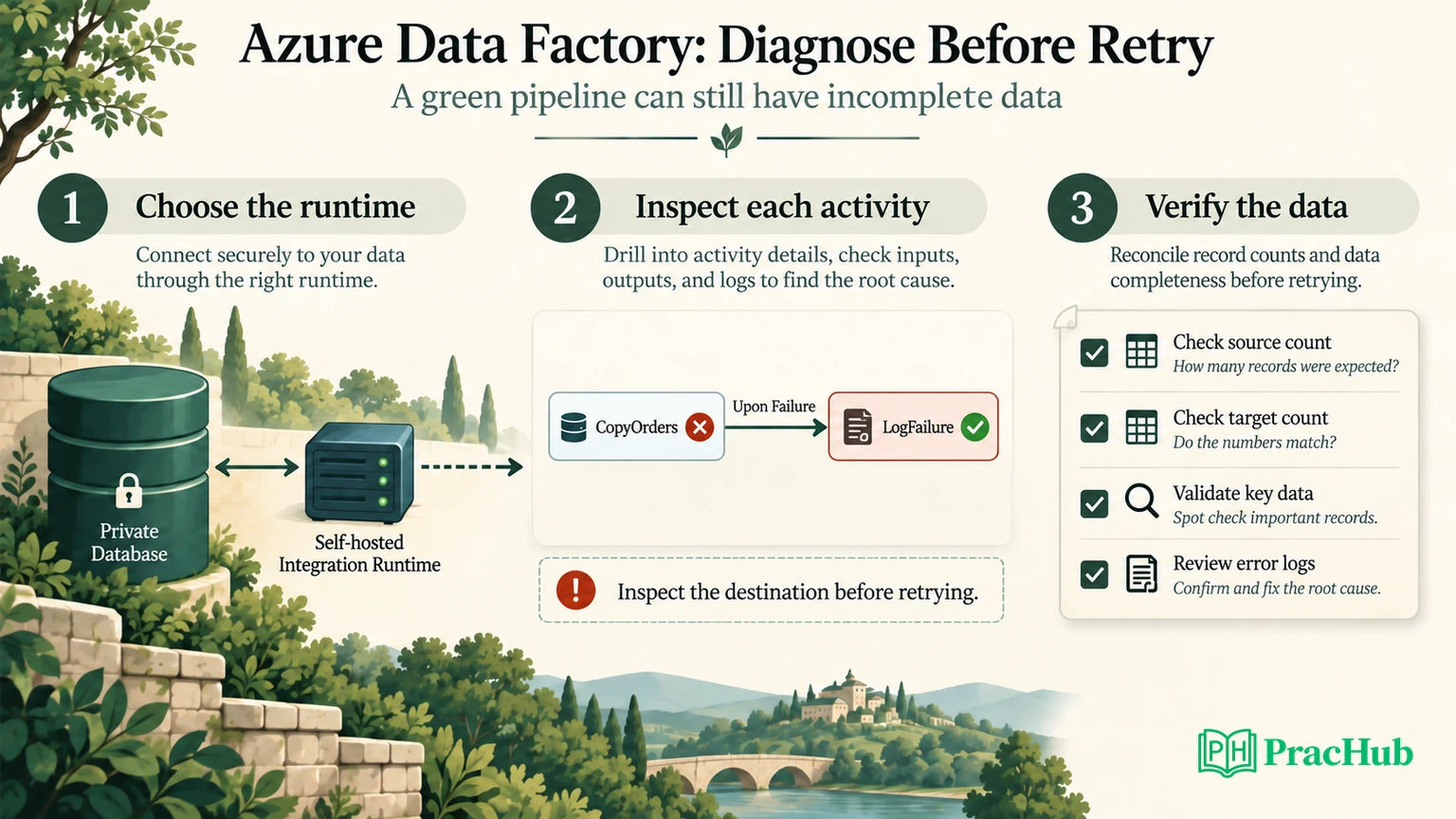
Choose the runtime from the execution requirement
Official facts: ADF offers Azure, self-hosted, and Azure-SSIS integration runtimes. Their capabilities differ: Azure IR supports managed data flows, movement, and dispatch; self-hosted IR supports movement and dispatch; Azure-SSIS runs SSIS packages. Dispatching a notebook is not the same as executing its Spark transformations inside the IR. Integration runtime documentation.
Use these original interview prompts to make the choice conditional rather than automatic.
| Scenario | Starting choice | What to verify next |
|---|---|---|
| Copy between supported cloud stores | Azure IR | Connector, authentication, region, endpoint access |
| Reach a database inside a private network | Self-hosted IR, or a supported managed private endpoint design | Actual network path and connector support |
| Run existing SSIS packages | Azure-SSIS IR | Package dependencies and catalog/network setup |
| Execute an ADF mapping data flow | Azure IR | Managed compute settings and source/sink access |
Do not answer “on-premises means install an agent” and stop. Draw the path from the chosen runtime to both endpoints. The server may reach the source but lack a route, certificate, driver, or permission for the destination. A successful connection test for one linked service does not establish end-to-end movement.
Official operational detail: self-hosted IR is installed on supported Windows infrastructure, and multiple nodes can support availability and scale. Treat node health and outbound connectivity as evidence in a failure investigation. Self-hosted IR setup.
An effective answer would be: “I need private SQL Server access and a supported Azure SQL sink. I will verify the selected runtime can reach both, then inspect the effective runtime recorded by the failed activity.” It is specific enough to test without inventing a complete production network.
Read the activity policy before changing retries
Official fact: activity policies define timeout, retry count, and retry interval. The default retry count is zero. Dependencies use Succeeded, Failed, Skipped, and Completed; completion does not mean successful business output. Pipelines and activities.
This is an original policy fragment for a Copy activity, not a complete deployable pipeline:
{
  "policy": {
    "timeout": "00:30:00",
    "retry": 2,
    "retryIntervalInSeconds": 60
  }
}
Explain it as an initial attempt with up to two retries, separated by the configured delay. It does not configure two total attempts, roll back a destination table, or establish exactly-once writes.
Before increasing the count, classify the failure. A transient connection interruption might justify a bounded retry after checking replay safety. A missing column or denied permission needs a repair. A throttled sink may need less concurrency rather than a larger wave of retrying activities.
Use a second question to expose the data risk: “Does another attempt append the same records, replace a bounded partition, or upsert by a stable key?” Until that is answered, a retry configuration is an availability setting without a correctness argument.
Why can a failed Copy produce a successful pipeline?
Official behavior: Microsoft's error-handling examples distinguish three graph shapes. When the business activity fails and the error handler succeeds, a failure-only catch can yield pipeline success; a success/failure branch pair yields failure; adding the documented skipped-success-path handler can yield success. Conditional execution.
Here is the same original CopyOrders activity in each shape. Assume LogFailure and any eligible dummy handler succeed.
| Shape | Outgoing paths | Expected pipeline after Copy fails |
|---|---|---|
| Catch only | Copy failure → LogFailure | Succeeded |
| Success and failure | Copy success → CheckBatch; failure → LogFailure | Failed |
| Success with skip handler | Same pair, plus CheckBatch skipped → HandleSkip | Succeeded |
These outcomes belong to these specific graph shapes. Adding more dependencies can change the result. Trace each final activity and skipped branch rather than applying the table to an arbitrary graph.
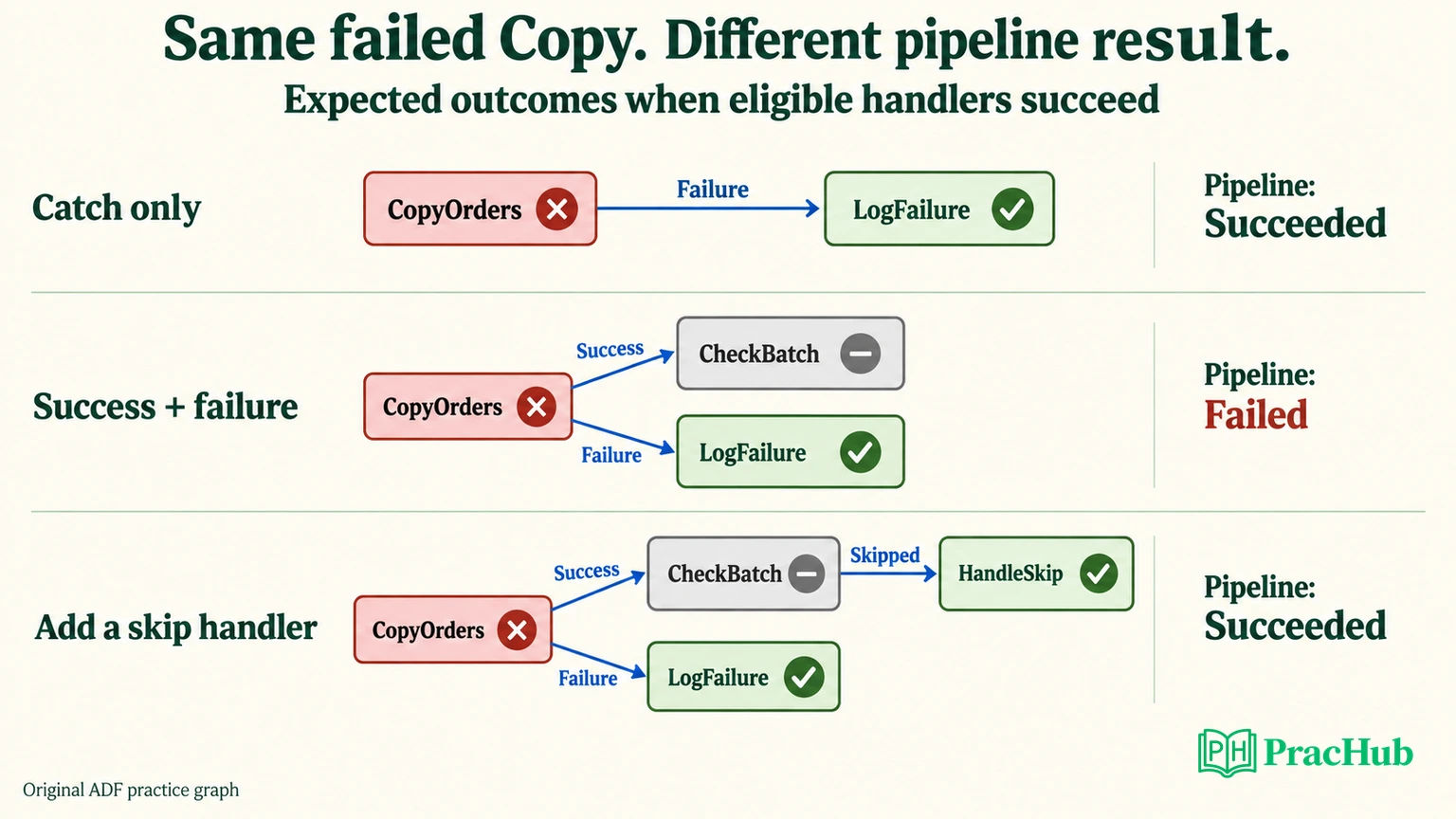
In this example, CheckBatch means our business validation step. It is not a claim that the built-in ADF Validation activity compares order totals. That built-in activity waits for a dataset to satisfy availability criteria such as existence, minimum size, or child items. Validation activity.
If incomplete orders must fail the run, make that business decision explicit. Official capability: a Fail activity can terminate execution with a supplied error code and message. Fail activity. For example, use ORDER_BATCH_INCOMPLETE and a message identifying the batch and failed check. Verify the complete graph so logging success does not conceal the intended failure.
Diagnose an original partial-load incident
The source batch contains four immutable order records. The extraction boundary is order_id > 100 AND order_id <= 104. This identifier boundary is an exercise assumption, not a recommendation to use IDs when production updates require a change timestamp or CDC mechanism.
| Order ID | Amount |
|---|---|
| 101 | 100 |
| 102 | 50 |
| 103 | 75 |
| 104 | 175 |
Expected controls are four rows, four distinct IDs, and total amount 400. The selected sink mode is append into a staging table with no uniqueness constraint. For the exercise, the first attempt commits orders 101 and 102 before its connection fails. This partial commit is a stated scenario, not a claim about every connector transaction boundary.
The fictional incident record reads:
| Evidence | Observation |
|---|---|
| CopyOrders activity | Failed after connection interruption |
| Destination query | Two rows: 101 and 102; amount 150 |
| LogFailure activity | Succeeded |
| Graph shape | Failure-only catch |
| Pipeline status | Succeeded |
| Saved watermark | Still 100 |
A weak answer trusts the green pipeline and moves the watermark to 104. That skips the missing records on the next incremental extraction. Another weak answer blindly appends the entire four-row batch again. Under our assumptions, the destination becomes six rows totaling 550, with duplicate IDs 101 and 102.
Neither conclusion requires guessing ADF internals. The destination query and immutable batch contract give you the evidence. If the actual sink instead rolled back the whole attempt, the destination would be empty and your recovery choice would change.
Choose a recovery that has a verifiable boundary
Official connector detail: Azure SQL Database Copy sinks support insert and upsert behavior, with configuration for keys and related write options. Inspect the actual connector and sink properties; do not transfer Azure SQL behavior to every storage destination. Azure SQL connector.
For this exercise, choose a batch-specific staging area. Preserve the failed run evidence, discard only this batch's incomplete staging rows, and reload the same fixed source boundary. Validate it before promoting data. A production implementation should prevent concurrent attempts from publishing the same batch and make promotion plus progress recording recoverable.
The recovery contract is concrete: no changes to unrelated batches; exactly one row for each expected order; matching amounts; watermark advances only after the validated publish succeeds. If publishing succeeds but recording the watermark fails, the next attempt must recognize the already-published batch rather than duplicate it.
Use these SQL checks against the reloaded staging data. batch_id represents a stable logical batch, not a fresh random identity on every retry.
SELECT COUNT(*) AS row_count,
       COUNT(DISTINCT order_id) AS distinct_orders,
       SUM(amount) AS total_amount
FROM stage_orders
WHERE batch_id = 'orders_101_104';

SELECT order_id, COUNT(*) AS copies
FROM stage_orders
WHERE batch_id = 'orders_101_104'
GROUP BY order_id
HAVING COUNT(*) <> 1;
Expected results after recovery are 4, 4, 400 and no duplicate rows. Also compare the actual expected IDs and amounts; matching aggregate totals alone cannot prove the right records arrived. Four wrong records can still satisfy a count check, and offsetting value errors can preserve a total.
Verification boundary: a local SQLite fixture reproduced the partial 2 / 2 / 150, blind replay 6 / 4 / 550, and clean reload 4 / 4 / 400 results. That validates the example's arithmetic and checks, not Azure runtime or connector execution.
Distinguish rerun from resumable copy
Official limitation: Copy's resume behavior applies to supported binary file-copy scenarios that preserve hierarchy. Resume is at file granularity; the failed file is recopied. For other scenarios, rerunning starts from the beginning. Copy activity overview.
Our relational order-row example therefore must not borrow a binary-file resume promise. “Rerun from failed activity” describes orchestration scope; it does not automatically mean “continue after the last committed row.” The sink's replay behavior still needs to be established.
Similarly, rerunning only Copy may reuse assumptions established upstream. Check whether the original boundary, parameters, and staged inputs are still available and whether they describe the same logical batch. If an upstream step selects a new high watermark, replaying from that step may create a different extraction interval.
Microsoft's incremental-copy guidance describes watermark-based approaches. For this exercise, retain the old and proposed new boundaries with the logical batch record, so a retry does not silently widen the input. Incremental copy overview.
Give an evidence-led troubleshooting answer
Official monitoring facts: Copy output can expose rows read/copied/skipped, effective integration runtime, duration, and execution details where applicable. Not every metric appears in every scenario. Copy monitoring.
A concise interview response for the original incident could be:
“I would preserve the failed activity details and query the destination before retrying. The catch-only graph explains the green pipeline, but two committed rows do not satisfy a four-order batch. I would keep watermark 100, repair the connection issue, reload the isolated batch safely, verify IDs and amounts, then publish and record progress.”
If asked why you did not resize the IR, connect the answer to evidence: the incident establishes an interruption and partial output, not a throughput bottleneck. If asked about ignored rows, inspect the fault-tolerance configuration and rejected records rather than declaring every copied row valid.
For operational follow-up, record the original and recovery run IDs, activity error, selected runtime, extraction interval, destination checks, and decision. Keep sensitive input values out of interview notes. This record lets another engineer distinguish a repaired load from an alert that merely stopped firing.
Practice five related PracHub questions
These are pipeline and quality exercises, not a claimed ADF employer question bank. Use each to defend one part of the recovery decision.
| PracHub question | Practice focus |
|---|---|
| Diagnose data quality and pipeline performance issues | Separate incomplete data from slow execution. |
| Design Transaction Data Quality Checks | Validate identities, counts, and values. |
| Data Pipeline Reliability, Backfills, and Spark Optimization | Explain bounded replay and recovery. |
| Design Data Quality and Observability Pipeline | Make business failure visible. |
| Defend a Data Pipeline Architecture and Its Trade-offs | Connect runtime choices to constraints. |
Return to the quality and performance diagnosis exercise and change one assumption: the destination enforces uniqueness. Explain why duplicate appends may now fail, and why that alone still does not complete the missing batch.
Sources and Further Reading
- Microsoft: Integration runtimes
- Microsoft: Self-hosted IR setup
- Microsoft: Pipelines and activities
- Microsoft: Conditional execution and error handling
- Microsoft: Validation activity
- Microsoft: Fail activity
- Microsoft: Azure SQL connector
- Microsoft: Copy activity
- Microsoft: Incremental copy
- Microsoft: Copy monitoring
Comments (0)