BigQuery SQL Interview Questions: UNNEST, Arrays, and Nested Data
Quick Overview
Practice BigQuery SQL interview questions with an original nested-order dataset. Predict UNNEST row counts, preserve empty parents, distinguish unknown arrays, diagnose revenue inflation from independent arrays, and reconstruct ordered results. Includes GoogleSQL reference-executed queries, exact outputs, and adjacent PracHub SQL exercises.
Two arrays sit inside the same order record: line items and marketing tags. You expand both, sum the line amounts, and get a plausible answer. It is also twice the correct amount for one order—and another order has disappeared entirely.
BigQuery SQL interview preparation should make that kind of error visible before you run the query. The central skill is tracking the grain: what one row represents before expansion, after expansion, and after aggregation. This guide uses an original nested-order dataset to work through UNNEST, empty arrays, independent arrays, and ordered reconstruction. For adjacent relational practice, start with PracHub’s SQL interview questions.
Evidence boundary: Google’s documentation establishes the language behavior discussed below. A public candidate discussion describes an upcoming BigQuery-dialect interview; UNNEST appears as a commenter’s preparation suggestion, not a verified employer requirement. Our exercises are editorial practice tasks, not reported interview questions. Candidate preparation discussion.
Verification scope: The queries were executed with Google’s official GoogleSQL reference implementation, release 2026.9.1. They were not executed in the BigQuery cloud service. The reference implementation is intended for language exploration and testing; these results establish neither BigQuery performance nor a cloud deployment test. GoogleSQL execution tool.
Define the parent and child grain before writing SQL
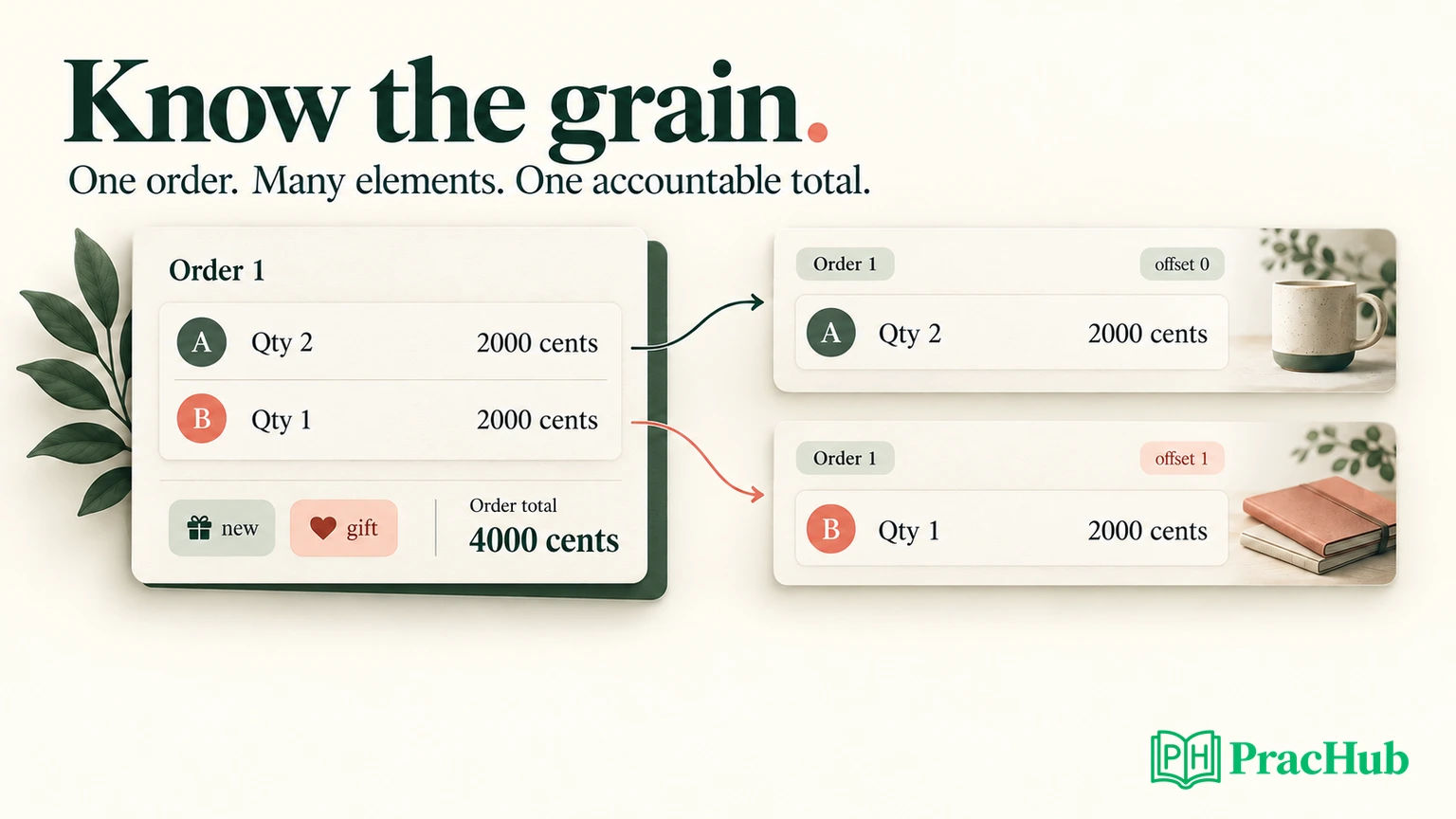
In this exercise, one source row represents one order. items is an array of structs; each struct keeps a SKU, quantity, and unit price together. tags is a separate array of order-level labels. There is no positional relationship between a tag and an item.
Official language behavior: GoogleSQL arrays contain ordered elements of one type, and those elements can be structs. UNNEST exposes array elements as rows. Capture WITH OFFSET when you need each element’s original position; do not assume the resulting rows retain array order without an explicit sort. Google’s array guide.
Use the following CTE before each query that refers to orders. It supplies all data inline, so the examples do not require customer data or a persistent table. Amounts are integer cents. Order 1 deliberately has two different lines worth the same amount; that will expose an incorrect DISTINCT repair later.
WITH orders AS (
  SELECT 1 AS order_id,
    [STRUCT('A' AS sku, 2 AS qty, 1000 AS unit_cents),
     STRUCT('B' AS sku, 1 AS qty, 2000 AS unit_cents)] AS items,
    ['new', 'gift'] AS tags
  UNION ALL
  SELECT 2, ARRAY<STRUCT<sku STRING, qty INT64, unit_cents INT64>>[], ['new']
  UNION ALL
  SELECT 3, [STRUCT('C', 3, 700)], ARRAY<STRING>[]
  UNION ALL
  SELECT 4, CAST(NULL AS ARRAY<STRUCT<sku STRING, qty INT64, unit_cents INT64>>), ARRAY<STRING>[]
)
Order 2 has a known empty item array. Order 4 has a NULL array expression, representing unknown item data in this exercise. That distinction is a data contract we chose, not a universal meaning of NULL.
BigQuery-specific boundary: Inside a query, a null array and an empty array are distinct. BigQuery converts null arrays to empty arrays in query results and when writing them to a table. Capture an explicit missing-data flag if the distinction matters downstream; do not expect a stored repeated field to preserve it automatically. Array data type and null handling.
Before continuing, predict three numbers: four parent orders, three actual line items, and 6,100 cents across the known lines. That total covers the known lines. Order 4 still has unknown revenue.
What does a correlated UNNEST return?
Flatten only the item array first. Keep the parent ID and original offset so the output remains explainable.
SELECT o.order_id, pos, item.sku, item.qty * item.unit_cents AS line_cents
FROM orders AS o CROSS JOIN UNNEST(o.items) AS item WITH OFFSET AS pos
ORDER BY o.order_id, pos;
The result has three rows:
| order_id | pos | sku | line_cents |
|---|---|---|---|
| 1 | 0 | A | 2000 |
| 1 | 1 | B | 2000 |
| 3 | 0 | C | 2100 |
Orders 2 and 4 contribute no elements and disappear from this cross join. If the question asks for all orders, this query has already lost required records before aggregation begins.
A useful interview explanation is: “The output grain is one item occurrence within one order. I retained the order ID for grouping and the offset for sequence. I have not yet preserved orders without elements.” That answer is more precise than saying that UNNEST simply “flattens JSON.” These fields are typed arrays and structs, not necessarily JSON values.
How do you preserve empty orders and count actual items?
Use a correlated left join when the parent must survive even if its array produces no matching rows. BigQuery’s query syntax documents the null-filled right side produced by this join. Correlated left joins and UNNEST.
SELECT o.order_id, COUNT(*) AS joined_rows, COUNT(pos) AS item_count,
  o.items_unknown,
  CASE WHEN o.items_unknown THEN NULL ELSE COALESCE(SUM(item.qty * item.unit_cents), 0) END AS total_cents
FROM (SELECT *, items IS NULL AS items_unknown FROM orders) AS o
LEFT JOIN UNNEST(o.items) AS item WITH OFFSET AS pos ON TRUE
GROUP BY o.order_id, o.items_unknown
ORDER BY o.order_id;
The derived table calculates items_unknown before grouping. The aggregate can then retain that flag without grouping the original array.
| order_id | joined_rows | item_count | items_unknown | total_cents |
|---|---|---|---|---|
| 1 | 2 | 2 | false | 4000 |
| 2 | 1 | 0 | false | 0 |
| 3 | 1 | 1 | false | 2100 |
| 4 | 1 | 0 | true | NULL |
There are five joined rows before grouping, but only three actual items. COUNT(*) includes the synthetic row that preserves an empty parent. COUNT(pos) counts actual element positions instead. Counting item.sku would additionally assume that every real item has a non-null SKU.
The zero for order 2 is intentional: its known item list is empty. The null total for order 4 is also intentional: its item data is unknown. A blanket COALESCE would erase that distinction and make an incomplete result look complete.
Now change the question to “keep every order, but show only items with quantity at least two.” Put the condition in the join:
SELECT o.order_id, item.sku FROM orders AS o
LEFT JOIN UNNEST(o.items) AS item ON item.qty >= 2
ORDER BY o.order_id, item.sku;
This returns four rows: (1, A), (2, NULL), (3, C), and (4, NULL). Moving the predicate to WHERE item.qty >= 2 after ON TRUE leaves only (1, A) and (3, C). Explain whether the requirement concerns qualifying children or qualifying parents before choosing either version.
Why do two independent UNNEST operations inflate revenue?
Consider this deliberately incorrect query:
SELECT o.order_id, COUNT(*) AS joined_rows,
  SUM(item.qty * item.unit_cents) AS wrong_cents
FROM orders AS o CROSS JOIN UNNEST(o.items) AS item
CROSS JOIN UNNEST(o.tags) AS tag
GROUP BY o.order_id ORDER BY o.order_id;
For order 1, two items combine with two tags to produce four item-tag pairs. Each line amount appears twice. The result reports wrong_cents = 8000, although the order contains only 4,000 cents of merchandise.
Order 3 has an item but no tags, so it disappears. This is not just a double-counting problem: the same query can overstate one group and omit another. An overall total may obscure both errors.
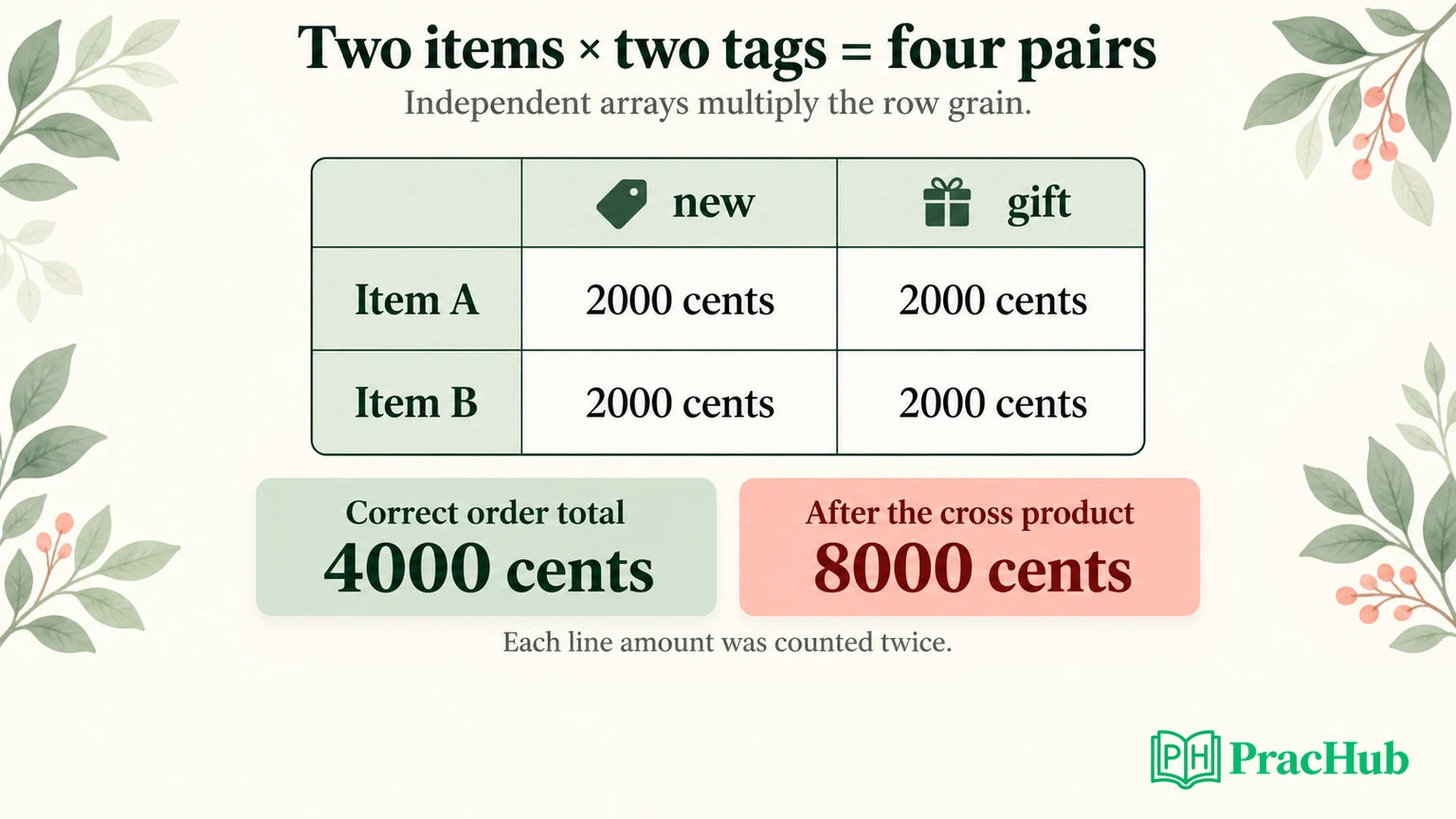
SUM(DISTINCT item.qty * item.unit_cents) is not a repair. Both legitimate lines in order 1 are worth 2,000 cents. Deduplicating their values would reduce the order to 2,000 rather than recover 4,000. Distinct amounts are not distinct business records.
If the requested output is one row per order, compute the independent item measure without expanding tags into the outer result:
SELECT o.order_id, o.items IS NULL AS items_unknown,
  CASE WHEN o.items IS NULL THEN NULL ELSE COALESCE(
    (SELECT SUM(item.qty * item.unit_cents) FROM UNNEST(o.items) AS item), 0)
  END AS total_cents,
  ARRAY_LENGTH(o.tags) AS tag_count
FROM orders AS o ORDER BY o.order_id;
This produces four rows. Totals are 4000, 0, 2100, and NULL; tag counts are 2, 1, 0, and 0. The unknown flag stays attached to order 4.
Editorial design guidance: If the requested output instead needs every item-tag combination, the cross product may be correct. The mistake is summing an item measure at that expanded grain without an allocation rule. Ask whether a tag-level report should credit the full order to each tag, divide value among tags, or use another business definition. SQL syntax cannot decide that policy.
How do you rebuild an array in a defined order?
Suppose the interviewer wants every order with a nested list of items whose quantity is at least two, preserving their original positions.
SELECT o.order_id,
  ARRAY(SELECT AS STRUCT pos AS original_offset, item.sku
        FROM UNNEST(o.items) AS item WITH OFFSET AS pos
        WHERE item.qty >= 2 ORDER BY pos) AS selected_items,
  o.items IS NULL AS items_unknown
FROM orders AS o ORDER BY o.order_id;
The output contains four parent rows. Order 1 contains {original_offset: 0, sku: A}; order 3 contains {original_offset: 0, sku: C}. Orders 2 and 4 return empty selected arrays, but their missing-data flags differ.
Official function behavior: ARRAY(subquery) returns an empty array for zero rows. Its subquery can specify ORDER BY to define the resulting element order, and SELECT AS STRUCT allows multiple fields in each element. ARRAY function reference.
If you already have item-grain rows and only need orders containing items, an ordered aggregate is another option:
SELECT o.order_id, ARRAY_AGG(item.sku ORDER BY pos) AS ordered_skus
FROM orders AS o CROSS JOIN UNNEST(o.items) AS item WITH OFFSET AS pos
GROUP BY o.order_id ORDER BY o.order_id;
It returns order 1 with [A, B] and order 3 with [C]. Orders 2 and 4 cannot reappear: the preceding cross join removed them. Ordering the outer result by order ID would not, by itself, specify the order inside each array.
Do not treat ARRAY_AGG and ARRAY(subquery) as interchangeable around empty inputs. Google documents that ARRAY_AGG returns null for zero input rows, and a final result array containing a null element raises an error. A left-joined placeholder therefore needs deliberate handling when aggregating scalar values. ARRAY_AGG reference.
What if two arrays are meant to be positional pairs?
A legacy record might store SKUs and quantities separately. Unlike the independent tags above, this schema claims that position identifies a relationship. Test that claim, including unequal lengths.
This self-contained query needs no orders CTE:
WITH legacy AS (SELECT ['A', 'B'] AS skus, [2] AS quantities)
SELECT pos, sku, quantities[SAFE_OFFSET(pos)] AS qty
FROM legacy CROSS JOIN UNNEST(skus) AS sku WITH OFFSET AS pos
ORDER BY pos;
The result is (0, A, 2) and (1, B, NULL). SAFE_OFFSET returns null for an out-of-range lookup. Array element access.
Here, the SKU array determines which positions survive. If quantities were longer, the extra quantities would be omitted. If the contract requires equal lengths, validate equality and reject or quarantine mismatches instead of silently treating the example as a complete repair. If the contract requires all positions from both arrays, define that output separately.
For new designs, an array of structs often expresses an item relationship more clearly because the SKU and quantity travel together. That is a modeling recommendation, not a guarantee that every workload should use nested storage.
Use small counterexamples in your interview explanation
Rehearse the exercise by predicting results before execution. A one-item, one-tag order cannot expose the multiplication bug. Two equal-valued lines expose why SUM(DISTINCT amount) is wrong. An empty array exposes whether you preserved the parent. A missing quantity exposes the boundary of positional access.
State the invariant you want to protect: every required parent remains represented, every legitimate line contributes once to its order total, and every reconstructed sequence has a defined order. Then name the smallest input that could violate it.
These five PracHub questions develop adjacent reasoning. They are not a BigQuery-specific test bank, and this article does not claim that PracHub runs the GoogleSQL examples above.
| PracHub question | Practice connection |
|---|---|
| Illustrate SQL Join Results with Duplicate Keys | Predict multiplicity before choosing an aggregate. |
| Aggregate exam scores with NULL handling | Separate absent matches, null values, and deliberate zeros. |
| Calculate Monthly Revenue from Orders in 2023 | Identify the line-level measure before rolling up orders. |
| Solve Python and SQL data tasks | Contrast ordered nested traversal with distinct-user aggregation. |
| Calculate Regional Revenue and Identify Top Customers | Keep aggregation levels explicit when producing several outputs. |
Continue with SQL interview practice on PracHub. Explain the row grain and expected cardinality before showing your query, then use an empty input or duplicate-valued record to challenge your own answer.
Comments (0)