Bytebase Tiny SQL Editor Challenge: Trace a Query From the Editor to the Result Grid
Quick Overview
A tiny SQL editor succeeds through a typed end-to-end query result contract that distinguishes rows, an empty result and a database error.
A tiny SQL editor needs a query to survive the whole path: the editor sends the intended SQL, the database executes it, the response preserves its columns and values, and the grid displays the correct state. Two rows, zero rows and a SQL error are three different outcomes. A table that keeps yesterday's successful result after today's failure breaks that contract even if the query endpoint works.
The public Bytebase challenge asks for SQL highlighting, a result table and execution against at least one database engine. Its retrieved README was modified in September 2021, so treat it as a historical public exercise, not a current invitation. Our original local SQLite fixture demonstrates the round trip with three queries. Begin with Full-Stack Data Table: Raw-SQL API, React Rendering, Row Flags and Pagination and trace one request through each boundary.
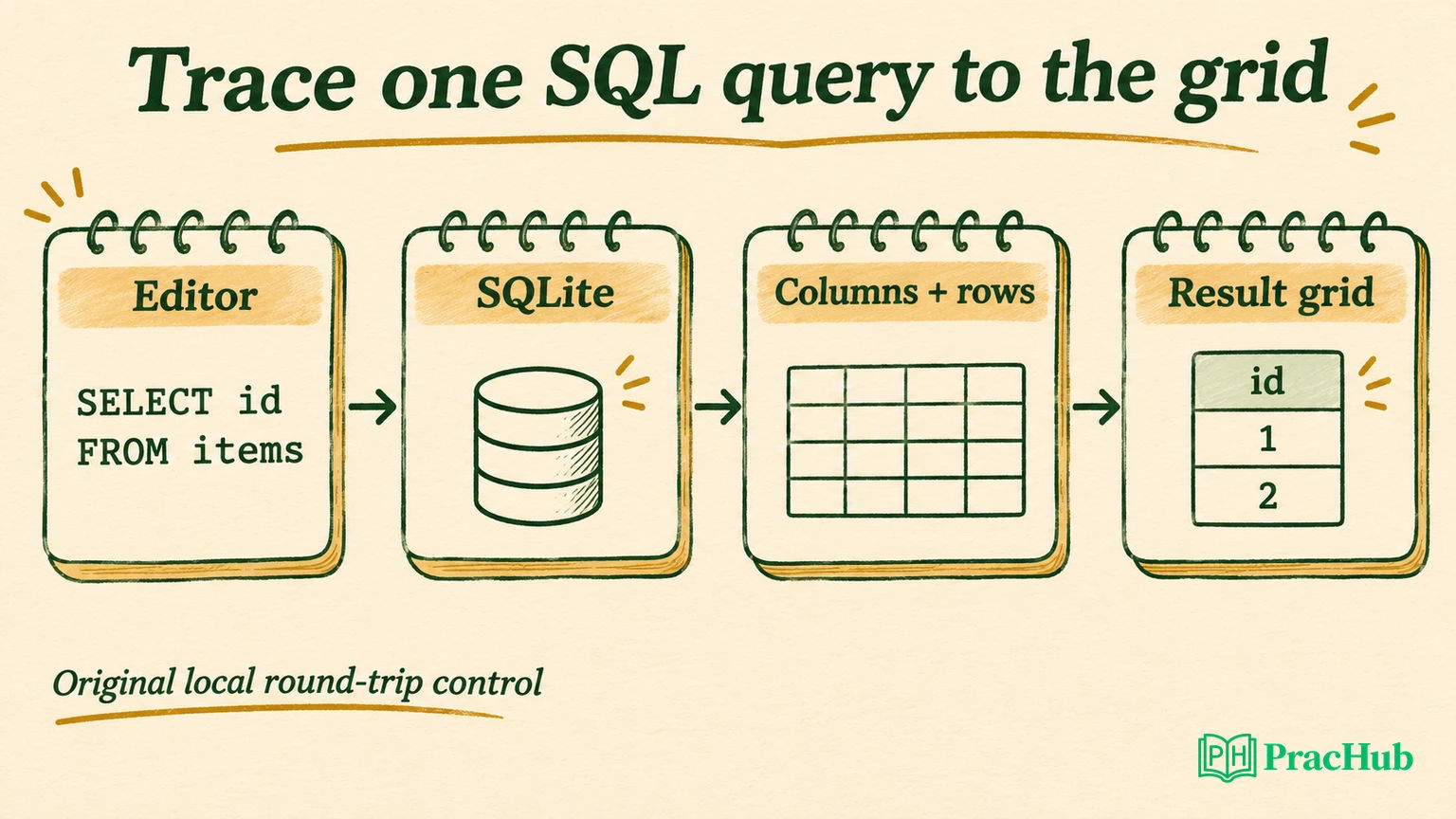
Choose the minimum product the brief actually asks for
The repository recommends a stack but does not enforce it, and permits a solution without a backend. Those are facts about the public brief. Supporting several engines, adding authentication or building a full database administration interface is not necessary to establish the stated minimum. If a real invitation adds requirements, follow that version.
For preparation, choose one engine and make its dialect visible. Our fixture uses an in-memory SQLite database, a small Python HTTP handler and a browser page. It includes a limited keyword-highlighted preview beside the editable SQL. That is a demonstration boundary, not a claim to implement a general SQL parser or a polished production editor.
Separate highlighting from execution. A colored keyword does not prove the query is valid. The database remains the authority on SQL syntax in this fixture. A frontend can display what the user typed while the server returns a typed execution outcome. Keeping these concerns separate prevents the editor's display rules from becoming an accidental second SQL implementation.
Define the dataset so someone can verify the result without trusting the application. Our synthetic table has columns id, value and note. The first row is (1, 0, NULL) and the second is (2, 12, ''). Those values expose a common rendering defect: a generic truthiness fallback can make zero, an empty string and NULL look identical.
State the response contract before rendering the first row
For a successful query, return column metadata separately from rows. A zero-row result still has a schema. Deriving headers from rows[0] fails precisely when a legitimate filter matches nothing. Python's official sqlite3 documentation provides the cursor interface used to read result descriptions and rows; the response shape below is our application design.
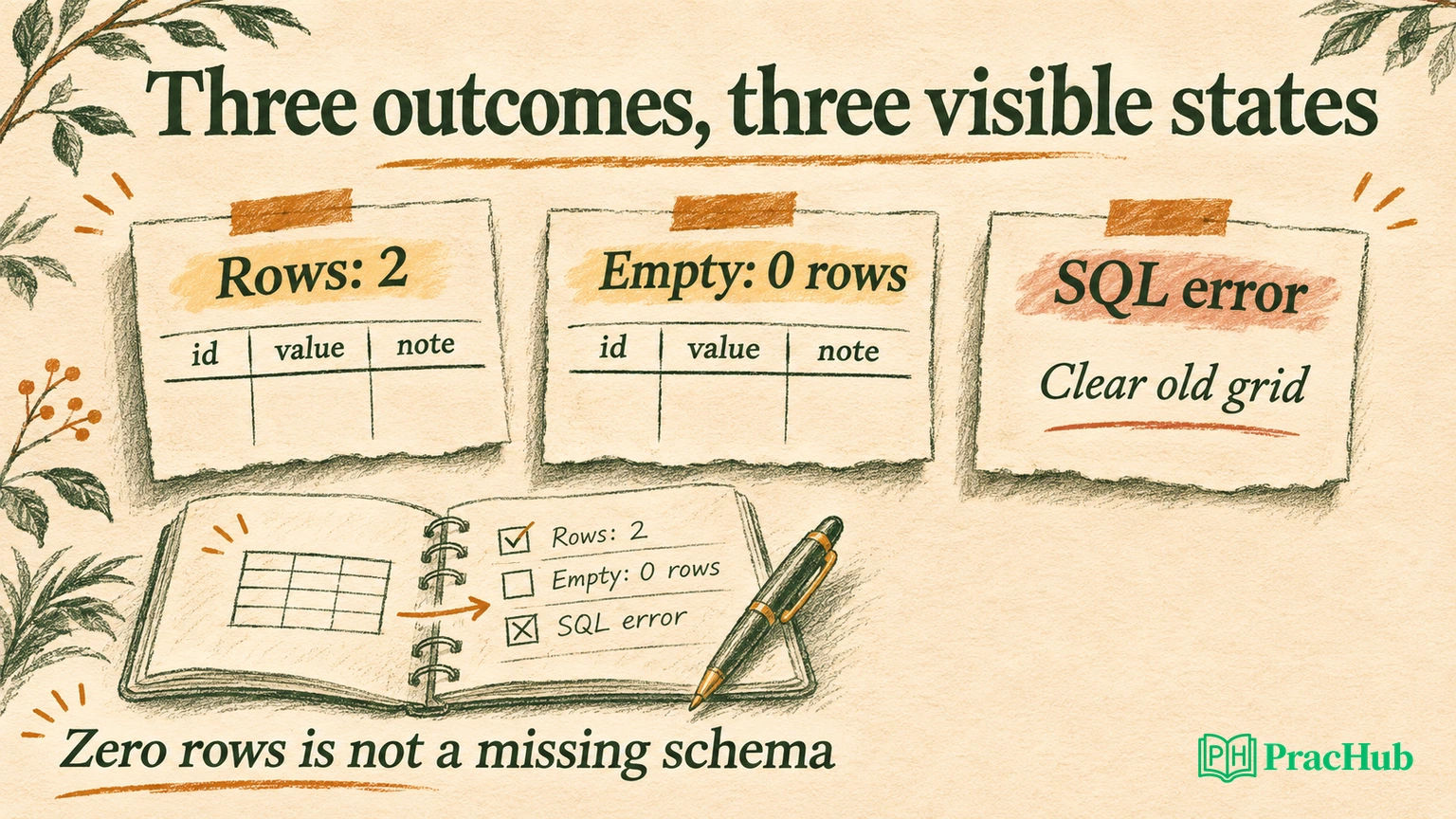
In the chosen fixture contract, success has status, columns, rows and a request ID. SQL errors have a distinct status and message. An empty success is not an error, and a database error is not the same as a failed HTTP request. Those distinctions give the UI enough information to show an understandable state.
The endpoint returns a SQL-error outcome as JSON in this local demonstration. Another reasonable API could use an appropriate non-success HTTP status with a documented error body. Whichever contract you choose, make the client handle it intentionally. Do not assume that every resolved Fetch promise means the SQL ran successfully.
MDN's Fetch documentation explains that HTTP error responses do not automatically reject the promise. A client needs to inspect the response status and parse its application body according to the API. Our fixture uses a fixed local endpoint and known JSON response; a production client would also handle malformed bodies and unexpected content types.
Run the three-query matrix in a real browser
We executed the following queries through the local page, HTTP handler and SQLite engine. The browser checks verified both visible status and actual table cells. This is observed local execution, not a screenshot of Bytebase's product, a hosted submission or a claim about a hiring evaluator.
| Query in the local fixture | Visible state | Result-grid evidence |
|---|---|---|
SELECT id,value,note FROM items ORDER BY id | 2 rows | Headers remain id, value, note; zero, NULL and empty string are distinct |
SELECT id,value,note FROM items WHERE id<0 | 0 rows | The same three headers remain, with no data rows |
SELEC id FROM items | SQL error | The old table is cleared and SQLite's syntax error is visible |
The normal grid displays the first row as 1, 0, NULL and the second as 2, 12, (empty string). These are chosen presentation labels. They do not change the JSON values: zero is numeric, NULL is null and the empty string remains a string. Rendering should preserve that distinction even if a designer later changes the visual treatment.
The empty result retains its headers because the endpoint reads cursor metadata independently of fetched rows. This is a useful interview asset: it connects a database interface detail to a visible user outcome. It also gives you a precise regression test when someone refactors the grid to infer columns from the first record.
For the invalid query, the fixture shows SQL error: near "SELEC": syntax error and no stale result table. That message is from the local SQLite runtime. In a real service, decide which database details are safe to display and which belong in restricted diagnostics. Do not expose credentials or infrastructure details merely to make an error look informative.
Make request ownership part of UI state
A user can run query A, edit the SQL and run query B before A completes. If A returns last, an unguarded handler can overwrite B's result. The grid would then display valid data for the wrong visible query. This is an application state bug, not a SQL correctness problem.
Our fixture gives each run an increasing local request ID and accepts a response only if that run is still current. An executed finite state control delivers response two before response one and confirms that the displayed value remains “new.” That control tests the ownership rule; it does not simulate a real network reordering in the browser demonstration.
Record the SQL snapshot associated with the run, not only the text currently in the editor. The user may edit without running again. A useful UI can distinguish “result for last executed query” from “current unsent text.” Decide whether to show that distinction with a label, a dirty indicator or a stored query preview.
Cancellation is optional scope, but it needs honest semantics. Aborting a browser request does not necessarily cancel database work already running on the server. If a real editor supports canceling a query, define server-side execution identity and cancellation behavior separately. Ignoring a late response protects the UI but does not recover the resources spent computing it.
A simple state model is ready, running, successful rows, successful empty result, SQL error and request failure. A transition should determine whether old data is cleared or visibly retained as stale. Our fixture clears the grid at the start of a new run. Another design can retain it with an explicit label, but silently presenting it as current is misleading.
Keep execution privileges and resource limits explicit
An editor intentionally accepts SQL, so parameterizing the whole query text does not turn it into a safe unrestricted database service. Parameterization protects values in a fixed statement; a query console gives the user control over the statement itself. Explain which user, database and permissions the execution path uses.
The local fixture creates a disposable synthetic in-memory database per request. It is not a production sandbox and does not claim comprehensive restrictions against hostile SQL. A real service needs an appropriate permission model, execution limits and a boundary that protects other workloads. Label those as additional design work rather than implying the demo solved them.
Define limits for result size and runtime before an interview follow-up forces them. Returning every row of a large table can exhaust both server memory and browser rendering. A cap, pagination or streaming design changes the response contract. The brief's one-engine minimum does not require implementing every option, but the user should be told when a result is truncated.
If you add pagination, establish stable ordering and database-snapshot behavior. Page two can shift under concurrent writes if the API simply offsets an unstable query. Do not add a page selector that appears reliable while the underlying execution contract cannot reproduce the same result set. Scope the feature or document its limitations.
Review the display path as carefully as the database path
Database text can contain markup-looking strings. Render values as text rather than inserting them as HTML. Our fixture uses text nodes for both highlighted fragments and result cells. The highlighting splits a limited keyword set and colors those fragments; it does not evaluate the SQL or interpret cell contents as page code.
Check keyboard and status behavior. The editor has a label, the Run action has a clear name and execution feedback is exposed as status text. A loading spinner without a final outcome is not sufficient evidence of completion. If multiple runs are permitted, the current run identity should govern the accessible status as well as the visual grid.
Test duplicate column names if the response uses row objects. A query such as selecting two columns with the same alias can lose information when object keys collide. Our fixture uses ordered columns and ordered row arrays, which preserve positions. That is a chosen response design; explain its trade-off against convenient named-property access.
Also decide how non-tabular statements behave. This walkthrough's verified cases are SELECT results and a syntax error. A write statement, multiple statements or a database-specific return type requires a defined outcome. Do not let code that assumes cursor.description exists turn those cases into an unexplained server exception in a broader solution.
Demonstrate the smallest complete trace
In a review, begin with the known two-row dataset and the normal query. Point to the request's SQL snapshot, the endpoint's columns and rows, and the rendered zero/NULL/empty-string distinction. Then run the zero-row filter and the invalid query. That sequence demonstrates the main contract with little setup.
Show the limited highlighting honestly and identify the next improvement if full editor behavior is required. Provide reproducible instructions and dependency versions, and keep the demo's database disposable. A reviewer should not need a private database account or access to your terminal session to understand the result.
Practise the query and response boundary
The following questions extend the same trace into engine implementation, asynchronous ownership and pagination. Treat each as a changed requirement with its own contract.
| PracHub question | What to practise |
|---|---|
| Full-Stack Data Table: Raw-SQL API, React Rendering, Row Flags and Pagination | Trace editor input through a rawSQL endpoint to a table. |
| Design and Implement a Mini SQL Query Engine | Distinguish executing SQL from implementing a new SQL language. |
| Implement cursor-based query pagination | State result limits and stable paging if scope requires them. |
| Evolve Cursor Pagination Without Breaking Clients | Keep response contracts explicit as pagination evolves. |
| Explain a System You Built, Then Convert a Synchronous Request to Asynchronous | Explain state when a synchronous call becomes asynchronous. |
Return to Full-Stack Data Table: Raw-SQL API, React Rendering, Row Flags and Pagination and explain all three visible outcomes. The most useful proof is a browser showing the correct current result, including when there are no rows or the SQL is invalid.
Comments (0)