Coderbyte Coding Assessment Questions: What Candidates Should Expect
Quick Overview
Coderbyte Coding Assessment Questions: What Candidates Should Expect now pairs its existing format and process guidance with a clearly sourced PracHub practice set. The added section shows each question's actual company, stored round, difficulty, prompt shape, and a timed workflow without claiming guaranteed assessment reuse.
A Coderbyte assessment can start with one click, run on a timer you cannot pause, and produce a report that shows much more than your final answer.
Depending on how the employer configured it, you might see algorithm problems, frontend or backend tasks, SQL, spreadsheets, multiple-choice questions, short answers, or video responses. Your submitted code may be graded by test cases, while the employer may also review your process, skill ratings, and integrity signals.
That makes the most important preparation question bigger than "Which Coderbyte questions should I memorize?" The better question is: what will this employer test, and how can you demonstrate clean, honest problem solving under its exact rules?
Quick Answer: What Should Candidates Expect?
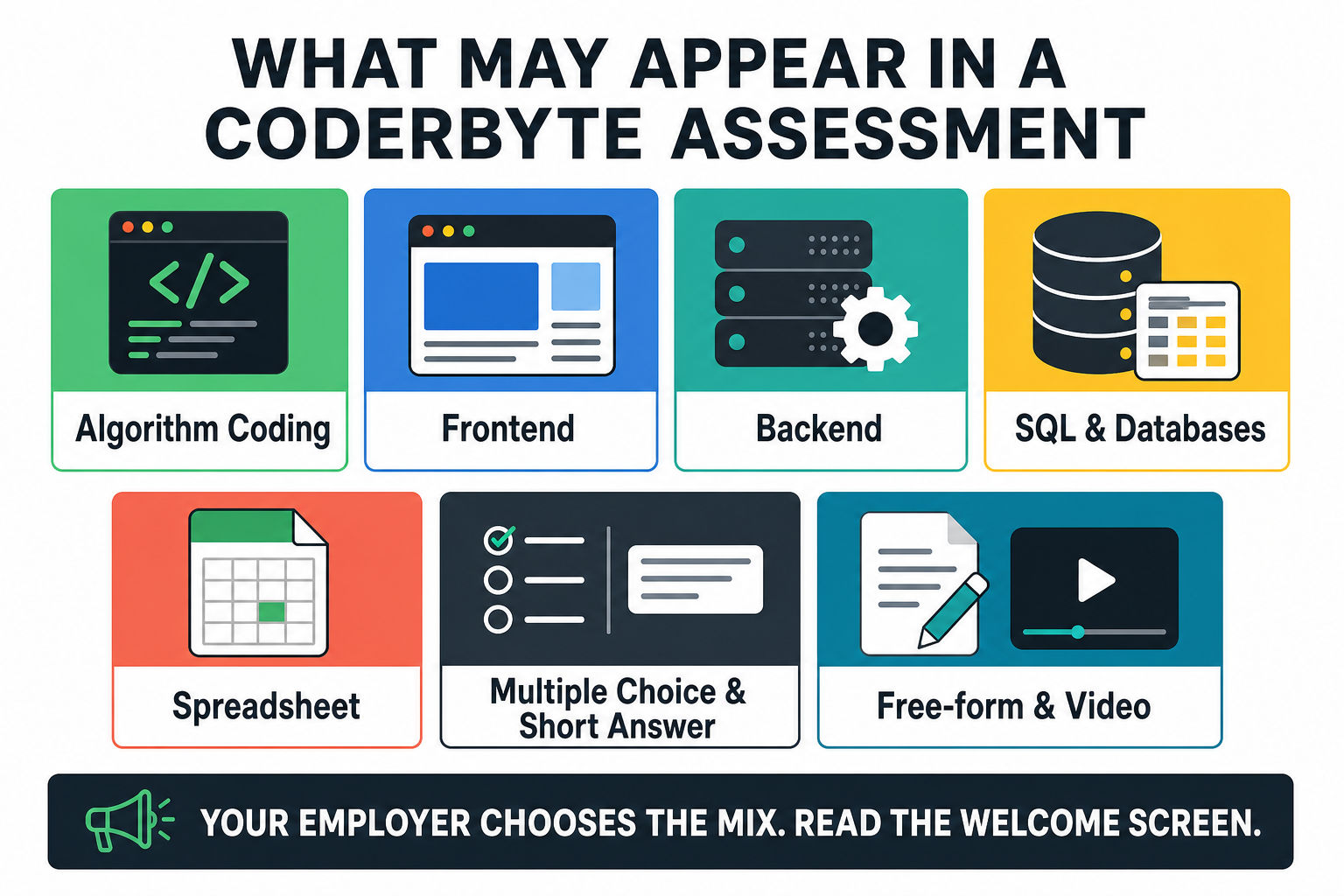
Expect a configurable technical screening assessment rather than one universal Coderbyte test. The employer chooses the question formats, skills, difficulty, time limit, scoring weights, result visibility, and monitoring settings.
For coding challenges, expect a prompt, an online editor, sample cases when provided, hidden test cases, and a Submit action. You may also receive spreadsheet challenges, multiple-choice or short-answer questions, and free-form or video prompts.
Prepare by mapping the role first. Use real interview questions with written solutions to diagnose your coding gaps, then use company-specific interview prep to see whether the employer typically emphasizes algorithms, frontend, backend, SQL, debugging, or another skill. This gives you a targeted plan before the assessment timer begins.
Best mindset: Do not try to reverse-engineer one rumored question. Prepare for the skill and format the employer is likely to select.
Before You Open the Coderbyte Assessment Link
Coderbyte's official candidate guide notes that an invitation may arrive by email or through another link, and that the link may be associated with your email address or usable only once. Read the invitation before opening it casually.
Complete this setup checklist first:
- Use a reliable computer and stable internet connection.
- Disable ad blockers if the assessment page requires it.
- Close unrelated applications, notifications, and browser tabs.
- Keep your device connected to power.
- Choose a quiet location and reserve the full time window.
- Confirm which programming languages and resources are permitted.
- Do not open the link merely to preview it unless the recruiter says that is safe.
The welcome screen is critical. It can show employer-specific instructions and the total time available. According to Coderbyte, once you begin, a configured timer starts and cannot be paused.
Coderbyte Assessment Question Types
The exact mix varies. Coderbyte's candidate documentation lists coding or spreadsheet challenges, free-form questions, multiple-choice questions, and short answers. Its challenge library also supports several technical formats.
Algorithm coding challenges
These questions usually ask you to complete a function that transforms an input into the required output. Expect arrays, strings, hash maps, parsing, sorting, recursion, trees, graphs, or other data-structure and algorithm tasks.
Do not modify required input or function-call scaffolding unless the instructions explicitly permit it. Coderbyte warns that the function call at the bottom of some algorithm editors is required for grading.
Frontend challenges
Frontend assessments may test JavaScript, React, Angular, DOM behavior, state management, component logic, or UI implementation. Read whether the employer cares only about functional output or also expects code structure and edge-case handling.
Backend challenges
Backend tasks may involve Node.js, C#, APIs, data transformation, validation, asynchronous logic, or framework-specific behavior. The challenge may be broader than a classic input-output algorithm problem.
SQL and database challenges
Coderbyte supports database-oriented challenges including SQL and related technologies. Practice joins, grouping, filtering, window functions, null handling, duplicates, and exact output requirements.
Data-heavy candidates can use PracHub's SQL interview practice to test queries against realistic company questions.
Spreadsheet challenges
Some assessments include spreadsheet work instead of, or alongside, code. You may need formulas, lookups, aggregation, data cleanup, or analysis. Do not assume every technical assessment is an algorithms test.
Multiple-choice and short-answer questions
These can test language knowledge, computer science fundamentals, frameworks, databases, security, or role-specific concepts. Read each option carefully and avoid spending coding-question time on one ambiguous multiple-choice item.
Free-form and video responses
An employer may ask you to explain a technical decision, describe relevant experience, or record a short response. These questions can evaluate clarity, judgment, and communication in addition to technical knowledge.
Possible Assessment Mix at a Glance
| Format | What It May Test | How to Prepare |
|---|---|---|
| Algorithm coding | Problem solving, data structures, correctness | Solve unseen questions under time and test edge cases |
| Frontend | JavaScript, frameworks, UI behavior | Build small functional components without heavy tooling |
| Backend | APIs, validation, async logic, services | Practice production-style implementation and debugging |
| SQL or database | Query correctness and data reasoning | Practice exact outputs, nulls, duplicates, and joins |
| Spreadsheet | Analysis, formulas, transformation | Review common functions and work cleanly under time |
| Multiple choice or short answer | Technical knowledge | Review role fundamentals and manage time |
| Free-form or video | Communication and experience | Prepare concise evidence-based explanations |
What the Coderbyte Coding Editor Is Like
Coderbyte's candidate guide describes a challenge page with instructions and sample test cases on the left and an editor for your solution. Your goal is to modify the provided code so it produces the required output.
A disciplined sequence works well:
- Read the full prompt and examples before coding.
- Confirm the input, output, constraints, and required function signature.
- Write down the simplest correct approach.
- Estimate time and space complexity when relevant.
- Implement in small, testable steps.
- Run sample cases and add your own edge cases.
- Click Submit for the challenge and confirm it was saved.
Do not paste code from an outside editor unless the instructions explicitly allow it. Coderbyte states that copy-and-paste activity can be detected and included in the employer's report.
How Coderbyte Coding Questions Are Scored
Coderbyte's scoring documentation says algorithm, frontend, backend, and database-oriented coding challenges are rated on a 1-10 scale. Test cases contribute points according to whether the submitted code produces the expected output.
The employer can also customize how sections contribute to the final assessment score. A coding section and a question section, for example, may have different weights. This means two assessments on the same platform can calculate final results differently.
Do not assume speed automatically determines your score
Older Coderbyte discussions may mention timing points for solving an input-output problem quickly. Coderbyte's current help article labels that timing-points feature as legacy and unavailable for assessments moving forward.
You still need to manage time because the overall assessment may be timed, but do not sacrifice correctness based on an outdated belief that every minute directly adds or removes points.
Is 70% a passing score?
Coderbyte lists 70% as the default qualifying score, while recommending that employers consider a threshold between 60% and 80%. Employers can change the threshold, and it powers their analytics rather than guaranteeing a candidate notification or next-round decision.
There is no universal Coderbyte passing score. A result must be interpreted in the context of the employer's difficulty, weighting, benchmark, and hiring process.
Will you see your score?
Maybe. Employers can choose whether candidates can view challenge results and whether they can redo a submitted challenge. If result visibility is disabled, you may only receive confirmation that the work was saved.
What the Employer May See After You Submit
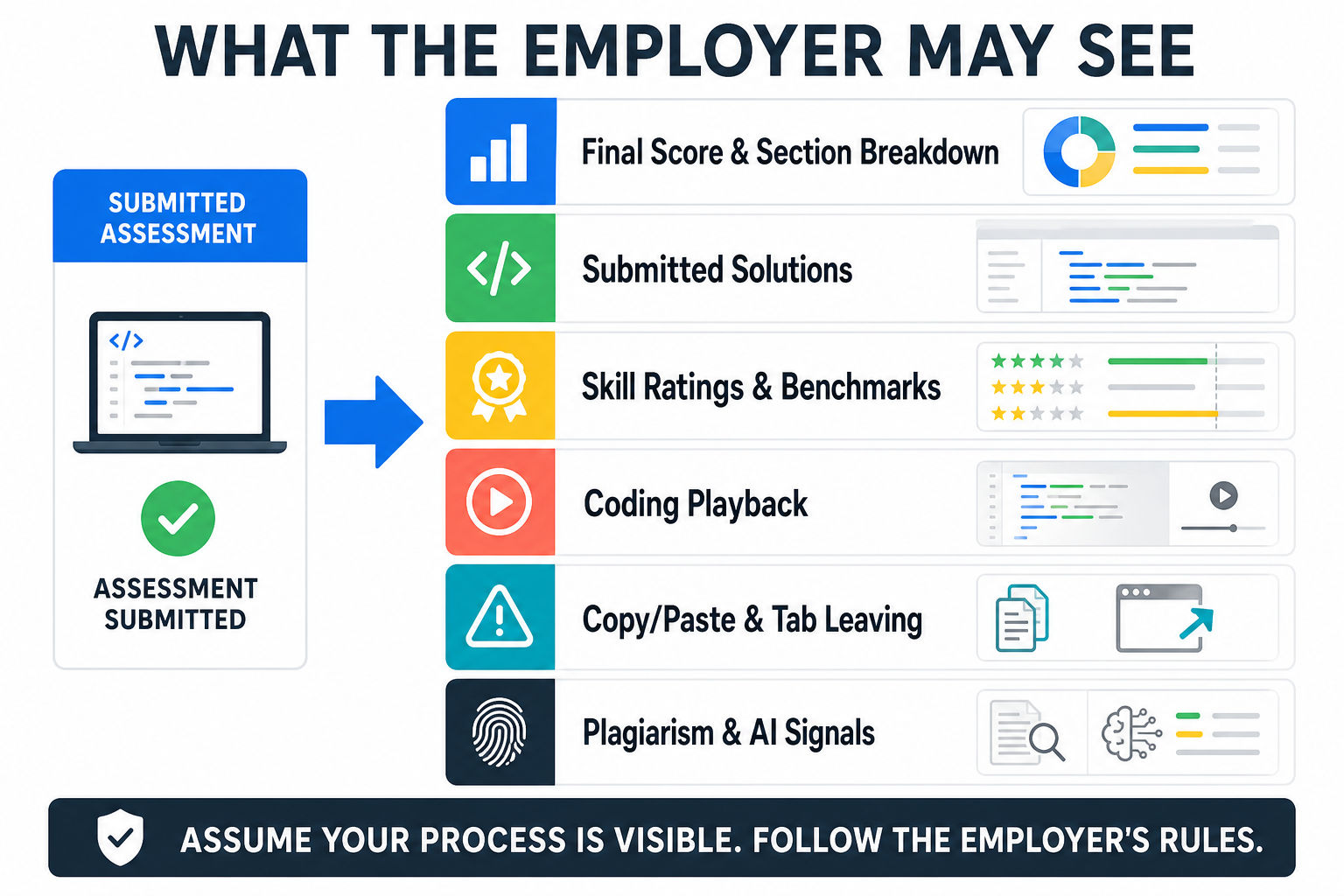
Coderbyte's candidate report documentation says an employer report may contain several layers of information, depending on the assessment configuration:
- Final score and a breakdown by challenge or question type
- Applied section weighting
- Submitted solutions and answers
- Automated skill ratings and available benchmarks
- Coding playback or recordings
- Copy-and-paste activity
- Tab-leaving behavior
- Plagiarism, similar-code, or AI-related signals
- Multiple-choice, open-ended, or video responses
These signals do not mean every unusual event proves cheating. They mean you should assume that your process may be reviewed and follow the employer's rules exactly.
Coderbyte Monitoring, Google Search, and AI Rules
Coderbyte advises candidates not to leave the tab while coding because tab leaving may be recorded. If the employer enables Coderbyte's built-in Google Search, you may see a search box inside the assessment and can use it without leaving the editor.
Do not assume that external search, ChatGPT, copied snippets, a second device, or another IDE is allowed. The employer determines the rules, and Coderbyte supports several integrity and monitoring settings.
The ethical strategy is also the safest strategy: clarify the allowed resources before starting, use only those resources, and submit work you can explain yourself.
How to Manage Time During the Assessment
Scan the entire assessment when the interface permits it
Identify the number of sections, point concentration, and question formats. Some employers enable progressive loading, so you may not be able to see everything at once. Work with the interface you receive.
Set a time budget before deep coding
Reserve time for reading, implementation, testing, and final submission. Do not spend half the assessment polishing one solution while leaving easier sections unanswered.
Prioritize correctness and visible progress
A complete correct solution is ideal. When time is short, a clean partial solution with sensible structure may be more useful than scattered unfinished code. Follow the prompt's scoring and submission rules.
Test boundary conditions
Try empty input when valid, one item, duplicates, negative values, already sorted input, large values, malformed data, nulls, and off-by-one boundaries as relevant. Hidden cases often target assumptions that the sample cases do not expose.
How to Prepare for a Coderbyte Assessment
Step 1: Decode the role and invitation
Extract every clue from the job description and recruiter message: language, stack, seniority, duration, and assessment purpose. If something material is unclear, ask before opening the link.
Step 2: Run a cold diagnostic
Attempt two or three real questions without notes. Use PracHub to filter by company and role, then identify whether your main gap is algorithms, SQL, frontend, backend, or communication.
Step 3: Practice in the required language
Interview day is not the right time to recall collection APIs, string parsing, test syntax, or async behavior. Practice with the exact language or framework named in the invitation.
Step 4: Rehearse the editor workflow
Complete a timed challenge using only the resources that would be allowed. Read the prompt, preserve the function signature, test locally within the platform, and submit intentionally.
Step 5: Prepare the broader interview loop
The Coderbyte assessment is usually a screening stage, not the complete hiring process. Continue with system design questions and behavioral and leadership interview practice so passing the screen does not leave you unprepared for the next round.
A 7-Day Coderbyte Preparation Plan
| Day | Focus | Action |
|---|---|---|
| 1 | Assessment map | Review the invitation, role, language, expected format, and rules |
| 2 | Cold diagnostic | Solve two company-relevant questions under time |
| 3 | Core implementation | Practice arrays, strings, maps, parsing, and testing |
| 4 | Role-specific work | Add frontend, backend, SQL, or spreadsheet practice |
| 5 | Full simulation | Run one uninterrupted assessment-length session |
| 6 | Gap repair | Review failed cases and repeat the weakest format |
| 7 | Readiness | Check equipment, environment, rules, and sleep |
Candidate Checklist for Assessment Day
- Read the welcome screen and employer instructions completely.
- Confirm that the timer has or has not started.
- Do not alter required function scaffolding.
- Use only permitted search, references, devices, and tools.
- Avoid copying external code into the editor.
- Do not leave the tab unless explicitly permitted or necessary.
- Submit each coding challenge as required.
- Submit the full assessment before the deadline.
- If a genuine technical issue occurs, document it and contact the recruiter or Coderbyte support promptly.
Practice with real questions from PracHub
A platform or process article cannot honestly attribute one company's question to every employer that uses the format. This set therefore uses real cross-company PracHub questions to rehearse common OA patterns. Each row shows its actual company and stored round; none is claimed to be supplied by this platform.
| Question | Evidence | Difficulty | Main pattern |
|---|---|---|---|
| Q1: Maximize revenue by choosing one query type | Snowflake · Technical Screen | Hard | Arrays and hashing |
| Q2: Validate hiring request under role constraints | HubSpot · Technical Screen | Medium | Strings |
| Q3: Return nodes on a tree diameter path | Citadel · Technical Screen | Medium | Graphs |
| Q4: Design a logger that returns top-K messages | Google · Technical Screen | Medium | Intervals |
What the prompts actually ask
Q1. Maximize revenue by choosing one query type
Bank evidence: Snowflake, Technical Screen, Hard. You are given a virtual warehouse that can execute queries. There are n query types, and you must choose exactly one query type to run repeatedly for at most k minutes. For query type i: - Each run takes time[i] minutes (a positive integer). - Each run yields profit[i] revenue (a non-negative integer).
Q2. Validate hiring request under role constraints
Bank evidence: HubSpot, Technical Screen, Medium. Problem You are building a simple HR assignment validator for a platform with companies, employees, and job roles. When the system receives a request to assign an employee to a role in a company, it must enforce the following rules: 1.
Q3. Return nodes on a tree diameter path
Bank evidence: Citadel, Technical Screen, Medium. Problem You are given an undirected tree with n nodes labeled 0..n-1 (connected, no cycles). The diameter of a tree is the longest simple path between any two nodes. Return the nodes (in order) along one diameter path (if multiple diameter paths exist, returning any one of them is acceptable).
Q4. Design a logger that returns top-K messages
Bank evidence: Google, Technical Screen, Medium. Problem Design an in-memory logging component that supports recording log events and querying the top K most frequent messages. Each log event has: - timestamp (integer seconds) - message (string) Implement the following operations: 1. log(timestamp, message): record a new log event. 2.
Run the set like an assessment
- Read all four prompts first. Give each a difficulty estimate and choose an order before coding.
- Hide the solution. Write the invariant, complexity target, and three edge cases before opening the editor.
- Use one timer. Preserve five minutes at the end for boundary, tie, scale, and output-format tests.
- Log the failure mode. Record the broken invariant or missed edge case, not merely the question title.
Frequently Asked Questions
What questions are on a Coderbyte assessment?
There is no fixed universal set. The employer can select algorithm, frontend, backend, database, spreadsheet, multiple-choice, short-answer, free-form, or video questions. Use the invitation, welcome screen, role, and recruiter guidance to infer the likely mix.
Can I use Google during a Coderbyte assessment?
Only when the employer's rules allow it. Coderbyte can provide a built-in Google Search box when enabled. Do not leave the assessment tab or use external resources based on assumption; follow the visible instructions.
Can Coderbyte detect tab switching?
Coderbyte's documentation says candidate reports can show the number of times a candidate left the page. Treat tab switching as visible and avoid it unless the employer explicitly permits or requires another page.
Can Coderbyte detect copied code or ChatGPT?
Coderbyte reports that it can record copy-and-paste behavior and provide plagiarism or AI-related signals in candidate reports when relevant features are enabled. Use only permitted resources and submit work you understand and can explain.
Will I see my Coderbyte score?
Not always. Employers can allow or hide candidate challenge results and can decide whether submitted challenges may be redone. You may see detailed results, or you may only see confirmation that your assessment was submitted.
Is 70% a good Coderbyte score?
Seventy percent is Coderbyte's default qualifying threshold, not a universal hiring cutoff. Employers can change it and apply different section weights. Difficulty, benchmark performance, integrity signals, and recruiter review can all affect interpretation.
What happens after I submit?
Coderbyte says no additional platform action is required after submission. The organization that invited you reviews the report and determines the next hiring step. Follow up with the recruiter according to the timeline they provided.
Final Takeaway: Prepare for the Skill, Not a Leaked Question
Coderbyte assessments are configurable, timed technical screens designed around the employer's needs. You may face coding, databases, spreadsheets, knowledge questions, or written and video explanations.
Your best advantage is not memorizing one rumored prompt. It is demonstrating correct implementation, careful testing, honest process, and role-relevant skill under the stated rules.
Before the invitation arrives, use PracHub's real interview questions and company filters to diagnose what the role is likely to test. After the assessment, continue preparing for the system design, behavioral, and technical rounds that come next.
Read the instructions. Protect your time. Test your code. Submit work you can defend.
Comments (0)