dbt Incremental Model Interview Questions: Late Data, Unique Keys, and Full Refreshes
Quick Overview
Practice dbt incremental model interview questions with a version-pinned DuckDB exercise covering late data, unique keys, duplicate versions, reruns, and full-refresh reconciliation. Learn the source assumptions and recovery boundaries behind correct incremental results.
A dbt incremental model can finish successfully while keeping an old order amount and missing two orders entirely. Adding unique_key does not rescue rows your SQL never selects. In a dbt incremental model interview, the useful question is therefore: under which source assumptions will repeated incremental runs produce the same current state as a full refresh?
Use this exercise alongside PracHub’s Data Engineer interview questions to practice explaining the failure and the fix.
This guide answers that question with a small, executable order-history example. Official facts are linked to dbt documentation. Verified exercise results come from our local runs. Preparation recommendations are our inference; the prompts are original practice questions, not candidate reports or claims about a particular employer's interview.
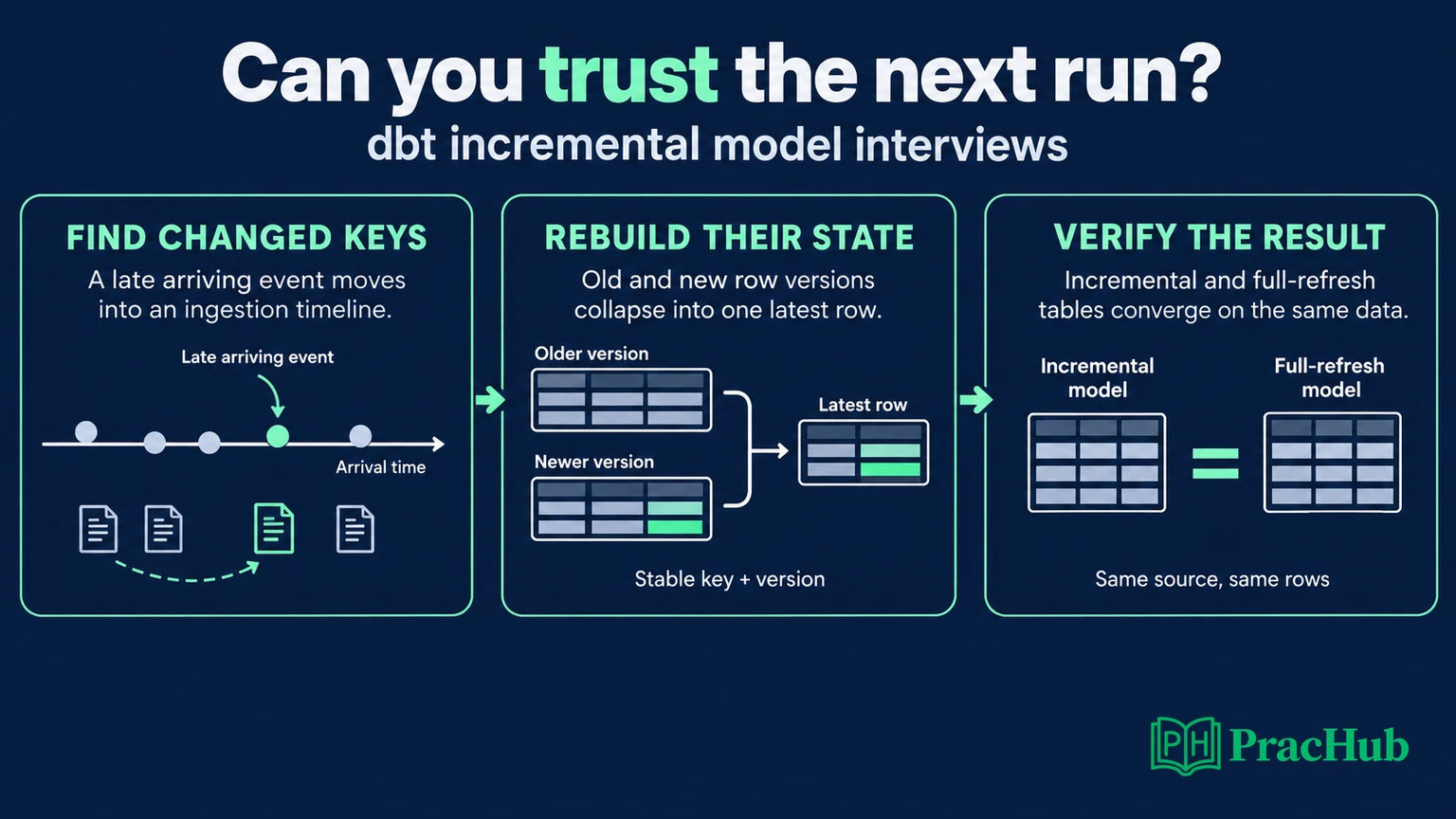
When Does is_incremental() Return True?
Official fact: ordinarily, the target must already be a table, the model must use incremental materialization, and the run must not request a full refresh. Both branches of the SQL must be valid. An existing but empty target can still take the incremental branch. dbt configuration documentation
Practice explaining three executions: first build, normal rerun, and rebuild. A filter referencing {{ this }} belongs inside the incremental branch; otherwise the first run can reference a table that does not exist. Our model also uses coalesce because max(ingested_at) is null on an empty target.
There is a configuration exception worth knowing: an explicit resource-level full_refresh: true or false takes precedence over the command-line flag. Check that setting before promising that a CLI flag will rebuild a protected model. Official full_refresh reference
Preparation recommendation: begin your answer with the output grain and change contract, then describe the macro. “One current row per order, with higher revision numbers winning” gives the interviewer something concrete to challenge.
Why Do Late Data and Equal Timestamps Break a Watermark?
Consider this original exercise. Amounts are integer units of one currency. The raw table retains every revision; order IDs are stable; revisions determine business precedence. Amount, revision, and timestamps are nonnull. Repeated copies of the same key and revision must agree on the business payload. Hard deletes are outside this exercise.
Create seeds/raw_orders.csv. Initially include only the header and first two records. After the first model run, add the remaining five records:
order_id,amount,revision,updated_at,ingested_at
A,100,1,2026-06-01,2026-06-01
B,200,1,2026-06-10,2026-06-10
A,150,2,2026-06-02,2026-06-11
C,300,1,2026-06-10,2026-06-11
C,300,1,2026-06-10,2026-06-11
,40,1,2026-06-11,2026-06-11
D,400,1,2026-06-01,2026-06-12
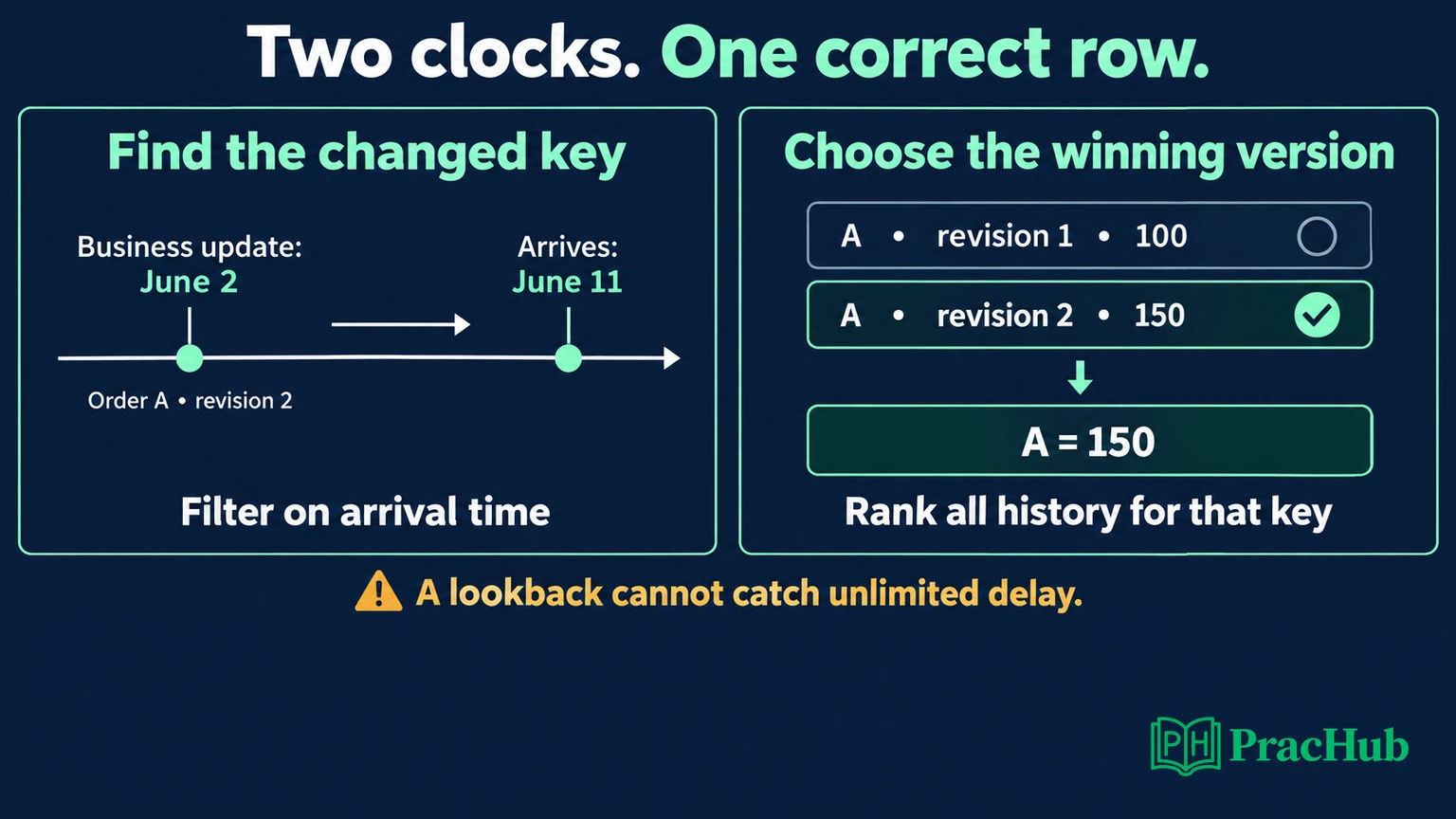
The initial target contains A=100 and B=200. A strict updated_at > max(updated_at) filter now compares incoming rows with June 10. It misses A's correction, C's equal-timestamp arrival, and D's older business event. The null-key record is invalid and must not become a current order.
Changing > to >= catches C but still misses A and D. A two-day business-time lookback also misses those older records. The boundary must reflect how changes become visible, not merely when the business event happened.
Our solution selects affected order IDs by ingestion time, then reads all retained versions of those IDs to choose the highest revision. This second step matters: a replayed old revision should trigger reconsideration without replacing a newer business value.
The two-day ingestion lookback is an explicit exercise assumption, not a universal safe setting. Newly visible rows must fall within that boundary. Future-dated timestamps, delayed visibility beyond the window, and unreliable ingestion timestamps need additional handling.
Run a Version-Pinned Incremental Model
Verified exercise environment: dbt Core 1.11.8, dbt-duckdb 1.10.1, and DuckDB 1.5.2. These are tested versions, not a recommendation to use the latest release. The adapter supports the selected delete+insert strategy; other warehouses require their own validation. Pinned adapter documentation
In a disposable directory, create a Python 3.11 environment and install:
python3.11 -m venv .venv
.venv/bin/pip install dbt-core==1.11.8 dbt-duckdb==1.10.1 duckdb==1.5.2
Create dbt_project.yml:
name: incremental_interview
version: '1.0'
config-version: 2
profile: incremental_interview
seeds:
  incremental_interview:
    raw_orders:
      +column_types:
        order_id: varchar
        amount: integer
        revision: integer
        updated_at: timestamp
        ingested_at: timestamp
Create profiles.yml alongside it:
incremental_interview:
  target: dev
  outputs:
    dev:
      type: duckdb
      path: interview.duckdb
      threads: 1
Save the following as models/orders_current.sql:
{{ config(materialized='incremental',
          incremental_strategy='delete+insert',
          unique_key='order_id', on_schema_change='fail') }}

with valid as (
    select * from {{ ref('raw_orders') }}
    where order_id is not null
), changed_keys as (
    select distinct order_id from valid
    {% if is_incremental() %}
    where ingested_at >= (
        select coalesce(max(ingested_at), timestamp '1900-01-01')
        from {{ this }}
    ) - interval '2 days'
    {% endif %}
), ranked as (
    select v.*,
           row_number() over (
               partition by v.order_id
               order by v.revision desc, v.ingested_at desc
           ) as rn
    from valid v
    join changed_keys k using (order_id)
)
select order_id, amount, revision, updated_at, ingested_at
from ranked
where rn = 1
Run these commands with the two-record seed, then repeat them after adding the remaining records:
.venv/bin/dbt seed --full-refresh --profiles-dir .
.venv/bin/dbt run --select orders_current --profiles-dir .
The seed refresh replaces the small raw fixture; it does not refresh orders_current. That distinction preserves the experiment's incremental target state.
The main code-review question is where filtering happens. Filtering valid itself would discard older versions before ranking. Here, the time condition narrows only changed_keys; the join still sees the full history needed to choose each winner. Move that condition while “optimizing” and you may change the answer.
This model favors clarity over a performance claim. It can revisit substantial history for affected keys. At production scale, measure scans and maintain a trustworthy ingestion checkpoint; max from a current-state table is not a complete ingestion ledger. Retaining an older winning row can keep that watermark behind and cause extra work.
Does unique_key Guarantee Unique, Valid Rows?
Official fact: unique_key tells dbt how to match records in the target. It is not a substitute for validating the model's grain. The update mechanism depends on the configured strategy. unique_key reference
Verified result: our explicit ranking produces one candidate row per order before delete+insert runs. The two identical C records become one C=300. A becomes 150. The blank key is excluded, remains available in raw history, and is counted separately as one rejected record.
In a production answer, give rejected records an owner and an alert threshold. Replacing every null key with one sentinel can combine unrelated orders; hashing a missing identity does not establish the missing business identity.
For conflicting copies—say A, revision 2, amounts 150 and 999—do not let row ordering silently choose a winner. Save this source-contract test as tests/conflicting_versions.sql:
{{ config(tags=['source_contract']) }}
select order_id, revision
from {{ ref('raw_orders') }}
where order_id is not null
group by order_id, revision
having count(distinct (amount, updated_at)) > 1
Run dbt test --select tag:source_contract --profiles-dir . after seeding and before running the model; stop if it fails. Our conflict injection failed this gate as intended. The SQL assumes the stated nonnull payload contract; extend checks when accepting other inputs.
Also challenge the key itself. If an order has multiple line items, order_id alone is the wrong grain unless the model deliberately aggregates them. A line-item model needs a stable identity for each line. If a business correction changes that identity, explain how the old row disappears; matching the new key alone leaves the old one behind.
Add unique and not_null data tests to the final order_id column too. Those catch a broken output grain, while the source test catches ambiguity before choosing a version. dbt's data tests are explicit checks, and dbt run does not execute them automatically. Data tests, run command
How Do You Prove Incremental and Full Refresh Agree?
Verified exercise results: we executed actual dbt runs against the pinned adapter, including an intermediate June 11 batch and the June 12 arrival. A deliberately broken model used the strict business-time filter with the same order key.
| Execution | Result |
|---|---|
| Initial build | A=100, B=200. Total: 300. |
| Strict business-time filter after all arrivals | A=100, B=200. Total: 300. |
| Corrected incremental model | A=150, B=200, C=300, D=400. Total: 1,050. |
| Same input replayed | A=150, B=200, C=300, D=400. Total: 1,050. |
| Full refresh of corrected model | A=150, B=200, C=300, D=400. Total: 1,050. |
Before rebuilding, preserve the incremental output in a separate comparison table. Then run:
.venv/bin/dbt run --full-refresh --select orders_current --profiles-dir .
Compare every output column in both directions, along with key uniqueness and row counts. Equal totals alone can hide offsetting errors. Compare against a fixed source snapshot so an arrival between the two runs does not create a misleading difference. Keep the comparison table separate from the rebuild target and inspect missing keys, extra keys, and changed values independently. If rows disagree, those categories distinguish a selection bug from a version-selection or transformation bug. Our verification compared complete ordered rows, including revision and timestamps, and found equality. Rerunning after emptying the existing target also restored the same four orders.
We additionally replayed A's old revision with a newer ingestion timestamp. A remained 150 because version selection considered its complete retained history. This is why selecting recent records and simply taking the newest arrival would violate our business rule.
Finally, we introduced E=500 with an ingestion timestamp of June 1 after the watermark had advanced to June 12. Incremental processing missed E; a full refresh recovered it, producing 1,550. This intentional failure establishes the limit of the lookback guarantee.
When Should You Backfill or Full Refresh?
Official fact: schema-change handling does not automatically populate historical values for newly added columns. Adding a column and recomputing its historical values are separate operations. Schema-change documentation
Preparation recommendation: choose recovery scope from the affected data, available history, and downstream dependencies:
- Known missed keys: recompute all retained versions for those keys and replace their current rows. Reconcile against the source afterward.
- Changed historical business logic: rebuild the affected history, often with a full refresh, after checking source retention and dependent models.
- New column: decide whether historical values are required. Use schema handling for structure and an explicit backfill for values.
- Missing source history: recover or reconstruct that history first. A rebuild cannot recreate records absent from its inputs.
For an aggregate model, the repair unit may be a whole day rather than an order. If one order changes, recompute the complete affected day's aggregate; replacing it with a sum of only changed orders would discard unchanged contributions. Similarly, hard deletes require an explicit deletion signal or reconciliation policy.
Strategy names do not remove these obligations. Row-oriented updates and partition replacement operate at different scopes, and support varies by adapter. Official strategy reference
Before running a broad repair, estimate its scan and rebuild cost, identify dependent tables, and decide how readers will see a consistent result. A targeted repair saves work only when you can identify the complete affected set. If that set is uncertain, say so and explain why a wider reconciliation is necessary.
An interview-ready answer names the missed records, explains the repair boundary, and states how correctness will be checked before downstream consumers rely on the result.
Practice the Reasoning Beyond This Fixture
These verified PracHub destinations cover adjacent skills; they are not presented as dbt-specific candidate reports. Use the final column to adapt each exercise to incremental correctness.
| PracHub question | Apply it here |
|---|---|
| Walk Through an ETL Project | Explain the source contract, watermark, and recovery path. |
| Describe ETL and pipeline challenges | Describe how you detect and repair missing historical updates. |
| Reason About Duplicate Data and Scaling in Spark | Preserve version precedence while changing execution strategy. |
| Answer SQL And Data Warehouse Fundamentals For A Data Engineering Interview | Connect grain, null handling, and window functions. |
| Ensure Data Quality and Deliver Impact Amid Challenges | Explain who was affected and how you verified recovery. |
The Spark question is labeled Software Engineer and the data-quality question Data Scientist; their reasoning transfers to this exercise. Continue with PracHub's Data Engineer interview questions, and practice explaining one concrete failure before naming the configuration that fixes it.
Comments (0)