DevOpsInterview.com Review: Production Scenarios, Terminal Demos, and Study Levels
Quick Overview
Inspect DevOpsInterview.com’s public checklist, terminal display, flow diagram and level routes. Includes original Kubernetes termination records that distinguish evidence from a diagnosis.
DevOpsInterview.com is useful for browsing production-themed questions and comparing a checklist, command display and flow diagram around one subject. The inspected Terminal Sandbox tab displayed commands to read or copy; it did not provide evidence of a running shell. Use those displays to plan an investigation, then obtain and interpret evidence from the relevant environment.
PracHub publishes this review and owns the complementary practice links. Our failing Kubernetes Pod exercise gives you another setting for explaining a next diagnostic step. The restart-evidence branch below is an original synthetic example, separate from DevOpsInterview.com and from a live cluster.
Confirm the domain and the specific interaction
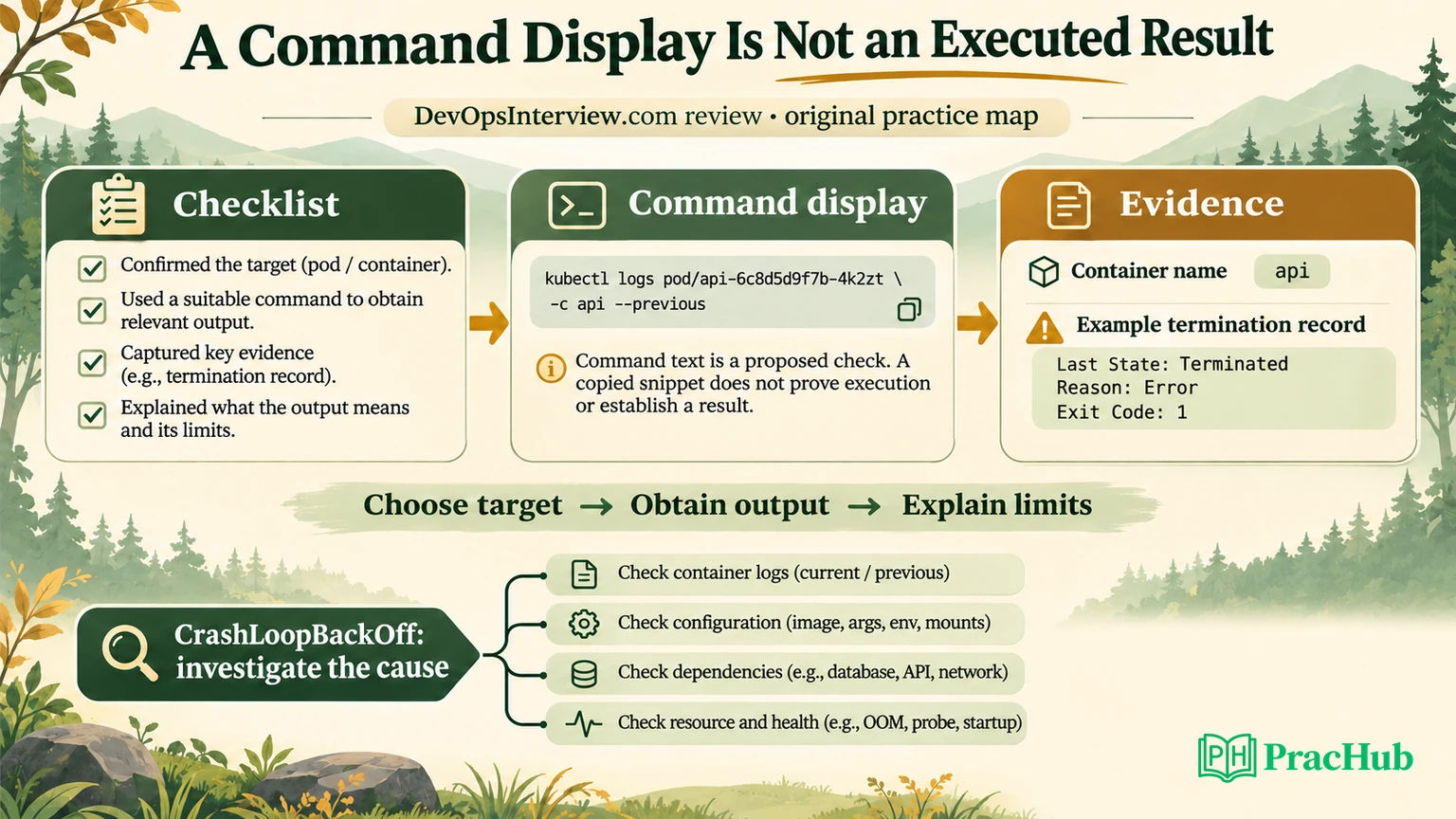
Direct observation, November 3, 2026: on DevOpsInterview.com, we opened the CrashLoopBackOff card’s quick answer, terminal tab and deployment flow. The terminal view contained a command block and copy control, with no editable input or execution button in that card. We did not run commands or connect a cluster.
The flow depicted a sequence involving liveness failure and restarts. The diagram illustrates one restart path; the cause in a particular incident still needs evidence. We restored the card to its checklist and collapsed state after the probe, without saving a bookmark or marking mastery.
Do not infer common ownership or shared features from similarly named DevOps preparation domains. This review covers the dot-com site and the observed routes named here. Other platforms’ labs, pricing or scoring are not evidence of this product’s capabilities.
Our assessment: the three representations can help you compare an explanation with a proposed investigation. Justify the observation you need next and explain how the displayed command could obtain it.
The discussion link and study levels need context
The inspected Full Discussion link opened a Kubernetes search, which reported 48 results across questions, pages and articles. It did not directly open a dedicated discussion for the card. We did not establish that all results were relevant to the original restart question.
The visible Prep Levels menu mapped Beginner, Intermediate and Senior/Lead to difficulty-query routes. We followed Senior/Lead, which opened the question bank with Hard labels and section counts. Those are navigation and classification observations, not an independently validated employer-level standard.
This matters when planning a session. A label can select material; it cannot establish the depth of your answer. A short factual prompt may support a much deeper operational follow-up, while a difficult-looking scenario can still be answered superficially.
Treat a search destination as a browsing step. Choose a specific question, preserve its assumptions and check its explanation. Do not count a search-results total as the number of distinct scenarios you have practised or as proof of the quality of each result.
Separate a display from an executed result
Here is an original comparison map for using the inspected card. It is a preparation framework, not the site’s grading system.
| Surface | What it can help you prepare | Evidence still needed |
|---|---|---|
| Checklist | An ordered set of candidate checks | Why each check distinguishes the current hypotheses |
| Command display | A proposed way to obtain information | The actual target, permissions, output and interpretation |
| Flow diagram | One possible state or failure sequence | Events showing that the sequence occurred |
| Executed investigation | Observations from a particular system | Scope, timing, identity and whether the result generalizes |
After choosing a command, distinguish its proposed check from the output you actually obtained. For example, asking for the previous container log is useful only if you identify which Pod and container are relevant. In a multi-container Pod, reading the wrong container’s output can make a reasonable investigation appear to produce no evidence.
A command can also return a snapshot that needs context. Resource usage measured after a restart may not capture the earlier peak. An empty log may reflect collection limits or the wrong time window. Explain the limitation before concluding that the system had no relevant error.
Practise with the static material by making a prediction: predict the output that would strengthen a hypothesis and the output that would weaken it. You can do this before obtaining a running environment, as long as the prediction is not presented as something you measured.
Original branch: CrashLoopBackOff does not identify the cause
The official Kubernetes Pod lifecycle documentation distinguishes Pod phase from individual container states and describes restart backoff. A displayed CrashLoopBackOff reason points you toward repeated container failure and restart handling. It is not the underlying cause by itself.
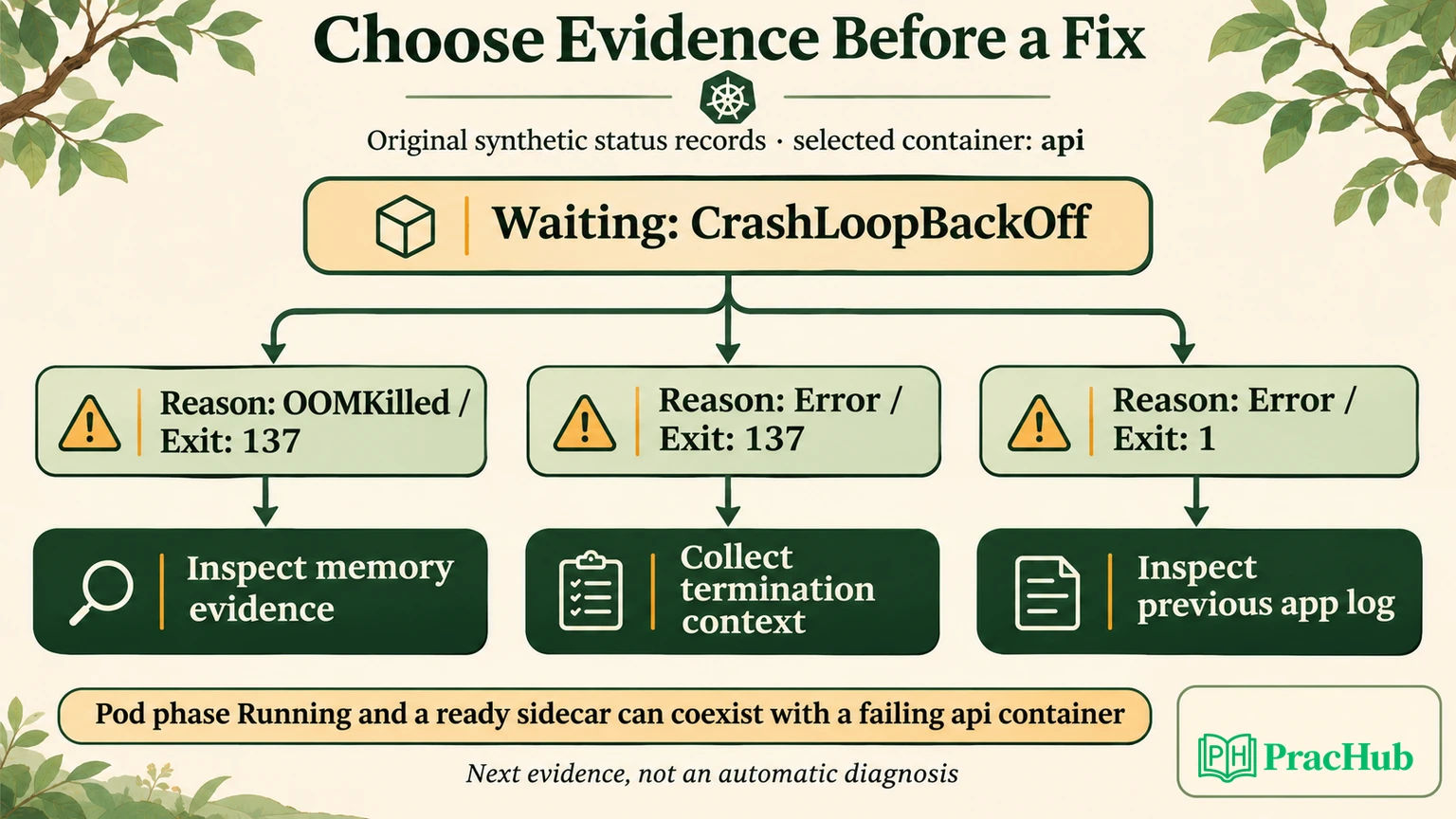
Consider an invented Pod with two containers. Its sidecar is ready, while the application container named api is waiting in restart backoff. The Pod’s phase is Running. Those facts can coexist; the phase alone does not prove that every container is healthy or serving traffic.
A shortened part of the synthetic application record looks like this:
{
  "name": "api",
  "ready": false,
  "restartCount": 6,
  "state": {"waiting": {"reason": "CrashLoopBackOff"}},
  "lastState": {"terminated": {"reason": "Error", "exitCode": 137}}
}
The next check should preserve which container and termination attempt the record describes. Do not replace the termination reason with an assumption based solely on the exit number.
Our original branch compares three records:
| Last termination in the invented record | Next evidence to seek | Conclusion not yet supported |
|---|---|---|
| OOMKilled, exit 137 | Memory limits, usage evidence and the termination timeline | The application necessarily needs a larger limit |
| Error, exit 137 | Events and termination context for that container | OOM is proven by the number alone |
| Error, exit 1 | The previous application log and relevant configuration | Every restart is a liveness-probe problem |
The official memory-resource task illustrates checking termination information for an out-of-memory event. In an investigation, use the reported reason and supporting evidence rather than treating one number as a complete diagnosis.
Our local record model selected the named api container and checked all three branches. It also checked that the Running Pod phase and healthy sidecar remained present, and that the 137-without-OOM record did not select the OOM branch. The checks passed on the synthetic data.
This was a record-processing example, not a Kubernetes experiment. It did not invoke kubectl, measure memory or prove why a real process stopped. Use the branch to choose evidence, then justify any proposed production change separately.
Check the probe mechanism before changing it
The inspected flow makes a probe failure worth discussing, but a probe change needs a mechanism. The official Kubernetes probe guide distinguishes liveness, readiness and startup behavior. Failed liveness or startup checks can lead to a restart under the relevant configuration. Readiness failure does not by itself restart the container.
For a slow-starting application, ask whether a startup check is appropriate and what initialization behavior must be accommodated. For an application that has already started, ask what the liveness check actually detects. Do not extend a threshold simply because a restart happened.
A follow-up might say that readiness fails while the process stays alive. That changes the investigation: examine whether the workload is ready to receive traffic and why the check is failing. It does not justify treating the failure as proof of the same restart path shown in a diagram.
Another follow-up removes the probe entirely. An application can exit on its own, after which restart behavior depends on its configuration. Your explanation should still have a branch for application failure rather than requiring every symptom to fit the visual sequence. Preserve the Pod identity and termination timestamps too. A replacement can have familiar labels while being a different Pod; combining an old log with a current status can produce a misleading timeline.
Turn a production-themed card into a defensible answer
Start by bounding the symptom. Which workload, namespace, container and user operation are affected? What changed, and when did the failures begin? State these as questions if you do not yet have their answers.
Then separate observation from hypothesis. “The last termination reports OOMKilled” is an observation from a particular record. “A recent change increased memory demand” is a hypothesis that needs comparison. Increasing a limit is an intervention whose effect and risk need explanation.
Choose a next check because it discriminates between alternatives. Previous logs may reveal an application exit. Events may connect a restart with a failed probe. Memory evidence may support a resource hypothesis. State what you would do if the expected signal is absent.
Finally, describe verification under the affected conditions. A restart count that stops increasing is useful but may not establish that users can complete their task. A ready container is another signal, not a substitute for testing the relevant request path.
These steps make the site’s checklist more useful without pretending the static card conducted the investigation. You can rehearse them with a partner who provides one invented observation at a time. Keep the invented case clearly separate from a personal incident you discuss with an interviewer.
What to check before relying on study-level progress
Use a manual mastery or saved-question control as a revision aid, with evidence attached to each label. We did not use those controls or test persistence, recommendations or any independent scoring. No account, paid feature or mock-interview quality was assessed.
If you keep a separate practice record, preserve what you demonstrated rather than only the card’s difficulty label. For the restart case, useful entries include selecting the correct container, distinguishing a reason from an exit number, choosing the next evidence and defining recovery verification.
The next attempt should change an assumption. Keep the exit number but remove the OOM reason, switch the failing container or replace a restart with a readiness failure. If your explanation still follows the evidence, the practice has tested more than recognition of the original card.
We did not audit the entire catalog, independently verify employer provenance or measure hiring outcomes. The public interface and the bounded card probe support a narrower recommendation: it can supply material for rehearsal, while you remain responsible for checking assumptions and demonstrating execution elsewhere.
Practice the gaps the product leaves open
These complementary PracHub prompts deepen the sampled Kubernetes troubleshooting theme. They are independent questions, separate from DevOpsInterview.com’s cards and any displayed study level.
| PracHub question | What to examine |
|---|---|
| Troubleshoot a Failing Kubernetes Pod: Where to Start and What to Check | Select the failing container and the first observation that can distinguish causes. |
| Explain How Microservices Run and Fail on Kubernetes | Connect container behavior to the wider request path and service impact. |
| Explain CI/CD, Kubernetes delivery, and troubleshooting | Explain what release evidence supports a rollback or a configuration investigation. |
| Design first-time Kubernetes deployment in new cloud | Validate the assumptions of a first deployment before changing runtime settings. |
| Design and operate a monolith on Kubernetes | Describe operational ownership and checks beyond a single status label. |
Who should use DevOpsInterview.com next
Consider the site when you want a public scenario prompt and several ways to view the same explanation. Check the actual destination behind discussion links and treat study levels as organizational labels. The inspected terminal display is useful as a command reference, not proof of shell execution.
For your next attempt, use the failing Kubernetes Pod exercise, select the affected container and compare the three synthetic termination records. Explain which observation you would seek next and what it cannot yet prove. Then validate the reasoning in an environment you are authorized to use.
Comments (0)