Docker Interview Questions for Platform Engineers: Images, Networking, Volumes, and Debugging
Quick Overview
Prepare for platform engineering interviews with practical Docker questions on image layers, networking, volumes, runtime behavior, security, and evidence-driven debugging.
The container is running, the port is published, and the logs show no obvious error. Why can nobody reach the service? A junior answer starts typing random Docker commands. A strong platform engineer traces the request across application, container, bridge, host, and firewall boundaries until one hypothesis survives.
That is the real difference in a Docker interview. Definitions matter, but interviewers are testing whether you understand lifecycle, isolation, and failure evidence well enough to operate a shared platform safely.
Use PracHub's real interview questions with written solutions to diagnose your broader interview gaps, then practice the Docker scenarios below aloud. For a specific loop, combine them with company-specific interview prep instead of studying every container command equally.
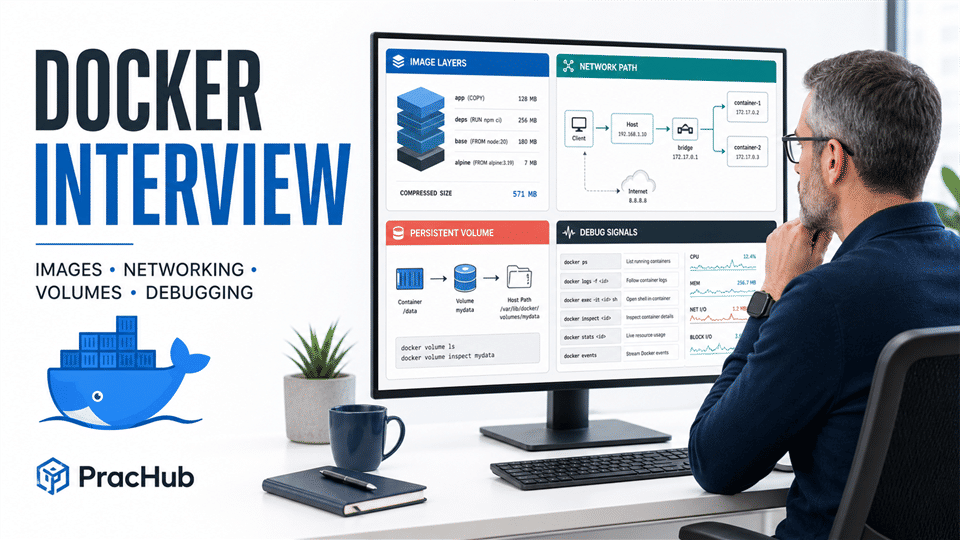
Quick Answer: What a Platform Engineer Must Show
A strong answer follows a repeatable pattern: define the boundary, identify the durable state, inspect evidence before changing the system, and verify the fix from the same path the user takes.
| Area | Strong signal | Weak signal |
|---|---|---|
| Images | Explains layers, cache invalidation, build context, runtime contents, and provenance | Optimizes only for the smallest possible image |
| Networking | Traces name resolution, listening address, container port, bridge, host publication, and firewall | Assumes EXPOSE opens a host port |
| Storage | Matches persistence and ownership requirements to writable layers, volumes, bind mounts, or tmpfs | Stores durable data in the container layer |
| Debugging | Preserves evidence, forms hypotheses, changes one variable, and verifies | Restarts first and investigates later |
| Platform judgment | Turns safe defaults into reusable guardrails with an escape hatch | Solves only the one container in front of them |
Docker Image and Build Interview Questions
1. What is the operational difference between an image and a container?
An image is an immutable, layered artifact. A container adds runtime configuration and a writable layer on top of those read-only layers. Multiple containers can share the same image while keeping separate writable layers.
The platform implication is more important than the definition: anything that must outlive replacement cannot depend on that writable layer. Logs, databases, and uploaded files need an intentional external destination.
2. How do image layers and build cache affect Dockerfile design?
Each filesystem-changing build instruction can create a reusable layer. If an early step changes, downstream cache entries may need rebuilding, so stable and expensive work should usually come before frequently changing source code.
For example, copy a dependency manifest and install dependencies before copying the full application. Keep the build context focused with .dockerignore, but do not treat fewer layers as the only goal; reproducibility and readability still matter.
3. Why use a multi-stage build?
Multi-stage builds separate compilation or asset generation from the runtime image. The final stage receives only the artifacts and runtime dependencies it needs, leaving compilers, package caches, and test tools behind.
A senior answer also considers debugging. You might keep an explicit debug target with symbols and tools while shipping a lean production target, rather than quietly installing tools into the production container during an incident.
4. How would you make an image safer and more reproducible?
Use a trusted, maintained base; pin what must be reproducible; rebuild for patched dependencies; run as a non-root user where practical; and scan the resulting artifact. Never bake credentials into ARG, ENV, copied files, or image layers.
Then define the platform policy: which checks block a release, who owns exceptions, and how old images are retired. Security tooling without an operating model becomes dashboard decoration.
Docker Networking Interview Questions
5. What is the difference between EXPOSE and publishing a port?
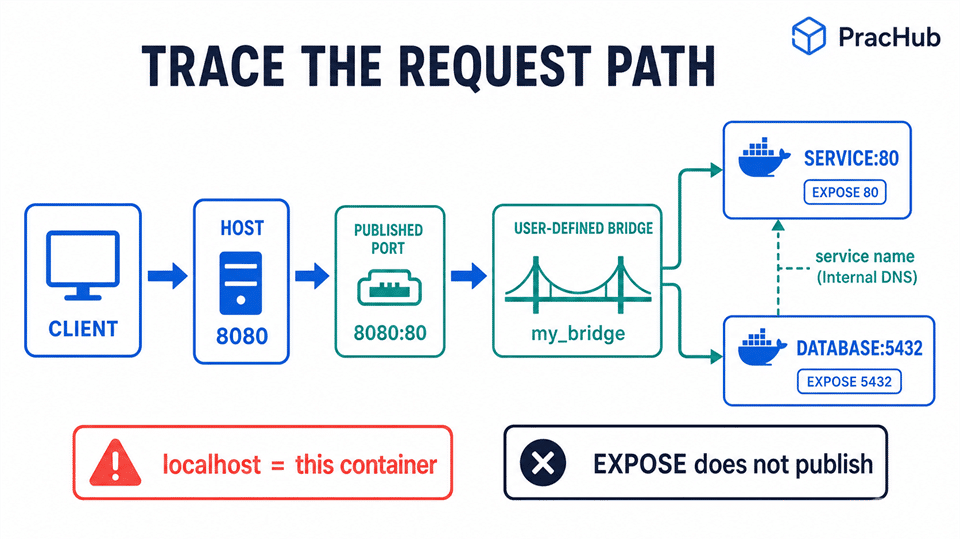
EXPOSE 80 documents that the image expects traffic on port 80; it does not make that port reachable from the host. Publishing with -p 8080:80 creates a mapping from host port 8080 to container port 80.
Binding without a specific host address commonly publishes on all host interfaces, so the interviewer may ask about exposure risk. The answer should include the bind address and host firewall, not just the two port numbers.
6. Why does localhost often break container-to-container traffic?
Inside a container, localhost refers to that container's own network namespace. A web container reaching a database container should use the database service name or network alias on a shared user-defined network.
Also verify the server's listening address. A process bound only to 127.0.0.1 inside its container may not accept traffic arriving on the container interface even when the network and port mapping are correct.
7. Why prefer a user-defined bridge over the default bridge?
On a user-defined bridge, containers can resolve one another by name or alias and can be attached or detached more deliberately. Separate networks also provide a useful isolation boundary between application groups.
Do not confuse internal reachability with host publication. Containers on the same bridge communicate with the target container port; external clients normally use the published host address and port.
8. A container is healthy but unreachable. What do you check?
Trace from the failing caller: DNS result, route, host bind address, published mapping, firewall/NAT rules, bridge membership, container IP, listening socket, and application protocol. Test from both sides of each boundary so the failure domain keeps shrinking.
“It works with curl localhost on the host” proves only one path. Reproduce from the client network that actually fails before declaring the incident fixed.
Docker Volumes and Storage Interview Questions
9. When would you use a volume, bind mount, or tmpfs?
A Docker-managed volume is a strong default for persistent container data. A bind mount exposes a specific host path and is useful when the host and container both need direct access, such as local development or controlled configuration injection. A tmpfs mount keeps temporary data in memory and does not persist it.
The official Docker storage guide separates all three from the container writable layer. Choose based on ownership, portability, backup, performance, and security requirements rather than habit.
10. Why did files disappear after adding a mount?
A bind mount or populated volume mounted over a non-empty directory obscures the image files at that path. A newly created empty volume may be populated from the container directory by default, unless copy-up is disabled; either way, the mount changes what the process sees.
Inspect the mount source and destination, verify whether initialization copied expected data, and avoid designing startup around accidental contents hidden beneath a mount.
11. How do you debug permission errors on mounted data?
Compare the process UID/GID inside the container with ownership and mode bits on the mounted filesystem. For bind mounts, also consider host security controls such as SELinux labeling where applicable.
Do not reach first for chmod 777 or a root container. Fix the ownership contract, read/write requirement, or platform provisioning rule, then test it with the same runtime identity used in production.
12. Does a named volume solve backup and disaster recovery?
No. Persistence across container replacement is not the same as backup, replication, or restore testing. Define what owns snapshots, retention, encryption, consistency, and recovery validation.
For a database, the correct answer may be a managed external service rather than a local Docker volume. The platform engineer should surface the service-level requirement before choosing the mount.
Docker Debugging Interview Questions
13. A container exits immediately. Where do you start?
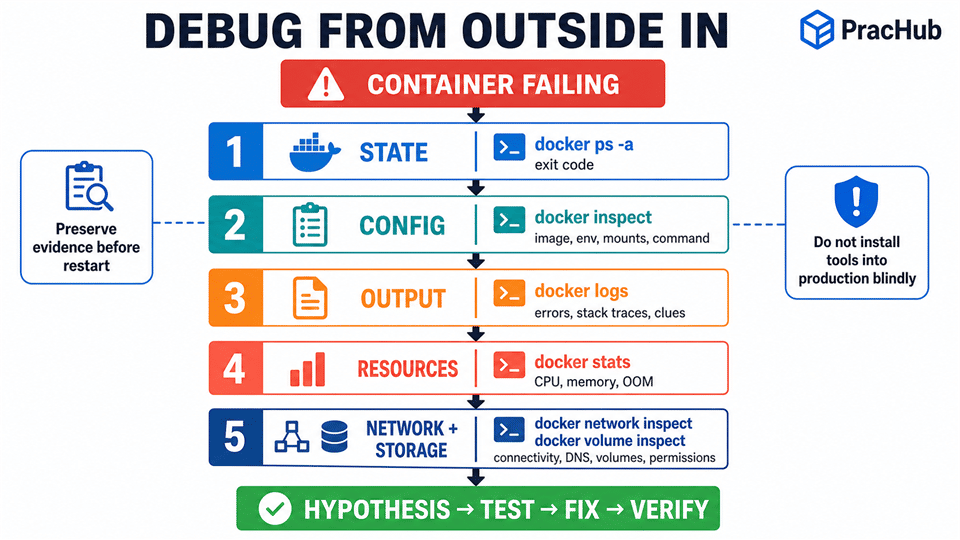
Start with docker ps -a, the exit code, the configured command, timestamps, and logs. Then inspect environment variables, mounts, user, working directory, entrypoint, and restart count.
Do not repeatedly restart it before capturing evidence. A restart policy can turn a clear startup error into noisy crash-loop symptoms while overwriting the context you needed.
14. How do you investigate high memory or an OOM kill?
Use docker stats for current CPU, memory, network, block I/O, and process signals, then inspect the container state and host-level evidence. Exit code 137 can indicate a SIGKILL, but it does not by itself prove the kernel OOM killer was responsible.
Compare the workload's measured behavior with its configured limits. The fix might be a leak, concurrency control, a larger limit, or a safer placement policy; simply removing limits can transfer failure to the host.
15. How do you debug a minimal image with no shell?
Use evidence available from outside first: inspect, logs, stats, events, network inspection, and mounted data. When supported, docker debug or a controlled diagnostic container can provide tools without permanently modifying the target image.
A missing shell is not a defect by itself. Production images and diagnostic environments can have different purposes, provided the team has a documented and auditable workflow.
16. Why do PID 1 and exec-form commands matter?
The main container process must receive and handle termination signals so it can drain work and exit within the grace period. Shell-form ENTRYPOINT or CMD can leave the application behind a shell that does not forward signals as expected.
Docker's exec-form recommendation makes the executable the main process. The application still needs correct signal handling and child-process reaping behavior.
A Complete Docker Troubleshooting Walkthrough
Suppose a release starts, but external health checks fail and the database looks empty. Preserve the failing container, write down the exact failing request, and collect a narrow evidence set:
docker ps -a --no-trunc
docker inspect api
docker logs --since=10m --timestamps api
docker stats --no-stream api
docker port api
docker network inspect app_net
docker volume inspect db_data
Read the evidence as a chain. Does the container stay running? Is the process listening on the expected container address and port? Does the host mapping match the health check? Are caller and service on the intended network? Does the database mount point reference the expected volume rather than a new anonymous volume or host directory?
Form one hypothesis, run the smallest discriminating test, make one controlled change, and repeat the original health check. Finish by asking how the platform could prevent recurrence: lint the Dockerfile, validate mount names, generate safe network defaults, or expose a self-service diagnostic bundle.
How Interviewers Score Docker Answers
| Dimension | Strong evidence | Common miss |
|---|---|---|
| Mental model | Distinguishes image, writable layer, mount, network namespace, and host | Treats the container like a small VM |
| Diagnosis | Moves from symptom to boundary to evidence to test | Lists commands without saying what each proves |
| Reliability | Covers restart behavior, signals, resource limits, persistence, and rollback | Stops after making the container run |
| Security | Limits exposure, privileges, secrets, and production mutation | Uses root or broad permissions as the default fix |
| Platform thinking | Converts the lesson into a safe default and measurable guardrail | Offers a one-off manual repair only |
A Focused 5-Day Docker Interview Plan
| Day | Focus | Practice output |
|---|---|---|
| 1 | Images and builds | Explain one Dockerfile's layers, cache misses, secrets, and runtime contents |
| 2 | Networking | Trace three request paths and explain every address and port |
| 3 | Storage | Reproduce volume, bind-mount, tmpfs, ownership, and obscured-file behavior |
| 4 | Debugging | Diagnose an exit loop, unreachable service, and memory failure from evidence |
| 5 | Platform design | Run a timed mock and propose guardrails that prevent each failure class |
Pair the technical mock with behavioral and leadership practice. Platform interviews often follow the technical answer with questions about rollout safety, developer experience, incident ownership, and how you influenced teams to adopt a standard.
Frequently Asked Questions
Do platform engineers need to memorize Docker commands?
Know the core inspection path, but understanding what evidence each command provides matters more than exact flag recall. An interviewer will usually value a disciplined model of state, configuration, output, resources, networking, and storage over a long command list.
Should I study Docker Swarm for a platform engineering interview?
Study it when the job description or company stack uses Swarm. Otherwise, prioritize image construction, runtime behavior, networking, storage, security, observability, and the relationship between Docker and the company's orchestrator. Do not let niche breadth replace production fundamentals.
Is Docker networking the same on Linux and Docker Desktop?
No. Docker Desktop runs the engine behind additional virtualization and host-integration layers, so host reachability and interface behavior can differ from native Linux. State your environment before drawing conclusions from an address or route.
What is the biggest mistake in a Docker debugging interview?
Changing the system before defining the failure and preserving evidence. Restarting, rebuilding, adding a shell, or widening permissions may hide the cause. First reproduce the failing path, capture state, and choose a test that can disprove a specific hypothesis.
Practice the Failure Boundaries
The best Docker answers are not the longest. They make the boundary visible: build versus runtime, container versus host, internal port versus published port, writable layer versus durable mount, and symptom versus evidence.
Use PracHub to practice real interview questions with written solutions and build a loop around your target companies. Then rehearse these Docker scenarios until you can diagnose them calmly, explain the trade-offs, and turn the fix into a better platform default.
Comments (0)