Does Coderbyte Record Your Screen? Webcam, Tab Switching, Copy-Paste, and Plagiarism Checks
Quick Overview
A candidate-focused Coderbyte proctoring guide covering what may be recorded or flagged, what depends on employer settings, and how to prepare ethically.
Updated August 17, 2026. This guide uses Coderbyte’s current employer-facing documentation. Your invitation and the instructions shown before you start are the source of truth for your specific assessment.
You receive a Coderbyte assessment link and immediately wonder: Does Coderbyte record my screen? Does it use my webcam? What happens if I switch tabs or paste a helper function? The honest answer is neither “everything is always recorded” nor “nothing is tracked.” Coderbyte offers several monitoring and integrity features, and the employer can choose which ones apply to a particular assessment.
That distinction matters. Coderbyte’s own documentation says employers can enable screen recording, webcam proctoring, identity verification, screenshot protection, AI/plagiarism detection, and other controls. But it does not mean every invite enables every feature. Read the assessment instructions, use only allowed resources, and treat the assessment as a professional work sample rather than a puzzle about surveillance.
Before your assessment, warm up with interview questions with written solutions so you can write and explain your own code without relying on unapproved help.
Quick answer: does Coderbyte record your screen?
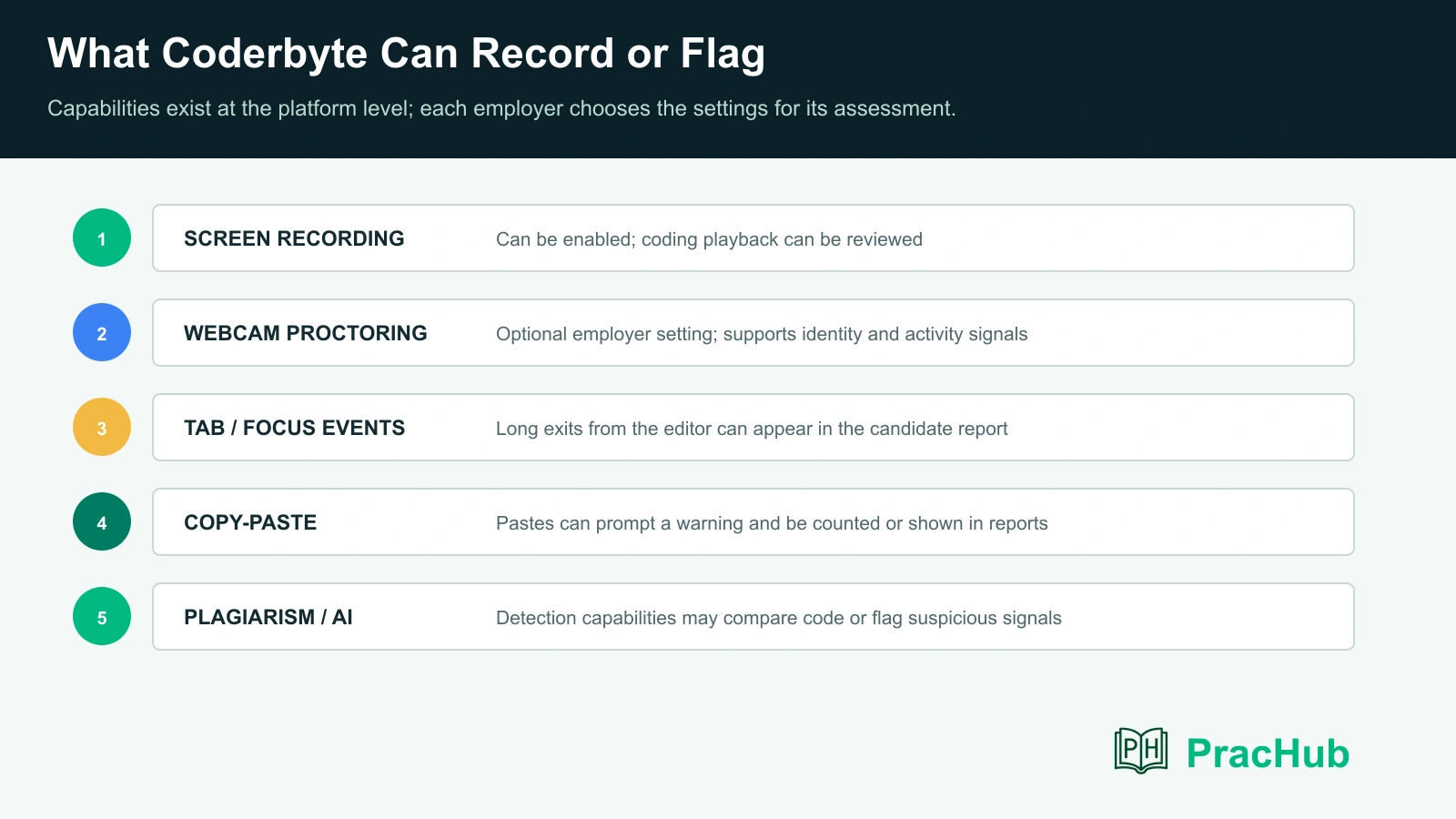
Coderbyte can record coding activity and provide employers with playback, but the actual recording setup depends on the assessment configuration. Coderbyte’s help center describes video recordings of candidates solving coding challenges and the ability for employers to review coding playback. Its main product page also lists screen recording among its assessment-integrity capabilities.
If your assessment includes screen recording, assume that your work inside the assessment environment can be reviewed. Do not make decisions based on a guess about what a reviewer will or will not notice. Follow the stated rules and keep unrelated windows, private material, and prohibited tools out of the process.
| Concern | Candidate-safe answer |
|---|---|
| Is my screen always recorded? | No universal answer. Coderbyte supports recording, but the employer’s assessment settings determine what applies. |
| Is webcam required? | Webcam proctoring is an optional feature. Your invitation or pre-test setup will tell you if camera permission is required. |
| Can tab switching be visible? | Coderbyte says lengthy exits from the editor can appear in a candidate report. Avoid unapproved navigation. |
| Does copy-paste matter? | Coderbyte says pasted code can trigger a warning and be counted or shown in the report. |
| Can code be checked for plagiarism or AI use? | Coderbyte documents plagiarism and AI/ChatGPT detection options; do your own work and obey the assessment policy. |
What Coderbyte can record or flag
Coderbyte’s public documentation describes a layered set of integrity tools. Employers may use a subset, none, or a more restrictive combination. The reliable question is not “What does Coderbyte theoretically have?” It is “What does this employer’s invitation require?”
Screen and coding playback
Coderbyte says employers can watch recordings of candidates solving code challenges through a playback feature. Its documentation explains that the recording centers on coding activity in the editor and that an ad blocker may prevent the editor from being recorded. That is a practical setup warning, not a loophole: if the assessment requires a compatible setup, fix the issue before you begin or contact the recruiter.
Webcam proctoring and identity signals
Webcam proctoring is described as an employer-enabled option. Coderbyte says the associated report can flag situations such as multiple people on camera, no person detected, or another device detected. Its product materials also refer to face and eye-related proctoring capabilities.
If a camera is required, choose a stable, well-lit place, keep your face in frame, and remove extra devices from view unless the instructions say they are permitted. If you have an accessibility need or a legitimate setup issue, ask before starting; do not wait until the timer is running.
Tab switching and leaving the assessment
Coderbyte’s candidate-report documentation says employers can see the number of times a candidate left the page while working on a solution, and its cheating-detection documentation refers to leaving the code editor tab for a lengthy duration. That does not mean every short focus change has a predetermined outcome. It does mean you should avoid treating a browser tab as a harmless second workspace when the rules do not allow it.
Copy-paste activity
Coderbyte says candidates may see a warning when pasting code and that the candidate report can show how many times code was pasted, as well as what was pasted in the solutions section. This is why “I only pasted a utility function” can still create an avoidable review question.
Write the solution in the provided environment unless the invitation specifically permits external notes, documentation, or starter code. If you accidentally paste something, do not panic or try to conceal it. Finish honestly and be ready to explain your reasoning if asked.
Plagiarism and AI-use checks
Coderbyte documents an option to scan challenge and free-form answers for matches with other candidates or AI/ChatGPT solutions. It also documents cheat-proof challenges that vary problem details to make shared answers less useful. These systems are designed as signals for employer review; Coderbyte’s materials use labels such as not detected, likely, and detected rather than claiming every flag is a final hiring decision.
The practical rule is simple: do not use an unapproved AI assistant, answer-sharing service, second person, or copied solution. If the assessment explicitly allows AI for a take-home project, follow those project rules instead of assuming the same allowance applies to an algorithmic assessment.
What depends on the employer’s settings
A Coderbyte link is not a complete proctoring policy. The employer chooses question types, time limits, whether tools such as reference search are enabled, monitoring settings, and the permitted-resources policy. Some assessments are closer to a controlled timed screen; others are deliberately designed as project work where outside tools may be part of the exercise.
Before you start, look for these signals in the invitation or welcome screen:
- Camera or identity prompt: tells you whether webcam or verification is required.
- Browser and recording notice: explains permissions, screen/coding playback, and compatibility needs.
- Allowed-resource policy: specifies whether documentation, search, AI, a local IDE, or notes are permitted.
- Time and retake rules: tells you whether you may pause, retry, or revisit a submitted task.
- Accommodation contact: gives you a path to resolve an issue before the assessment begins.
If the instructions do not answer a material question, email the recruiter before launching the assessment. A one-sentence question such as “Could you confirm whether external documentation is allowed for this Coderbyte assessment?” is far better than discovering a policy after submission.
A candidate-safe workflow for a Coderbyte assessment
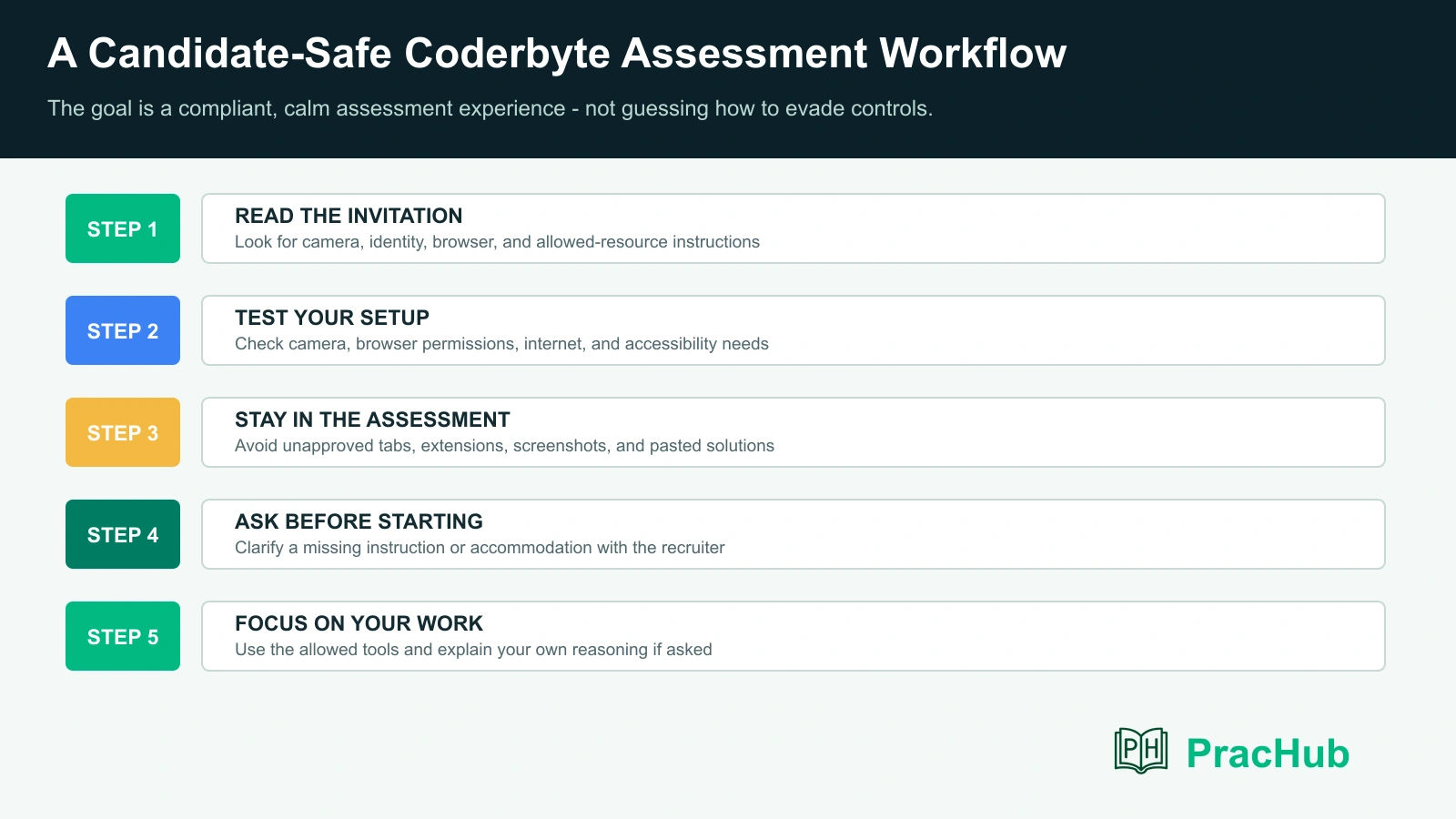
The best preparation is boring in the best way: understand the rules, test the environment, and spend your attention on the problem. Trying to infer exactly what monitoring can detect makes you slower and creates risk without improving your engineering signal.
1. Read the instructions before the timer starts
Do not skim permissions, allowed resources, or submission rules. If webcam access is requested, decide whether you can provide it in a suitable setting. If a screen-recording or browser requirement is stated, use the supported browser and disable only extensions that create genuine compatibility problems, not controls you are expected to accept.
2. Test your setup
Check power, network stability, browser updates, camera permission, and audio if a video response may be included. Close unrelated applications and notifications. If your device has a corporate VPN, unusual security configuration, or a required accessibility tool, test early and ask the employer how to proceed if anything conflicts.
3. Work inside the allowed environment
Use the provided editor and the resources the employer explicitly permits. Solve the problem in small, testable steps: restate constraints, choose a data structure, write a minimal correct version, test ordinary inputs, then test edge cases. This gives you a stronger result than a pasted solution and makes your work easy to explain.
4. Keep a simple hidden-test checklist
For coding questions, run through empty input, one-element input, duplicates, boundary values, malformed input only if the prompt expects it, complexity at maximum size, and output formatting. For projects, check setup instructions, tests, README expectations, and what you would explain in a review.
Practice before the assessment, not during it
Coderbyte assessments can include algorithmic challenges, multi-file projects, multiple-choice items, spreadsheets, and more. The preparation should match your invitation, but a reliable base is timed coding practice plus the ability to explain your choices.
| PracHub question | Practice focus | Why it helps |
|---|---|---|
| Traverse All Reachable Pages With Parallel BFS | Graphs, concurrency, and edge cases | Build the habit of stating assumptions and testing a nontrivial implementation. |
| Solve Array Distance and Wiki Navigation | Arrays and graph search | Practice reading constraints carefully before coding. |
| Implement Topological Sort and Tree Boundary Traversal | Ordering and traversal | Trains correctness reasoning, cycle handling, and clear complexity explanations. |
| Design an In-Memory Filesystem and Circular Queue | Object design and testing | Useful for practical or multi-file assessments that reward clean interfaces. |
Use a timer, write without pasting in a ready-made answer, and review your own output. That is the closest useful rehearsal for an assessment where employers may inspect both the submitted code and the path you took to create it.
Frequently asked questions
Can Coderbyte see me through my webcam?
Only if the employer has enabled webcam proctoring and your assessment requires camera access. Review the pre-test prompt and invitation rather than assuming a default.
Will Coderbyte know if I switch tabs?
Coderbyte documents reporting on candidates leaving the page and lengthy exits from the editor. Do not switch to unapproved tabs; if you need a permitted resource, confirm the policy first.
Does Coderbyte record keystrokes?
Coderbyte publicly describes code-editor recording/playback and pasted-code reporting. It does not mean every assessment uses identical recording settings. Use the invitation as the specific policy.
Will one paste automatically fail me?
No public rule says that one paste automatically determines a hiring outcome. Coderbyte says pastes can be flagged or displayed in reports. The safer approach is not to paste unapproved code in the first place.
Can I use ChatGPT during a Coderbyte assessment?
Only when the employer explicitly permits it. Coderbyte documents AI detection options and separately describes some take-home projects where AI may be intentionally allowed. Never transfer permission from one format to another.
Bottom line
Coderbyte can support screen/coding playback, webcam proctoring, focus-change signals, pasted-code reporting, and plagiarism or AI-detection tools. Whether your assessment uses those controls depends on the employer’s configuration. Read the rules, clarify ambiguities before the timer begins, and give the assessment the same integrity you would bring to a supervised technical screen.
Build confidence ahead of time with interview questions with written solutions, then use the actual assessment only to demonstrate your own problem-solving process.
Research note: Coderbyte’s documentation describes configurable assessment capabilities. Employers set the policy and tools for a particular assessment, so the invitation and on-screen instructions take precedence over generalized guidance.
Related Articles
CodeSignal Business Skills Assessment Guide 2026: AI Interview, Timers, and Employer Reports
Prepare for a CodeSignal Business Skills Assessment: understand AI conversations, question timers, written tasks, submissions, and employer review.
Which Programming Language Should You Use in an OA? Speed, Compatibility, and Employer Preferences
Choose the best programming language for an OA by comparing speed, runtime compatibility, employer preferences, and your own error rate with confidence.
Do Partial Test Cases Count in an OA? Hidden Tests, Weighted Scores, and Cutoffs
Do partial test cases count in an OA? Learn how hidden tests, weighted scores, platform rules, and employer cutoffs affect coding assessment results.
Does Finishing an Online Assessment Early Matter? Completion Time, Accuracy, and Recruiter Review
Does finishing an online assessment early matter? Learn when time affects scoring, what recruiters see, and when accuracy should win in coding tests.
Comments (0)