Does CodeSignal Record Your Screen? Proctoring, Camera, and ID Rules in 2026
Quick Overview
CodeSignal can record your screen, camera, and microphone when an assessment is proctored. This 2026 guide explains when proctoring applies, how photo ID verification works, what employers receive, how long CodeSignal retains proctoring data, and what to do if permissions fail. It also gives software engineering candidates a practical pre-test checklist and an ethical preparation workflow using PracHub's real interview questions.
You open a CodeSignal assessment, click through the setup, and suddenly your browser asks for access to your camera, microphone, and entire screen. At that point, the coding problem may feel less stressful than the monitoring.
Yes, CodeSignal records your screen during a proctored assessment. It can also record your camera and microphone and require a government-issued photo ID. But not every CodeSignal assessment is proctored, and proctoring does not directly change the score your code receives.
Once you understand the setup, put your energy where it matters: solving accurately without outside help. Use PracHub's real interview questions with written solutions to practice under a timer, or read the complete CodeSignal OA guide for scoring, question types, and report details.
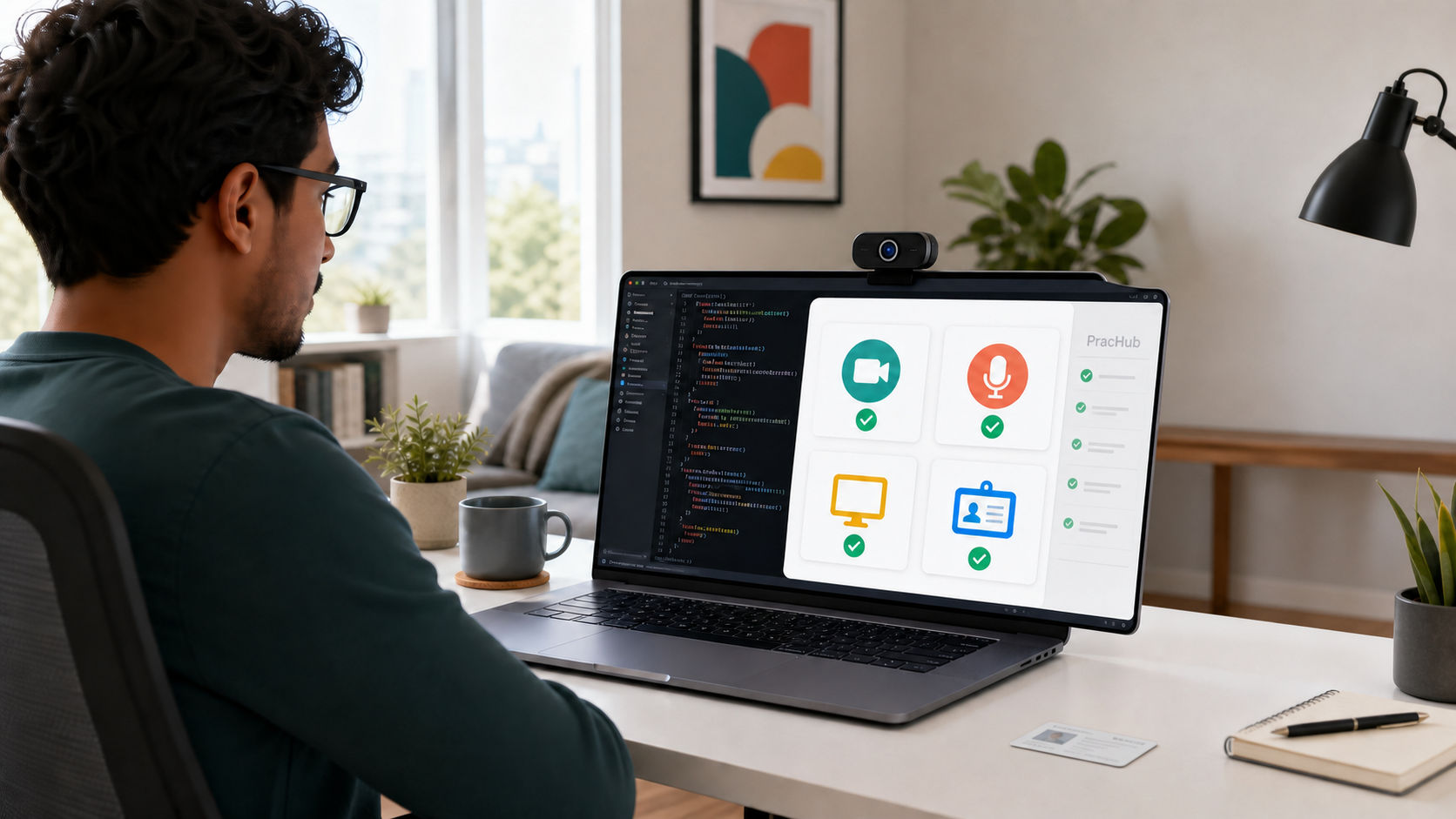
A proctored CodeSignal assessment may record your screen, camera, and microphone and verify your photo ID.
Quick Answer: What Does CodeSignal Record?
When proctoring is enabled, CodeSignal asks you to share your camera, microphone, and screen for the assessment session. You also take a photo of your face and provide a valid government-issued photo ID for identity verification.
Your assessment invitation or CodeSignal Assessment Hub should indicate whether proctoring is required. A custom assessment can use different settings, so the rules displayed before your test are more important than another candidate's experience.
| Candidate question | Short answer |
|---|---|
| Does CodeSignal record your screen? | Yes, during a proctored assessment. |
| Does it use your camera and microphone? | Yes, when proctoring is enabled. |
| Does CodeSignal require ID? | Proctored sessions can require a valid government-issued photo ID. |
| Is every assessment proctored? | No. The employer and assessment configuration determine this. |
| Does proctoring affect your coding score? | No. CodeSignal says scoring is calculated separately. |
How CodeSignal Proctoring Works in 2026
Before a proctored assessment begins, CodeSignal runs a setup flow. It can check browser compatibility and network quality, request video and audio permissions, ask you to share your entire screen, capture a face photo, and collect a photo of your ID.
The assessment timer does not begin while you complete these setup steps. Do not rush through them. A blurry ID photo or incorrect screen-share selection can create a verification problem that has nothing to do with your coding ability.
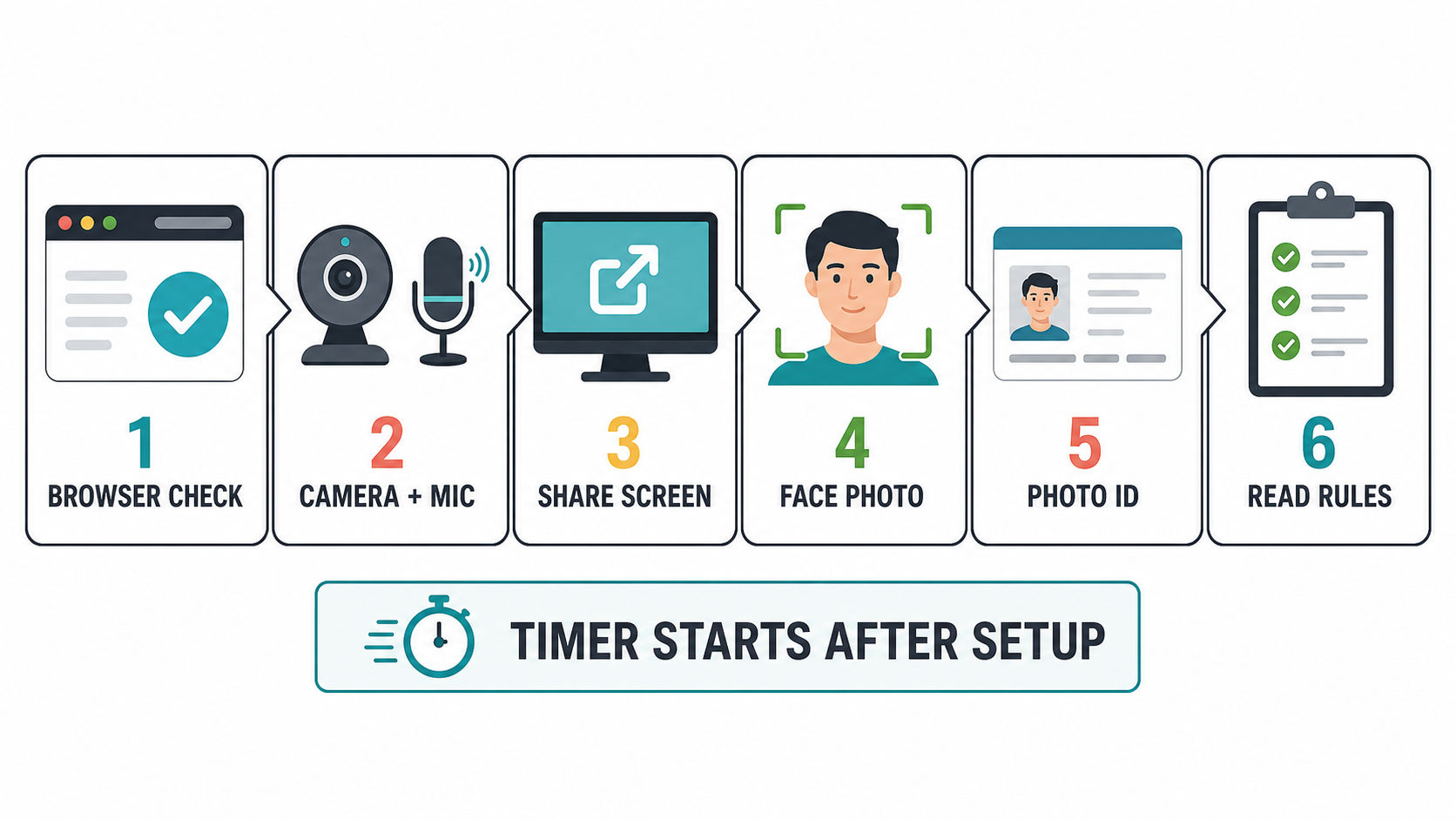
The setup happens before the assessment timer starts.
Camera and Microphone
For a proctored session, expect your camera and microphone to remain shared for the duration of the evaluation. Position your camera so your face is clearly visible, use a quiet space, and confirm that another application is not already controlling your microphone.
Screen Sharing and Recording
CodeSignal's current candidate instructions tell users to share the entire screen, not one browser tab. Its support documentation also states that the screen is recorded during a proctored session.
Close unrelated tabs, browser windows, and applications before you begin. This protects your privacy, prevents notifications from interrupting you, and makes it easier to follow the assessment rules.
Photo and ID Verification
Your ID should be government-issued, unexpired, and show your full name and photo. CodeSignal says the expiration date must also be visible. You may redact other information if you prefer, as long as the required fields remain readable.
If your preferred name differs from your ID, or you do not have a standard government-issued photo ID, contact CodeSignal Support before the assessment. Its current guidance allows candidates to request an accommodation or provide an alternative form of identification.
Does CodeSignal Detect Tab Switching?
A proctored assessment records the screen, and CodeSignal instructs candidates to close unrelated tabs, windows, and applications. That means leaving the assessment to open another resource may be visible during review and may violate the rules shown for your session.
CodeSignal's public candidate documentation does not establish a universal rule that one accidental tab switch automatically fails every assessment. It also does not publish a safe number of switches. The correct approach is to remain in the assessment and use only resources explicitly permitted by the on-screen rules.
Do not rely on claims about invisible overlays, second devices, incognito mode, or supposed detection thresholds. They are not a preparation strategy, and using unauthorized assistance can turn a strong coding result into an unverified session.
What Does the Employer See?
CodeSignal's proctoring team reviews the submitted identity information and session recording. The employer can receive your assessment result and a verification decision or status.
According to CodeSignal's candidate-facing documentation, the company does not receive your raw photo ID or proctoring recording. CodeSignal says identification and proctoring data is reviewed for verification, stored temporarily, and deleted within 15 days.
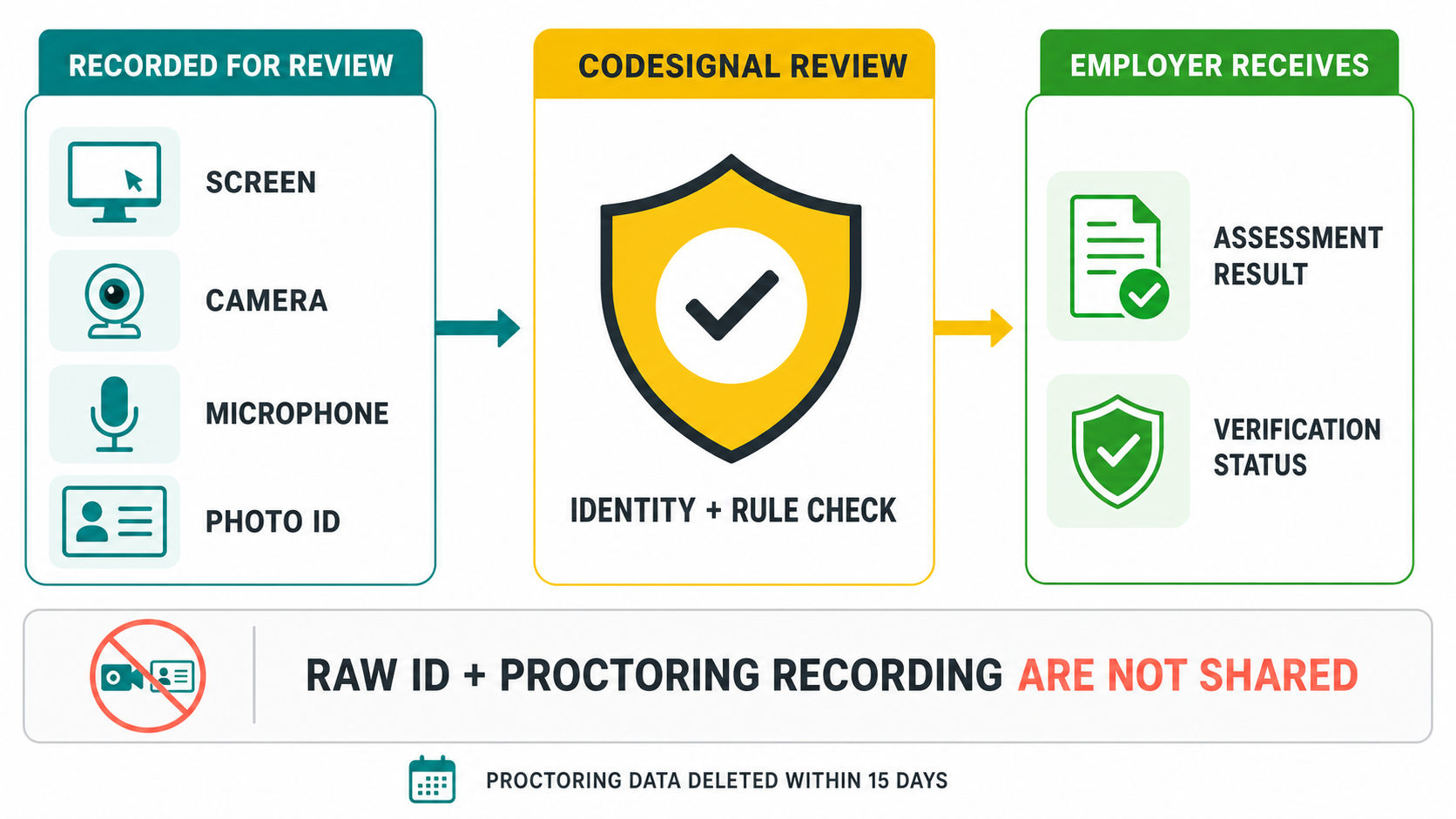
CodeSignal reviews the proctoring data; the employer receives the assessment result and verification outcome.
Verification is separate from scoring. A correct solution still earns its calculated score, but an employer may treat an unverified result differently. CodeSignal's employer documentation says verification commonly takes one to three business days.
A Practical Pre-Test Setup
Most proctoring problems are easier to prevent than to fix after the assessment. Use the same computer, browser, camera, microphone, and network you plan to use on test day.
| When | What to do |
|---|---|
| One day before | Open the invitation, confirm whether it is proctored, test the CodeSignal environment, and locate your valid photo ID. |
| Fifteen minutes before | Close unrelated apps and tabs, silence notifications, connect power, check lighting, and use a stable private network. |
| During setup | Share the entire screen, check the camera preview, submit a clear face photo, and make sure the required ID details are readable. |
| During the test | Follow the displayed rules, stay in the assessment, submit working progress, and use only expressly approved resources. |
CodeSignal recommends a current desktop browser and a laptop or desktop computer for proctored assessments. Mobile devices and tablets are not supported for that workflow.
What If Camera, Screen Share, or ID Setup Fails?
If screen sharing fails, first confirm that the browser has screen-recording permission and that you selected the entire screen. CodeSignal recommends refreshing the browser and trying the setup again when the share does not initialize.
If the camera or microphone is unavailable, close video-call and recording applications that may already be using it. Fix permissions before starting the timed portion. For an ID or name issue, contact CodeSignal Support rather than submitting information that will not match.
When a persistent technical problem prevents you from starting or finishing, document the error and contact the recruiter promptly. The hiring company decides whether to issue another invitation.
Prepare So You Do Not Need Another Tab
The best response to strict proctoring is not learning how monitoring works around the edges. It is becoming comfortable enough with the expected problems that you can stay focused inside the assessment.
Start with PracHub's company-specific interview prep. Choose the employer and role, attempt relevant questions under a timer, and explain your solution before reading the written answer. After each attempt, test boundary cases and review why any hidden-style cases might fail before you read the solution.
For the wider CodeSignal format, scoring system, and time strategy, continue with the CodeSignal OA Guide. Passing the assessment is only one stage, so candidates targeting mid-level or senior roles should also prepare system design questions and behavioral and leadership interviews.
Frequently Asked Questions
Does CodeSignal always record your screen?
No. Screen recording applies when the assessment is proctored. Check the invitation and Assessment Hub before starting because employers can use different assessment configurations.
Does the CodeSignal camera stay on for the whole test?
For a proctored assessment, CodeSignal asks candidates to share the camera, microphone, and screen for the duration of the evaluation. Keep your face visible and follow the exact rules shown during setup.
Does CodeSignal require a government ID?
Proctored assessments can require an unexpired government-issued photo ID showing your full name, photo, and expiration date. Contact CodeSignal Support before the test if you need an accommodation or alternative ID.
Can employers watch the CodeSignal recording?
CodeSignal says its proctoring team reviews the identity and session data. Its candidate documentation states that raw identification and proctoring data is not shared with the requesting company; the employer receives the assessment result and verification outcome.
How long does CodeSignal verification take?
CodeSignal's current employer documentation says verified results are generally available after review within one to three business days. Timing can vary, so contact the requesting company if your result remains unresolved.
Does proctoring lower your CodeSignal score?
No. CodeSignal states that proctoring does not affect the automatically calculated assessment score. Verification is a separate integrity decision, although an employer may require a verified result.
Final Takeaway
CodeSignal does record your screen, camera, and microphone when you take a proctored assessment. It may also collect a face photo and government-issued ID, while unproctored assessments can use a different setup.
Read the rules shown for your invitation, complete the system check early, and prepare to solve without outside help. Start with PracHub's real interview questions and written solutions, practice in one focused window, and arrive at the assessment ready to spend your attention on the code rather than the camera.
Sources
This guide was checked against CodeSignal's current documentation on how proctoring works, GCA rules and setup, screen-sharing troubleshooting, supported browsers and devices, and verification after a proctored assessment.
Comments (0)