Generative AI System Design Interviews: How to Design LLM Applications That Work in Production
Quick Overview
This resource is a comprehensive guide to generative AI system design interviews, covering how to design production-ready LLM applications beyond simple prompts and model calls. It explains how GenAI interviews differ from traditional system design and ML system design, then walks through the core areas candidates must understand: problem framing, AI task definition, data and context strategy, RAG, tools, memory, fine-tuning, orchestration, evaluation, safety, reliability, latency, and cost. It is designed for software engineers, machine learning engineers, AI engineers, data scientists, backend engineers, and technical candidates preparing for system design interviews involving LLMs, agents, enterprise search, copilots, customer-support assistants, document intelligence, and inference platforms. The guide is valuable because it gives candidates a practical 50-minute interview framework, highlights the signals interviewers look for, explains common mistakes, and helps readers develop the judgment needed to design GenAI systems that are useful, safe, scalable, observable, and cost-effective.
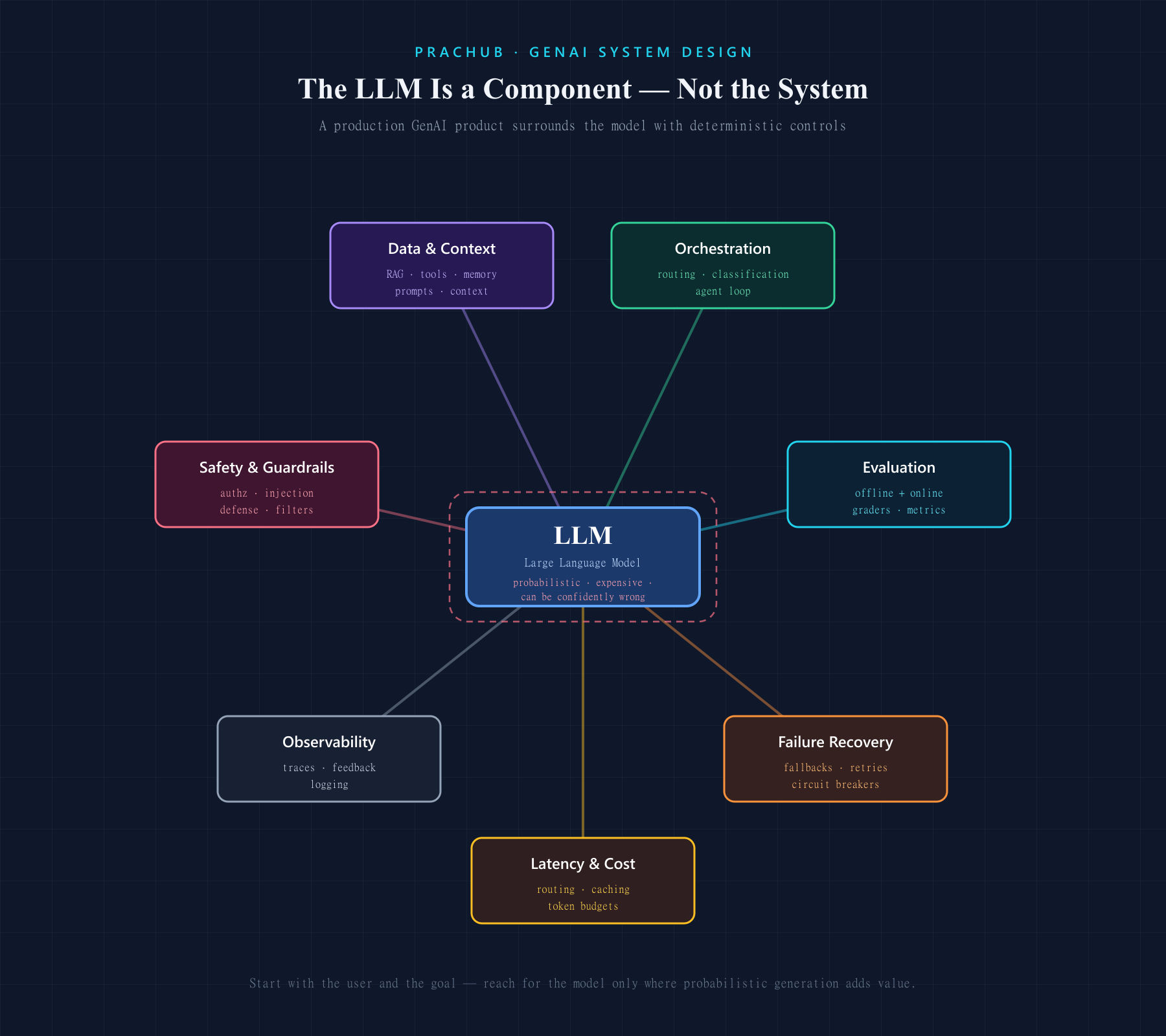
The biggest mistake in a generative AI system design interview is treating the large language model as the entire system.
A production GenAI product needs far more than a prompt and a model endpoint. It needs data and context pipelines, orchestration, evaluation, safety controls, observability, failure recovery, and a plan for controlling latency and cost. The LLM is an important component, but it is also probabilistic, expensive, and capable of producing confident mistakes.
That is what makes a GenAI system design interview different.
You are not only being asked whether an AI model can generate an answer. You are being asked whether you can build a product around that model that users can trust.
What Is a Generative AI System Design Interview?
A GenAI system design interview typically gives you an open-ended prompt such as:
- Design an AI customer-support assistant
- Design an LLM-powered enterprise search system
- Design a coding copilot
- Design an agent that can schedule meetings
- Design a document-processing platform for claims or invoices
- Design a text-to-image generation service
You will usually have about 35 to 60 minutes to define the problem, propose a high-level architecture, dive into one or two difficult components, and explain your trade-offs.
Traditional system design concerns still matter: APIs, storage, caching, queues, rate limiting, scalability, reliability, and monitoring. GenAI adds another layer of uncertainty:
- The output is open-ended rather than fixed
- Quality is difficult to measure with a single metric
- The same request may produce different responses
- Prompts and retrieved context can change model behavior
- Model calls may be slow and expensive
- Outputs may contain hallucinations, unsafe content, or sensitive data
- External model providers introduce rate limits and availability risks
- Agents may take real actions with real consequences
The interview is therefore testing two abilities at once: conventional systems thinking and practical judgment about probabilistic models.
How GenAI System Design Differs From Traditional ML System Design
Traditional machine learning systems often produce bounded outputs such as a score, label, prediction, or ranking. Their evaluation usually compares the prediction with a known target using metrics such as precision, recall, or error rate.
Generative systems create new content: text, code, images, audio, or video. Several outputs may all be valid, and an answer can be fluent without being correct. Evaluation often requires a combination of automatic tests, model-based grading, human review, user behavior, and safety analysis.
The design focus also changes.
A traditional ML interview may spend more time on feature engineering, training pipelines, feature stores, drift, and batch or online prediction. A GenAI interview is more likely to explore:
- Prompt and context construction
- Retrieval-augmented generation
- Model selection and routing
- Tool calling and agent orchestration
- Conversation or long-term memory
- Output validation and guardrails
- Offline and online evaluation
- Hallucination and prompt-injection risks
- Token usage, inference latency, and cost
The underlying distributed-systems fundamentals remain the same. The difference is that you must design around a component whose behavior cannot be fully specified in advance.
The Eight Signals Interviewers Are Looking For
1. Clear problem framing
“Design an AI assistant” is not a usable specification.
Before drawing the architecture, identify:
- Who the user is
- What task the user wants to complete
- What the system receives as input
- What a successful output looks like
- What data the system may access
- Whether it only recommends or can take actions
- What latency users will tolerate
- What level of incorrectness is acceptable
- What privacy, compliance, geographic, or device constraints apply
The business objective matters. An assistant that suggests marketing copy can tolerate more creativity and uncertainty than one extracting medication instructions from clinical notes.
End the framing phase with a prioritized goal:
“I’ll design for grounded answers over internal documents, with citations and strict access control. The first version will answer questions but will not modify company data.”
That statement narrows the design and exposes the most important constraints.
2. Correctly framing the AI task
Define the input and output modalities precisely.
For an enterprise search assistant:
- Input: a natural-language question, user identity, and conversation context
- Output: a concise answer with supporting citations from documents the user is authorized to view
Then decide which parts require generative behavior and which should remain deterministic.
The LLM may interpret the request and produce the final answer. Authentication, document permissions, billing, policy enforcement, and irreversible actions should not depend on free-form model judgment.
A strong design uses the model where flexibility is valuable and conventional software where predictability is required.
3. Data and context strategy
The model only sees the context you provide. That makes context design one of the most important parts of the system.
You should be able to choose among:
- Prompting: Best for instructions, formatting, and behavior that can fit within the context window
- RAG: Best when answers must use fresh, private, or source-backed information
- Tools: Best when the system needs structured data, computation, or external actions
- Memory: Useful when past interactions improve the current task, but requires relevance filtering and privacy controls
- Fine-tuning: Useful for stable behavioral or task patterns that prompting alone cannot deliver efficiently
These mechanisms solve different problems. RAG adds knowledge at inference time. Fine-tuning changes model behavior but does not automatically keep facts current. Tools provide authoritative data or execute operations. Memory preserves selected context across interactions.
Do not default to fine-tuning before explaining why prompting, retrieval, or tools are insufficient.
4. LLM-aware architecture
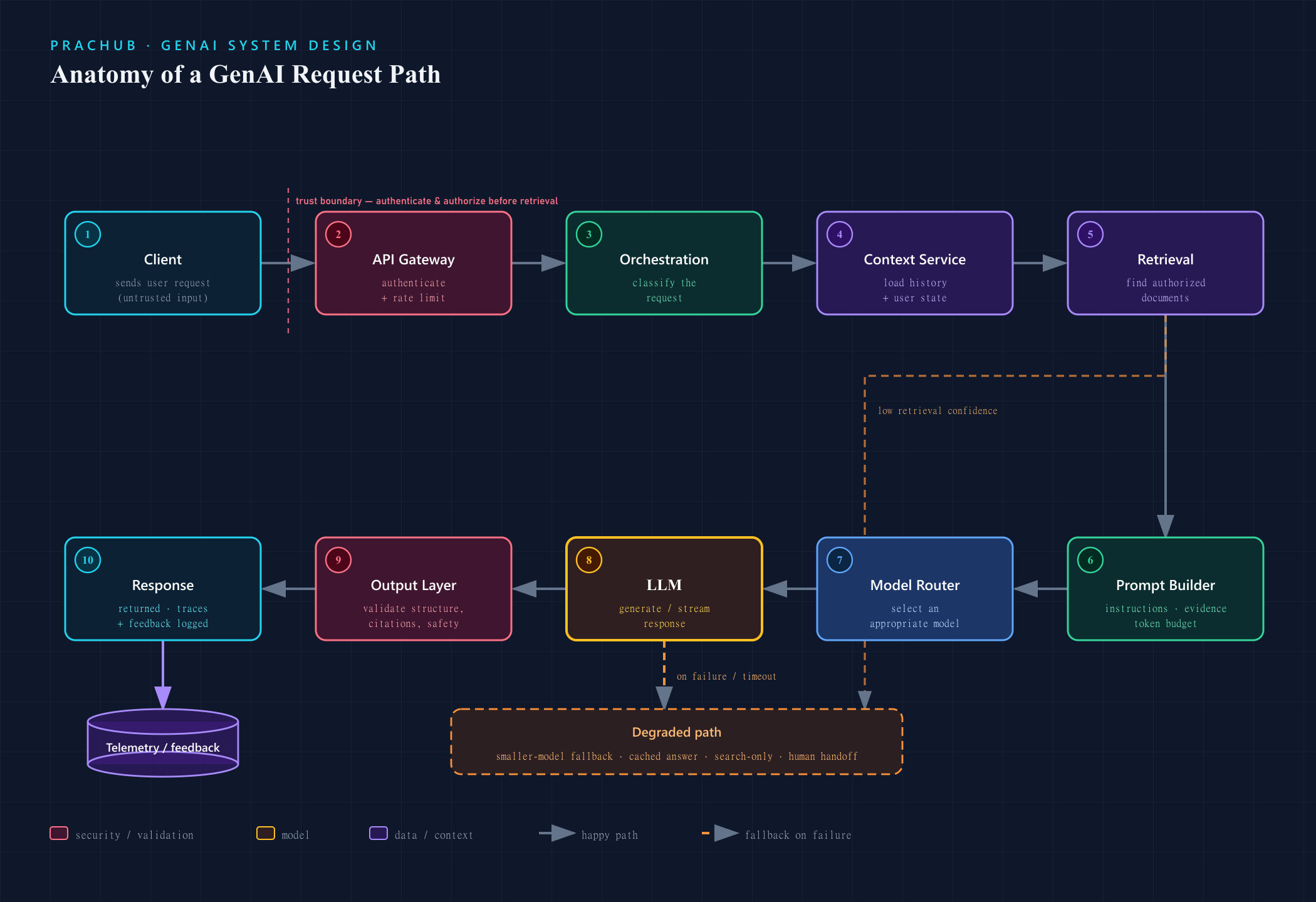
A typical request path might include:
- Client sends a user request
- API gateway authenticates the user and applies rate limits
- Orchestration service classifies the request
- Context service loads relevant history and user state
- Retrieval service finds authorized documents
- Prompt builder assembles instructions, evidence, and token budget
- Model router selects an appropriate model
- LLM generates or streams a response
- Output layer validates structure, citations, and safety
- Response is returned while traces and feedback signals are logged
The exact components depend on the requirements. A simple summarization feature may not need retrieval or an agent loop. An enterprise copilot may need both.
Your diagram should show more than the happy path. Identify trust boundaries, external dependencies, asynchronous work, and where the system can fall back when the primary model or retrieval layer fails.
5. Evaluation
Evaluation is not an optional final section. In a GenAI product, it is part of the architecture.
Start by converting the product objective into measurable dimensions. For a document assistant, you might measure:
- Answer correctness
- Faithfulness to retrieved evidence
- Citation accuracy
- Retrieval recall
- Completeness
- Refusal accuracy
- Safety-policy compliance
- P95 latency
- Cost per successful answer
- User task-completion rate
Use multiple evaluation layers.
Offline evaluationCreate a versioned dataset of representative and adversarial examples. Include normal requests, rare cases, multilingual inputs, malformed documents, permission boundaries, prompt-injection attempts, and questions the system should refuse.
Run this suite whenever you change the model, prompt, retriever, chunking strategy, safety policy, or orchestration logic.
Automated metrics are useful, but many GenAI tasks also require human review. LLM-based graders can increase coverage, but their own bias and inconsistency should be calibrated against expert judgments.
Online evaluationMeasure real product outcomes:
- Completion and abandonment rates
- Explicit user feedback
- Escalation or correction rate
- Regeneration frequency
- Citation clicks
- Retention
- Latency and error rate
- Cost per request
- Safety incidents
Do not optimize a proxy metric without explaining how it connects to the user’s goal. A chatbot can increase engagement by being verbose while making users less productive.
6. Safety, security, and privacy
GenAI creates new attack surfaces because instructions and data are often mixed together in the model context.
A production-ready answer should consider:
- Prompt injection in user input or retrieved documents
- Sensitive-data leakage
- Cross-tenant retrieval
- Unauthorized tool calls
- Excessive agent permissions
- Unsafe or policy-violating output
- Malicious file uploads
- Model-provider data retention
- Logging of private prompts or responses
Use defense in depth:
- Enforce authorization before retrieval, not after generation
- Separate trusted instructions from untrusted content
- Give tools scoped, short-lived credentials
- Validate tool parameters using deterministic code
- Require confirmation for sensitive or irreversible actions
- Filter input and output where appropriate
- Redact sensitive data before logging or external model calls
- Maintain audit trails for actions
- Test against adversarial prompts continuously
The model should never be the only security boundary.
7. Reliability and graceful degradation
The LLM, vector store, embedding service, tool APIs, and model provider can all fail independently.
Discuss:
- Timeouts and bounded retries
- Exponential backoff and jitter
- Circuit breakers
- Queueing and backpressure
- Idempotency for tool execution
- Provider failover
- Smaller-model fallback
- Cached or search-only responses
- Partial answers with clear uncertainty
- Dead-letter queues for asynchronous jobs
- Reconciliation after interrupted agent workflows
If an AI assistant cannot generate a complete answer, the best fallback may be to show relevant documents or transfer the user to a human. Reliability is not only about returning a 200 response; it is about preserving a useful and honest user experience.
8. Latency and cost judgment
LLM cost grows with traffic, model size, input tokens, output tokens, retrieval volume, and the number of model or tool calls per request.
Estimate:
- Peak requests per second
- Average input and output tokens
- Number of model calls per user request
- Model cost per token
- Retrieval and embedding costs
- GPU capacity if models are self-hosted
- Expected cache hit rate
Then optimize deliberately:
- Route simple requests to smaller models
- Reserve expensive models for complex or high-value tasks
- Limit context to relevant evidence
- Compress or summarize long histories
- Cache deterministic or repeated results where safe
- Batch offline workloads
- Stream output to improve perceived latency
- Set hard token and tool-call budgets
- Apply rate limits by user or plan
- Precompute embeddings and reusable context
Every optimization has a quality or complexity cost. A smaller model may be faster but less capable. Semantic caching can reduce spend but risks serving stale or inappropriate responses. Aggressive prompt compression can remove evidence the model needs.
Explain what you are optimizing and what you are willing to sacrifice.
A Practical 50-Minute GenAI System Design Framework
Use a framework to stay organized, but adapt it to the role and prompt. An infrastructure role may require more depth on inference and capacity. An applied-AI role may emphasize retrieval and evaluation. A research-oriented role may spend more time on model development and training.
Minutes 0–7: Clarify requirements
Define:
- User and business objective
- Primary use cases and exclusions
- Input and output modalities
- Available data
- Scale and latency target
- Quality and safety expectations
- Privacy and action permissions
- Cost constraints
State a clear scope before continuing.
Minutes 7–12: Frame the AI task and success criteria
Specify what the model should do, what deterministic services should do, and how success will be measured.
Choose initial quality, safety, latency, reliability, and business metrics. This prevents the architecture from becoming a collection of fashionable components without a measurable goal.
Minutes 12–22: Draw the high-level architecture
Trace the main request through:
- Client and API layer
- Authentication and rate limiting
- Orchestration
- Context and retrieval
- Model selection and inference
- Tools or external services
- Output validation
- Storage, telemetry, and feedback
Also mention the offline path for document ingestion, embeddings, evaluation datasets, prompt or model versioning, and deployment.
Minutes 22–37: Deep-dive into the hardest component
Choose the area that determines whether the design works.
For a RAG system:
- Document ingestion and deletion
- Chunking and metadata
- Embedding choice
- Hybrid retrieval and re-ranking
- Permission filtering
- Citation generation
- Freshness and index updates
For an agent:
- Tool schema and selection
- Planning loop
- State and memory
- Permission boundaries
- Idempotency
- Human approval
- Retry and reconciliation
For an inference platform:
- Model routing
- Batching
- Streaming
- KV-cache strategy
- GPU scheduling
- Autoscaling and warm-up
- Queue admission and load shedding
Go deep enough to show mechanics, not just component names.
Minutes 37–45: Evaluate and stress the system
Cover:
- Offline and online evaluation
- Hallucination and safety testing
- Prompt injection
- Provider or tool failure
- Traffic spikes
- Latency and cost limits
- Data deletion and privacy
- Observability and rollback
Walk through at least one failure scenario end to end.
Minutes 45–50: Summarize trade-offs and next steps
Return to the original requirements. State:
- What the design optimizes
- Its largest remaining risk
- The most important trade-off
- What you would test before launch
- How you would improve the next version
Choosing Between Prompting, RAG, Tools, Memory, and Fine-Tuning
This decision appears in many GenAI interviews.
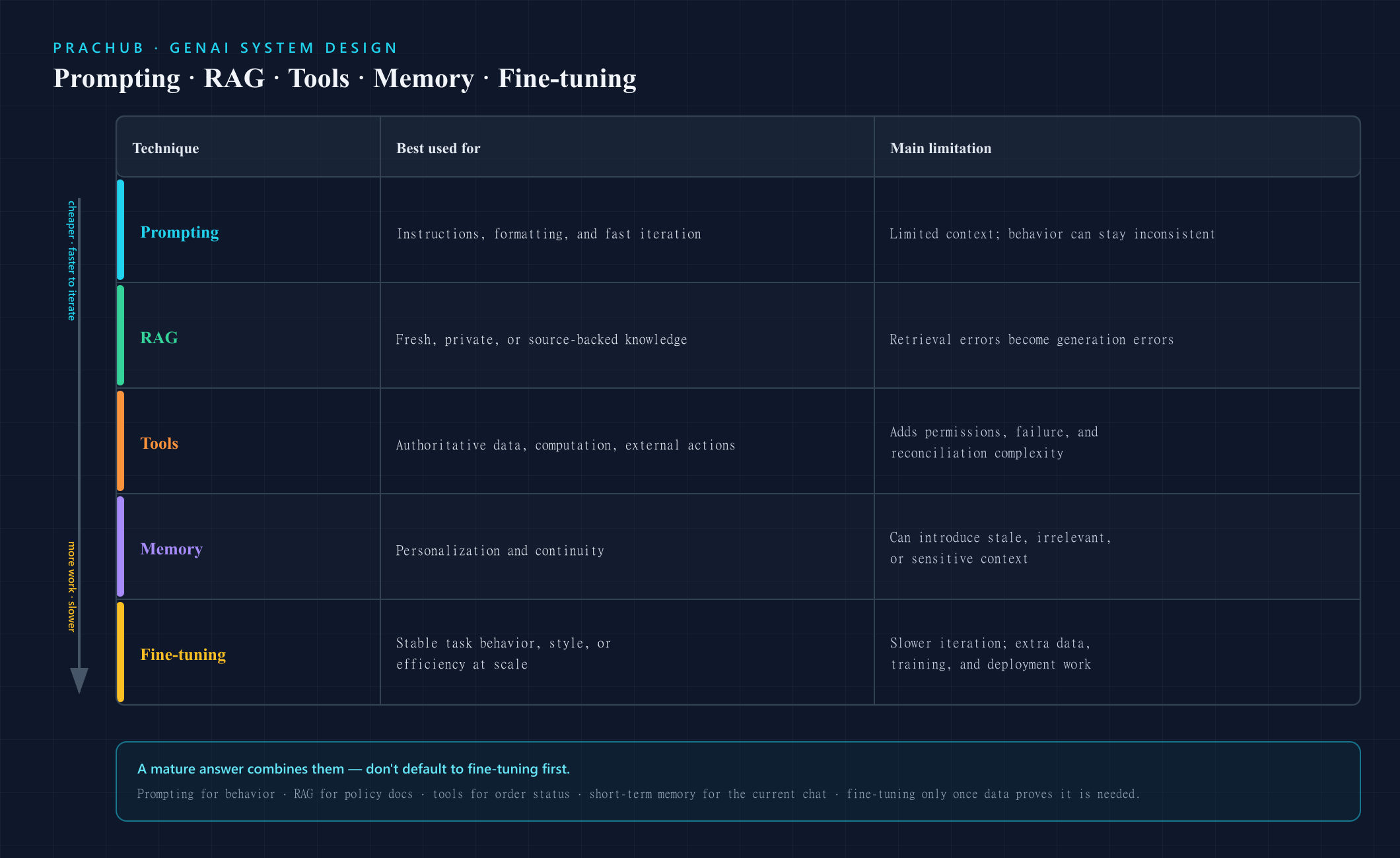
| Technique | Best used for | Main limitation |
|---|---|---|
| Prompting | Instructions, formatting, and fast iteration | Context is limited and behavior can remain inconsistent |
| RAG | Fresh, private, or source-backed knowledge | Retrieval errors become generation errors |
| Tools | Authoritative data, computation, and external actions | Adds permissions, failure, and reconciliation complexity |
| Memory | Personalization and continuity | Can introduce stale, irrelevant, or sensitive context |
| Fine-tuning | Stable task behavior, style, or efficiency at scale | Slower iteration and additional data, training, and deployment work |
A mature answer often combines them. For example, a support assistant might use prompting for behavior, RAG for policy documents, tools for order status, short-term memory for the current conversation, and fine-tuning only after enough production data proves that a recurring behavior cannot be solved more simply.
Common GenAI System Design Questions
Practice across different system categories:
LLM applications
- Design ChatGPT
- Design a customer-support assistant
- Design a coding copilot
- Design an AI writing assistant
Retrieval and document intelligence
- Design an enterprise search assistant
- Design a RAG system for legal or medical documents
- Design an AI pipeline for processing PDFs, emails, and images
- Design a conversational product-recommendation system
Agents and tool use
- Design an AI agent that schedules meetings
- Design an agent that resolves customer refunds
- Design a research agent that browses and cites sources
- Design a multi-step workflow agent with human approval
Model and inference systems
- Design an LLM inference API
- Design a text-to-image generation platform
- Design an inference-batching service
- Design a model router serving multiple models
The value of these prompts is not memorizing their diagrams. Each one forces you to reason about a different combination of quality, data, actions, safety, and infrastructure.
Common Mistakes That Cost Candidates
Treating the model as a database
An LLM can generate plausible language without authoritative knowledge. Use retrieval, tools, citations, or deterministic validation when correctness matters.
Starting with fine-tuning
Fine-tuning is not a universal solution for freshness, hallucination, or access to private data. Start with the least expensive mechanism that addresses the actual requirement.
Adding RAG without designing retrieval
“Use a vector database” is not enough. Discuss ingestion, chunking, metadata, ranking, permissions, freshness, citations, and deletion.
Ignoring evaluation
If you cannot define how quality and safety will be measured, you cannot know whether the system improved or regressed.
Designing only the happy path
Model providers throttle requests. Tools time out. Retrieved documents contain malicious instructions. Agents repeat actions. Explain how the product responds.
Ignoring token economics
Long prompts, large models, and repeated agent loops can make an otherwise elegant system financially unusable.
Using AI jargon without decisions
Listing “RAG, agents, vector database, fine-tuning” does not demonstrate judgment. Tie every component to a requirement and a trade-off.
Overdesigning before confirming the scope
A single-turn summarization tool does not need the same architecture as a multi-tenant enterprise agent. Start simple and add complexity at proven pressure points.
How to Prepare
Master the distributed-systems foundation
Review APIs, databases, caching, queues, streaming, rate limiting, backpressure, partitioning, multi-region reliability, and observability. GenAI does not replace these fundamentals.
Learn the GenAI application patterns
Be comfortable with:
- Tokenization and context limits
- Prompt construction
- Structured output and function calling
- Embeddings and retrieval
- Re-ranking and citations
- Agent loops and tool permissions
- Memory design
- Model routing
- Streaming and batching
- Guardrails and prompt-injection defenses
- Offline and online evaluation
Practice trade-offs, not definitions
Do not stop at explaining what RAG or fine-tuning is. Practice answering:
- When would RAG be worse than direct search?
- When is a smaller model sufficient?
- What should happen if retrieval confidence is low?
- When should the system ask a clarifying question?
- Which agent actions require human approval?
- How would you detect a prompt regression?
- What would you remove if the budget were cut in half?
Practice out loud
Complete full sessions while drawing and explaining your reasoning. Ask a peer to change a requirement, challenge your model choice, introduce a provider outage, or question your evaluation metric.
Use PracHub to find company- and role-specific interview questions, then apply the same framework across different prompts. The goal is to build adaptable judgment rather than memorize one architecture.
Final Takeaway
The strongest GenAI system design answers do not put the LLM at the center of every decision.
They start with the user and the product goal. They use the model only where probabilistic generation adds value, surround it with deterministic controls, ground it with the right data, measure its behavior, and prepare for the ways it can fail.
A convincing answer should show that your system can produce useful output—and that it can do so safely, reliably, observably, and at a sustainable cost.
That is the difference between demonstrating familiarity with generative AI and demonstrating that you can ship it.
Comments (0)