HackerRank Data Science Assessment: Notebooks, CSV Outputs, and Submission Checks
Quick Overview
A practical HackerRank Data Science project guide covering notebook state, required CSV files, prediction alignment, reproducibility, and submission validation.
A HackerRank Data Science assessment can go wrong after the analysis is finished: the notebook displays sensible predictions, but the required CSV is missing, its columns are wrong, or its rows no longer match the test records. Prepare to deliver a file that can be evaluated, as well as code that explains how you produced it.
Official platform guidance, checked September 8, 2026: HackerRank's current Data Science Projects documentation describes an integrated VS Code IDE with notebook support. Candidates can run individual cells or use Run All, then save their answer and finalize the test. Older Jupyter-only walkthroughs may not match the interface you receive. Candidate guide
This article focuses on notebook execution and output delivery. The examples are original practice exercises, not assessment questions. Use PracHub's Data Scientist questions for complementary modeling and data reasoning.
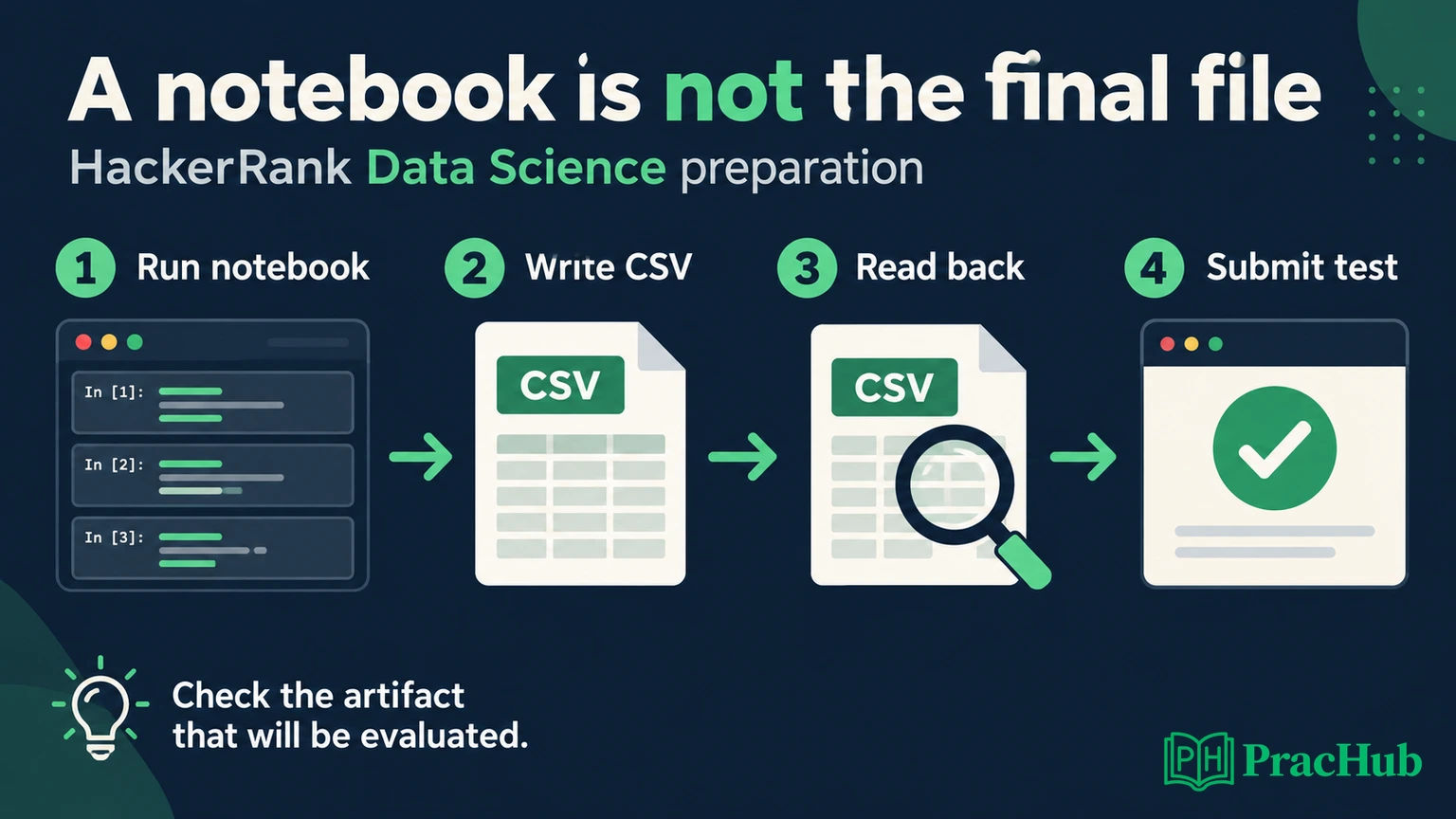
Identify the required deliverables before exploring the data
Official capability: HackerRank lets question authors configure automatic or manual evaluation. For supported automatic scoring, authors specify a candidate CSV filename, expected result, sample submission, and scoring configuration. This means the output contract belongs to the particular question. There is no universal filename or metric you should memorize. Data Science question configuration
Read the problem statement and inspect the supplied project. Identify which files contain training data, which contain evaluation inputs, and whether a sample submission exists. Write down the required output path, column names, value types, and row relationship before selecting a model.
For a prediction task, determine whether the output contains labels, probabilities, or numeric estimates. If the required value is a positive-class probability, a column of hard labels may be syntactically valid while answering the wrong question. If IDs are required, establish whether their order must match an input or template.
Also identify any notebook explanation, chart, or additional file requested. A model file alone does not replace a CSV; a CSV alone does not replace an explicitly requested analysis. Build the smallest complete deliverable first, then improve its quality within the time available.
Keep three kinds of notebook state separate
A notebook session contains more than the visible cells. There is the saved notebook document, the running kernel's memory, and any files written to disk. These can disagree without an obvious warning.
Technical background: Jupyter documents notebooks as files containing code, text, and outputs, with computation handled by a kernel. This is why a saved output can remain visible even when the variables needed to regenerate it are absent from a fresh session. Jupyter notebook documentation
Original failure example: An early cell defines features with columns A and B. Later, an exploratory cell adds C. You train a model using A, B, and C, then delete the exploratory cell without rerunning the notebook. The current kernel still holds the modified object. A clean run constructs only A and B and behaves differently.
The problem is an undocumented dependency, not a mysterious model failure. Keep the main path in order: load inputs, define preprocessing, fit or load the model, generate predictions, construct the required output, and validate the exported file.
During practice, restart the kernel and run the notebook from top to bottom. During a timed test, plan enough time for that check if runtime permits. Run All in an already populated kernel is useful, but it does not necessarily expose every dependence on leftover state.
Build an end-to-end baseline before tuning
Your first complete version should answer three operational questions: can the notebook read the supplied inputs, can it produce a prediction for every required record, and can it write the requested artifact?
For an original classification rehearsal, a simple baseline can establish that the pipeline works. Record the metric on a legitimate validation split, then inspect the output schema. Do not spend the entire session tuning a model before checking whether the export cell runs.
Keep training and evaluation transformations consistent. Scikit-learn's guidance recommends fitting preprocessing on training data and applying the learned transformation to other splits; pipelines help prevent leakage and inconsistent preprocessing. This is preparation guidance, not a claim that every HackerRank task requires scikit-learn. Common pitfalls
Set relevant random seeds where supported, and record the input files and important configuration. A seed improves repeatability but does not guarantee identical results across all hardware, package versions, or parallel algorithms. The stronger goal is a clear procedure with no hidden manual step between prediction and export.
If a feature step drops rows, revisit it before generating the submission. Quietly losing evaluation records can produce a shorter file, and filling the gap with arbitrary predictions hides the defect rather than resolving the contract.
Worked example: correct predictions attached to the wrong IDs
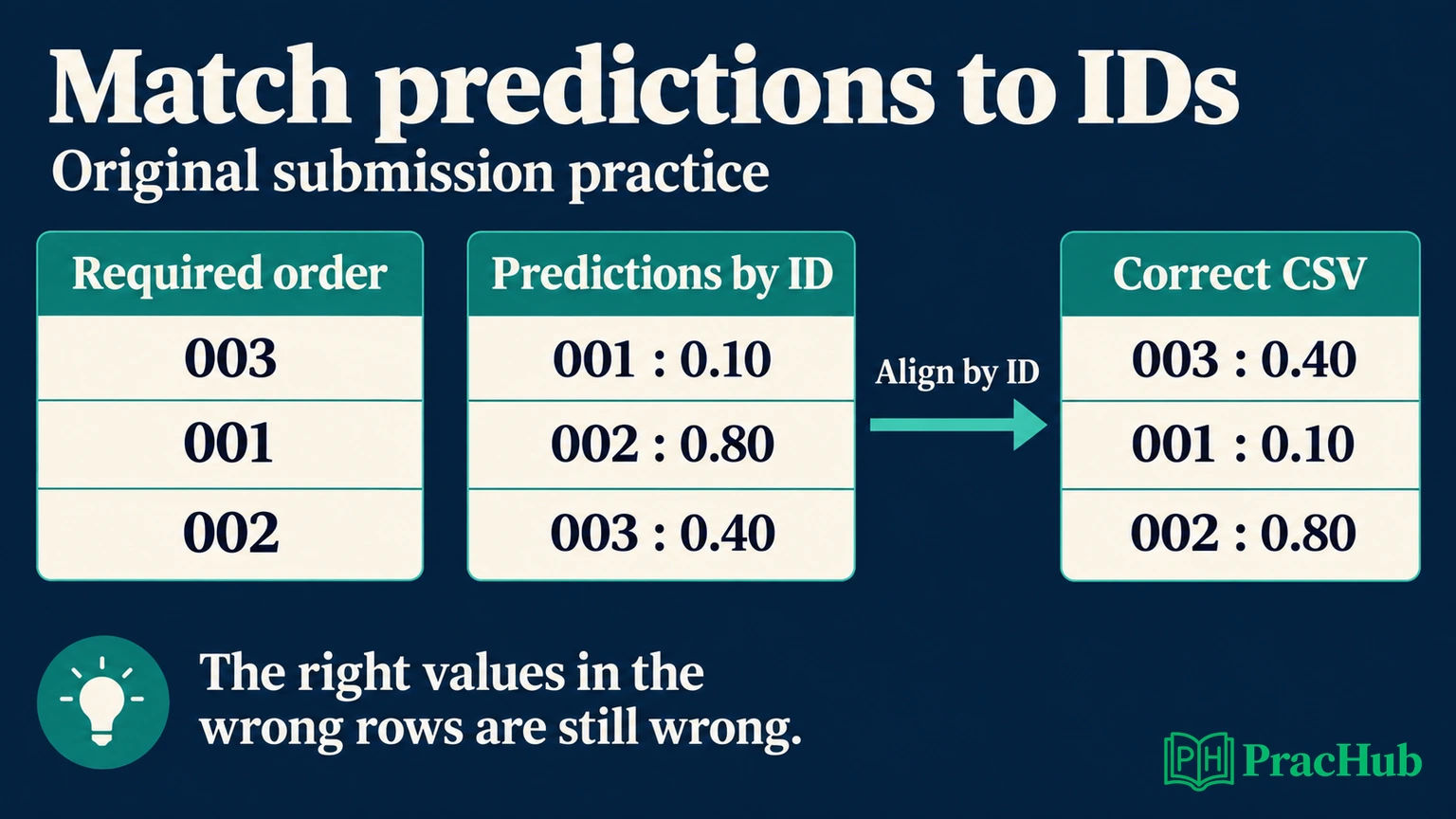
Original exercise: The required test-record order is 003, 001, 002. Your model outputs were collected in another order: 001 has probability 0.10, 002 has 0.80, and 003 has 0.40. All three numbers are valid probabilities, but attaching them by position produces incorrect ID-value pairs.
The correct submission pairs are 003 → 0.40, 001 → 0.10, and 002 → 0.80. Checking only the row count, probability range, or average cannot identify this permutation: the same three values are present in both files.
Carry a stable record identifier through transformations. If you sort, filter, join, or batch the test data, retain enough information to restore the required relationship. When an assignment omits IDs from the output, you still need to preserve its required row order internally.
The following code assumes unique, nonempty IDs and one probability per ID. It deliberately checks both missing and unexpected records. The names and values are illustrative; replace them with the actual question's contract.
import pandas as pd

required_ids = ["003", "001", "002"]
predictions = pd.Series(
    [0.10, 0.80, 0.40],
    index=["001", "002", "003"],
)
assert all(required_ids)
assert len(required_ids) == len(set(required_ids))
assert predictions.index.is_unique
assert set(predictions.index) == set(required_ids)

ordered = predictions.reindex(required_ids)
assert ordered.notna().all()
assert ordered.between(0, 1).all()
submission = pd.DataFrame({
    "record_id": required_ids,
    "probability": ordered.to_numpy(),
})
The explicit array conversion keeps pandas from accidentally aligning the prediction Series by its old index during DataFrame construction. This example establishes structural and identity correctness, not the quality of a trained model or whether the probability refers to the right target class.
Export the file, then inspect what was actually written
A displayed DataFrame is not a saved CSV. Write the exact requested filename in the required location, then reopen that path. Check the file on disk rather than assuming that the export used the object you meant to save.
Documented pandas behavior: DataFrame.to_csv writes the row index by default. Use index=False when the contract does not include that index. Otherwise an extra column can appear in the artifact even though the displayed data columns looked correct. CSV export documentation
Here is a readback check for the original two-column exercise. submission.csv is only this exercise's filename; the actual assessment may require a different path.
from pathlib import Path

output_path = Path("submission.csv")
submission.to_csv(output_path, index=False)
assert output_path.is_file()
assert output_path.stat().st_size > 0

saved = pd.read_csv(
    output_path,
    dtype={"record_id": "string"},
)
assert saved.columns.tolist() == [
    "record_id", "probability"
]
assert saved["record_id"].tolist() == required_ids
assert saved["probability"].notna().all()
assert saved["probability"].between(0, 1).all()
Reading the ID as text preserves leading zeros in this example. Pandas exposes dtype and missing-value options for CSV imports; select them to match your schema rather than relying entirely on inference. CSV import documentation
The checks are intentionally scoped. They would need different value constraints for a regression output, different columns for a multiclass task, or a different ordering check if the prompt specifies another convention. For the known toy values, also compare the saved probabilities with 0.40, 0.10, and 0.80 using a suitable numeric tolerance.
Diagnose output failures before changing the model
A submission problem can belong to a different layer from model quality. Locate that layer before restarting expensive training.
| Observed problem | First check |
|---|---|
| Required CSV is missing | Did the export cell finish, and does its path match the required location? |
| An unexpected first column appears | Was the DataFrame index exported? |
| File has the correct number of rows but wrong results | Did sorting or joining break prediction-to-record alignment? |
| Output contains missing values | Did preprocessing drop records or did a lookup fail? |
| A fresh run fails after earlier success | Does a cell depend on hidden kernel state or an unsaved edit? |
Inspect the first exception in execution order. A later missing-file error may simply mean training failed earlier and the export cell never ran. Repeatedly renaming the file will not repair that upstream failure.
Conversely, a schema warning is not evidence that you need a more sophisticated estimator. Fix the filename, column, or value-type mismatch first. Separating these causes keeps the final minutes focused on changes that can make the existing work evaluable.
Understand the platform's validation and final submission
Official checks: HackerRank documents checks for file presence, filename, column names, and column data types. Its candidate guide warns that proceeding despite validation failures can leave a solution unscorable. Submission validation
Treat a successful format check as one layer of evidence. It does not establish good predictive performance, absence of leakage, or correct row-to-prediction mapping. Your own checks should address the parts of the contract that a generic validator may not establish.
Official sequence: Save & Proceed saves the answer and moves onward or returns to the test home; Submit Test finalizes the test. The guide also describes Modify for edits before the test ends. Saving the notebook and finalizing the assessment are therefore distinct actions. Candidate workflow
Read any validation message before deciding what to fix. After a correction, rerun the necessary cells, regenerate the CSV, and inspect the new file. A repaired notebook can still leave an older export on disk if you forget that last step.
Rehearse a clean handoff under realistic limits
Use a small public or synthetic dataset for a complete rehearsal. Start from a fresh session, follow the notebook in order, and produce a file that another run can recreate. Do not practice only the model-fitting cell.
Budget for the full chain, including loading, preprocessing, prediction, export, and readback. If training takes several minutes, stop experimenting early enough to finish that chain. There is no universal HackerRank Data Science timer established by these platform pages; use your invitation's actual limit.
Document the choices a reviewer needs: target definition, split strategy, preprocessing, baseline, metric, and known limitations. Keep comments tied to decisions. A long narrative cannot compensate for missing code or a mismatched output file, but concise explanations can make a working solution easier to evaluate.
Five practice questions for reliable data-science delivery
These PracHub questions provide broader preparation, not actual HackerRank assessment prompts. Use them to practice a specific stage of the notebook-to-artifact workflow.
| PracHub question | Delivery skill to practice |
|---|---|
| Construct a Churn-Prediction Pipeline Using Scikit-Learn | Keep preprocessing, fitting, and prediction in one reproducible path. |
| Perform no-intercept linear regression from two datasets | Verify feature-target alignment before interpreting results. |
| Illustrate SQL Join Results with Duplicate Keys | Predict when a join can duplicate evaluation records. |
| Implement a Text-Embedding Recommender Training Pipeline | Trace IDs and preprocessing through a saved inference artifact. |
| Decide standardization, sparse numerics, correlated features | Keep learned transformations inside the training boundary. |
Start with one Data Scientist practice question, then add an explicit output contract to your solution. Finish by reopening the generated file and checking its IDs, columns, and values. That final verification connects the analysis you intended to deliver with the artifact that actually exists.
Sources and Further Reading
- HackerRank: Answer Data Science Questions — current candidate environment, notebook controls, validation, and submission sequence.
- HackerRank: Data Science Questions — employer configuration of project outputs and scoring; capabilities vary by question.
- Jupyter Notebook documentation — notebook documents and kernel execution.
- pandas DataFrame.to_csv — CSV export and index behavior.
- pandas read_csv — explicit import types and parsing options.
- scikit-learn common pitfalls — consistent preprocessing and leakage prevention.
Comments (0)