Harver Assessment Guide 2026: Cognitive Tests, Virtual Interviews, Proctoring, and Results
Quick Overview
A current candidate guide to Harver cognitive tests, asynchronous virtual interviews, optional proctoring, employer reports, and result visibility.
The phrase "Harver assessment" does not describe one fixed exam. Harver is a configurable pre-employment platform: an employer may combine cognitive subtests, work simulations, questionnaires, language or job-knowledge tasks, and a recorded virtual interview. The invitation controls which modules you receive, how they are timed, and whether monitoring is enabled.
Harver's current documentation also draws useful privacy boundaries. Its optional proctoring can take periodic photos, block copy-paste, and detect focus changes, but it is not automatically active for every vacancy. Its asynchronous video module records the answers you submit, while Harver says that module does not use facial or micro-expression analysis. Use PracHub behavioral and leadership questions to rehearse concise examples, then let your own invitation control the final rules.

Harver Assessment: Quick Answers
The safest way to understand a Harver invitation is to separate platform capabilities from employer choices.
| Candidate question | Evidence-based answer |
|---|---|
| Is there one standard Harver test? | No. Employers configure modules for a vacancy, so two Harver invitations can contain different activities. |
| What cognitive tests can appear? | Harver currently lists perceptual speed, verbal, spatial, logical, and mathematical reasoning subtests. |
| Is the virtual interview live? | Harver's assessment module is a one-way asynchronous interview. A separate live interview can exist elsewhere in the process. |
| Does Harver record your screen? | Current proctoring documentation describes focus-change detection, periodic photos, and copy-paste blocking, not a universal continuous screen recording. |
| Does AI judge your video face or expressions? | Harver says its Virtual Interview module does not use automated decision-making or facial or micro-expression analysis. |
| Will you see a score? | Only if the employer enables candidate result access or sends feedback. Recruiter-facing reports can contain more information. |
What Is a Harver Assessment?
A Harver assessment is a vacancy-specific sequence of pre-employment modules selected by the hiring organization. Harver supplies the platform, assessment library, candidate journey, and reporting tools; the employer chooses the components and advancement rules.
That distinction explains conflicting online accounts. One candidate may complete numerical reasoning and typing. Another may receive personality, situational judgment, spoken-language, or job-knowledge modules. A third may encounter a recorded video response after the tests. A report from another company can help you recognize a format, but it cannot establish your exact sequence.
Before practicing, make a short inventory from your invitation: activity names, deadline and time zone, estimated duration, device requirements, permitted aids, camera or microphone prompts, and whether the assessment must be finished in one sitting. If a rule is not stated, do not fill the gap with a rumor.
Harver Cognitive Tests: Five Modular Abilities
Harver's current cognitive assessment page lists five subtests and says each can take about 5-15 minutes. Because the system is modular, receiving Harver does not mean you will receive all five.
| Cognitive subtest | What Harver says it measures | Practical preparation |
|---|---|---|
| Perceptual speed | Ordering, sorting, checking, and verifying information | Compare rows or symbols accurately; use a fixed scan direction. |
| Verbal reasoning | Discovering and applying logical rules among verbal concepts | Work from the stated relationship, not outside knowledge. |
| Spatial ability | Visualizing components and spatial relationships | Track rotation, reflection, position, and how parts form a whole. |
| Logical reasoning | Solving problems with limited or missing information | Test the simplest rule against every example before adding complexity. |
| Mathematical reasoning | Number sequences, abstract thinking, and numerical insight | Name the operation, estimate the range, calculate, and check direction. |
Accuracy matters, but so does pacing. If one item is consuming the time needed for several answerable items, make the best rule-based choice available and move on when the interface permits it. Keep scratch work compact: label the target quantity, units, and one or two candidate rules rather than rewriting the whole prompt.
Harver's cognitive results documentation describes results on a norm-referenced 0-100% scale. It identifies 50% as average and says most people score between 30% and 70%. That does not make 50% a universal pass mark. The employer can interpret the module inside a vacancy-specific matching model and alongside other application evidence.
How the Harver Virtual Interview Works
Harver's Virtual Interview module is an asynchronous, one-way video interview. The employer can present a written question, a prerecorded question, or both; you then prepare and record a response for later review.
The current module documentation says employers can configure a maximum response time and whether candidates may re-record. Do not assume you will have unlimited preparation or a second attempt. Use the practice or setup step to verify the camera, microphone, framing, and upload path before a scored response begins.
For behavioral questions, use a compact structure:
- State the situation and the decision that mattered.
- Name your responsibility rather than describing only what the team did.
- Explain the action, evidence, and trade-off.
- Close with a result and one lesson or follow-up.
Harver explicitly says the Virtual Interview module does not use automated decision-making or facial or micro-expression analysis. Recruiters can watch and rate submitted responses, and multiple reviewers may contribute ratings. That is different from claiming the system grades your eye contact, accent, emotion, or personality from your face.
Harver Proctoring: Photos, Focus Changes, and Copy-Paste
Harver introduced its current proctoring capabilities in 2025. The official proctoring documentation says the feature is configured per vacancy in its newer candidate journey and, when enabled, combines three controls:
- periodic webcam photos;
- blocking cut, copy, and paste inside the candidate journey; and
- detecting when focus moves to another tab, window, application, or screen.
The documentation says candidates see consent, camera permission, and image-check pages before the journey begins. Photo capture requires consent, while the employer may configure that consent as optional or mandatory. If optional consent is declined, Harver says photos and focus monitoring are disabled, the recruiter is informed, and copy-paste remains blocked.
This is not the same as saying every Harver assessment records your webcam or screen. When proctoring is off, those vacancy-level controls do not apply. When it is on, Harver describes periodic photos and focus-change events rather than a continuous video of every screen pixel. Harver also states that AI is not involved in this proctoring feature; the captured photos and behavior records are displayed to recruiters.
Follow the disclosed rules rather than trying to discover an invisible threshold for tab changes. Close unrelated apps, disable unnecessary notifications, keep permitted materials within reach, and document a genuine technical interruption immediately.
What Employers See in Harver Results
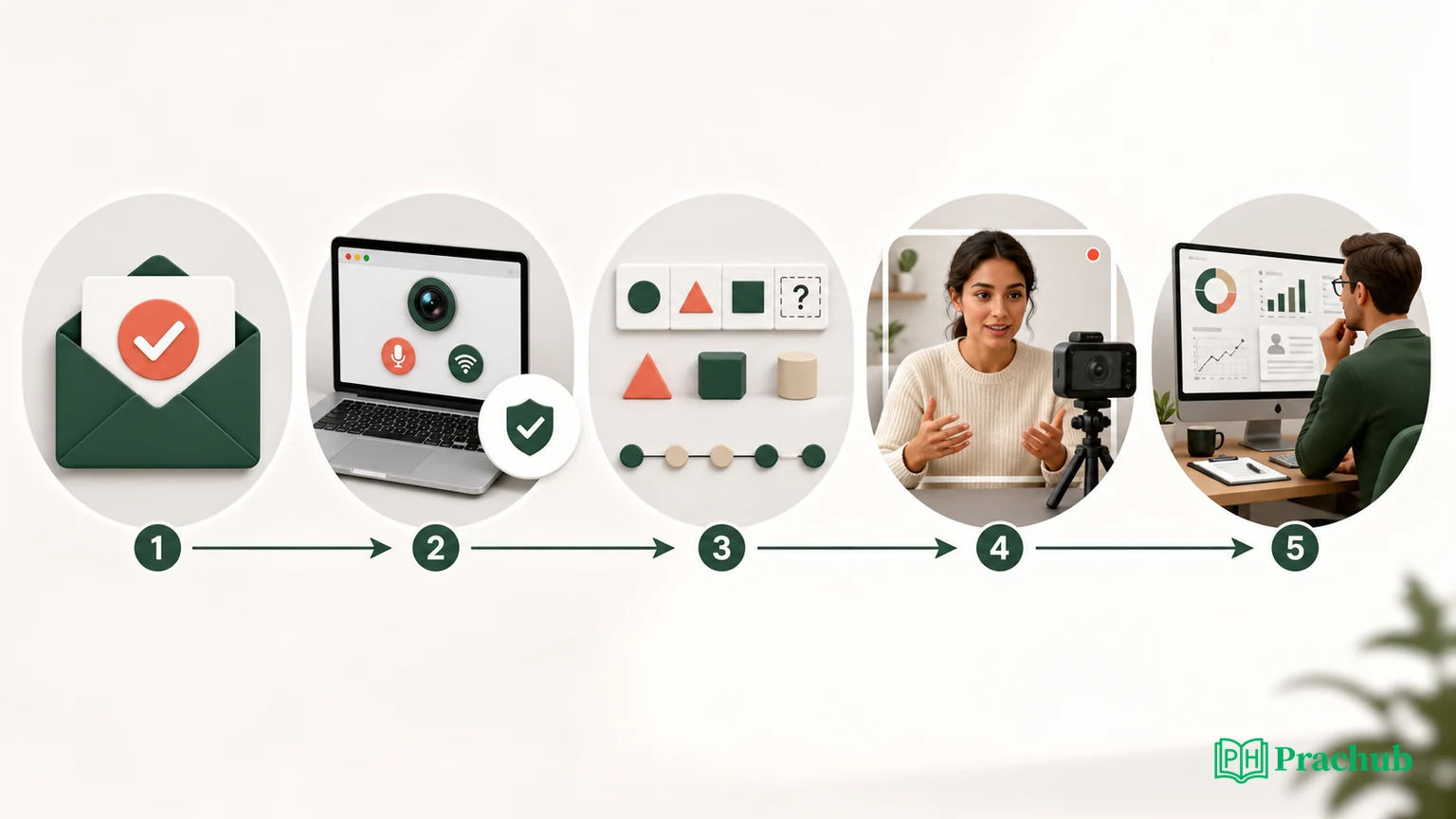
Harver's 2026 Candidate Details Page documentation says the recruiter view depends on the vacancy configuration, completed modules, candidate status, and enabled features. It can include individual module results, virtual-interview responses, an overall matching score, notes, session logs, and proctoring information when those features apply.
The Reports Hub can collect available assessment reports in one recruiter-facing location or connect them to an applicant-tracking system. Candidate results are included by default in that employer report view; interview guides and candidate feedback reports appear only when configured.
Do not reduce that package to one magic score. Cognitive results, job-knowledge percentages, behavioral profiles, video ratings, and matching indicators can be different signals. The hiring team may also consider eligibility, resume evidence, interview capacity, and other stages before making a decision.
Can Candidates See Their Harver Results?
Sometimes. Harver's candidate support says each hiring company decides whether candidates can view results. If enabled, a My Results button appears and the candidate can return through the registration link later. If the button is absent, it does not by itself mean the assessment failed or did not submit.
The employer also controls status communication. Harver says completed results are shared with the applicable recruiting team and notes that companies often respond within two weeks, while emphasizing that timing differs by company and vacancy. Use the employer's stated timeline first. If it passes, send one concise follow-up containing the role, completion date, and application reference.
For privacy questions, Harver's current privacy policy says the hiring company generally acts as the controller for candidate data and Harver acts as its processor. The employer's privacy notice is therefore the most relevant source for retention, access, and use in your specific application.
How to Prepare for a Harver Assessment
Prepare by module rather than searching for one leaked Harver answer key.
| Module or stage | High-value preparation |
|---|---|
| Cognitive reasoning | Timed patterns, ratios, number sequences, analogies, checking, and spatial transformations. |
| Situational or work judgment | Identify the objective, affected people, authority, risk, and proportionate next action. |
| Virtual interview | Record concise examples, test setup, and rehearse one clear follow-up for each story. |
| Job knowledge or simulation | Review the role description and practice the exact tools or workflows named there. |
| Proctored journey | Read consent text, test permissions, close distractions, and follow only authorized-resource rules. |
Track errors by cause: misunderstood instruction, missed pattern, arithmetic, rushed comparison, weak example, vague ownership, or technical setup. Repeating more questions helps only when you know which failure mode you are correcting.
Practice with Harver-Relevant Questions from PracHub
These PracHub question-bank records train quantitative reasoning, prioritization, communication, and judgment. They are not predictions of your exact Harver assessment or video prompts.
| PracHub question | Practice focus | Why it helps |
|---|---|---|
| Solve Quick Probability Questions | Timed numerical reasoning | Builds fast setup, symmetry checks, and concise calculation under pressure. |
| Communicate a Difficult Decision to Stakeholders | Recorded behavioral response | Trains a clear recommendation, trade-off, disagreement, and follow-through. |
| Prioritize Conflicting Tasks Under Shifting Deadlines | Situational judgment | Forces explicit decision rules, sequencing, and stakeholder communication. |
| Use Data to Resolve an Ambiguous Problem | Evidence and uncertainty | Practices assumptions, data quality, defensible conclusions, and impact. |
| Take Ownership Through Ambiguity | Ownership and judgment | Builds a focused story about unknowns, collaboration, and useful early progress. |
A Seven-Day Harver Preparation Plan
| Day | Focus | What to do |
|---|---|---|
| Day 1 | Inventory | List every named module, deadline, time zone, device rule, permitted aid, and accommodation need. |
| Day 2 | Cognitive diagnostic | Complete a mixed timed set and label every miss by reasoning, calculation, or pacing. |
| Day 3 | Targeted reasoning | Drill the weakest two abilities, then repeat a short mixed set without extending the timer. |
| Day 4 | Judgment | Work through situational scenarios using objective, risk, authority, stakeholders, and next action. |
| Day 5 | Video responses | Record five concise answers and review content, ownership, timing, audio, and framing. |
| Day 6 | Full simulation | Combine reasoning and recorded answers in one uninterrupted session using only permitted materials. |
| Day 7 | Logistics | Update the browser, test camera and microphone, confirm the deadline, and stop cramming new formats. |
Frequently Asked Questions
Is the Harver cognitive test timed?
Yes, cognitive subtests are designed for timed assessment. Harver currently gives a typical range of 5-15 minutes per subtest, but the employer chooses the module combination. Use the timer and instructions shown in your journey as the authoritative limits for your attempt.
What is a good Harver assessment score?
Harver describes cognitive results on a norm-referenced 0-100% scale, with 50% as average and most scores between 30% and 70%. That is not a universal passing threshold. Employers can use role-specific matching profiles, module weights, and other application evidence.
Does Harver detect tab switching?
It can when proctoring is enabled for the vacancy. Harver says focus-change detection can register movement to another tab, window, application, or screen. Candidates should see a proctoring notice first. The feature is not automatically active for every Harver journey.
Can you re-record a Harver virtual interview answer?
Only if the employer enables re-recording in the Virtual Interview settings. Maximum response time is configurable too. Treat each scored response as a single attempt unless the interface explicitly offers another recording, and use the setup step to catch camera or microphone problems.
How long after Harver will the employer respond?
Harver says companies often respond within two weeks, but the timing varies by company and vacancy. A completed assessment transfers the result to the recruiting team; it does not guarantee an interview. Follow the employer's stated window and send one concise status inquiry after it passes.
Final Takeaway
The best Harver preparation starts by rejecting the idea of one universal test. Identify your assigned modules, practice each underlying skill, rehearse recorded answers, and verify the device before the timer begins. If proctoring appears, read the consent screen and follow the disclosed rules instead of assuming that every platform capability is active.
Use PracHub to practice the reasoning and communication that remain valuable after the assessment. Your invitation controls the mechanics; clear analysis, honest examples, and reliable execution control the quality of the evidence you submit.
Sources and Further Reading
- Harver Cognitive Assessments
- Harver Cognitive Ability Results
- Harver Virtual Interview Overview
- Harver Virtual Interview Module Documentation
- Harver Fraud Detection and Proctoring
- Harver Candidate Details Page
- Harver Reports Hub
- Harver: How Candidates Can View Assessment Results
- Harver: When Candidates Receive Application Feedback
- Harver Privacy Policy
Research note: This guide was checked on August 29, 2026. Harver modules, proctoring settings, result access, deadlines, and employer decisions can change; your invitation and the hiring company's current policy remain the source of truth.
Related Articles
CodeSignal Business Skills Assessment Guide 2026: AI Interview, Timers, and Employer Reports
Prepare for a CodeSignal Business Skills Assessment: understand AI conversations, question timers, written tasks, submissions, and employer review.
Which Programming Language Should You Use in an OA? Speed, Compatibility, and Employer Preferences
Choose the best programming language for an OA by comparing speed, runtime compatibility, employer preferences, and your own error rate with confidence.
Do Partial Test Cases Count in an OA? Hidden Tests, Weighted Scores, and Cutoffs
Do partial test cases count in an OA? Learn how hidden tests, weighted scores, platform rules, and employer cutoffs affect coding assessment results.
Does Finishing an Online Assessment Early Matter? Completion Time, Accuracy, and Recruiter Review
Does finishing an online assessment early matter? Learn when time affects scoring, what recruiters see, and when accuracy should win in coding tests.
Comments (0)