LWC Interview Questions: Wire vs Imperative Apex, Caching, and Data Refresh
Quick Overview
Trace one record through wired Apex, imperative Apex, and Lightning Data Service, then explain the correct refresh responsibility after an Apex save.
A save succeeds, the toast says “Saved,” and one Lightning web component still shows the old record name. Another panel updates immediately. The useful interview question is not simply “wire or imperative?” It is: who supplied each displayed value, and who must refresh it after this write?
This guide follows one record through wired Apex, an imperative Apex read, and a Lightning Data Service record wire. Verification boundary: the platform rules below come from current Salesforce documentation. We also ran five local LWC Jest component tests with mocked Apex and LDS responses. Those tests verify component behavior and call ordering; they do not establish real Salesforce network traffic, cache invalidation, or an org deployment.
For related practice, start with Synchronize Shared Data Across Two Lists. Explain how two views can display the same underlying entity while owning different local representations of it.
Choose the read mechanism from the requirement
Official behavior: wiring an Apex method requires @AuraEnabled(cacheable=true). Reactive parameters let the framework provision values as their inputs change. An undefined Apex parameter prevents the call; a null parameter does not have that same meaning. Wire Apex methods
Use wired Apex when the component should react to its inputs and consume the resulting data stream. Use an imperative call when application code should decide when to invoke the method, such as a button-driven operation. A method that performs an insert, update, or delete cannot be used as a cacheable wired read. Imperative Apex
Do not turn that distinction into “wire is cached, imperative is always uncached.” An imperative read can also be cacheable. In our example, the explicitly controlled readNow method is intended to be non-cacheable so a subsequent invocation requests a new result. That is a design choice for this exercise, not a description of all imperative Apex methods.
Before answering a scenario, state the trigger and the operation. “The record ID changes, so this read should react” is a different requirement from “the user confirmed a save.” The first can fit a wire; the second needs controlled mutation. Choosing a mechanism from the verb prevents a memorized rule from being applied to the wrong operation.
Track three representations of one record
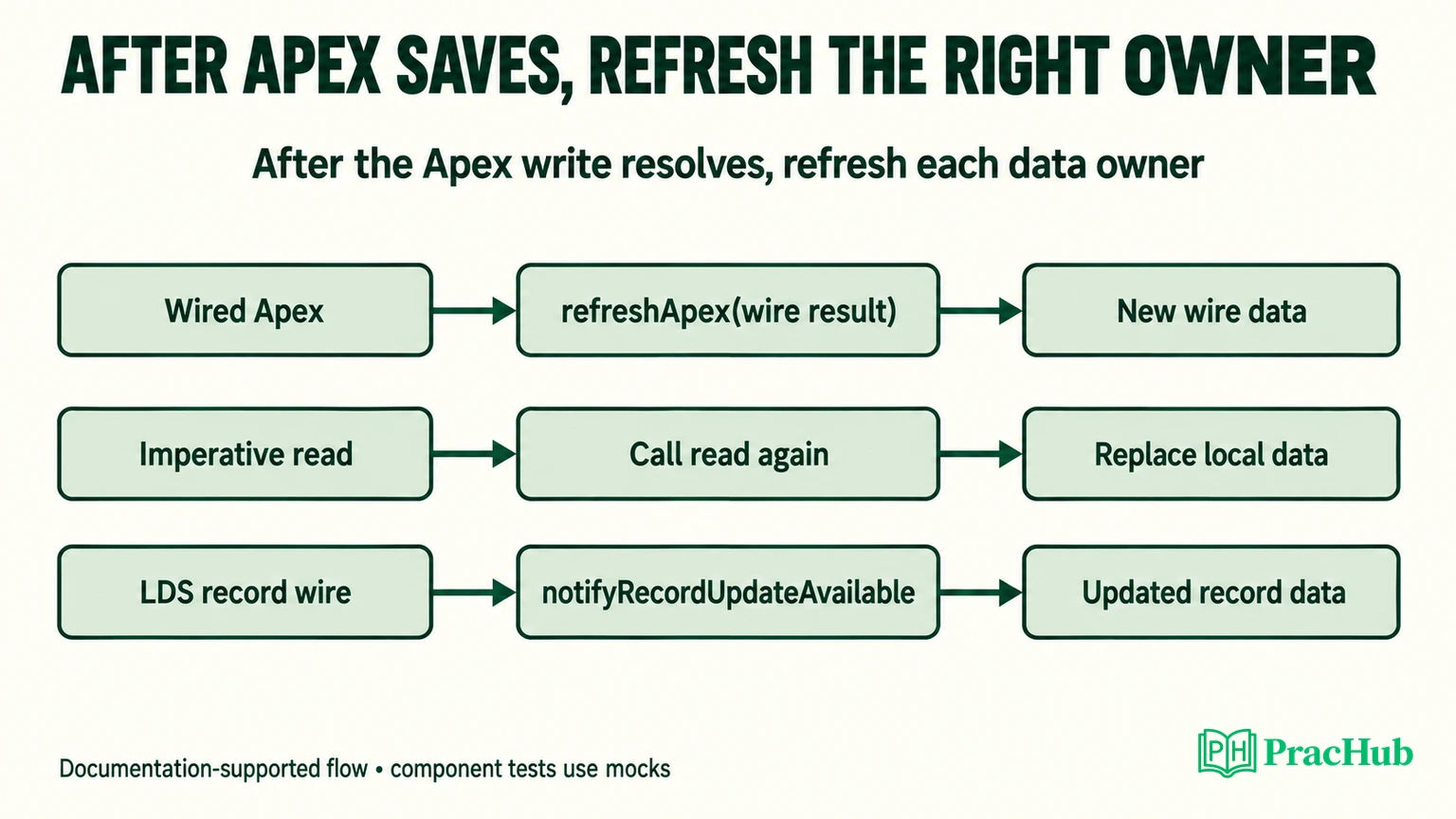
Our original practice component displays three names for the same Account record. Initially, all show Old. A save changes the intended name to New through an Apex mutation. Each displayed value has a different source:
| Data source and ownership | Action after the Apex save |
|---|---|
| Wired Apex supplies the name through a retained wire result. | Pass that emitted result object to refreshApex. |
| An imperative read assigns a value to a local component property. | Invoke readNow again and replace the property with its result. |
The LDS getRecord wire supplies the displayed record fields. | Notify LDS about the record changed outside its managed write path. |
Official behavior: the wire service provisions an immutable stream. A provisioned value can come from cache, so a rerender or wire emission is not a count of server requests. Copy data into an editable form model rather than mutating the provisioned object. Wire service
The same record ID does not make the imperative property a live subscription. If code assigned its value yesterday, another panel's refresh does not automatically rerun that assignment. Likewise, repainting the component can redraw the same stale property. Distinguish “the component rendered again” from “the data owner supplied a newer value.”
For an interview diagram, draw arrows from each source to its displayed property. Then trace the save separately. If you cannot connect the completed write to the relevant refresh or reread operation, that missing edge is a concrete stale-data hypothesis.
Why does a save-only handler leave stale data?
The deliberately incomplete handler in our local component awaited the save and set the status to Saved, then returned. It did not refresh any reader. With the test adapters still supplying Old, all three displayed names remained Old.
That is a component-test observation, not proof that every Salesforce page would behave identically. A real page could have other components or framework actions updating some records. The negative control establishes the narrower problem: this handler does not arrange fresh values for the three paths it owns.
The repaired orchestration used this sequence:
await saveName({ recordId: this.recordId, name: 'New' })
await refreshApex(this.wireValue)
await this.loadNow()
await notifyRecordUpdateAvailable([{ recordId: this.recordId }])
loadNow() calls the non-cacheable imperative read and assigns its returned name to imperativeName. The Apex wire callback and the LDS wire callback update their respective displayed properties when data is provisioned.
The sequence is intentionally easy to reason about. It establishes that the write completed before any refresh began. It does not claim that these independent reads must always execute serially in a production component. If you choose concurrent refreshes, define how you will report partial success rather than hiding all outcomes behind one generic error.
Keep the scope of the mutation visible too. If Apex updates several records, the relevant LDS notification set may contain several IDs. A notification for one Account cannot communicate arbitrary changes to unrelated records or recompute every custom Apex aggregation on the page.
What exactly should refreshApex receive?
The common mistake is saving only the data portion of a wire callback and later passing that array or record to refreshApex. Our component retains the full emitted value:
@wire(readWired, { recordId: '$recordId' })
wired(value) {
  this.wireValue = value
  if (value.data) this.wiredName = value.data.Name
}
Official behavior: refreshApex must receive a value previously emitted by an Apex wire. Its Promise signals that the wire data is fresh; the Promise's resolved value is not the refreshed record to assign to the UI. The refreshed data arrives through the wire. Salesforce also advises against assuming a fixed client-cache duration. Apex result caching
In our component test, the refresh mock was called with an object containing the original wire data, rather than with just the name string. The mock then emitted the new wire data, and the component rendered it. This checks that the component passes along the right kind of value and consumes subsequent emissions.
It does not test Salesforce's internal cache implementation. A mock programmed to emit New cannot independently prove that the real platform would fetch New under every condition. The documented API contract and the component test answer different parts of the problem.
Also avoid using a timer to guess when cached results expire. A timer can make a stale view seem to repair itself during a demonstration while leaving the underlying invalidation responsibility unexplained. If the component knows its own write changed the data, represent that knowledge explicitly in the flow.
What does notifyRecordUpdateAvailable update?
Official behavior: after records change through a mechanism outside LDS, such as imperative Apex, notifyRecordUpdateAvailable tells LDS which cached records may be stale. Its argument is an array of objects containing recordId. The returned Promise resolves when LDS has completed the relevant processing; changed data can then be provisioned to affected record wires. Unchanged data need not produce another emission. Record update notification
Call it after the Apex write resolves. Sending the notification first would ask readers to refresh before the mutation is known to have completed. Our deferred-save test verified that the component did not call its refresh functions while the save Promise was still pending.
Do not treat notification as a replacement for every other refresh. It does not assign a new value to an arbitrary imperative property. It is also not the refresh operation for an Apex wire result. In the three-panel exercise, each path has an explicit responsibility even though all three represent the same Account.
If a scenario instead uses an LDS-managed write, reassess the flow from that write mechanism rather than mechanically copying an Apex-write recipe. Ask which layer already knows about the mutation, which subscribers it manages, and whether a separate custom read remains stale. That reasoning is more useful than calling several refresh APIs “just in case.”
Preserve the difference between save failure and refresh failure
Our practice component uses separate status messages: Saving, Refreshing, Saved and refreshed, Save failed, and Saved; refresh failed. The last two represent materially different states.
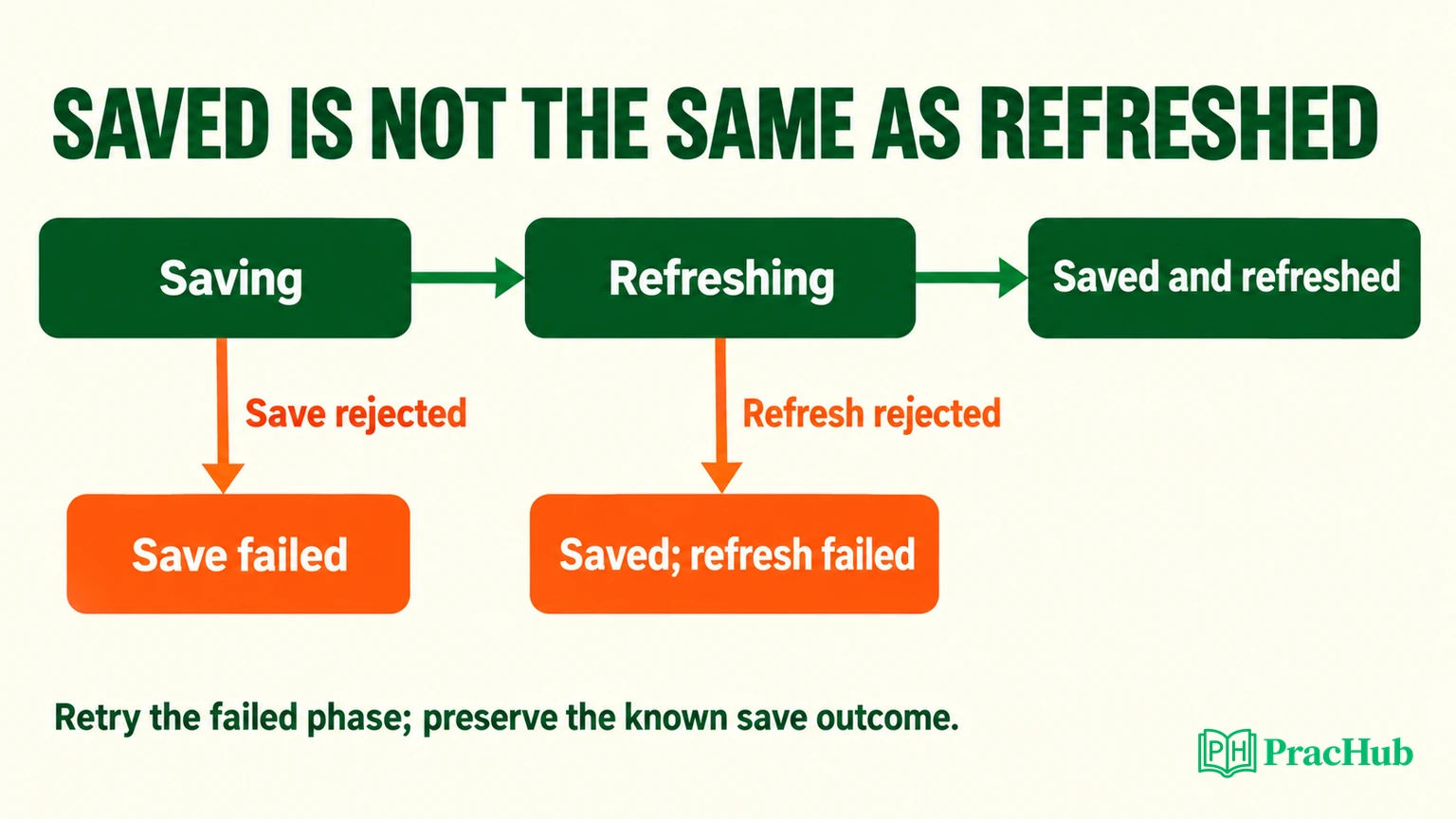
If the write fails, the component should not announce success or start pretending that a new value is available. In the local test, a rejected save left refresh calls untouched. If the write succeeds but a refresh rejects, the component should retain that known save outcome. Our refresh-failure test displayed Saved; refresh failed rather than the misleading Save failed.
This distinction affects the recovery action. Repeating a save when only a read failed can repeat side effects. An appropriate UI can offer to retry the read or explain that the saved change has not yet been reflected in the view. The exact recovery policy depends on the operation; the test protects the distinction rather than implementing a universal retry strategy.
In the sequential example, a failed wired refresh prevents the later reread and LDS notification from running. That is an explicit limitation of the minimal orchestration. A more complete component might track each refresh independently and retry only the unfinished paths. Explain that trade-off before presenting the small example as a finished production design.
What did the local tests actually verify?
We ran @salesforce/sfdx-lwc-jest 7.9.0 with LWC 8.28.2 and Jest 29.7.0. Five tests passed:
| Local check | Verified component behavior |
|---|---|
| Save-only negative control | Status says Saved while all three supplied names remain Old. |
| Repaired flow | Each independently mocked path supplies New and the corresponding UI updates. |
| Deferred save | Refresh does not begin before the save resolves. |
| Rejected save | No refresh is attempted; the UI reports Save failed. |
| Rejected refresh after save | The UI preserves the successful save outcome and reports the refresh failure. |
Official testing guidance: Salesforce's wire test utilities let tests emit controlled Apex and LDS data. They support deterministic component checks without depending on remote invocation or server latency. Testing wire-based components
The test fixtures supplied only the fields this component reads. The Apex methods and notification function were mocked, and the LDS record response was a local fixture. No Apex class was compiled in an org, no real record was changed, and no network request count was measured. Those limitations are part of the result, not an excuse to describe a unit test as platform integration validation.
For an interview walkthrough, begin with the stale field, identify its source, name the post-save action, and describe what observation would confirm the repair. If asked about network behavior, distinguish the documented expectation from an actual browser trace. If asked about cache duration, explain why your design avoids depending on a fixed value.
Continue with these transferable PracHub exercises. They are not advertised as a Salesforce runtime or a collection of guaranteed LWC employer questions:
| Practice question | Apply the same reasoning |
|---|---|
| Synchronize Shared Data Across Two Lists | Trace which view owns each representation. |
| Debug a cache incident end-to-end | Distinguish stale data from a failed render. |
| Extend an Existing Endpoint Cache and Prove It with Tests | State the cache contract and the test boundary. |
| Compare front-end state management approaches | Explain ownership and update propagation. |
| Implement list, form, and API rendering with pitfalls | Keep write status and view freshness distinct. |
Use Debug a cache incident end-to-end next. Before proposing a refresh, identify the data owner and the exact evidence that the displayed value is stale.
Comments (0)