Paradox Video Interview Guide 2026: One-Way Questions, Recording, and What Employers See
Quick Overview
A current candidate guide to Paradox video interviews, including one-way recording, Olivia screening, what employers can review, technical setup, privacy boundaries, and practical preparation.
A Paradox video interview may be a one-way recorded response or a live meeting arranged through Olivia. Identify which one you have before preparing: a recorded prompt needs a self-contained answer, while a live conversation gives you a chance to ask clarifying questions.
For a recorded interview, the useful preparation is straightforward: confirm the employer’s settings, choose truthful evidence, rehearse on your actual device and submit only when the page shows the intended response. A polished delivery cannot compensate for an answer that never explains what you did.
What Paradox’s public information confirms
The current video product page describes recording responses within an application conversation or a follow-up, on-demand employer viewing and separate browser-based live meetings. Those capabilities do not define one assessment configuration for every organization.
Paradox’s 2021 product announcement describes a record-later option and reminders. Treat that as evidence of a supported capability, not a promise that your invitation allows deferral. The visible instructions still control your deadline and recording choices.
| Format | How to recognize it | Preparation that matters |
|---|---|---|
| One-way response | A prompt with recording/submission controls, no live interviewer | A complete example with personal action and result |
| Live interview | A scheduled meeting time and joining instructions | Conversation, questions and the relevant role skills |
| Text screening | A chat asking for information or answers | Accurate responses to the question actually asked |
Olivia’s presence does not by itself mean your camera is recording. Observe the actual video step and device indicators. Native live video and an integrated meeting tool can have different setup requirements; test the link named in your invitation.
For the answer exercise below, use PracHub’s Deliver Under a Tight Deadline Without Hiding Risk as transferable practice. That record is Amazon-tagged; it is not a leaked Paradox prompt or a prediction of your employer’s questions.
Before you start: write down the employer’s configuration
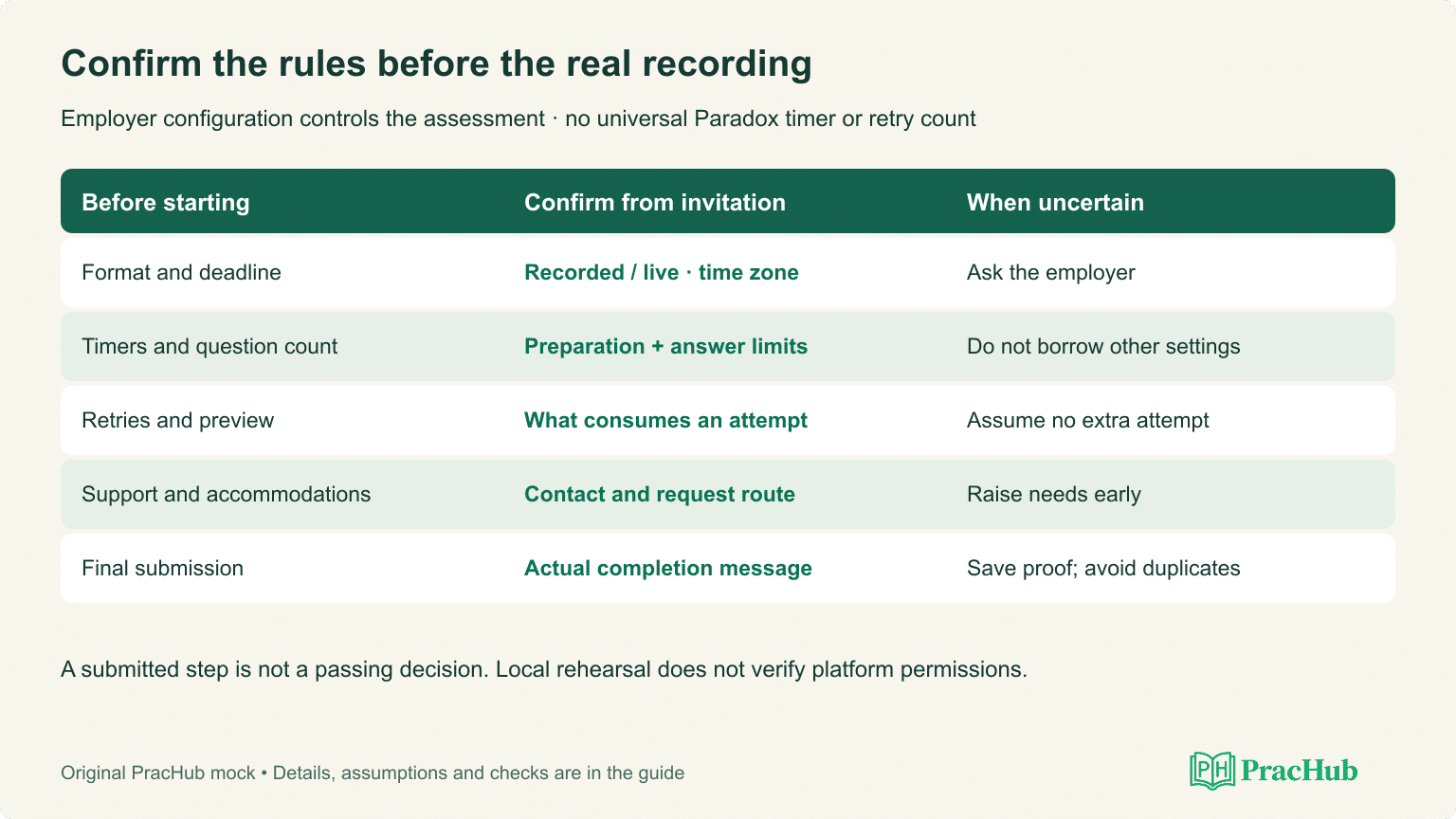
Make a small checklist from the invitation and visible instructions. Unknown settings stay unknown until confirmed; do not borrow another applicant’s timer or retry allowance.
| Check | What to capture | If it is unclear |
|---|---|---|
| Format | Recorded response, live meeting or text step | Ask which step the link opens |
| Deadline | Date, time and time zone | Confirm before relying on a local conversion |
| Question count | Visible count or stated sequence | Allow setup time; do not invent a count |
| Preparation timer | Whether reading/thinking time is limited | Check before starting a real prompt |
| Answer limit | Maximum recording time and cutoff behavior | Rehearse adaptable lengths |
| Retakes | Whether retry is allowed and what consumes an attempt | Assume no extra attempt unless offered |
| Preview/submission | Whether you can review and when it becomes final | Read the button labels carefully |
| Practice mode | Whether a test recording is separate from submission | Avoid probing a real question by submitting |
| Tools and notes | Employer instructions on notes, assistance and AI | Ask rather than using undisclosed help |
| Accommodations | Contact and request procedure | Contact the employer early |
| Technical support | Employer/support route in the invitation | Save it before the recording step |
Example, not Paradox defaults: a fictional invitation might specify three prompts, 30 seconds of preparation, 90 seconds of recording and no retakes. Another employer might configure the process differently. The number 90 below is a rehearsal scenario, not a platform rule.
If the link does not state a deadline, do not infer one from a reminder’s arrival. If a live meeting gives a time zone, verify the calendar’s local display. Leave time to handle a blocked microphone or a connection problem without rushing your answer.
Worked behavioral prompt: fix the evidence, not the personality
Original practice prompt: “Tell us about a time you helped a customer while working under a tight deadline.” The story below is entirely fictional and written to demonstrate editing. Never present its actions, numbers or outcome as your own experience.
First draft: pleasant, but difficult to evaluate
I am a very hardworking person and I always put customers first. There was a really busy day when things were going wrong and everyone was stressed. We worked together and I helped the team because communication is very important. I stayed positive and we managed to get everything done. My manager was happy with me and I learned that teamwork and a good attitude can solve any problem. I would bring that same passion to this company.
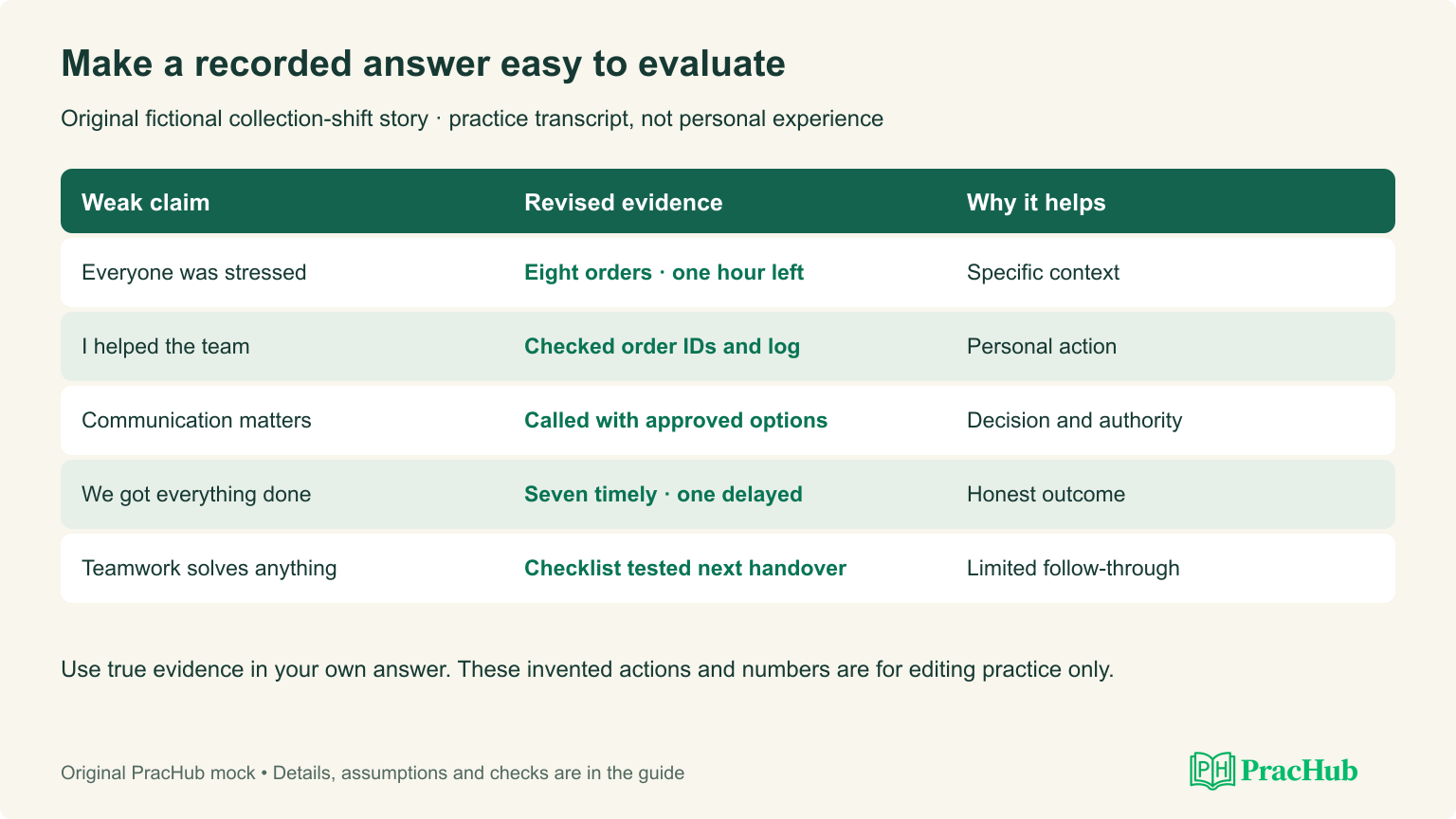
The first draft sounds positive, but it provides little evidence. The listener cannot identify the customer problem, the deadline, the candidate’s responsibility, the decision or the result. “We got everything done” also hides whether anyone was delayed. Adding more enthusiasm would not fix those gaps.
Before rewriting, make five notes: eight orders missing, one hour before closing, responsibility for finding orders and updating customers, an incorrect shelf record, seven timely collections and one delayed collection. Decide which actions belong to the candidate and which belong to the manager or teammate.
Revised transcript: a specific, honest account
During a busy collection shift at a fictional store, eight prepaid orders were missing from their assigned shelves, with an hour left before closing. I was responsible for finding the orders and giving customers accurate updates. I checked order IDs against the handover log and found that one shelf label had been changed without updating the record. I asked a teammate to verify the corrected shelf while I called the affected customers with the manager’s approved collection options. I also flagged one order we still could not locate instead of promising it was ready. Seven customers collected before closing. The manager arranged the remaining customer’s later collection, and I documented the delay. Before my next shift, I proposed a shelf-change checklist; the manager approved it, and we tested it in the following handover. I learned to separate a quick recovery from a process fix, and to give an honest update when the outcome is still uncertain.
This revision is useful because the reviewer can follow a decision, not because it contains special keywords. It keeps the imperfect outcome: one customer waited. It also distinguishes the immediate recovery from the later change to the handover process.
Annotation: what each part adds
| Part of the answer | Evidence added | Editing choice |
|---|---|---|
| Eight orders, one hour before closing | A specific problem and deadline | Keep the setup to two sentences |
| Responsible for finding orders and updates | The candidate’s scope | State responsibility before actions |
| Checked IDs against the handover log | A concrete investigation | Explain how the cause was found |
| Teammate verified; candidate called customers | Personal action and collaboration | Credit the teammate’s work accurately |
| Flagged the missing order | Judgment under uncertainty | Avoid a false ready-for-collection promise |
| Seven collected, one delayed | An observable, imperfect outcome | Do not turn partial recovery into total success |
| Proposed a checklist, manager approved it | Follow-through with proper authority | Separate proposal from approval |
| Tested in the following handover | Limited evidence of adoption | Do not claim months of sustained improvement |
Notice what remains unproved. The transcript does not show that the checklist prevented every future error. It says it was tested at the next handover. In your own story, use the outcome you actually observed rather than stretching a short trial into a permanent result.
A useful editing question is: “Could a reviewer tell what changed because of my action?” If not, replace a broad claim with the decision, communication or artifact. A second question is: “Am I taking credit for work somebody else did?” Rewrite that sentence before practicing the delivery.
Rehearse the timing without treating an estimate as a rule
The revised transcript contains 156 whitespace-separated words. At a planning pace of 130 words per minute, plus six seconds for pauses, it estimates about 78 seconds. That fits the fictional 90-second scenario on paper; it is not a measured recording or a prediction of your speaking speed.
Record it locally once at a comfortable pace and time the result. If you rush, remove low-value setup rather than swallowing words. If you finish early, do not fill the silence with generic praise. The goal is an understandable response that answers the prompt within the employer’s actual limit.
For a shorter version, keep the problem, your two most important actions, the mixed result and one lesson. For a longer version, add why you chose that option and what you would do differently. Preserve the truth at both lengths. Do not add an invented percentage improvement to make the ending stronger.
Review audio before reviewing appearance. Can you hear every sentence? Does the answer explain your role without the listener reading your résumé? Is the result understandable? Use three or four proof-point notes if allowed; avoid reading a full script when it makes you lose the thread of the question.
Adapt the evidence to the role and prompt
For a software-engineering application, choose a true deployment, debugging, design or delivery example. Explain the user impact in ordinary language before the implementation detail. Describe what you personally investigated, changed or verified, then identify the boundary of your contribution.
For customer-facing work, show how you understood the need, checked available options and communicated accurately. Do not suggest that good service means bypassing policy or promising an outcome outside your authority. The fictional collection story works because the manager approves the available options and handles the unresolved order.
For motivation, replace the experience structure with a specific connection: a responsibility in the posting, relevant evidence from your background and the contribution you hope to make. “I love the brand” is a starting point, not a complete answer. Research the employer rather than describing Paradox as the hiring company when it is only the platform.
For failure or feedback, keep your responsibility visible. A useful account explains the mistake, the feedback, the changed behavior and evidence from later work. Avoid turning every failure into a disguised success or blaming a teammate while claiming the learning for yourself.
Recording setup: test the exact route you will use
Use the device and browser specified by the invitation. Check the intended microphone, camera framing, lighting and connection before the real prompt. A local test can establish that your microphone works; it does not establish that the interview page has permission to use it.
Close distracting notifications, connect power and choose a quiet location you can realistically maintain. Put the camera near eye level and use front lighting. A plain background and role-appropriate clothing reduce distractions, but the reviewed sources do not establish a universal appearance score.
Read the practice-step label before using it. If it clearly offers a separate test, check recording and playback there. If it starts a real timed prompt, do not assume you can exit and reset it. Permission to record video is distinct from a request to share your screen; inspect any separate request and the employer’s instructions.
What employers can review, and what remains employer-specific
The product page supports a narrow conclusion: the hiring organization can view submitted responses. Paradox’s Get Candidates integration documentation describes candidate information, conversation fields, media URLs and workflow states. It also describes a viewed state for company users.
That documentation is not a promise that every recruiter has the same screen or that a candidate receives a read receipt. It does not establish routine access to unrelated browser tabs, private notes or your entire device. Follow any separate monitoring notice supplied with the assessment.
Read the employer’s notice if you need to understand access, retention or evaluated signals. Ask the employer about material ambiguity. Do not share another person’s private details in a behavioral example; explain your work using only information you are entitled to disclose.
Olivia’s recruiting automation is not evidence of one universal facial-expression, voice, emotion or keyword-scoring model. The reviewed public video material does not establish such a model. It also does not prove that every employer uses only manual review. Prepare clear evidence for the actual question and follow any disclosed assessment rules.
A technical problem needs a documented next step
If recording or upload fails, note the time, browser, device, stage and visible error. Contact the route given in the invitation. Avoid posting the actual question publicly while seeking help.
If a completion message is visible, preserve it before trying again. A repeated reminder does not necessarily mean the submission failed. Ask whether another response is needed rather than creating a duplicate on assumption. If the deadline is near, report the problem promptly; the employer determines extensions and retry options.
After a successful submission, save the confirmation and follow the stated timeline. Completion proves that the step was submitted, not that you passed or that a reviewer watched it. Scheduling, another screen or a decision may follow, depending on the organization.
A three-session preparation plan
In session one, read the posting and select truthful examples for ownership, customer focus, disagreement, feedback and failure. For each, write the problem, your action, outcome and limitation. Do not force one story into every prompt.
In session two, record an answer locally and edit the transcript. Cut generic praise, clarify personal responsibility and keep an honest result. Time the spoken version; word-count arithmetic is only a planning aid.
In session three, use a fresh practice question and the actual device setup. Read the prompt carefully, choose the most relevant example and finish without inventing evidence. Complete the employer-configuration checklist before the real recording.
Frequently asked questions
Is a Paradox video interview always recorded?
No. Paradox supports recorded responses and live video meetings. A deadline-based prompt without an interviewer is different from a scheduled meeting; use your invitation to identify the format.
How many questions or retries will I get?
There is no public universal count or retry allowance in the reviewed sources. Check the employer’s visible instructions before starting. Do not assume that practice attempts or another candidate’s retakes apply to you.
What does the employer see after submission?
The hiring organization can review the submitted video. Paradox’s integration documentation also describes candidate, conversation, media and workflow fields, but it does not establish one access list or reviewer screen for every employer.
Does Paradox score facial expressions or keywords?
The reviewed public video sources do not establish a universal facial, voice, emotion or keyword scoring model. Read any employer assessment notice and ask about unclear evaluated signals instead of optimizing for an imagined algorithm.
What if the recording fails near the deadline?
Use the employer or support contact in your invitation. Report the time, device, browser, stage and visible error, preserve a completion message if one exists, and ask for the next step. A technical failure does not create an automatic retry entitlement.
Sources and scope
- Paradox Video Interview Software: current recorded-response and live-video capabilities.
- Say Hello to Paradox Video: historical February 2021 announcement, including deferral and reminders.
- Paradox Get Candidates documentation: available integration fields, not a universal reviewer screen.
- Paradox FAQs: recruiting-platform context and support information.
Checked October 8, 2026. The prompt, store story and rehearsal settings are original fictional examples. No candidate recording was made or submitted during this guide’s preparation. Employer instructions determine the actual format, timing, retries and permitted assistance.
Comments (0)