React Testing Library Interview Questions: Async UI, User Events, and Reliable Assertions
Quick Overview
Learn to test an autosaving preferences control with semantic queries, controlled promises, reliable assertions, and a mutation that proves the test catches a regression.
A checkbox changes, a mock gets called, and the test turns green. Has the preference actually been saved? That gap is the useful starting point for React Testing Library interview preparation: distinguish what the user did from what the application eventually confirmed.
This guide uses an original autosaving email preference exercise. The goal is to explain an observation, control an asynchronous boundary, and demonstrate that the test detects a meaningful regression. It is not a reconstruction of an employer’s assessment. Official facts below describe library behavior; practice recommendations are our engineering choices. No candidate reports are used to establish an interview format.
For a broader discussion prompt, practice Plan Testing and Deployment for a React Feature, then apply your answer to the concrete failure states here.
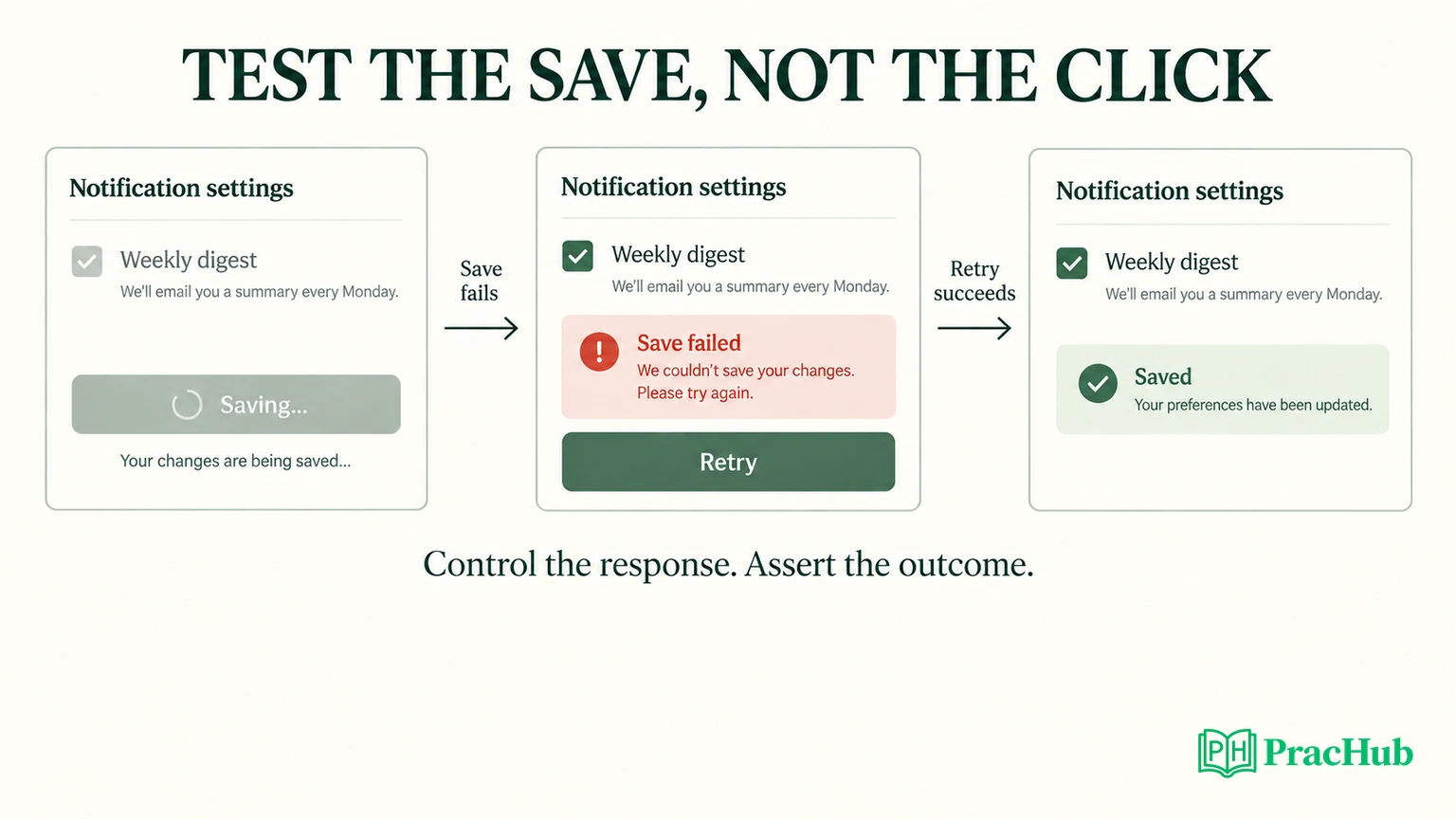
Start with the contract: selected does not mean saved
Our fictional settings panel contains one “Weekly digest” checkbox, initially unchecked. Clicking it immediately shows the requested selection and starts persistence. While the request is pending, the checkbox is disabled and the panel says “Saving…”. A successful response produces “Saved”. A rejection produces “Save failed” and a Retry button.
The failure behavior is deliberate: the requested selection remains visible, but the error makes clear that persistence failed. Retry submits that same selection. This is an optimistic local display, not a claim that the server accepted the change. Another product could roll back the checkbox; its tests would need a different contract.
Before writing code, ask what confirms success, whether editing is allowed during a request, and what retry should resend. These questions prevent you from baking an accidental implementation into the test. Here, disabling the control excludes overlapping edits from the exercise. It does not solve multi-tab conflicts or server-side concurrency.
| Situation | Required observation | Incorrect shortcut |
|---|---|---|
| Initial render | Checkbox unchecked and enabled | Assume every test starts clean |
| Request pending | Saving message and disabled checkbox | Assert only that the mock was called |
| Response succeeds | Saved message and enabled, checked checkbox | Treat optimistic selection as persistence |
| Response fails | Alert, no Saved message, Retry available | Accept any status text |
| Retry succeeds | Same payload sent again; alert removed | Click Retry without checking the result |
This matrix is an original practice asset. Read each row as an acceptance criterion, then select the smallest assertion that distinguishes it from the wrong state.
Which query should you use, and when?
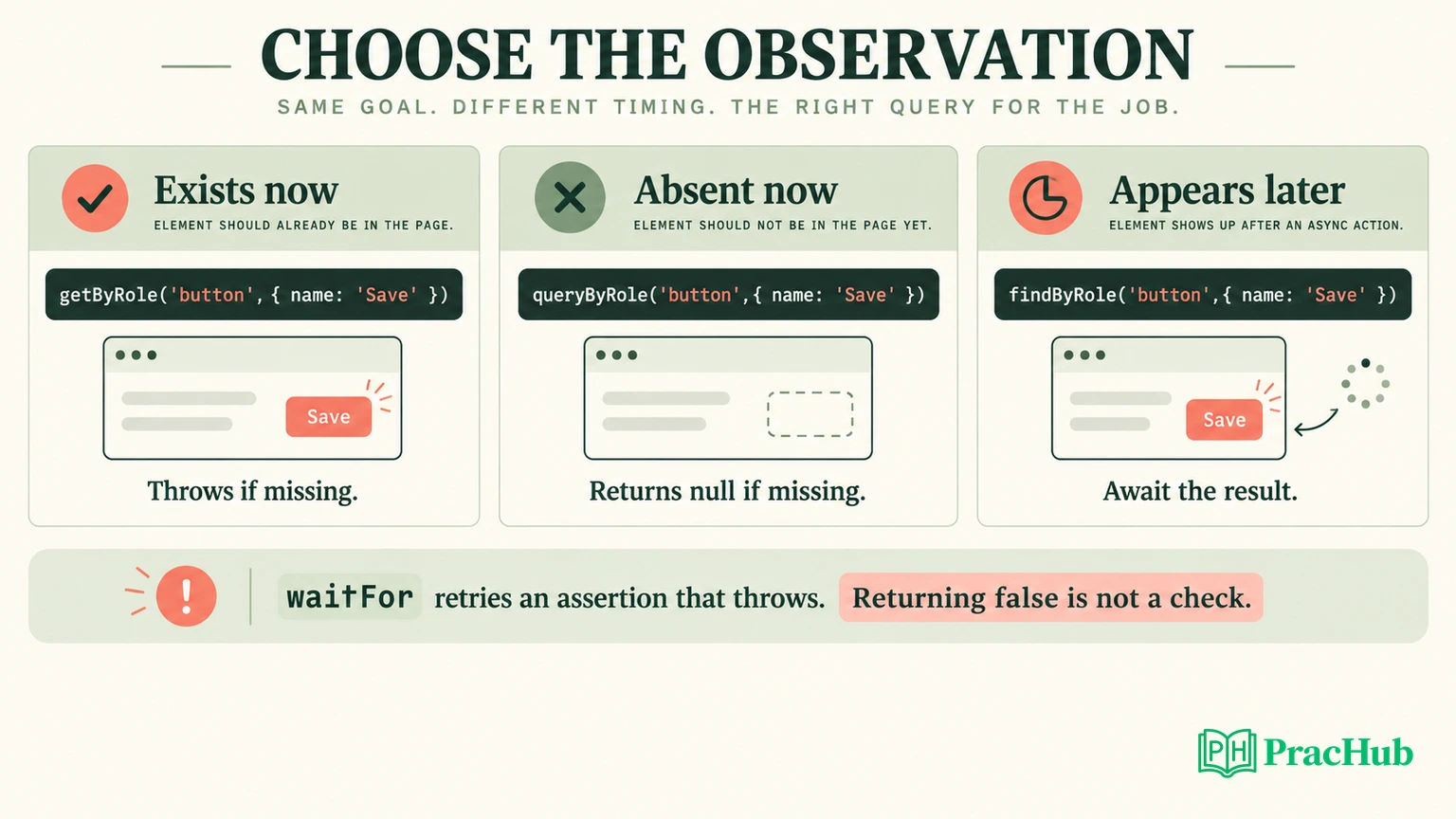
Official behavior: single-element getBy queries fail when the target is missing; queryBy returns null for a missing target; findBy returns a promise and retries. All three single-element families reject ambiguous multiple matches. Testing Library recommends queries based on accessible roles and names where appropriate. About Queries
For this checkbox, use getByRole('checkbox', {name: 'Weekly digest'}). It connects the assertion to a recognizable control. Querying an internal CSS class would make a harmless styling refactor look like a behavioral regression. Conversely, an incorrect label should matter: users need to identify the control.
Use queryByRole('alert') when asserting that an alert is absent at the current checkpoint. Use an awaited findByRole('alert') when waiting for failure to become visible. Do not replace every query with findBy: waiting for an element that must already exist can hide a mistaken understanding of the render sequence.
A negative assertion is especially easy to place too early. “There is no error” immediately after a click does not prove the request succeeded. First wait for the affirmative success outcome, then check the absence of the error. The checkpoint makes the negative assertion meaningful.
Why await user events instead of firing a click?
Official guidance: user-event v14 models interactions that can involve multiple events and interactability checks. Its documentation recommends a setup instance and awaited interaction calls. fireEvent remains useful for specific low-level events that the higher-level API does not cover. user-event introduction
Our tests create const user = userEvent.setup() inside each test and use await user.click(box). That finishes the modeled interaction; it does not promise that an unrelated persistence request has finished. The request needs its own observation or controlled completion.
This distinction matters in an interview. Saying “await the click” is incomplete if you cannot explain what remains pending afterward. In this exercise, the checkbox can already be checked while the save promise is unresolved. That is exactly the interval in which we verify the disabled state and reject a duplicate interaction.
Avoid wrapping the click inside a retrying assertion callback. Repeated observation should not repeatedly perform the action. Keep the sequence readable: arrange the service, render, interact once, observe pending behavior, complete the service, observe the result.
Build a component with one controllable boundary
The complete practice component uses an injected savePreference function. Its handler is small enough to inspect:
async function save(next) {
  setEnabled(next);
  setState('saving');
  try {
    await savePreference({weeklyDigest: next});
    setState('saved');
  } catch {
    setState('error');
  }
}
The checkbox is controlled by enabled, disabled while state === 'saving', and its change handler passes event.target.checked to save. The saving and saved paragraphs have role="status"; the error paragraph has role="alert". Retry calls save(enabled).
Practice recommendation: mock this persistence boundary rather than React’s state setters. A state-setter mock could confirm that an implementation method was invoked while missing a broken label, disabled control, or error display. The injected service lets the real component render each state.
The boundary also limits the claim. These are component integration tests in jsdom. They do not verify an HTTP adapter, database persistence, CSS layout, or a real screen reader. A production system would need additional checks at those boundaries. Do not describe a mocked service response as a successful backend write.
How do you test the pending state without sleeping?
Create a deferred promise whose completion the test controls. The service returns it, so the test can pause after the interaction and inspect the pending UI. There is no guessed delay and no dependence on a fast mock resolving before the assertion.
function deferred() {
  let resolve, reject;
  const promise = new Promise((yes, no) => {
    resolve = yes;
    reject = no;
  });
  return {promise, resolve, reject};
}
The central test then checks both the blocked interaction and the eventual result:
const pending = deferred();
const save = vi.fn(() => pending.promise);
const user = userEvent.setup();
render(<Preferences savePreference={save} />);
const box = screen.getByRole('checkbox', {name: 'Weekly digest'});
await user.click(box);
expect(screen.getByRole('status')).toHaveTextContent('Saving…');
expect(box).toBeDisabled();
await user.click(box);
expect(save).toHaveBeenCalledTimes(1);
expect(save).toHaveBeenCalledWith({weeklyDigest: true});
await act(async () => pending.resolve());
expect(await screen.findByText('Saved')).toBeInTheDocument();
expect(box).toBeEnabled();
expect(box).toBeChecked();
The second attempted click is intentional: the test verifies that a disabled control does not trigger another request. The payload assertion checks that the requested value crossed the service boundary. Neither replaces the final UI assertion.
Official context: React’s act helper flushes updates associated with the tested operation before assertions. We use its asynchronous form around our manually resolved promise because that completion is initiated by the test, outside the normal user-event call. This is a targeted boundary, not a blanket wrapper for every statement. React act
Can a wait pass without checking anything?
Yes. This is a deliberately broken assertion pattern:
await waitFor(() => Boolean(screen.queryByText('Saved')));
Official behavior: waitFor retries when its callback throws. Returning false does not request another attempt. Its async result must also be awaited. Async Methods
The code above can therefore finish while Saved is absent. Replace it with an assertion that throws on failure, or use the more direct awaited query:
await waitFor(() => {
  expect(screen.getByText('Saved')).toBeInTheDocument();
});
// Alternatively:
expect(await screen.findByText('Saved')).toBeInTheDocument();
We executed a diagnostic test with a rejected save. The weak boolean wait still passed; an additional diagnostic assertion confirmed that “Save failed” was visible. This is stronger evidence than saying the code looks suspicious: the test demonstrated the false-positive mechanism.
Keep assertions specific. Finding a status element alone is insufficient when both Saving and Saved use that role. Assert the expected text at the relevant checkpoint. Likewise, a screenshot snapshot can document markup while failing to explain which asynchronous transition the test intended to protect.
Test recovery, then prove a regression fails
Our recovery test configures the service to reject once and resolve on the second call. It clicks the checkbox, awaits the alert, confirms Saved is absent, clicks Retry, and awaits Saved. It also checks that the second call contains {weeklyDigest: true} and that the alert disappears.
That last check protects against a confusing mixed state: successful persistence alongside a stale failure warning. The second payload check protects against retrying the old value. Each assertion corresponds to a distinct user-facing or service-boundary failure, rather than duplicating the component’s internal state names.
We then changed the success handler from setState('saved') to setState('idle'). The proper success test failed because Saved never appeared. The intentionally weak boolean test still passed. Finally, we restored the component. This small mutation provides evidence that the repaired test protects a specific behavior; it does not establish exhaustive coverage.
The local baseline run passed three tests, including the diagnostic demonstration. The targeted mutation run failed as expected, and the weak-check run passed as expected. The environment used React/React DOM 19.2.8, RTL 16.3.3, user-event 14.6.7, jest-dom 7.0.1, Vitest 5.0.0, and jsdom 30.0.1. These are the versions tested for this article, not a promise about every project configuration.
Explain isolation and the next test you would add
Each test creates its own service mock and interaction instance. The fixture explicitly runs cleanup after each test, which unmounts rendered components. Tests do not share a pending promise or a mutable module-level preference object. RTL documents cleanup and its automatic integration when the environment supplies the relevant hook; explicit cleanup makes this fixture’s lifecycle clear. RTL API
If a test fails only in the suite, investigate leaked DOM, mock behavior, unfinished asynchronous work, and shared fixtures before increasing timeouts. A longer timeout cannot repair an assertion that never throws or a service that never settles.
For a follow-up, propose one concrete extension: unmount during a pending save, keyboard interaction, or allowing a second edit before the first response. Explain how that extension changes the contract. If concurrent edits become allowed, controlling response order becomes necessary; the current disabled-control design intentionally keeps that problem outside scope.
Practice explaining the test strategy
Use these verified PracHub questions to extend the exercise. They are related practice prompts, not claims that a particular employer asks this exact component.
| PracHub question | What to practice |
|---|---|
| Plan Testing and Deployment for a React Feature | Separate component confidence from release confidence. |
| Design Test Cases for UI Change: Ensuring Quality and Functionality | Turn pending, failure, and recovery into observable cases. |
| Write good tests and define integration tests | Explain the injected service boundary precisely. |
| Debug React Sorting, Persistence, Routing, and Accessibility | Connect a visible defect to a focused regression test. |
| Decide When Automated Tests Are Necessary | Prioritize behavior that protects a meaningful failure. |
Finish by rehearsing Plan Testing and Deployment for a React Feature: state the contract, show the controlled request, and explain the mutation that made your test fail. A useful answer connects every wait and assertion to an observable risk.
Comments (0)