SAP MM Interview Questions: Trace Purchasing Documents, Stock Movements, and Invoice Blocks
Quick Overview
Work through an original SAP MM purchase-to-pay ledger: 120 ordered, 90 received and 110 invoiced. Separate stock types, parked or posted status, configured tolerances, GR-based references and conditional supplier correction from payment release. No SAP tenant execution is claimed.
Answer SAP MM interview questions by tracing the document that establishes each fact: what was ordered, what physically arrived, where stock was posted and what the supplier invoiced. Then identify the first inconsistency and propose a correction that preserves the real receipt and the payment-control boundary.
Start with PracHub's PO, receipt and invoice reconciliation exercise for adjacent business-systems practice. The worked ledger below makes those distinctions concrete.
Evidence boundary: SAP Learning supplies the documented process behavior. All document labels, quantities, prices and correction decisions in the case are fictional practice. The checks are local arithmetic and document reasoning, not execution in an SAP tenant, validation of its configuration or reports of an employer's questions.
Start SAP MM interview questions with a document trace
Official process context: SAP's procure-to-pay lesson connects purchasing, goods receipt, invoice processing and payment. Those steps establish different facts. A purchase order is not evidence that the entire quantity reached the warehouse, and invoice posting is not the same event as payment.
Ask for the PO item and its history, the relevant material documents, invoice document and status, and supporting delivery evidence. Keep item, unit of measure, currency and reference assignment consistent. An apparently tidy header total can leave the wrong item or receipt unresolved.
Also confirm the landscape. This guide follows SAP S/4HANA learning material; an actual answer must identify edition, release, available app and configured process. Do not combine SAP ERP screenshots, Public Edition integration behavior and an S/4HANA transaction name into one supposedly universal click path.
Read the original order-receipt-invoice ledger
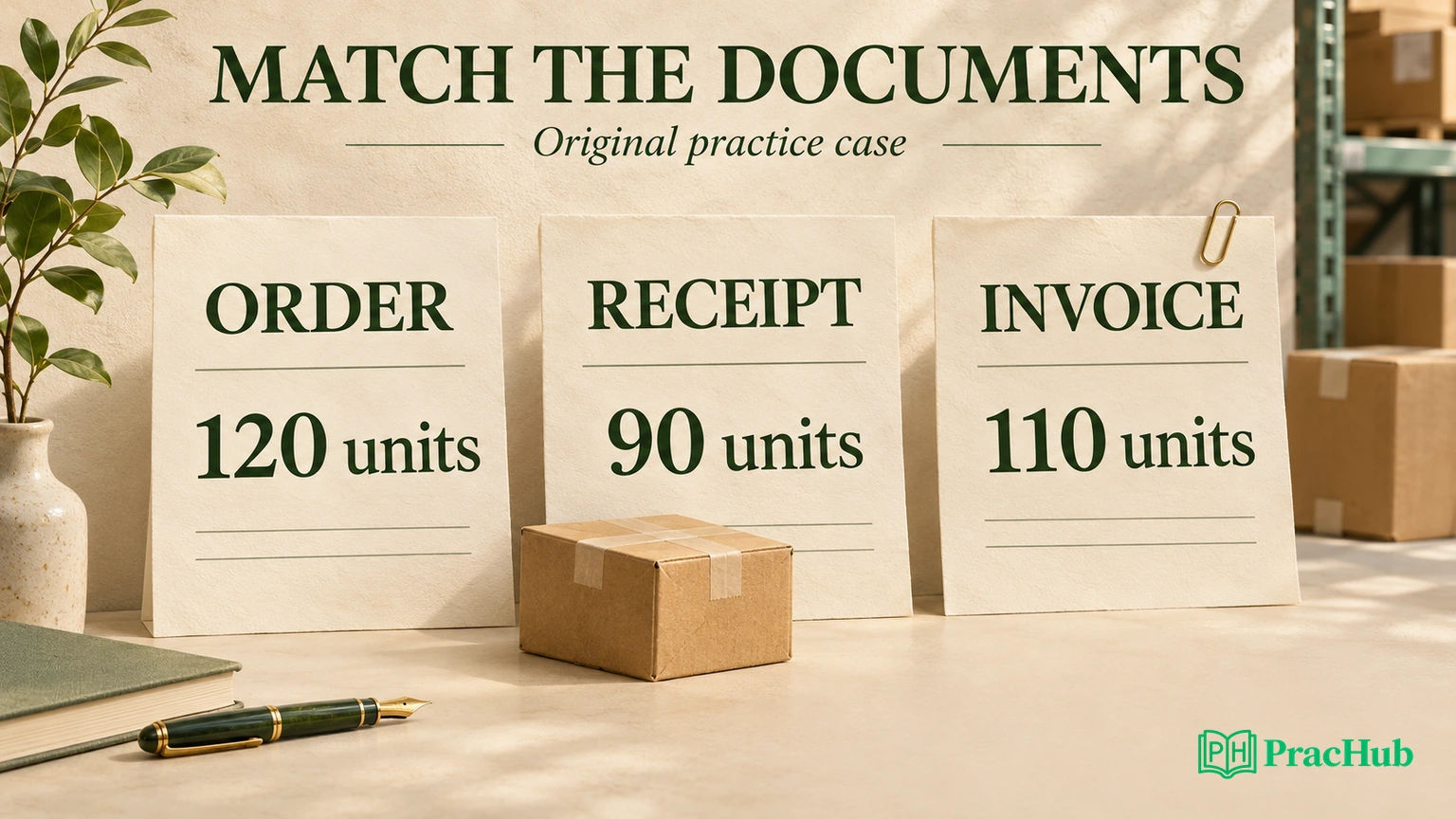
Our fictional case uses one valuated stock-material item, unit EA and a reference price of EUR 15 per unit. There are no prior invoices, returns, goods issues, taxes, freight, discounts or currency differences. Opening stock is zero. The main case uses PO-based invoice verification, without the GR-based IV indicator.
Warehouse evidence confirms that ninety units physically arrived. The goods receipt records the same ninety units into unrestricted-use stock. Assume the invoice for 110 units was successfully posted and payment-blocked because the relevant configured upper quantity tolerance was crossed. That is a supplied case condition, not an SAP default or a tested configuration.
| Original case evidence | Quantity | Reference amount at EUR 15 per unit |
|---|---|---|
| Authorized PO item | 120 EA | EUR 1,800 |
| Physical count and posted GR | 90 EA | EUR 1,350 |
| Posted supplier invoice | 110 EA | EUR 1,650 |
| Invoice excess over recorded receipt | 20 EA | EUR 300 |
| Ordered quantity not yet received | 30 EA | EUR 450 |
Do not confuse the last two rows. Twenty units are the invoice-versus-receipt excess. Thirty units remain unreceived against the order. Neither number establishes that a further delivery occurred or that the order should be closed.
The reference amounts simplify comparison; they are not a full accounting journal or proof of a GR/IR balance. Actual valuation, account determination and clearing require their own evidence. The local companion checks these declared quantities and amounts only.
Which document is first inconsistent?
Under the supplied evidence, the receipt agrees with the physical count and the authorized PO still permits a partial delivery. The invoice is the first document whose quantity conflicts with what was received: 110 invoiced against 90 received, with no prior invoicing in the fixture.
An invoice below the total PO quantity can still exceed the received quantity. Saying “110 is less than 120, so it matches” skips the receipt comparison. The difference is 20 units, or EUR 300 at the declared reference price. There is no price variance in this simplified case because the same EUR 15 unit price is used throughout.
If the warehouse instead proves that 110 units arrived but only 90 were posted, the receipt record may be the first incorrect document. Investigate the missing or incorrect posting rather than automatically demanding a supplier credit. A numerical mismatch identifies a question; physical and document evidence determine which record needs correction.
Before choosing a remedy, check the item and receipt references, unit conversion, earlier invoice or credit, and any reversal. Those facts are excluded from our fixture, but each can change the comparison behind a similar-looking discrepancy.
Can an invoice be posted but blocked for payment?
Official variance behavior: SAP's invoice-variance lesson describes configured tolerance checks. An upper-limit variance can allow posting while automatically blocking payment. The block can affect the entire invoice even when only one item has the variance, and release is a separate step.
Do not translate a visible invoice number into either “paid” or “never posted.” Inspect the actual document status, related accounting information and block reason. Conversely, a document saved for later processing should not be treated as an ordinary posted invoice merely because it appears in a list.
Official parking nuance: SAP's Parking of Documents lesson says parking can create a parked FI document and update PO history. Held invoices have different effects. Therefore, “parked means there is no FI record and no PO-history update” is an unsafe generalization.
| State to distinguish | What to establish | What not to infer |
|---|---|---|
| Held | Saved entry and its actual status | That it has the same history/accounting effects as parking. |
| Parked or saved as complete | Parked MM/FI information and remaining posting/workflow steps | That a normal posted payable or payment release is established. |
| Posted, payment-blocked | Posted invoice and the specific blocking reason | That saving or posting cleared it for payment. |
The case specifically supplies a posted, blocked invoice. If the interviewer changes that fact to parked, revise the processing answer; do not reuse the same correction sequence without checking the status.
What do configured tolerances change?
A tolerance is a configured limit governing how a variance is handled. For this case, the relevant upper quantity limit is assumed to be crossed. There is no universal “SAP allows this percentage” answer, and no numeric tolerance in this guide is a recommended company setting.
Distinguish the quantity discrepancy from the active checking rule. SAP documents absolute and percentage quantity-variance limits, as well as separate price and other checks. Identify the actual configuration and message before predicting its exact treatment. A EUR 300 reference discrepancy alone does not reproduce every condition in the system's tolerance logic.
Raising the limit to make the invoice pass would change a control instead of establishing that the supplier billed correctly. Start with the business documents and approved correction. Treat a genuine policy/configuration change as a separate decision with an owner, scope and verification.
Also avoid diagnosing every block as a quantity problem. Price, date, quality or a manual payment block can require different evidence. Our fixture deliberately removes those other causes so the quantity trace remains inspectable.
For an original price-check variant, keep the received and invoiced quantities at 90 EA but let the invoice amount be EUR 1,620. With no additional costs in that variant, the implied unit price is EUR 18 rather than EUR 15. The quantity now agrees; the price does not. A familiar blocked status should not make you reuse the twenty-unit quantity diagnosis.
For a unit-check variant, a delivery note lists nine boxes while the GR lists ninety EA. If the verified conversion is ten EA per box, those quantities agree. Compare both the quantity unit and the price basis before declaring a shortage. Do not silently compare boxes, pieces and a price per hundred units as if they were identical.
What changes with GR-based invoice verification?
Official reference behavior: SAP's invoice-verification types lesson describes GR-based IV as assigning invoice items to individual goods-receipt items or partial deliveries. The reference is consequential; matching only the total ordered quantity loses that assignment.
Check the PO item's indicator and the receipt to which the invoice item belongs. Do not assume a later receipt can be used by simply reassigning an existing invoice. SAP's lesson also describes reference-sensitive handling of subsequent deliveries and reversals. Confirm the supported process in the actual landscape.
Keep this separate from our PO-based base case. Do not promise that entering an excessive quantity under GR-based IV will follow exactly the same posting path. The appropriate answer names the receipt, the entry behavior and the observed status rather than extrapolating from another verification mode.
If the interviewer removes the goods receipt entirely, first clarify whether GR-based IV is active. A missing reference receipt and an existing receipt with a quantity variance are different conditions. They should not be collapsed into the same “release the block” instruction.
Why can received stock be unavailable for normal use?
Official stock distinction: SAP's goods-receipt-with-reference lesson describes movement 101 for reference receipts and warehouse postings into unrestricted-use, quality-inspection or blocked stock. The stock type identifies the bucket updated by the receipt; quantity alone cannot establish normal-use availability.
Our fixture explicitly chooses unrestricted-use stock. If the goods were posted into quality-inspection stock, the same received quantity would not establish unrestricted-use availability. Inspect the material document, stock type, plant and storage location, then the relevant quality or release process. Do not post another receipt merely because one stock view appears empty.
The same lesson distinguishes ordinary blocked stock from nonvaluated GR blocked stock, a conditional-acceptance process with different posting consequences. Avoid treating every use of “blocked” as an invoice payment block or an identical inventory bucket. The document and business object determine what the status means.
Propose a controlled correction without inventing stock
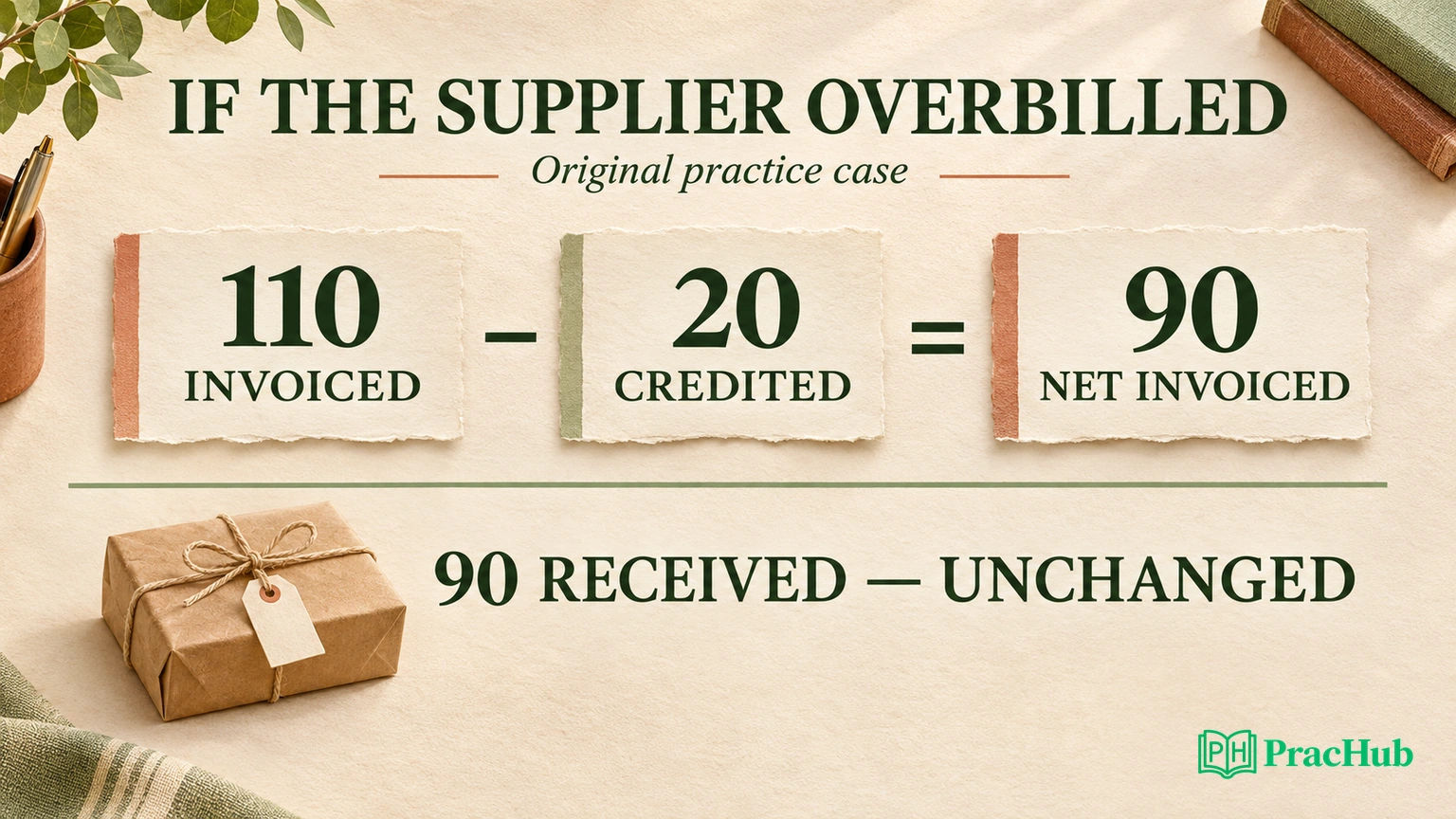
Return to the supplied evidence: ninety units arrived and the GR correctly records ninety. Purchasing and accounts payable confirm the supplier billed twenty excess units and agree an authorized quantity credit for EUR 300. This is a conditional proposed correction, not automatic SAP behavior or permission to post it.
After that agreed credit, net invoiced quantity is 110 minus 20, or 90. Net reference amount is EUR 1,650 minus EUR 300, or EUR 1,350. Physical and recorded stock remain 90 units; a quantity credit does not establish that another twenty units arrived. The thirty-unit unreceived order balance remains a separate issue.
Official correction context: SAP's credit-memo and reversal lesson distinguishes reversing an invoice from a partial correction through a manually entered credit memo. It also notes that cancellation does not automatically clear the FI document lines. The authorized correction method and its references must fit the actual document.
If a genuine additional delivery arrives instead, record the real receipt through the correct process and reassess the variance. Do not post a phantom GR, reverse a correct receipt or force-close the order simply to make a three-way comparison look balanced.
Recheck the block separately from the arithmetic
Official release context: SAP's blocked-invoice release lesson explains that release checks whether blocking reasons remain valid. A further delivery or credit may remove a quantity reason, but other reasons or a manual header payment block can still matter. Automatic release is not a universal response to any document correction.
Reconcile the corrected invoice history with the actual receipt, inspect every remaining block reason and verify the resulting payment-block status after the authorized release process. A spreadsheet net of ninety is not evidence that payment was released.
Likewise, equality at the reference price is not proof that every accounting item has cleared. Review actual GR/IR and FI information with the appropriate team, including valuation or additional postings outside this exercise. The local checks demonstrate only the declared ledger arithmetic and preservation of stock quantity.
Finish with the first conflicting document, its supporting evidence, the conditional correction and the next check. Distinguish the supplier problem from an inventory posting or configuration problem.
An original spoken answer could be: “The authorized order is 120 units, but the supplied physical count and receipt both show 90. The posted invoice for 110 is therefore the first conflicting quantity in this case. I would verify the item, units and document history, then follow the agreed supplier correction for the twenty-unit excess. I would not invent a receipt for it. After the correction, I would recheck every remaining block and the actual release status.” This is a rehearsal answer, not a statement that any posting was performed.
Keep the same evidence chain when the interviewer changes a fact. A new physical count, a different unit, a parked status or GR-based assignment can change the next step. State which assumption changed before naming the revised correction; otherwise, a memorized answer can overwrite a valid control.
Practise the document and control questions
These verified PracHub records come from adjacent product and software roles. Use their reconciliation, mismatch and consistency reasoning; they are not SAP MM hiring reports or a claim that SAP MM candidates must complete a coding round.
| PracHub practice question | SAP MM follow-up to rehearse |
|---|---|
| AP Product Design: Auto-Reconciling POs, Receipts and Invoices and Routing Mismatches | Identify the document and owner behind each mismatch. |
| Phased Plan to Extend an Invoice Management Product into Purchase Requisitions | Keep requisition, order, receipt and invoice decisions distinct. |
| Match Payments to Invoices by ID, Exact Amount, then a Forgiveness Range | Explain an explicit matching rule without presenting it as SAP tolerance configuration. |
| Design scalable inventory system and avoid races | Preserve stock facts while changing another document. |
| Prevent Duplicate Payments Under High Load | Separate invoice matching, correction and payment controls. |
For one bounded reconciliation rehearsal, start with the PO-receipt-invoice exercise, explain why the excess is twenty while the open order quantity is thirty, then change one supplied fact. Revise the first inconsistent document and correction instead of memorizing a transaction code.
Sources and Further Reading
- SAP Learning: Exploring the Procure-to-Pay Process
- SAP Learning: Entering Invoices with Variances
- SAP Learning: Parking of Documents
- SAP Learning: Using Different Types of Invoice Verification
- SAP Learning: Posting a Goods Receipt with Reference
- SAP Learning: Handling Credit Memos and Reversals
- SAP Learning: Releasing Blocked Invoices
Comments (0)