SQL Not Equal: <> vs !=, and the NULL Traps That Follow
Quick Overview
The SQL not-equal operator comes in two spellings, <> (the ANSI standard) and != (supported by every major engine), and they behave identically. The real interview material starts after the syntax: NULL <> 'x' evaluates to UNKNOWN and silently drops rows, a NULL in a NOT IN subquery silently erases rows (all of them, when the subquery is uncorrelated), and IS DISTINCT FROM is the null-safe fix. This guide works through each trap using real SQL interview questions from Yahoo, PayPal, Intuit, Netflix, and Point72.
The SQL not-equal operator has two spellings: <> is the ANSI-standard form, and != is the C-style alias that PostgreSQL, MySQL, SQL Server, Oracle, SQLite, BigQuery, Snowflake, and Redshift all accept. Every one of those engines treats them as synonyms; PostgreSQL goes as far as rewriting != to <> while parsing. Pick either; nobody has ever failed an interview over that choice.
What does fail candidates is what happens after the operator. WHERE status <> 'cancelled' does not mean "everything except cancelled rows." It means "everything where the comparison evaluates to TRUE" — and for a NULL status the comparison evaluates to UNKNOWN, so the row vanishes without an error, a warning, or any hint in the output. Interviewers plant NULLs in the sample data precisely to see whether you know this. The rest of this page is that second half: the NULL trap, NOT IN vs NOT EXISTS, IS DISTINCT FROM, case sensitivity, and what inequality does to your indexes.
Key Takeaways
<>and!=are interchangeable on every major engine;<>is the only one in the SQL standard. The single practical holdout is Microsoft Access, which accepts only<>.NULL <> anythingis UNKNOWN, not TRUE, soWHERE col <> 'x'silently excludes every row wherecolis NULL. If you want NULLs kept, say so explicitly:col <> 'x' OR col IS NULL, or useIS DISTINCT FROM.- A NULL in a
NOT INsubquery silently erases every outer row it touches; when the subquery is uncorrelated, that is the entire result set. UseNOT EXISTSfor exclusion subqueries: it is NULL-safe and plans at least as well. IS DISTINCT FROMtreats NULL as a comparable value, which is what you almost always want when diffing two nullable columns (snapshots, before/after audits, change detection).- Most planners treat
col <> 'x'as a scan-plus-filter rather than an index seek, and inequality join predicates rule out hash joins. When the excluded value dominates the table, invert the filter into an allowlist or use a partial index.
<> or !=: pick either, they mean the same thing
Asked at Uber — Write SQL and Pandas for Uber Trips You get riders, drivers, trips, and payments tables, where each trip carries a
statusfrom a small set of values:completed,cancelled_by_rider,cancelled_by_driver,driver_no_show. The analytics tasks keep coming back to one split — completed trips versus everything else.
That split starts with an inequality or its inverse:
-- share of trips that did not complete, by city
SELECT city,
       AVG(CASE WHEN status <> 'completed' THEN 1.0 ELSE 0 END) AS non_completed_rate
FROM trips
GROUP BY city;
Write status != 'completed' instead and nothing changes. On PostgreSQL, != is rewritten to <> before the parse tree ever reaches the planner, so EXPLAIN shows the same plan for both spellings; MySQL and SQL Server document the two as synonyms. There is no mainstream engine where the choice affects the result or the speed.
Why prefer <> anyway? Two small reasons. It is the only spelling in the ANSI standard, so it survives ports to odd targets (Access, some embedded engines, strict linters). And in an interview, saying "I'll use <> since it's the standard form, though != is equivalent everywhere that matters" costs three seconds and signals you know the difference exists. Cheap points.
One more thing about that CASE expression, because it previews the rest of this page: a trip with a NULL status fails the <> test (the comparison is UNKNOWN, not TRUE) and falls through to the ELSE branch, so it gets counted as completed. Move the same test into a WHERE clause and the NULL row is dropped from the result instead. Same predicate, two different fates for the NULL row, neither one announced. Here status is constrained to four listed values; on a nullable column you would have to decide which behavior you actually meant.
The other common mistake at this level isn't the operator, it's the operand. status <> completed (no quotes) is a column reference, not a string, and errors out. And status <> 'Completed' with a capital C returns different results depending on your engine's collation — which we'll get to.
The NULL trap: inequality filters silently drop NULL rows
Asked at Yahoo — Diagnose DAU drop with SQL by country You must diagnose a country-level drop in daily active users for a mail product in a single query, excluding events flagged
is_bot = TRUEand excluding users enrolled in the treatment arm of an active experiment.
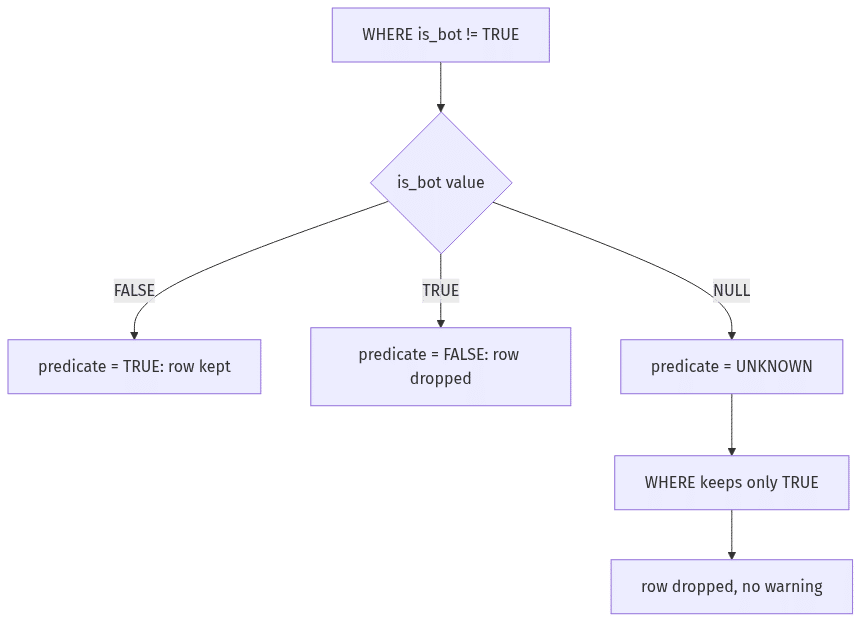
That bot-flag exclusion is where rows leak. In production event tables, bot flags are usually nullable: detection often runs asynchronously, so some events never get scored. Grant that one realistic assumption and the way you spell the exclusion decides who counts as a user. Here is the trap on four rows:
CREATE TABLE events (user_id INT, event_type TEXT, is_bot BOOLEAN);
INSERT INTO events VALUES
  (1, 'login',     FALSE),
  (2, 'open_mail', TRUE),
  (3, 'send_mail', NULL),   -- detector never scored this event
  (4, 'login',     FALSE);

SELECT COUNT(*) FROM events WHERE is_bot != TRUE;
 count
-------
     2
User 3 is a real human whose event was never scored, and the filter threw them away. NULL != TRUE is UNKNOWN under SQL's three-valued logic, and WHERE keeps only rows that evaluate to TRUE; UNKNOWN is discarded exactly like FALSE. In a DAU diagnosis, that means your "drop" might just be the bot detector falling behind on scoring.
The fixes, in rough order of how good they look in an interview:
-- 1. Boolean-specific and standard: IS NOT TRUE treats NULL as "not true"
--    (needs a real BOOLEAN type; SQL Server has none, so use option 2 there)
WHERE is_bot IS NOT TRUE

-- 2. Explicit and dialect-proof
WHERE (is_bot = FALSE OR is_bot IS NULL)

-- 3. Null-safe inequality (PostgreSQL, Snowflake, BigQuery, SQL Server 2022+)
WHERE is_bot IS DISTINCT FROM TRUE

-- 4. Works but hides intent inside a function
WHERE COALESCE(is_bot, FALSE) = FALSE
The decision you should narrate out loud is not which spelling to use. It's whether unscored events belong in DAU at all. Maybe they do (innocent until proven bot), maybe they don't (unscored traffic is suspect). Either answer is defensible; failing to notice the question is not. is_bot != TRUE and is_bot IS NOT TRUE look interchangeable, and on a nullable flag they are two different predicates that give two different counts.
The same logic applies to any nullable column. WHERE country <> 'US' excludes rows with NULL country. WHERE delivered_at <> '2025-08-30' excludes undelivered orders whose delivered_at is NULL. Every inequality filter on a nullable column is implicitly also an IS NOT NULL filter, and the query text does not say so.
NOT IN vs NOT EXISTS: one NULL can empty the result
Asked at PayPal — Write SQL to flag Venmo ATO As a decision scientist on Venmo's account-takeover team, you must flag logins in the last 7 days that came from a device or IP the user had never used in the prior 30 days, followed within 2 hours by a large transfer to a first-time recipient. The heart of the query is a "never seen before" condition: an anti-join against the user's own login history.
The tempting shape is NOT IN:
-- Looks right. Breaks for any user whose login history contains a NULL device_id.
SELECT l.user_id, l.device_id, l.login_ts
FROM logins l
WHERE l.login_ts >= TIMESTAMP '2025-08-25'
  AND l.device_id NOT IN (
    SELECT prior.device_id
    FROM logins prior
    WHERE prior.user_id = l.user_id
      AND prior.login_ts <  l.login_ts
      AND prior.login_ts >= l.login_ts - INTERVAL '30 days'
  );
Login tables have NULL device IDs: web sessions before fingerprinting, older app versions, privacy modes. The problem is the expansion. x NOT IN (a, b, NULL) means x <> a AND x <> b AND x <> NULL, and that last conjunct is UNKNOWN. AND-ing anything with UNKNOWN can never produce TRUE, so no row survives a comparison against a list that contains a NULL.
How much damage that does depends on the subquery's shape. The query above is correlated — the subquery runs against each user's own 30-day history — so a NULL erases exactly the users whose history contains one, silently, while everyone else's rows come back fine. A report that is quietly missing its riskiest users is arguably worse than one that obviously failed. Flatten it to the uncorrelated form, device_id NOT IN (SELECT device_id FROM logins), and a single NULL anywhere in the table returns zero rows for everyone. Either way your fraud detector under-reports while accounts are being drained.
The null-safe version is NOT EXISTS:
SELECT l.user_id, l.device_id, l.login_ts
FROM logins l
WHERE l.login_ts >= TIMESTAMP '2025-08-25'
  AND NOT EXISTS (
    SELECT 1
    FROM logins prior
    WHERE prior.user_id  = l.user_id
      AND prior.device_id = l.device_id
      AND prior.login_ts <  l.login_ts
      AND prior.login_ts >= l.login_ts - INTERVAL '30 days'
  );
NOT EXISTS asks "does a matching row exist?" — a yes/no question that NULLs cannot poison, because prior.device_id = l.device_id simply fails to match when either side is NULL, and a failed match is what you wanted anyway.
Here is how the three standard anti-join shapes compare:
| Approach | NULL-safe? | Typical plan | Where it breaks |
|---|---|---|---|
NOT IN (subquery) | No — a NULL in the subquery result silently drops every affected outer row | SQL Server and Oracle can rewrite it as an anti-join when the column is provably NOT NULL; PostgreSQL never does | Any nullable column on either side |
NOT EXISTS (correlated) | Yes | Anti-join on every major engine | Verbose; correlated subquery scares juniors, shouldn't |
LEFT JOIN ... WHERE right.key IS NULL | Yes, if you test the join key | Anti-join | Testing a right-side column that can be NULL in matched rows misclassifies matches as misses. Filter on the join key or another NOT NULL column |
(A common worry about the LEFT JOIN form, duplicate keys on the right side, is actually harmless here: every matched copy carries a non-NULL key, so the IS NULL filter removes them all and the anti-join output is still correct.)
On PostgreSQL the planner gap is real but often misquoted. PG never rewrites NOT IN into an anti-join, not even when the column is declared NOT NULL. The good case is a hashed SubPlan: the subquery result is hashed once and probed per outer row, tolerable until the result outgrows work_mem. The bad case is a correlated NOT IN like the one above, which cannot be hashed at all, so the subquery re-executes for every outer row. NOT EXISTS, by contrast, reliably becomes a hash anti-join. On a login table with tens of millions of rows, that is the difference between a query that finishes and one you kill. Default recommendation: use NOT EXISTS for every exclusion subquery, and reserve NOT IN for short literal lists of values you control — status NOT IN ('cancelled', 'refunded') is fine because you can see there is no NULL in the list.
The same anti-join shape shows up in the Yahoo question above (exclude users enrolled in the treatment arm): "users who did X but never did Y" is one of the most re-used exclusion patterns in data science screens.
IS DISTINCT FROM: the null-safe not-equal
Asked at Intuit — Compute churn and revenue churn in SQL You get monthly end-of-month subscription snapshots — one row per user per month with an
is_activeflag and an MRR amount — and must compute August-2025 churn metrics. A user churned if they were active in the July snapshot and not active in August.
Now add the wrinkle that every snapshot diff carries, whether or not the prompt spells it out: a user can be missing from the August snapshot entirely (deleted account, ETL gap), and after a LEFT JOIN that user's August is_active is NULL. If your definition of churn is "was active, isn't anymore," the missing user churned harder than anyone. Watch the naive predicate fail:
SELECT jul.user_id
FROM snapshots jul
LEFT JOIN snapshots aug
  ON  aug.user_id = jul.user_id
  AND aug.snapshot_date = DATE '2025-08-31'
WHERE jul.snapshot_date = DATE '2025-07-31'
  AND jul.is_active = 1
  AND aug.is_active <> 1;        -- misses users with NO August row
aug.is_active is NULL for the missing user, NULL <> 1 is UNKNOWN, row dropped. The user who vanished hardest is the one your churn metric ignores. The one-token fix:
AND aug.is_active IS DISTINCT FROM 1; -- catches 0 AND the missing-row NULL
IS DISTINCT FROM is not-equal with NULL promoted to a first-class value: two NULLs are not distinct (the comparison is FALSE), and NULL vs anything else is distinct (TRUE). It never returns UNKNOWN, which is the whole point. It is the right operator whenever you diff two nullable values: churn snapshots like this one, change-data-capture ("did any column change between versions?"), reconciling a table against its backup.
Engine support, since this is the least portable item on this page:
- PostgreSQL, Snowflake, BigQuery, Spark SQL, SQL Server 2022+:
a IS DISTINCT FROM bas written. - MySQL / MariaDB: no
IS DISTINCT FROM; use the null-safe equality operator and negate it:NOT (a <=> b). - SQLite:
IS DISTINCT FROMis supported natively since 3.39; on older versions,a IS NOT bdoes the same job, because SQLite'sIS NOTis null-safe for all types. - Older SQL Server / anything else: expand it by hand:
(a <> b) OR (a IS NULL AND b IS NOT NULL) OR (a IS NOT NULL AND b IS NULL).
In an interview, writing the hand expansion once and then saying "this is what IS DISTINCT FROM abbreviates" is a strong move: it proves you understand the semantics rather than pattern-matching syntax. The Intuit question also asks for revenue churn, MRR that shrank, and aug.mrr IS DISTINCT FROM jul.mrr, aug.mrr < jul.mrr, and COALESCE(aug.mrr, 0) < jul.mrr give three different answers on the missing-row user. Say which one you mean and why.
String exclusions: NOT LIKE wildcards and case sensitivity bite separately
Asked at Netflix — Aggregate D1 retention cohorts in SQL Compute daily engagement and day-1 retention over a week of event data, with one throwaway line in the prompt: exclude any
user_idbeginning withbot_. That one line hides two separate bugs.
Bug one is the wildcard. _ in a LIKE pattern matches any single character, so:
WHERE user_id NOT LIKE 'bot_%'    -- WRONG: also excludes 'botany_fan', 'bot99x'
WHERE user_id NOT LIKE 'bot\_%' ESCAPE '\'   -- right: literal underscore
The unescaped version excludes every ID whose first three characters are bot followed by anything. botany_fan is a real user, gone. Most candidates never notice, because the sample data conveniently contains no such ID. Strong candidates escape the underscore without being told; the strongest also ask whether the convention is even enforced (bot_ prefix vs an is_bot column — and the Yahoo section above shows what a nullable flag column does to the filter).
Bug two is our recurring friend: NOT LIKE on a NULL user_id is UNKNOWN, so NULL user IDs are excluded too. For retention math over anonymous events, that may be exactly right, or it may silently shrink the denominator. Decide on purpose.
Asked at Pinterest — Find top category by video time spent Among video pins, find the category with the highest average time spent, except
pin_typevalues must be compared case-insensitively, the data contains the misspellingvediothat should count asvideo, and categories need lowercasing and whitespace-stripping before mapping. It's a pandas question, but the comparison-semantics lesson transfers to SQL directly.
Whether pin_type <> 'video' excludes a row whose value is 'Video' depends on the collation, and the defaults disagree:
- PostgreSQL: comparisons are case-sensitive by default.
'Video' <> 'video'is TRUE, so the capital-V row survives your exclusion filter. - MySQL with the default
utf8mb4_0900_ai_cicollation: case-insensitive.'Video' <> 'video'is FALSE, and the same filter excludes the row. - SQL Server: most default collations are case-insensitive (
_CI_in the name), matching MySQL's behavior.
The same query text, three engines, two different result sets. The portable defense is to normalize before comparing: LOWER(TRIM(pin_type)) <> 'video'. It costs you index eligibility on that predicate (unless you build an expression index), but for a data-quality-laden column like this one, correctness comes first — the Pinterest prompt is explicitly testing whether you normalize before filtering rather than after. For the pandas-side treatment of the same normalization pattern, the Python vs SQL in data science interviews guide covers when each tool earns the job.
Denylist vs allowlist: <> chains age badly
Asked at Point72 — Write SQL for recent customer activity One ANSI-SQL query per customer with at least one non-canceled order ever: last order timestamp, distinct products in the last 7 days, and net spend after refunds. The cohort is described in words, but the metrics themselves are pinned to
status IN ('COMPLETED','SHIPPED')— an allowlist, not a not-equal.
That allowlist is the lesson. A denylist written with not-equal —
WHERE status <> 'CANCELED'
-- or the chained version
WHERE status <> 'CANCELED' AND status <> 'PAYMENT_FAILED'
-- or equivalently
WHERE status NOT IN ('CANCELED', 'PAYMENT_FAILED')
— makes two fragile promises. First, that you have enumerated every bad status including the ones added after you wrote the query: when the orders team ships a REFUND_PENDING status next quarter, a denylist silently includes it in revenue; an allowlist silently excludes it, which is the safer failure. Second, that status is never NULL. If it is, the denylist drops the row (UNKNOWN again) when your intent was almost certainly "a NULL status is not canceled, keep it" or at least "flag it, don't vanish it."
Allowlists fail closed; denylists built on <> fail open and eat NULLs. When a prompt hands you the positive-list form, as this one does, preserve it in your answer rather than "simplifying" it back into <> 'CANCELED'.
There is a legitimate use for a <> chain or a short NOT IN literal list: excluding a small, closed set of values you control, on a NOT NULL column, in a one-off analysis. That is a much narrower situation than the range of places <> chains actually get written.
What inequality does to indexes and joins
Asked at SIG (Susquehanna) — Write SQL for deliveries analytics A PostgreSQL-flavored analytics set over users, orders, and couriers, where orders carry a constrained
status(created,in_progress,delivered,cancelled) and adelivered_atthat is NULL until delivery. Several tasks need "orders that aren't cancelled" or "not yet delivered" filters over what is, in production, the biggest table in the schema.
Correctness aside, <> has a performance personality worth two minutes in any interview that asks "how would this run at scale?":
A B-tree seek wants a contiguous range, and <> doesn't give it one. status <> 'cancelled' describes two open ranges (everything below the value, everything above), so PostgreSQL treats it as a filter applied during a scan, never a seek. Most planners behave the same way, though SQL Server can convert <> into a pair of range seeks in some plans. Whether any of this matters depends entirely on selectivity:
- If cancelled orders are a small slice of the table,
status <> 'cancelled'keeps nearly every row, a sequential scan was the right plan anyway, and the missing index seek costs you nothing. - If you flip it,
status <> 'delivered'on a table where almost every order is delivered, you keep a thin slice of rows and want index help. Rewrite as the allowliststatus IN ('created','in_progress','cancelled'), which the planner turns into three seekable ranges. Or, on PostgreSQL, build a partial index:CREATE INDEX ... ON orders (created_at) WHERE status <> 'delivered'— one of the few places<>in DDL is actively great, because the index only stores the slice you query. SQL Server's filtered indexes do the same job.
Inequality join predicates rule out hash joins. A hash join needs equality to bucket rows, and a merge join needs equality keys too, so ON a.key <> b.key forces a nested loop. If you ever find yourself writing a <> join — say, pairing each order with couriers other than its own for a comparison metric — expect O(n·m) behavior and say so before the interviewer asks.
NULL-position footnote: on the SIG schema, "not yet delivered" is delivered_at IS NULL, never delivered_at <> something. NULL tests are their own predicate class, and PostgreSQL B-trees index NULLs, so IS NULL can seek where <> cannot.
None of this changes the answer's correctness, which is why it separates seniors from juniors: the junior writes a correct query; the senior writes the same query and mentions which predicate the planner will hate.
Practice these on PracHub
Every trap above came from a real screen. Work them in order — each drills one specific failure mode — or browse the full question bank and the Top 50 SQL interview questions with answers for the wider syllabus.
- Diagnose DAU drop with SQL by country (Yahoo) — the bot-flag exclusion where
is_bot != TRUEandIS NOT TRUEpart ways on nullable data. - Write SQL to flag Venmo ATO (PayPal) — the "never seen before" anti-join; the exact query where
NOT INgoes quiet andNOT EXISTSsaves you. - Compute churn and revenue churn in SQL (Intuit) — snapshot diffing where the missing row is the churned user;
IS DISTINCT FROMterritory. - Aggregate D1 retention cohorts in SQL (Netflix) — the
NOT LIKE 'bot\_%'escape and NULL-user-ID denominator decisions, inside a retention calculation. - Write SQL for recent customer activity (Point72) — allowlist status filtering under refund and 7-day-window pressure.
- Write SQL for deliveries analytics (SIG) — status and
delivered_at IS NULLpredicates over the kind of orders table where index behavior starts to matter.
Most of these also chain into window-function follow-ups once the filtering is right; the SQL window functions guide covers that next layer.
Comments (0)