Google Technical Solutions Engineer Interview: Compute Troubleshooting and OS Fundamentals
Quick Overview
Prepare for Google Technical Solutions Engineer Compute interviews with current role evidence and a simulated VM boot case. Distinguish platform RUNNING from guest and application readiness, investigate fstab dependencies, assess nofail trade-offs, and build a precise escalation and recovery plan.
For a Google Technical Solutions Engineer interview focused on Compute, prepare to explain how an operating system, a virtual machine, and a customer workload fail differently. A useful answer connects a symptom to evidence: which layer is failing, what remains uncertain, and what observation would change your diagnosis.
This guide focuses on Compute troubleshooting and OS fundamentals. It uses current official role information, carefully limited candidate evidence, and an original simulated VM incident. Start with Google interview questions on PracHub, then use the case below to practice moving from “the VM is running” to a defensible recovery plan.
What does the Compute role actually emphasize?
Official role evidence: A current Google Technical Solutions Engineer, Infrastructure, Compute posting, reviewed September 9, 2026, describes customer diagnosis, networking, system administration, and programming or scripting. It also includes reproducing problems, improving diagnostic tools, and working with Product, Engineering, and SRE teams. Its qualifications belong to that particular opening, not every TSE position.
That scope suggests preparation grounded in operating behavior: explain a failure, collect useful evidence, propose a targeted intervention, and verify the customer outcome. Do not assume that preparation for a Customer Engineer architecture presentation covers the same task. Read the actual job description and confirm whether your invitation is for Compute, another product track, or a different customer-facing role.
Historical official account: In Google’s June 2021 employee profile, Sanjay Khubchandani described studying OS management, web technologies, and networking. His interview story refers to an earlier period. It is useful background about his preparation, not a current interview syllabus.
Candidate evidence: A recent Compute TSE discussion asks what to expect in technical rounds. An upcoming candidate’s question establishes their uncertainty, not the contents of a completed loop. The public evidence reviewed here does not establish two independent, same-cycle accounts of completed interviews.
Editorial inference: Prioritize diagnosis and communication exercises, but confirm coding expectations, allowed references, technical track, and round format with your recruiter. This article does not promise a fixed number of rounds, a particular coding difficulty, or that the following case will appear.
Which OS fundamentals make troubleshooting answers stronger?
Study mechanisms through questions you can investigate. For boot problems, distinguish firmware and bootloader progress, kernel initialization, discovery of storage, filesystem mounting, service startup, and application readiness. Knowing that sequence helps you ask where progress stopped instead of listing unrelated commands.
For a filesystem problem, explain the difference between a cloud disk resource, a guest-visible block device, a filesystem identifier, and a mount point. Those names refer to different objects. A directory named /srv/reports can exist even when the intended filesystem is not mounted there.
For process questions, connect service state to dependencies and the actual work being done. A process can start but remain unable to load required data. For networking, distinguish a client-side name-resolution failure, a TCP connection failure, SSH authentication rejection, and an application response. The customer may describe any of these outcomes as “I cannot connect.”
Use a short answer pattern during practice: explain the mechanism, name the evidence you would inspect, and give one alternative explanation. For example, a failed SSH attempt could follow a guest boot failure, but it could also come from the access path. A fresh serial log showing emergency mode changes which branch deserves attention first.
Practice case: RUNNING, but the guest does not finish booting
Original simulated materials: The following timeline and configuration are authored practice inputs, reviewed against the linked Google Cloud and systemd documentation. They are not a captured customer incident, a candidate-reported question, or an executed Compute Engine experiment. No GCE console session or cloud repair was performed for this article.
Assume a Linux VM using systemd serves scheduled reports from a required data volume. The customer reports that the service stopped after planned maintenance. Reveal these facts to a practice partner in order:
| Time, UTC | Supplied observation | What it leaves unresolved |
|---|---|---|
| 09:00 | Reports served normally | The exact disk and mount configuration still need recording |
| 09:12 | Maintenance changed the VM’s attached disks | Which disk changed and whether that was intended |
| 09:14 | A restart was requested | Whether guest boot completed |
| 09:16 | Compute Engine reports RUNNING; SSH attempts time out | Guest readiness and the access path |
| 09:17 | Fresh serial output indicates a device wait, a failed /srv/reports mount dependency, and emergency mode | Whether the device is missing, misidentified, or otherwise unavailable |
The first important answer is that RUNNING does not prove the application is healthy. Google’s instance lifecycle documentation explicitly includes booting within that state. The platform observation and the guest boot evidence can therefore be consistent.
A useful initial diagnosis is: “The supplied serial evidence points to a guest mount dependency blocking normal boot. I will reconcile the requested mount with the attached disks and guest-visible filesystem identifiers.” That is narrower than declaring the cloud platform down or claiming the data disk was deleted.
Read the relevant boot evidence
Google documents viewing serial port output separately from connecting to an interactive serial console. Reading output can reveal boot progress without a working guest SSH connection. Confirm the project, zone, VM identity, and timestamps so you do not diagnose an earlier boot or a similarly named instance.
This documented command form is an example to run in an authorized environment; replace the placeholders:
gcloud compute instances get-serial-port-output VM_NAME \
  --project=PROJECT_ID \
  --zone=ZONE \
  --port=1
The CLI reference describes the port and output-offset options. The direct output buffer is limited; an empty or incomplete excerpt is not proof that boot produced no error. Historical Cloud Logging evidence depends on collection having been configured.
Reading serial output and obtaining an interactive shell are different capabilities. Interactive access has configuration and permission requirements, described in Google’s serial console troubleshooting documentation. A visible emergency prompt does not guarantee that you possess usable guest credentials.
Compare the mount requirement with the actual device
The simulated /etc/fstab includes this entry:
UUID=11111111-2222-4333-8444-555555555555 /srv/reports ext4 defaults 0 2
The UUID is a fictional fixture value. Ask for the current attachment inventory, the intended data disk identity, and guest filesystem information from an approved diagnostic or recovery environment. The investigation must connect the expected filesystem to the device actually available to the guest.
Google’s fstab boot troubleshooting guide identifies incorrect UUIDs, unavailable devices, syntax problems, and unsuitable mount options among possible causes. The supplied mount failure narrows the investigation, but does not select one cause by itself.
Now reveal a second fixture fact: the approved maintenance record identifies the reports disk as detached, and the current attachment inventory lacks that disk. This supports investigating restoration of that specific attachment. It does not establish that the disk’s contents are intact or that reattachment will be the only required repair.
If instead the expected disk were attached and its filesystem identifier differed from fstab, the next step would change. You would establish why the identifier differs before editing the mount configuration. Never choose a disk solely because its size resembles the missing one.
Why adding nofail is not automatically the right answer
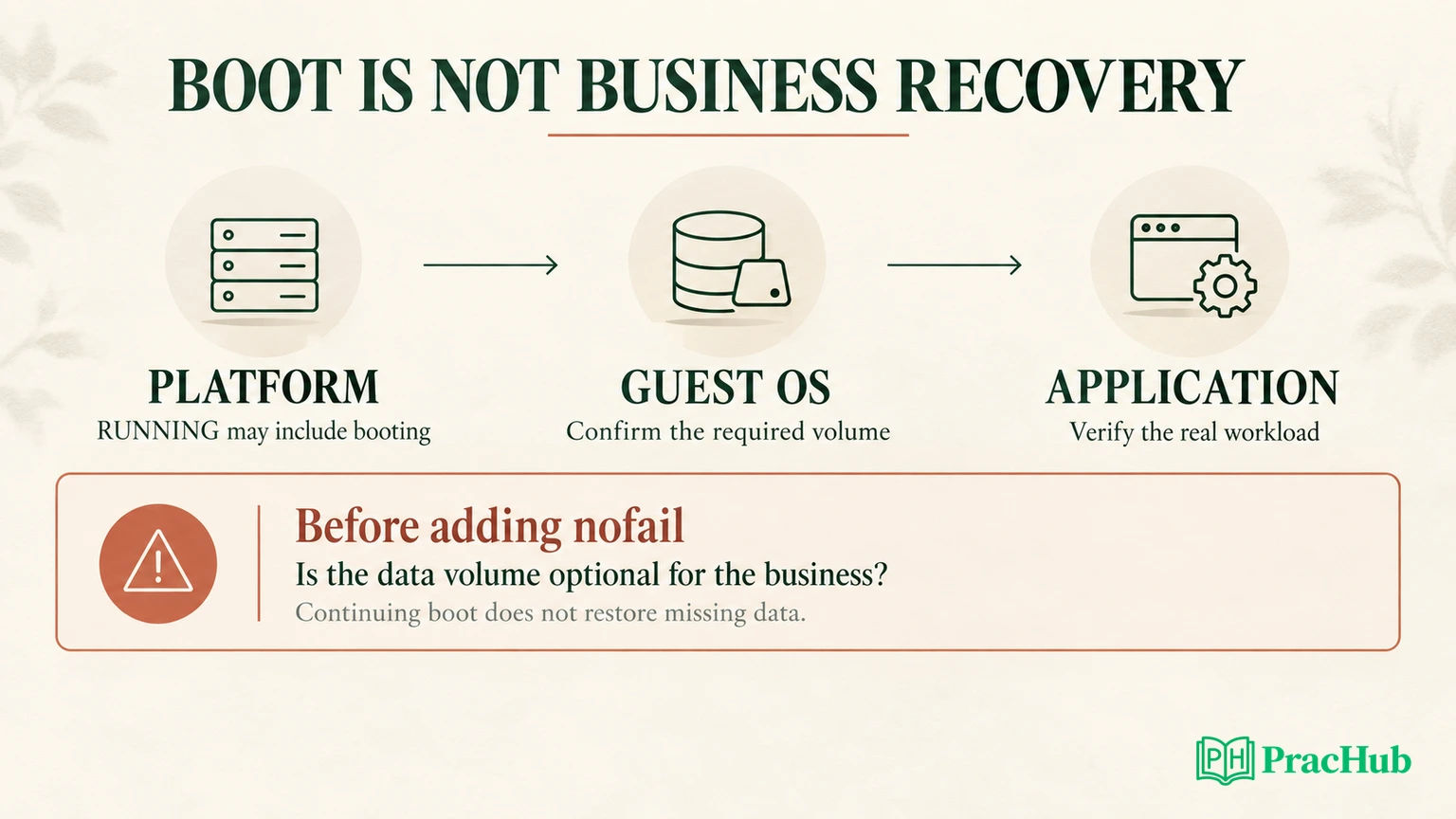
An interviewer may propose adding nofail to let boot continue. Explain the consequence before accepting the change.
The primary systemd mount documentation describes how nofail changes the mount’s relationship to filesystem targets: the mount is wanted rather than required, and boot does not wait for it in the same way. That changes boot dependency behavior. It does not supply the missing filesystem or make its data available.
In this simulated workload, reports require that volume. Allowing the guest to boot might improve diagnostic access, but it is not equivalent to restoring the service. The application could fail, or—depending on its own behavior—use the underlying directory without the intended mount. Treat that latter possibility as a risk to inspect, not an observed event in this case.
Ask the customer whether the mount is optional for the workload, which service depends on it, and what should happen when it is absent. Separate a temporary recovery measure from the desired steady-state configuration. If a service must not run without a particular filesystem, confirm that requirement is enforced in its startup and readiness design.
This is a useful interview trade-off: keeping the OS accessible can aid repair, while preserving the workload’s data assumptions protects correctness. A good answer explains both and chooses according to the stated requirement.
Choose a recovery path that matches the available access
Do not jump from a boot error to a universal repair command. The appropriate route depends on the distribution, bootloader, credentials, permissions, and disk layout.
Google’s fstab guidance notes that emergency-mode login can require a root password, which is not set by default on Google-provided Linux images. Recovery instructions also differ by distribution. Do not present one boot parameter or interactive-console action as valid for every Linux image.
If the available console path cannot support the repair, consult Google’s inaccessible VM rescue procedure. Its snapshot and temporary recovery-VM approach gives you a documented alternative. Identify the correct disk and preserve recovery options before modifying files. A rescue environment is also a different environment: keep track of which mounted root you are inspecting.
In this mock, propose restoring the intended disk attachment after the owner confirms the disk identity and maintenance intent. Then verify guest discovery, the filesystem identifier, and the expected mount. If those checks contradict the proposal, reopen the hypothesis rather than repeatedly rebooting.
The article does not assert that this repair succeeded. A preparation answer should say which result would establish success and what you would do if that result failed to appear.
Write an escalation another engineer can use
An escalation should preserve the evidence chain and identify the help required. Use a short structure: impact and identity; timeline; observations; working explanation; alternatives still open; action requested; verification plan.
Here is a completed example using only the simulated facts:
Impact and identity: The scheduled reporting service on the identified Compute VM has been unavailable since maintenance. Project, zone, instance ID, and intended reports-disk ID are recorded in the case.
Evidence: Normal service at 09:00 UTC; attachment change at 09:12; restart at 09:14. The platform reports RUNNING, while fresh serial output indicates a failed reports-mount dependency and emergency mode. The maintenance record and attachment inventory agree that the intended reports disk is detached.
Working explanation: The required data volume is unavailable to the guest. This explains the observed mount failure, but data integrity and subsequent service readiness remain unverified.
Request: Confirm whether detachment was intentional and coordinate restoration of the approved disk attachment. If the device remains unavailable afterward, collect guest device and filesystem evidence before changing fstab.
Success criteria: Guest boot completes, the expected filesystem is mounted at the reports path, approved SSH access works, and the reporting workload successfully uses the expected data.
Notice what this note does not exclude. It does not declare the network healthy simply because a boot problem exists. It also does not claim that storage corruption has been ruled out. An engineer reading it can continue while knowing which explanations remain open.
Verify the workload, then practice follow-ups
Plan recovery checks across all relevant layers. Confirm the intended instance and current boot, the correct filesystem mounted at the correct path, the required service state, and a representative reporting operation. Retain the expected access restrictions and check for unintended changes introduced during diagnosis.
Then vary one fact in the mock. If the guest reaches a normal login prompt but SSH still fails, investigate the access path using Google’s SSH troubleshooting guidance. If serial output shows a kernel panic before the mount stage, the original mount hypothesis no longer explains the primary failure. If the application starts with stale data, a green process indicator is still insufficient.
These verified PracHub questions build adjacent skills across roles and companies; they are not predictions of a Compute TSE interview.
| PracHub question | Deliberate practice action |
|---|---|
| Explain virtual machines and concurrency basics | Separate hypervisor resources from guest-kernel behavior. |
| Troubleshoot a Host That Rejects SSH Connections | Reopen the access-path investigation after guest boot is healthy. |
| Troubleshoot CPU, latency, and DNS issues | Explain what each signal can establish before proposing a command. |
| Describe conflict resolution and stakeholder management | Resolve disagreement about a recovery change using shared evidence. |
| Answer leadership and ambiguity scenarios | Identify the decision owner and the missing fact without abandoning ownership. |
Continue with Google interview practice on PracHub. Finish your next mock by stating what the diagnosis explains, why the next action is justified, and how you will observe the customer outcome.
Sources and Further Reading
- Google Careers: Technical Solutions Engineer, Infrastructure, Compute
- Google employee profile, June 2021: historical preparation experience
- Compute TSE Reddit question: upcoming-candidate uncertainty
- Compute Engine instance lifecycle
- Viewing serial port output
- gcloud get-serial-port-output reference
- Interactive serial console troubleshooting
- Linux VM boot problems caused by fstab errors
- systemd mount manual source
- Rescue an inaccessible VM
- Compute Engine SSH troubleshooting
Comments (0)