SQL CASE WHEN: CASE Statement Syntax, IF/ELSE Logic, and Conditional Counts
Quick Overview
A worked reference for the SQL CASE statement, built around a small fixture and queries that run as written on PostgreSQL. Covers searched versus simple CASE, CASE as SQL's portable if/else, multiple conditions inside one WHEN, conditional counts with COUNT and SUM, the first-match-wins ordering trap, NULL behaviour, and the T-SQL specifics SQL Server screens ask about.
You reached for IF and PostgreSQL told you the function does not exist. Every engine has some conditional shortcut, but the one that runs everywhere is CASE: write CASE WHEN <condition> THEN <result> ... ELSE <default> END, branches evaluate top to bottom, the first true condition wins, and a missing ELSE returns NULL. That is the whole syntax. Most people call this the SQL CASE statement; SQL itself calls it an expression, a distinction worth one sentence in an interview and covered below. What a SQL screen actually tests is what you build with it: conditional counts, rates, pivots, custom sorts, plus two failure modes (branch order and NULL) that produce wrong answers without producing errors. Every query on this page runs as written on PostgreSQL against the small tables defined below, except the blocks explicitly labelled SQL Server.
Key Takeaways
- CASE has two forms. The searched form (
CASE WHEN condition THEN ...) evaluates any boolean per branch; the simple form (CASE expr WHEN value ...) compares one expression by equality, which also means it can never matchNULL. - Conditional aggregation,
COUNT(CASE WHEN cond THEN 1 END)orSUM(CASE WHEN cond THEN 1 ELSE 0 END), computes several filtered metrics in one pass over the table. Drill it before anything else on this page. - Branches evaluate top to bottom and stop at the first true condition. With overlapping ranges, put the most specific condition first or later branches become unreachable, silently.
- A
WHENwhose condition evaluates to UNKNOWN (usually a comparison againstNULL) falls through as if false, and a CASE with no matching branch and noELSEreturnsNULL. CASEis ANSI standard.IF(),IIF(), andDECODE()are dialect shortcuts. In an interview, writeCASEunless you know exactly which engine you are on.
The two forms: searched CASE and simple CASE
People search for the SQL CASE statement, but inside a query CASE is an expression: it produces one value per row and can sit anywhere a value can — the SELECT list, WHERE, GROUP BY, ORDER BY, or inside an aggregate function. The statement form exists only in procedural code (PL/pgSQL, T-SQL stored procedures), which is not what a data screen is asking about.
All examples run on this seven-row table:
CREATE TABLE transactions (
  transaction_id INT PRIMARY KEY,
  user_id        INT,
  amount         NUMERIC(10,2),
  status         TEXT,   -- 'approved' | 'declined' | 'review'
  country        TEXT    -- nullable
);

INSERT INTO transactions VALUES
  (1, 101,   25.00, 'approved', 'US'),
  (2, 101,  900.00, 'declined', 'US'),
  (3, 102,   50.00, 'approved', 'CA'),
  (4, 103, 1200.00, 'approved', 'US'),
  (5, 103,   75.00, 'review',   NULL),
  (6, 104,   30.00, 'approved', 'CA'),
  (7, 104,   45.00, 'declined', NULL);
The searched form takes a full boolean condition per branch:
SELECT transaction_id,
       amount,
       CASE
         WHEN amount >= 1000 THEN 'large'
         WHEN amount >= 100  THEN 'medium'
         ELSE 'small'
       END AS size_bucket
FROM transactions
ORDER BY transaction_id;
| transaction_id | amount | size_bucket |
|---|---|---|
| 1 | 25.00 | small |
| 2 | 900.00 | medium |
| 3 | 50.00 | small |
| 4 | 1200.00 | large |
| 5 | 75.00 | small |
| 6 | 30.00 | small |
| 7 | 45.00 | small |
The simple form names one expression once and compares it against values:
SELECT transaction_id,
       status,
       CASE status
         WHEN 'approved' THEN 'settled'
         WHEN 'declined' THEN 'failed'
         ELSE 'in progress'
       END AS pipeline_stage
FROM transactions
ORDER BY transaction_id;
| transaction_id | status | pipeline_stage |
|---|---|---|
| 1 | approved | settled |
| 2 | declined | failed |
| 3 | approved | settled |
| 4 | approved | settled |
| 5 | review | in progress |
| 6 | approved | settled |
| 7 | declined | failed |
The simple form only tests equality. Ranges, compound conditions, and NULL checks all need the searched form, and you cannot stack values in one simple branch: CASE status WHEN 'approved' OR 'declined' THEN ... errors in PostgreSQL, because OR demands booleans and tries to coerce the strings. If you want a value list, use the searched form with IN: CASE WHEN status IN ('approved', 'declined') THEN .... In practice I default to the searched form and reach for the simple form only when mapping one column through a short lookup, as above.
SQL if/else: CASE is the portable version
If you arrived here searching "sql if else", the CASE statement is the answer. A two-branch CASE is an if/else; a chain of WHENs is an else-if ladder; the ELSE is the final else.
SELECT transaction_id,
       amount,
       CASE WHEN amount >= 100 THEN 'high' ELSE 'low' END AS value_flag
       -- SQL Server / SQLite: IIF(amount >= 100, 'high', 'low')
       -- MySQL / BigQuery:    IF(amount >= 100, 'high', 'low')
FROM transactions
ORDER BY transaction_id;
| transaction_id | amount | value_flag |
|---|---|---|
| 1 | 25.00 | low |
| 2 | 900.00 | high |
| 3 | 50.00 | low |
| 4 | 1200.00 | high |
| 5 | 75.00 | low |
| 6 | 30.00 | low |
| 7 | 45.00 | low |
Coming from Python or Java, the reflex for else-if is to nest. SQL lets you, and it is worth writing both spellings once to see that they are the same thing:
SELECT transaction_id,
       amount,
       CASE
         WHEN amount >= 1000 THEN 'large'
         ELSE CASE
                WHEN amount >= 100 THEN 'medium'
                ELSE 'small'
              END
       END AS nested_bucket,
       CASE
         WHEN amount >= 1000 THEN 'large'
         WHEN amount >= 100  THEN 'medium'
         ELSE 'small'
       END AS flat_bucket
FROM transactions
ORDER BY transaction_id;
| transaction_id | amount | nested_bucket | flat_bucket |
|---|---|---|---|
| 1 | 25.00 | small | small |
| 2 | 900.00 | medium | medium |
| 3 | 50.00 | small | small |
| 4 | 1200.00 | large | large |
| 5 | 75.00 | small | small |
| 6 | 30.00 | small | small |
| 7 | 45.00 | small | small |
Identical output, and the flat version is the one to write. Nesting buys nothing here, it makes the branch order harder to audit, and on SQL Server it burns through a hard cap of 10 nesting levels that the flat form never touches.
The one behaviour that surprises people migrating from a procedural language: an if with no else does not return an empty string or skip the row, it returns NULL. Drop the ELSE from the first query and every row under 100 comes back NULL in value_flag. That default is a feature inside aggregates — it is the entire mechanic behind conditional counts — and a bug in a displayed column, so decide which one you are writing.
The two commented lines above are the same logic in the dialect shortcuts. None of them is standard SQL, and they do not all reach each other: IIF moves between SQL Server and SQLite, IF moves between MySQL and BigQuery, and neither spelling exists in PostgreSQL. SQL Server's IIF is documented as being rewritten into a CASE, so it is sugar in the strict sense; MySQL's IF() is a native function that happens to have the same two-branch semantics. The engine-by-engine breakdown, including the one MySQL trick that silently fails to port, is further down the page. The reason to learn the CASE spelling first is that it is the one an interviewer accepts on any engine, and the only one that chains past two branches without turning into nested parentheses.
That same expression, dropped inside an aggregate function, is where SQL screens actually spend their time.
Conditional aggregation: COUNT and SUM over CASE
Asked at TikTok — Count buggy vs non-buggy by employer Given an employers table and a submissions table with a boolean column separating buggy from non-buggy submissions, return every employer with its buggy count and its non-buggy count — in one query, and including employers that have no submissions at all. The follow-up asks how the query changes if that column were a string instead of a boolean.
In PracHub's question bank, conditional aggregation is the most common crux in analytics SQL questions, and it rests on one mechanic: aggregate functions skip NULLs, and a CASE with no ELSE emits NULL for non-matching rows. So COUNT(CASE WHEN cond THEN 1 END) counts exactly the rows where the condition holds.
SELECT user_id,
       COUNT(*) AS total_txns,
       COUNT(CASE WHEN status = 'approved' THEN 1 END)             AS approved_cnt,
       SUM(CASE WHEN status = 'declined' THEN 1 ELSE 0 END)        AS declined_cnt,
       SUM(CASE WHEN status = 'review' THEN amount ELSE 0.00 END)  AS review_amount
FROM transactions
GROUP BY user_id
ORDER BY user_id;
| user_id | total_txns | approved_cnt | declined_cnt | review_amount |
|---|---|---|---|---|
| 101 | 2 | 1 | 1 | 0.00 |
| 102 | 1 | 1 | 0 | 0.00 |
| 103 | 2 | 1 | 0 | 75.00 |
| 104 | 2 | 1 | 1 | 0.00 |
Both spellings appear above on purpose. COUNT(CASE WHEN ... THEN 1 END) and SUM(CASE WHEN ... THEN 1 ELSE 0 END) return the same counts; pick one and stay consistent. SUM earns its keep when you conditionally total a real column, like review_amount.
The TikTok question hides a second trap in "including employers with zero submissions". That forces a LEFT JOIN from employers to submissions, and after a LEFT JOIN, COUNT(*) is wrong: an employer with no submissions still produces one null-extended row, so COUNT(*) reports 1. The conditional counts stay correct, because the null-extended row satisfies no WHEN condition and both land at 0. That asymmetry between COUNT(*) and COUNT(expr) is exactly what the interviewer is fishing for, and it is the same rule that governs COUNT(DISTINCT) — SQL COUNT: COUNT(*) vs COUNT(column) vs COUNT(DISTINCT) works through the full set. The string-column follow-up is almost a gift: with CASE the only edit is the comparison inside WHEN.
Asked at PayPal — Write conditional aggregation SQL queries Compute a conditional total two ways — once as
SUM(CASE WHEN ...)over all rows, once as a plainSUMunder aWHEREfilter — and explain when the two stop being interchangeable. A later part moves a condition intoHAVINGand asks whether that syntax survives in MySQL.
For a single filtered metric, WHERE wins. It is shorter, and the planner can use an index to skip non-matching rows instead of reading them and discarding them inside the aggregate:
SELECT SUM(amount) AS approved_revenue
FROM transactions
WHERE status = 'approved';
| approved_revenue |
|---|
| 1305.00 |
The moment you need two filtered metrics side by side, WHERE cannot split the rows: filtering for approved discards the declined rows you also need. Conditional aggregation does both in one scan:
SELECT SUM(CASE WHEN status = 'approved' THEN amount ELSE 0.00 END) AS approved_revenue,
       SUM(CASE WHEN status = 'declined' THEN amount ELSE 0.00 END) AS declined_revenue
FROM transactions;
| approved_revenue | declined_revenue |
|---|---|
| 1305.00 | 945.00 |
On seven rows nobody cares. On a billions-of-rows events table, five filtered metrics as five separate queries means five full scans; one query with five conditional aggregates means one. Say that out loud in the interview — it is the difference between knowing the syntax and knowing why it exists.
And know when not to use it: a question like Capital One's Determine Country with Most 'Sunny' Days needs one filtered count per group, so WHERE weather = 'sunny' plus GROUP BY country is the clean answer. Wrapping it in CASE adds tokens, not correctness.
Rates and shares: CTR in one pass
Asked at Pinterest — Compute CTR by format for new US users Three tables: an events log where impressions and clicks are rows distinguished by an event-type column, a users table with country and sign-up date, and a pin-to-format mapping. Compute click-through rate by pin format, restricted to US users whose sign-up date falls within 30 days of the event date. One query.
CTR is conditional aggregation applied twice. Clicks and impressions live in the same column of the same table, so both the numerator and the denominator are CASE aggregates over one pass:
CREATE TABLE ad_events (
  ad_id INT,
  event TEXT   -- 'impression' | 'click'
);

INSERT INTO ad_events VALUES
  (1, 'impression'), (1, 'impression'), (1, 'click'),
  (2, 'impression'), (2, 'impression'), (2, 'impression'), (2, 'click'), (2, 'click'),
  (3, 'impression');
SELECT ad_id,
       SUM(CASE WHEN event = 'impression' THEN 1 ELSE 0 END) AS impressions,
       SUM(CASE WHEN event = 'click' THEN 1 ELSE 0 END)      AS clicks,
       ROUND(
         SUM(CASE WHEN event = 'click' THEN 1 ELSE 0 END)::numeric
         / NULLIF(SUM(CASE WHEN event = 'impression' THEN 1 ELSE 0 END), 0)
       , 2) AS ctr
FROM ad_events
GROUP BY ad_id
ORDER BY ad_id;
| ad_id | impressions | clicks | ctr |
|---|---|---|---|
| 1 | 2 | 1 | 0.50 |
| 2 | 3 | 2 | 0.67 |
| 3 | 1 | 0 | 0.00 |
Two guards in that query kill the two most common wrong answers. The ::numeric cast prevents integer division — without it, PostgreSQL computes 2 / 3 = 0 and every CTR comes back zero. And NULLIF(..., 0) turns a zero-impression denominator into NULL instead of a division-by-zero error; Meta's version of this question, Compute CTR overall and by campaign type, demands that guard explicitly, along with deduplicating the event log first. Capital One runs the same computation after a four-CSV join in Merge ad CSVs and compute CTR; the CASE part is identical, the joins are the work.
Asked at Meta — Analyze Group Call Adoption Using SQL Queries A call-log table records each call with a group-call flag and a participant count. The task is to write SQL against those historical logs to analyze adoption of the newly launched group-call feature.
Share-of-total questions have a shortcut worth memorizing: the average of a 0/1 indicator is the proportion. Here is per-user approval rate on our transactions table:
SELECT user_id,
       ROUND(AVG(CASE WHEN status = 'approved' THEN 1.0 ELSE 0.0 END), 2) AS approval_rate
FROM transactions
GROUP BY user_id
ORDER BY user_id;
| user_id | approval_rate |
|---|---|
| 101 | 0.50 |
| 102 | 1.00 |
| 103 | 0.50 |
| 104 | 0.50 |
For a prompt like Meta's, share of group calls per day is the natural first cut: group by the date, average a CASE over the flag. When the denominator is the whole table rather than the group — "each format's share of all clicks" — you need a window function instead; that pattern and its evaluation order live in our window functions guide.
CASE beyond SELECT: pivots, buckets, and custom sorts
Asked at Meta — Write SQL filtering, grouping, CASE, UNION tasks An orders table mixes web and store purchases across paid, pending, and refunded statuses. The multi-part prompt escalates from filtering through grouping into CASE and UNION work over that one table — a full analytics screen compressed into a single schema.
A pivot is conditional aggregation with a naming convention: GROUP BY the dimension you want as rows, write one CASE aggregate per column you want across the top.
SELECT status,
       COUNT(CASE WHEN country = 'US' THEN 1 END)     AS us_cnt,
       COUNT(CASE WHEN country = 'CA' THEN 1 END)     AS ca_cnt,
       COUNT(CASE WHEN country IS NULL THEN 1 END)    AS unknown_cnt
FROM transactions
GROUP BY status
ORDER BY status;
| status | us_cnt | ca_cnt | unknown_cnt |
|---|---|---|---|
| approved | 2 | 2 | 0 |
| declined | 1 | 0 | 1 |
| review | 0 | 0 | 1 |
The limitation to name before the interviewer asks: the column list is fixed when you write the query. Standard SQL cannot emit a variable number of columns, so if the country list changes monthly you either generate the SQL, use a dialect feature (crosstab in PostgreSQL's tablefunc extension, PIVOT in SQL Server and Snowflake), or return long format and pivot in the BI layer. Saying that unprompted reads as production experience, because it is.
The reverse direction, columns back into rows, is not a CASE problem at all: that is UNION ALL (or UNPIVOT where it exists), and the dedup semantics that make UNION ALL rather than UNION the right operator there are in UNION vs UNION ALL in SQL. Instacart's advertiser-spend question, covered in the NULL section below, asks exactly that; recognizing "this is an unpivot, not a CASE" in the first minute is worth more than any syntax recall.
CASE also works past the SELECT list, because it is an expression and slots anywhere a value can. GROUP BY a CASE expression to bucket first and aggregate second:
SELECT CASE
         WHEN amount >= 1000 THEN 'large'
         WHEN amount >= 100  THEN 'medium'
         ELSE 'small'
       END AS size_bucket,
       COUNT(*)    AS txn_cnt,
       SUM(amount) AS total_amount
FROM transactions
GROUP BY size_bucket
ORDER BY txn_cnt DESC, size_bucket;
| size_bucket | txn_cnt | total_amount |
|---|---|---|
| small | 5 | 225.00 |
| large | 1 | 1200.00 |
| medium | 1 | 900.00 |
One dialect landmine: GROUP BY size_bucket references the output alias, which PostgreSQL and MySQL accept but SQL Server and Oracle reject — there you repeat the whole CASE expression in GROUP BY or wrap the query in a subquery. If you do repeat the expression, keep the two copies byte-identical. A threshold edited in SELECT but not in GROUP BY splits rows into buckets that no longer match their labels, and nothing errors.
In ORDER BY, CASE builds custom sort orders. Put transactions needing review first, then failures, then the settled ones:
SELECT transaction_id, status, amount
FROM transactions
ORDER BY CASE status
           WHEN 'review'   THEN 1
           WHEN 'declined' THEN 2
           ELSE 3
         END,
         transaction_id;
| transaction_id | status | amount |
|---|---|---|
| 5 | review | 75.00 |
| 2 | declined | 900.00 |
| 7 | declined | 45.00 |
| 1 | approved | 25.00 |
| 3 | approved | 50.00 |
| 4 | approved | 1200.00 |
| 6 | approved | 30.00 |
Always add a tiebreaker (transaction_id here). Rows that tie on the CASE key come back in whatever order the executor produces, and an interviewer running your query twice may see two different outputs.
Multiple conditions in one CASE WHEN
Each WHEN holds one boolean, and a boolean can be as compound as you like: AND, OR, IN, BETWEEN, IS NULL, even a subquery. This is where "sql case when multiple conditions" usually lands — not multiple WHEN branches, but several tests inside a single branch.
SELECT transaction_id,
       amount,
       status,
       country,
       CASE
         WHEN status = 'declined' AND amount >= 500 THEN 'escalate'
         WHEN status = 'review' OR country IS NULL  THEN 'manual check'
         ELSE 'auto clear'
       END AS action
FROM transactions
ORDER BY transaction_id;
| transaction_id | amount | status | country | action |
|---|---|---|---|---|
| 1 | 25.00 | approved | US | auto clear |
| 2 | 900.00 | declined | US | escalate |
| 3 | 50.00 | approved | CA | auto clear |
| 4 | 1200.00 | approved | US | auto clear |
| 5 | 75.00 | review | NULL | manual check |
| 6 | 30.00 | approved | CA | auto clear |
| 7 | 45.00 | declined | NULL | manual check |
Row 7 is the row to explain out loud. It is declined, so it tried the first branch, failed the amount test at 45.00, and fell to the second, where country IS NULL caught it. Swap that IS NULL for country <> 'US' and row 7 comes back auto clear instead: NULL <> 'US' is UNKNOWN, not true, and an UNKNOWN WHEN behaves like a false one. Compound conditions are where that rule bites hardest, because a single UNKNOWN operand kills an AND outright and contributes nothing to an OR.
Range bucketing is the other multi-condition shape interviewers reach for. Non-overlapping ranges are the easy case:
SELECT transaction_id,
       amount,
       CASE
         WHEN amount BETWEEN 0 AND 49.99   THEN 'tier 1'
         WHEN amount BETWEEN 50 AND 499.99 THEN 'tier 2'
         WHEN amount >= 500                THEN 'tier 3'
       END AS tier
FROM transactions
ORDER BY transaction_id;
| transaction_id | amount | tier |
|---|---|---|
| 1 | 25.00 | tier 1 |
| 2 | 900.00 | tier 3 |
| 3 | 50.00 | tier 2 |
| 4 | 1200.00 | tier 3 |
| 5 | 75.00 | tier 2 |
| 6 | 30.00 | tier 1 |
| 7 | 45.00 | tier 1 |
Two things to check before you hand that over. BETWEEN is inclusive at both ends, so 50.00 lands in tier 2 and not tier 1 — write the boundary you mean. And the gap between 49.99 and 50 is only safe because amount is NUMERIC(10,2); give the column more precision and a value of 49.995 matches no branch and returns NULL, because there is no ELSE here. Half-open ranges (amount >= 50 AND amount < 500) have no gaps at any precision, which is why they are the safer default.
Those three tiers cannot overlap, so their order in the CASE does not matter. That is the exception, not the rule.
First-match-wins: ordering overlapping conditions
Asked at PayPal — Analyze Transactions and Classify by Amount in SQL A live ad-hoc round over a transactions table: per-user totals filtered by status, then classifying each transaction into amount bands. The banding step is where branch order either works or fails, and it fails without an error message.
CASE stops at the first true condition. Write overlapping ranges in the wrong order and later branches become unreachable:
SELECT transaction_id,
       amount,
       CASE
         WHEN amount > 20   THEN 'over 20'
         WHEN amount > 100  THEN 'over 100'   -- unreachable
         ELSE '20 or under'
       END AS bucket
FROM transactions
ORDER BY transaction_id;
| transaction_id | amount | bucket |
|---|---|---|
| 1 | 25.00 | over 20 |
| 2 | 900.00 | over 20 |
| 4 | 1200.00 | over 20 |
(Rows 3, 5, 6, and 7 also come back over 20 — all seven rows do.)
Every amount over 100 is also over 20, so the first branch swallows everything, including the 900.00 and 1200.00 rows that were supposed to land in over 100. The query is valid, runs instantly, and returns garbage — the worst failure class in a live screen, because nothing prompts you to double-check. The fix is mechanical: sort range thresholds descending (or ascending with <), most specific condition first. The size_bucket query at the top of this page is the corrected version of this exact query.
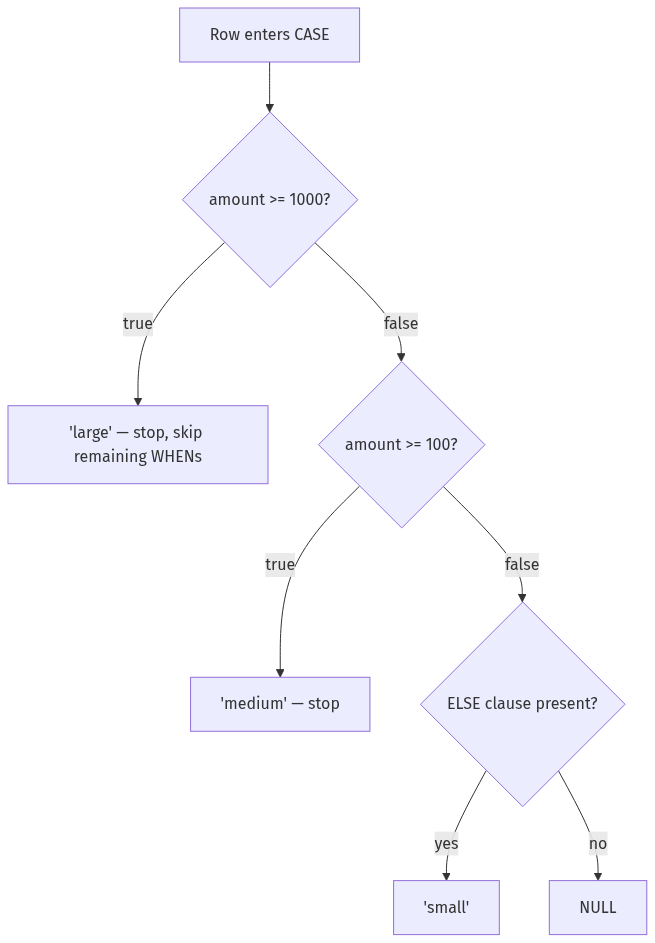
First-match-wins also carries compound conditions. Each WHEN can hold any boolean (AND, OR, IN, BETWEEN), and later branches quietly depend on earlier ones having already fired:
SELECT transaction_id,
       amount,
       country,
       CASE
         WHEN status = 'approved' AND country = 'US' THEN 'domestic settled'
         WHEN status = 'approved'                    THEN 'international settled'
         ELSE 'not settled'
       END AS settlement_class
FROM transactions
ORDER BY transaction_id;
| transaction_id | amount | country | settlement_class |
|---|---|---|---|
| 1 | 25.00 | US | domestic settled |
| 2 | 900.00 | US | not settled |
| 3 | 50.00 | CA | international settled |
| 4 | 1200.00 | US | domestic settled |
| 5 | 75.00 | NULL | not settled |
| 6 | 30.00 | CA | international settled |
| 7 | 45.00 | NULL | not settled |
The second branch does not need to re-check country <> 'US', because the first branch already claimed those rows. That is the idiomatic style, and it is also why reordering CASE branches is never a cosmetic edit. Review diffs that shuffle WHEN order the way you would review changed logic, because they are changed logic.
NULL inside CASE
Asked at Instacart — Write SQL to rank advertisers and profitability Per-program ad spend arrives as three columns,
spend_prog_Athroughspend_prog_C, and the sample data plants aNULLin one advertiser's program-C spend. Unpivot the columns into rows withUNION ALLand rank the advertisers — which forces a decision about what that NULL contributes to every total and label downstream.
NULL interacts with CASE in three specific ways, and all three come from the same root: comparisons against NULL yield UNKNOWN, not true. (The full three-valued-logic story, including why <> NULL filters match nothing, is in SQL Not Equal: <> vs !=, and the NULL Traps That Follow.)
First: the simple form compares with =, so WHEN NULL can never fire.
SELECT transaction_id,
       country,
       CASE country
         WHEN NULL THEN 'unknown'   -- never matches
         ELSE country
       END AS label
FROM transactions
ORDER BY transaction_id;
| transaction_id | country | label |
|---|---|---|
| 1 | US | US |
| 2 | US | US |
| 3 | CA | CA |
| 4 | US | US |
| 5 | NULL | NULL |
| 6 | CA | CA |
| 7 | NULL | NULL |
Rows 5 and 7 sail past the WHEN NULL branch (NULL = NULL is UNKNOWN), hit the ELSE, and return country, which is NULL. The label column looks like the branch worked until you check the rows that mattered. The searched form fixes it because IS NULL is a real predicate — only the two NULL-country rows change:
SELECT transaction_id,
       country,
       CASE
         WHEN country IS NULL THEN 'unknown'
         ELSE country
       END AS label
FROM transactions
ORDER BY transaction_id;
| transaction_id | country | label |
|---|---|---|
| 5 | NULL | unknown |
| 7 | NULL | unknown |
(For this two-branch shape, COALESCE(country, 'unknown') says the same thing in one call.)
Second: a WHEN that evaluates UNKNOWN falls through as if false. In the pivot query earlier, rows with NULL country matched neither country = 'US' nor country = 'CA'; they only landed somewhere because a country IS NULL column caught them. Leave that column out and those rows vanish from every count without warning.
Third: no matching branch plus no ELSE returns NULL. Inside COUNT(CASE ...) that silence is load-bearing — it is what makes the conditional-count idiom work. In a displayed column it usually reads as a bug. The Instacart question makes you commit: after the unpivot, a labeling branch like WHEN spend >= 1000 THEN 'major' sends the NULL spend row to the fallthrough, so decide whether it needs an explicit WHEN spend IS NULL bucket before the interviewer has to ask.
CASE vs IF, IIF, and DECODE
Asked at PayPal — Write conditional aggregates with CASE WHEN Produce per-merchant conditional aggregates — approved versus declined counts, plus sums of amounts flagged for review — and then defend why
CASE WHENis the portable spelling compared with dialect tricks like summing a boolean expression directly. Readability and maintainability are explicitly part of the expected answer.
If you searched "sql if else": portable SQL has no IF in queries. Each engine grew its own shortcut, and every one of them is CASE wearing a different coat:
| Engine | Shortcut | The catch |
|---|---|---|
| PostgreSQL | none in queries | IF exists only in PL/pgSQL blocks; use CASE, or FILTER (WHERE ...) on aggregates |
| MySQL | IF(cond, a, b) | booleans coerce to 1/0, so SUM(status = 'approved') runs — and breaks the day you port it |
| SQL Server | IIF(cond, a, b) | sugar that compiles to CASE; CASE nesting is capped at 10 levels |
| Oracle | DECODE(expr, v1, r1, ..., default) | legacy; unlike CASE, DECODE treats two NULLs as a match |
| SQLite | IIF(cond, a, b) | added in 3.32; older builds need CASE |
| BigQuery | IF(cond, a, b), COUNTIF(cond) | COUNTIF is the tidiest conditional count going — Snowflake and Spark SQL spell it COUNT_IF |
The PayPal question names the MySQL trick directly: SUM(status = 'approved') counts approved rows there because true coerces to 1. PostgreSQL rejects the same expression with "function sum(boolean) does not exist". CASE is the spelling that survives the migration, the shared codebase, and the interviewer who says "assume ANSI SQL".
PostgreSQL also implements the standard FILTER clause (SQL:2003, and in SQLite since 3.30), which reads closer to the intent than CASE-counting:
SELECT user_id,
       COUNT(*) FILTER (WHERE status = 'declined') AS declined_cnt
FROM transactions
GROUP BY user_id
ORDER BY user_id;
| user_id | declined_cnt |
|---|---|
| 101 | 1 |
| 102 | 0 |
| 103 | 0 |
| 104 | 1 |
My interview advice is boring and consistent: write CASE by default, and if you know the engine, mention the local idiom. "On Postgres I'd write this with FILTER" costs five seconds and signals you have shipped queries on that engine, not just practiced puzzles.
The SQL Server CASE statement: T-SQL specifics
T-SQL screens ask about CASE constantly, and the syntax itself holds no surprises: SQL Server supports both the simple form (CASE status WHEN 'approved' THEN ...) and the searched form (CASE WHEN status = 'approved' THEN ...), spelled exactly as they are above. The differences are in the rules around the expression. Here is the same fixture in T-SQL types — a separate session on SQL Server, not a second table alongside the PostgreSQL one above:
-- SQL Server (T-SQL)
CREATE TABLE transactions (
  transaction_id INT PRIMARY KEY,
  user_id        INT,
  amount         DECIMAL(10,2),
  status         VARCHAR(10),
  country        VARCHAR(2) NULL
);

INSERT INTO transactions VALUES
  (1, 101,   25.00, 'approved', 'US'),
  (2, 101,  900.00, 'declined', 'US'),
  (3, 102,   50.00, 'approved', 'CA'),
  (4, 103, 1200.00, 'approved', 'US'),
  (5, 103,   75.00, 'review',   NULL),
  (6, 104,   30.00, 'approved', 'CA'),
  (7, 104,   45.00, 'declined', NULL);
CASE in ORDER BY is the most-used T-SQL variant, because it is how you get a business sort order out of a column that has none. Sort by the CASE key first and a real column second — and pick a second column that actually breaks every tie, which amount does on this fixture but would not on production data with repeated amounts:
SELECT transaction_id, status, amount
FROM transactions
ORDER BY CASE WHEN status = 'review'   THEN 1
              WHEN status = 'declined' THEN 2
              ELSE 3
         END,
         amount DESC;
| transaction_id | status | amount |
|---|---|---|
| 5 | review | 75.00 |
| 2 | declined | 900.00 |
| 7 | declined | 45.00 |
| 4 | approved | 1200.00 |
| 3 | approved | 50.00 |
| 6 | approved | 30.00 |
| 1 | approved | 25.00 |
That query runs unchanged on PostgreSQL too. What differs is what else ORDER BY will accept: SQL Server lets you sort by a SELECT alias but not group by one, because ORDER BY is the last clause processed and the alias exists by then, while GROUP BY runs before the SELECT list is built. That asymmetry, and the rest of the clause ordering it comes from, is laid out in SQL Order of Operations.
Nesting stops at 10 levels. Microsoft documents a hard cap of 10 levels of nesting for CASE expressions, and IIF() counts against it because the optimizer rewrites IIF into a CASE. Three levels deep already looks like this:
SELECT transaction_id,
       CASE WHEN amount >= 1000 THEN 'large'
            ELSE CASE WHEN amount >= 100 THEN 'medium'
                      ELSE CASE WHEN amount >= 50 THEN 'small'
                                ELSE 'tiny' END
                 END
       END AS bucket
FROM transactions
ORDER BY transaction_id;
| transaction_id | bucket |
|---|---|
| 1 | tiny |
| 2 | medium |
| 3 | small |
| 4 | large |
| 5 | small |
| 6 | tiny |
| 7 | tiny |
A flat four-outcome CASE — three WHEN branches and an ELSE — produces the identical column with no nesting at all, which is why the cap almost never bites people who write searched CASE by default. It bites the code generators and the IIF chains that grew one condition at a time.
Branches must agree on a type. SQL Server picks the result type by data-type precedence, then converts every branch to it, so a mixed CASE fails at runtime rather than returning the branch you expected:
-- SQL Server: fails even though the first branch is the true one
SELECT CASE WHEN 1 = 1 THEN 1 ELSE 'unknown' END;
-- Conversion failed when converting the varchar value 'unknown' to data type int.
Integer outranks varchar, so 'unknown' gets converted, not tolerated. PostgreSQL rejects the same expression too, with invalid input syntax for type integer: "unknown". The fix on either engine is to make the intent explicit — CAST(1 AS VARCHAR(10)) in the first branch — and it is a good habit anywhere a CASE mixes a numeric code with a text label.
Practice these on PracHub
Work these in order — each one leans on the previous pattern and adds one complication:
- Count buggy vs non-buggy by employer (TikTok) — the canonical conditional-aggregation warm-up, plus the LEFT JOIN zero-count trap.
- Write conditional aggregation SQL queries (PayPal) — forces you to articulate CASE-versus-WHERE, which interviewers love as a follow-up.
- Compute CTR by format for new US users (Pinterest) — conditional aggregation after a three-table join with a date-window condition.
- Compute CTR overall and by campaign type (Meta) — the same skeleton with deduplication and a division-by-zero guard bolted on.
- Write SQL filtering, grouping, CASE, UNION tasks (Meta) — a full multi-part screen where the CASE work lands mid-way, once you are already warm.
- Analyze Transactions and Classify by Amount in SQL (PayPal) — live ad-hoc bucketing where branch order is the whole game.
- Write SQL to rank advertisers and profitability (Instacart) — the unpivot that CASE cannot solve, with a NULL spend cell waiting in the sample data.
For broader coverage, the Top 50 SQL Interview Questions with Answers (2026) puts CASE next to the join and window-function questions it usually travels with, SQL for Data Analysis walks the six query patterns these problems keep recombining, and the full company-tagged bank is at prachub.com/questions. More SQL guides live in the resources hub.
Comments (0)