UNION vs UNION ALL in SQL: Dedup, INTERSECT, EXCEPT, and Interview Traps
Quick Overview
UNION stacks two result sets and removes duplicate rows; UNION ALL stacks them and keeps everything, which is why UNION ALL is the correct default and UNION is a claim about your data. This guide covers the whole set-operator family with runnable PostgreSQL examples and exact output: the within-branch dedup rule, NULLs treated as equal, column-count and type-coercion errors, the ORDER BY and LIMIT parenthesization trap, UNION vs JOIN, and INTERSECT and EXCEPT including their ALL variants. Every trap is drawn from real interview questions asked at Amazon, Meta, Capital One, Fannie Mae, and Gemini.
You need one sentence to answer this in an interview: UNION stacks two result sets and removes duplicate rows; UNION ALL stacks them and keeps everything. The follow-up is where candidates get sorted. Removing duplicates costs a sort or hash pass over the entire combined set, so UNION ALL is the correct default. You reach for UNION only when you can say, out loud, which duplicates you expect and why they must go. Meta asks for that justification outright; Amazon makes you prove the semantics by predicting row counts. Both formats fail the candidate who only memorized the definition.
All examples below run on PostgreSQL as written. Dialect differences are called out where they exist.
Key Takeaways
- UNION ALL concatenates. UNION concatenates, then deduplicates the whole combined set — including duplicates that were already inside a single branch.
- Default to UNION ALL. If you write UNION, be ready to name the duplicate rows it removes. "Just to be safe" is the answer that fails.
- UNION treats NULLs as equal when deduplicating. Otherwise-identical rows whose NULLs line up collapse into one, the opposite of what
NULL = NULLdoes in a WHERE clause. - A trailing ORDER BY or LIMIT applies to the entire combined result, not to the last branch. Parenthesize a branch to sort or limit it alone.
- Summing a UNION ALL of overlapping tables double counts. Deduplicate on the business key before you aggregate, not on whatever columns happen to be in the SELECT list.
The row counts prove the difference
Asked at Amazon — Compute join counts and window ranks A data scientist screen whose schema includes two tiny integer tables —
Aholding the values 1, 2, 2, 3 andBholding 2, 3, 4 — alongside customer, order, and score tables. The candidate has to state the exact number of rows returned by various joins and set operations and justify each count.
This question format exists because it is unfakeable. If you can predict the counts, you understand the semantics; if you memorized a one-liner, you will miss one. Here is that setup:
CREATE TABLE a (val INT);
INSERT INTO a VALUES (1), (2), (2), (3);

CREATE TABLE b (val INT);
INSERT INTO b VALUES (2), (3), (4);
a has 4 rows, b has 3. UNION ALL returns all 7, duplicates and all:
SELECT val FROM a
UNION ALL
SELECT val FROM b
ORDER BY val;
 val
-----
   1
   2
   2
   2
   3
   3
   4
(7 rows)
UNION returns 4:
SELECT val FROM a
UNION
SELECT val FROM b
ORDER BY val;
 val
-----
   1
   2
   3
   4
(4 rows)
The detail most candidates miss: table a contained 2 twice before any combining happened, and UNION collapsed that pair too. UNION deduplicates the entire combined set, not just rows that "collide across" the two branches. If your first branch has internal duplicates you wanted to keep, UNION silently eats them. That single sentence is the difference between a rehearsed answer and a real one, and it is exactly what the count-prediction format is designed to detect.
The two operators are different physical plans, not one plan with a flag:
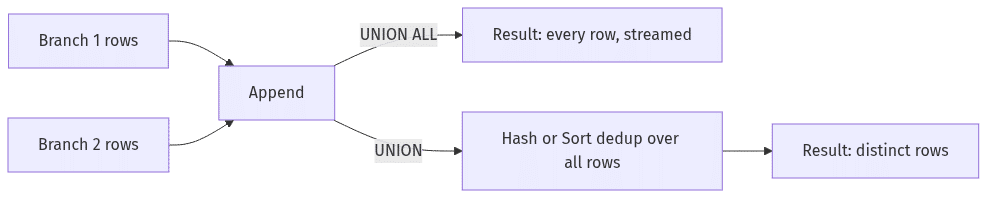
UNION ALL is the default; UNION is a decision
Asked at Amazon — Identify SQL Joins and Correct Query Errors A fundamentals round with a
Winnertable (Alice, Bob, Carol) and aLosertable (Dave, Erin, Frank). Among questions on primary keys and join types, the candidate has to produce one list of all names from the two separate tables.
The two tables are disjoint by construction — a person is either in Winner or in Loser. So:
CREATE TABLE winners (id INT, name TEXT);
INSERT INTO winners VALUES (1, 'Alice'), (2, 'Bob'), (3, 'Carol');

CREATE TABLE losers (id INT, name TEXT);
INSERT INTO losers VALUES (4, 'Dave'), (5, 'Erin'), (6, 'Frank');

SELECT name FROM winners
UNION ALL
SELECT name FROM losers
ORDER BY name;
 name
-------
 Alice
 Bob
 Carol
 Dave
 Erin
 Frank
(6 rows)
Writing UNION here returns the same six rows and still costs a deduplication pass that can accomplish nothing. On six rows nobody cares. On two 50-million-row event partitions, the difference is visible in the plan. PostgreSQL executes UNION ALL as a bare Append node; rows stream through with no memory beyond the scans themselves:
 Append
   ->  Seq Scan on winners
   ->  Seq Scan on losers
UNION puts a HashAggregate (or a Sort followed by Unique, depending on size and available work_mem) on top of that same Append:
 HashAggregate
   Group Key: winners.name
   ->  Append
         ->  Seq Scan on winners
         ->  Seq Scan on losers
PostgreSQL's HashAggregate materializes every row from both branches before it emits anything, and if the distinct set outgrows work_mem the operation spills to disk. Nor will the planner remove the dedup for you: it cannot generally prove your branches are disjoint, so it pays for the UNION you wrote even when the data made it pointless. (A few engines can eliminate the pass in narrow constraint-backed cases — SQL Server over partitioned views with disjoint CHECK constraints, for one — an exception worth knowing about, not relying on.)
So the senior framing is: UNION ALL is free of surprises; UNION is a claim about your data. When you say UNION in an interview, follow it immediately with the claim: "the same order can appear in both extracts, and I want it once." If you cannot finish that sentence, you wanted UNION ALL.
| UNION ALL | UNION | |
|---|---|---|
| Duplicate rows | Kept, including within one branch | Removed across the entire combined set |
| NULL rows | Kept as-is | NULLs compare as equal for dedup; duplicate NULL rows collapse |
| Execution (PostgreSQL) | Append — streaming, no extra memory | Hash or sort dedup over all rows; can spill past work_mem |
| Row order | Not guaranteed (often branch order in practice — never rely on it) | Not guaranteed; a sort-based plan may look ordered, also not reliable |
| Safe default? | Yes | Only with a stated reason duplicates must go |
UNION treats NULLs as duplicates — WHERE would not
Asked at Capital One — Write one SQL for exam scores aggregation A single-statement challenge over
students,exams, andscorestables in which somescorevalues are NULL. The candidate has to combine JOIN, WHERE, GROUP BY, and aggregates in one statement while handling those NULLs explicitly with ISNULL or COALESCE.
That question drills NULL handling in aggregates. UNION's NULL rule is the other half of the same probe, and it is where set operations quietly diverge from everything you learned about WHERE clauses. In a predicate, NULL = NULL evaluates to UNKNOWN and the row is filtered out — that is three-valued logic, and it is the root of the <> traps we covered in SQL Not Equal: <> vs !=, and the NULL Traps That Follow. Deduplication does not use =. It uses distinctness, under which two NULLs are not distinct from each other:
SELECT (NULL = NULL) AS equality_check,
       (NULL IS NOT DISTINCT FROM NULL) AS distinctness_check;
 equality_check | distinctness_check
----------------+--------------------
                | t
(1 row)
The equality check comes back NULL (rendered blank above); the distinctness check comes back true. UNION, DISTINCT, and GROUP BY all follow the distinctness rule. Watch it act on score rows:
CREATE TABLE midterm (student TEXT, score INT);
INSERT INTO midterm VALUES ('Ana', 90), ('Ben', NULL);

CREATE TABLE final_exam (student TEXT, score INT);
INSERT INTO final_exam VALUES ('Ana', 90), ('Ben', NULL), ('Cal', 75);

SELECT student, score FROM midterm
UNION
SELECT student, score FROM final_exam
ORDER BY student;
 student | score
---------+-------
 Ana     |    90
 Ben     |
 Cal     |    75
(3 rows)
Five input rows, three output rows (Ben's blank score is the NULL — psql prints it as empty). ('Ana', 90) collapsing is no surprise. ('Ben', NULL) collapsing is the trap: two rows that a WHERE clause could never match against each other are duplicates to UNION. Say this unprompted in an interview — "UNION dedups NULLs as equal, which is the opposite of comparison semantics" — and you have separated yourself from most of the room. The corresponding failure mode in production: a UNION over two feeds where NULL means "not yet measured" merges genuinely different unmeasured records into one.
Column count, names, and type coercion
Asked at Amazon — Consolidate and Rank Global Salaries in USD An HR-reporting scenario with per-country employee tables (
employees_usand friends) plus an exchange-rate reference table. The task is to append the country files into one global table with UNION ALL, convert salaries to USD, and return the top earners worldwide.
Appending "the same" table from different sources is the canonical UNION ALL job, and it is where the structural rules bite, because independently maintained tables drift. The rules, in the order they will hurt you:
1. Every branch needs the same number of columns. Not the same names — the same count. A mismatch is an immediate error, and the fix is to write explicit column lists instead of SELECT *. SELECT * in a set operation is a deferred outage: the day someone adds a column to one source table, the query dies (or worse, if both tables changed, silently misaligns).
2. Columns pair up by position, and each pair must share a common type. Suppose the US file stored salary as an integer while the German file used a decimal type:
CREATE TABLE employees_us (emp_id INT, name TEXT, salary INT);
INSERT INTO employees_us VALUES (1, 'Alice', 120000), (2, 'Bob', 95000);

CREATE TABLE employees_de (emp_id INT, name TEXT, salary NUMERIC(10,2));
INSERT INTO employees_de VALUES (7, 'Greta', 88000.50), (8, 'Hans', 101000.00);

SELECT name, salary FROM employees_us
UNION ALL
SELECT name, salary FROM employees_de
ORDER BY salary DESC;
 name  |  salary
-------+-----------
 Alice |    120000
 Hans  | 101000.00
 Bob   |     95000
 Greta |  88000.50
(4 rows)
PostgreSQL resolves INT and NUMERIC to NUMERIC and the query works. Pair a number with a text column, though, and PostgreSQL raises "UNION types ... cannot be matched" rather than guessing — while MySQL will coerce both sides to strings and keep going, which turns your ORDER BY salary DESC into a lexicographic sort where '95000' outranks '101000.00'. Same query, two engines, one right answer and one quietly wrong one. Cast explicitly at every branch and no engine gets to choose for you.
3. Output column names come from the first branch. SELECT name AS employee FROM employees_us UNION ALL SELECT name FROM employees_de yields a column named employee; an alias on the second branch is ignored. Alias the first branch, and put any final ORDER BY in terms of those first-branch names.
Two errors are worth recognizing on sight, because each one tells you which rule you broke. Drop a column from one branch and PostgreSQL counts before it types:
SELECT name, salary FROM employees_us
UNION ALL
SELECT name FROM employees_de;
ERROR:  each UNION query must have the same number of columns
LINE 3: SELECT name FROM employees_de;
               ^
The message says UNION even though the query says UNION ALL — the parser reports the operator family, not the variant — and INTERSECT and EXCEPT print the same sentence with their own names in place of UNION. Keep the counts equal but pair incompatible types, and the wording changes:
SELECT name FROM employees_us
UNION ALL
SELECT salary FROM employees_us;
ERROR:  UNION types text and integer cannot be matched
LINE 3: SELECT salary FROM employees_us;
               ^
"Same number of columns" means fix the SELECT list. "Types ... cannot be matched" means add a cast.
The full Amazon question then joins the appended set to exchange rates and ranks it — at which point you want RANK() or DENSE_RANK() over the combined rows, covered in depth in our window functions guide.
ORDER BY and LIMIT bind to the whole set, not the last branch
Asked at Meta — Write SQL filtering, grouping, CASE, UNION tasks A multi-part SQL screen over an
orderstable with web and store channels, mixing WHERE filters, GROUP BY, CASE buckets, and set-operation tasks that combine per-channel result sets.
Read this query and predict its intent, then its output:
CREATE TABLE web_sales (order_id INT, amount NUMERIC(10,2));
INSERT INTO web_sales VALUES (1, 19.99), (3, 5.00), (5, 100.49);

CREATE TABLE store_sales (order_id INT, amount NUMERIC(10,2));
INSERT INTO store_sales VALUES (2, 10.00), (4, 5.00);

SELECT order_id, amount FROM web_sales
UNION ALL
SELECT order_id, amount FROM store_sales
ORDER BY amount DESC
LIMIT 2;
The author, judging by the layout, wanted "web sales, plus the top two store sales." What the query means is "the top two rows of everything":
 order_id | amount
----------+--------
        5 | 100.49
        1 |  19.99
(2 rows)
Both survivors are web rows; the store branch was silently truncated away. A trailing ORDER BY and LIMIT attach to the result of the whole set operation. Indentation is a lie the parser never sees.
To sort or limit one branch, parenthesize it:
(SELECT order_id, amount FROM web_sales ORDER BY amount DESC LIMIT 2)
UNION ALL
SELECT order_id, amount FROM store_sales
ORDER BY order_id;
 order_id | amount
----------+--------
        1 |  19.99
        2 |  10.00
        4 |   5.00
        5 | 100.49
(4 rows)
Top two web orders (ids 5 and 1), all store orders, and a final ORDER BY over the combined four rows. PostgreSQL and MySQL both accept this parenthesized form. Two related habits worth stating in an interview: without a final ORDER BY, the row order of any set operation is unspecified — UNION ALL tends to return branch order and a sort-based UNION plan tends to look sorted, and neither is a contract. And SQL Server does not allow LIMIT syntax at all; the per-branch trick there is SELECT TOP 2 ... ORDER BY inside a derived table.
The double-counting trap: aggregating overlapping sources
Asked at Fannie Mae — Assess SQL joins, unions, windows, dedup, and pandas A broad data-scientist assessment covering joins, unions, window functions, deduplication, and pandas, over a schema that includes separate
web_ordersandstore_ordersextracts alongside the main orders tables.
Combining two extracts like those for one company-wide number is the highest-stakes version of the UNION choice, because both naive answers produce a wrong total that looks plausible. Suppose order 103 was exported into both extracts (a POS system that also logs web pickups, a backfill overlap — the mechanism varies, the overlap is routine), and customer 1 legitimately placed two different 20-dollar web orders:
CREATE TABLE web_orders (order_id INT, customer_id INT, amount NUMERIC(10,2));
INSERT INTO web_orders VALUES (101, 1, 50), (102, 2, 30), (103, 1, 20), (105, 1, 20);

CREATE TABLE store_orders (order_id INT, customer_id INT, amount NUMERIC(10,2));
INSERT INTO store_orders VALUES (103, 1, 20), (104, 3, 45);
Five real orders: 101, 102, 103, 104, 105. True revenue is 50 + 30 + 20 + 45 + 20 = 165. Now watch both easy answers miss it.
UNION ALL double counts the overlap:
SELECT SUM(amount) AS total
FROM (
  SELECT order_id, customer_id, amount FROM web_orders
  UNION ALL
  SELECT order_id, customer_id, amount FROM store_orders
) t;
 total
--------
 185.00
(1 row)
Order 103 was counted twice. So you switch to UNION — but project only the columns you need for the sum, dropping the key:
SELECT SUM(amount) AS total
FROM (
  SELECT customer_id, amount FROM web_orders
  UNION
  SELECT customer_id, amount FROM store_orders
) t;
 total
--------
 145.00
(1 row)
Now it is wrong in the other direction. UNION deduplicated (customer_id, amount) pairs, so orders 103 and 105 — genuinely distinct orders that happen to share a customer and an amount — collapsed into one row. UNION deduplicates whatever you project, not what makes a row a real-world entity. Narrow the SELECT list and you narrow the definition of "duplicate" along with it.
The correct query keeps the business key in the set operation:
SELECT SUM(amount) AS total
FROM (
  SELECT order_id, customer_id, amount FROM web_orders
  UNION
  SELECT order_id, customer_id, amount FROM store_orders
) t;
 total
--------
 165.00
(1 row)
With order_id in every branch, the only rows UNION can collapse are true duplicates of the same order. If the two extracts could disagree about an order's amount (the web extract says 20, the store extract says 21), UNION keeps both versions — full-row dedup only merges identical rows — and you need DISTINCT ON (order_id) or a ROW_NUMBER() window with an explicit source-priority rule instead. Saying that caveat out loud is the strongest answer this question admits. More schema-level thinking about where overlapping extracts come from lives in our database design interview guide.
When UNION is genuinely right: symmetrizing an edge list
Asked at Meta — Write SQL to infer group-call demand A product-analytics problem: from 1:1 call logs, estimate demand for a group-call feature by finding short windows where three or more users are chained together through overlapping calls. Step one is building an undirected edge view of the calls, and the prompt explicitly asks the candidate to justify UNION versus UNION ALL and name the deduplication pitfalls.
Call logs are directional — caller and callee — but "these two people talked" is not. To traverse the relationship in either direction, you emit every call twice, once per orientation, and here duplicates are not an accident to tolerate. They are noise to remove: user 1 calling user 2 three times must not produce three parallel edges when you only care whether a connection exists.
CREATE TABLE calls (caller INT, callee INT);
INSERT INTO calls VALUES (1, 2), (2, 1), (1, 3), (1, 2);

SELECT caller AS u, callee AS v FROM calls
UNION
SELECT callee AS u, caller AS v FROM calls
ORDER BY u, v;
 u | v
---+---
 1 | 2
 1 | 3
 2 | 1
 3 | 1
(4 rows)
Four calls became four edge rows: two undirected edges (1–2 and 1–3), each stored in both orientations for easy joining. UNION ALL would have returned 8 rows, with the 1–2 edge appearing six times across both orientations — and any "count distinct partners" or session-chaining logic downstream would have to re-deduplicate anyway, later and more expensively. This is the UNION justification an interviewer wants to hear: the reversed projection guarantees duplicates by construction, and edge existence is a set, not a bag.
The flip side completes the answer. If the metric is call frequency per pair, dedup destroys the signal — you keep every row and aggregate:
SELECT LEAST(caller, callee) AS u, GREATEST(caller, callee) AS v, COUNT(*) AS call_count
FROM calls
GROUP BY 1, 2
ORDER BY u, v;
 u | v | call_count
---+---+------------
 1 | 2 |          3
 1 | 3 |          1
(2 rows)
Same table, opposite choice, both defensible — because each is tied to what the number downstream means. That is the pattern across this whole page: the operator follows the semantics of the question, never a habit.
One boundary worth drawing before you practice: set operations stack rows from queries with matching shapes. If what you want is columns side by side from tables that may not match — every customer with web and store totals aligned in one row — that is a FULL OUTER JOIN, not a UNION; stacking would give you two half-empty rows per customer instead of one complete one. And within a single table, WHERE status = 'paid' OR channel = 'web' does the job of a self-UNION in one scan; splitting one table's filter into a UNION of two SELECTs is an old optimizer workaround, not a pattern to reach for first. If a set operation ever feels forced, check whether one of these is the actual question. Both Meta questions on this page came from data scientist screens; our Meta Data Scientist interview guide covers how to prepare for that loop.
UNION vs JOIN: stacking rows versus lining up columns
Asked at Fannie Mae — Understand SQL Aggregations and Joins: Key Differences Explained A fundamentals screen over a small
Employeestable (id, name, salary, dept_id) and aDepartmentstable. The candidate explains what COUNT, SUM, AVG, MIN, and MAX each do, then describes INNER, LEFT, RIGHT, and FULL OUTER joins and says when each one is the right choice.
The FULL OUTER JOIN aside above deserves a section of its own, because these two mental models get swapped constantly, and a candidate who reaches for a union when the answer is a join produces a result set that is the wrong shape before it is the wrong numbers. Joins and set operations move data in perpendicular directions: a union makes the result taller, a join makes it wider.
Two quarterly extracts with identical shapes make the contrast concrete:
CREATE TABLE q1_sales (rep TEXT, amount NUMERIC(10,2));
INSERT INTO q1_sales VALUES ('Ana', 100.00), ('Ben', 250.00);

CREATE TABLE q2_sales (rep TEXT, amount NUMERIC(10,2));
INSERT INTO q2_sales VALUES ('Ana', 175.00), ('Cal', 60.00);
Stack them and each sale keeps its own row, with the quarter carried as data:
SELECT 'Q1' AS quarter, rep, amount FROM q1_sales
UNION ALL
SELECT 'Q2', rep, amount FROM q2_sales
ORDER BY rep, quarter;
 quarter | rep | amount
---------+-----+--------
 Q1      | Ana | 100.00
 Q2      | Ana | 175.00
 Q1      | Ben | 250.00
 Q2      | Cal |  60.00
(4 rows)
Join them and each rep keeps its own row, with the quarters carried as columns:
SELECT COALESCE(q1.rep, q2.rep) AS rep,
       q1.amount AS q1_amount,
       q2.amount AS q2_amount
FROM q1_sales q1
FULL OUTER JOIN q2_sales q2 ON q1.rep = q2.rep
ORDER BY rep;
 rep | q1_amount | q2_amount
-----+-----------+-----------
 Ana |    100.00 |    175.00
 Ben |    250.00 |
 Cal |           |     60.00
(3 rows)
Same four numbers, two shapes. Neither is more correct. "Total sales this half" wants the stacked form, because SUM does not care which quarter a row came from. "Which reps sold in Q1 but not Q2" wants the joined form, because that comparison happens within a row — and FULL OUTER JOIN is what keeps Ben and Cal, each of whom traded in only one quarter. Ben's missing Q2 amount comes back NULL, printed blank.
The tell is in the inputs, not in the output you want. Same columns, different rows — two months, two regions, two source systems holding the same entity — is a set operation. Different columns tied together by a key — orders and customers, employees and departments — is a join. When a UNION forces you to invent columns so the branches line up, it is usually a join wearing a disguise; our join guide walks every join type with runnable results.
One case blurs honestly. Among joins that match on a key, FULL OUTER JOIN is the only one that never drops a row from either side, which makes it feel union-like. It still matches on that key, which no set operator ever does.
INTERSECT: the rows both branches return
Asked at Amazon — Compute join counts and window ranks The same count-prediction screen from the top of this page, now for the rest of the family. Its two integer tables are built with the minimum data that can separate every set operator: a duplicate on one side, a value each side does not share, and an overlap of two. The candidate states the exact count each operation returns.
Keep a (1, 2, 2, 3) and b (2, 3, 4) in mind. INTERSECT keeps only the values present in both:
SELECT val FROM a
INTERSECT
SELECT val FROM b
ORDER BY val;
 val
-----
   2
   3
(2 rows)
Two rows, deduplicated exactly the way UNION deduplicates — the pair of 2s inside a collapses before anything is emitted, which is the same within-branch rule that trips people up on UNION. INTERSECT ALL keeps duplicates, but by a rule most candidates guess wrong: a row's multiplicity in the result is the minimum of its multiplicities in the two branches, not the sum and not the count from the bigger side.
SELECT val FROM a
INTERSECT ALL
SELECT val FROM b
ORDER BY val;
 val
-----
   2
   3
(2 rows)
Identical output, and that is the lesson. a holds 2 twice, b holds it once, so min(2, 1) = 1. INTERSECT ALL only diverges from INTERSECT when both sides carry duplicates of the same row.
The interview nugget sits one step further out. INTERSECT compares rows the way DISTINCT does, not the way = does, so two NULLs match each other under INTERSECT while every comparison operator says they do not:
CREATE TABLE t1 (v INT);
INSERT INTO t1 VALUES (1), (NULL);

CREATE TABLE t2 (v INT);
INSERT INTO t2 VALUES (2), (NULL);

SELECT
  (SELECT COUNT(*) FROM (SELECT v FROM t1 INTERSECT SELECT v FROM t2) s) AS via_intersect,
  (SELECT COUNT(*) FROM t1 JOIN t2 ON t1.v = t2.v) AS via_equijoin,
  (SELECT COUNT(*) FROM t1 WHERE v IN (SELECT v FROM t2)) AS via_in;
 via_intersect | via_equijoin | via_in
---------------+--------------+--------
             1 |            0 |      0
(1 row)
Three phrasings of one intuitive question — what do these two tables have in common? — and INTERSECT finds a match where the equi-join and the IN subquery find nothing at all. The single shared value is NULL. INTERSECT treats it as not distinct from itself, while t1.v = t2.v evaluates to UNKNOWN and IN inherits the same three-valued logic; the NULL trap that makes IN and NOT IN return zero rows is this mechanism, and <> behaves the same way. If you are deduplicating or intersecting, NULLs are equal. If you are comparing, they never are. That pair of sentences answers most NULL questions an interviewer can ask about set operations.
Portability matters more here than for UNION, since this is where dialects diverge: MySQL only gained INTERSECT and EXCEPT in 8.0.31, SQLite supports both but not their ALL variants, and Oracle's classic spelling of EXCEPT is MINUS.
EXCEPT: what is in A and not in B
Asked at Gemini — Write SQL/Python for ACH fraud analytics A fraud-analytics screen over users, transactions, devices, and logins as of a fixed date, with ACH returns kept in their own table keyed by transaction id. Several parts reduce to comparing one keyed set against another — which payments came back, and therefore which ones did not.
EXCEPT answers the question that schema is shaped around: rows in the first branch that do not appear in the second. It is the only set operator whose operand order changes the answer.
SELECT val FROM a
EXCEPT
SELECT val FROM b
ORDER BY val;
 val
-----
   1
(1 row)
SELECT val FROM b
EXCEPT
SELECT val FROM a
ORDER BY val;
 val
-----
   4
(1 row)
a has a 1 that b lacks; b has a 4 that a lacks. Swapping the branches answers a different question just as correctly, which is why "show me the difference between these tables" is an ambiguous requirement worth clarifying out loud before you type.
EXCEPT ALL is the ALL variant that earns its keep on these tables, because it subtracts counts rather than membership:
SELECT val FROM a
EXCEPT ALL
SELECT val FROM b
ORDER BY val;
 val
-----
   1
   2
(2 rows)
A 2 survives. a held two of them, b held one, and one remains. Plain EXCEPT removes the value outright.
Now the production version, and the trap that comes with it. Take transactions against a return log in which one row has a NULL transaction id — routine when a feed arrives incomplete:
CREATE TABLE transactions (txn_id TEXT);
INSERT INTO transactions VALUES ('t1'), ('t2'), ('t3');

CREATE TABLE ach_returns (txn_id TEXT);
INSERT INTO ach_returns VALUES ('t2'), (NULL);

SELECT txn_id FROM transactions
EXCEPT
SELECT txn_id FROM ach_returns
ORDER BY txn_id;
 txn_id
--------
 t1
 t3
(2 rows)
Right answer: t2 came back, t1 and t3 did not. Ask the same question with NOT IN and the result collapses:
SELECT txn_id FROM transactions
WHERE txn_id NOT IN (SELECT txn_id FROM ach_returns)
ORDER BY txn_id;
 txn_id
--------
(0 rows)
Zero rows. No error, no warning, and a dashboard that reports every payment as returned or none as returned depending on which way you wrote it. NOT IN against a list containing NULL can never evaluate to true, so every transaction is filtered out. EXCEPT is NULL-safe; NOT IN is not. The third form, an explicit anti-join, is NULL-safe too:
SELECT t.txn_id
FROM transactions t
WHERE NOT EXISTS (SELECT 1 FROM ach_returns r WHERE r.txn_id = t.txn_id)
ORDER BY t.txn_id;
 txn_id
--------
 t1
 t3
(2 rows)
Same two rows, and this is usually the version to ship. EXCEPT compares whole rows and deduplicates them, so every branch must project exactly the compared columns and any genuine duplicate quietly disappears — the same failure the double-counting section showed for UNION. NOT EXISTS matches on a key you name and leaves the rest of the left row untouched, so you can return the amount, the timestamp, and anything else without changing what "not returned" means. Use EXCEPT when the question really is set against set on identical shapes. Use an anti-join when you want columns back.
One precedence rule closes out the family. INTERSECT binds tighter than UNION and EXCEPT, so a mixed chain does not evaluate left to right:
CREATE TABLE c (val INT);
INSERT INTO c VALUES (3), (9);

SELECT val FROM a UNION SELECT val FROM b INTERSECT SELECT val FROM c ORDER BY val;
 val
-----
   1
   2
   3
(3 rows)
That ran as a UNION (b INTERSECT c). Force the left-to-right grouping most readers assume and the answer shrinks to a single row:
(SELECT val FROM a UNION SELECT val FROM b) INTERSECT SELECT val FROM c ORDER BY val;
 val
-----
   3
(1 row)
Three rows or one, from the same three tables and the same two operators. Parenthesize any chain that mixes them.
UNION ALL is the engine inside a recursive CTE
There is one place UNION ALL is structural rather than a choice: every recursive CTE is built on it. The anchor term runs once, the recursive term runs against the rows the previous iteration produced, and the set operator between them is what feeds the loop.
WITH RECURSIVE countdown(n) AS (
  SELECT 3
  UNION ALL
  SELECT n - 1 FROM countdown WHERE n > 1
)
SELECT n FROM countdown;
 n
---
 3
 2
 1
(3 rows)
UNION ALL is the standard spelling because a recursion is meant to keep every row it generates. Swapping in UNION changes behavior in a way worth knowing about: it discards rows already produced, which pays a deduplication on every iteration but also terminates a walk over a cyclic graph that would otherwise loop forever. Hierarchies, graph traversals, and generated date series all live here — the CTE guide covers the recursive form properly.
What the dedup actually costs
The plan shapes earlier on this page show where deduplication happens. What decides query time is when: hash and sort dedup are blocking operators, and Append is not. Ask for two rows out of a UNION ALL and PostgreSQL stops reading once it has them:
 Limit
   ->  Append
         ->  Seq Scan on a
         ->  Seq Scan on b
Ask for two rows out of the equivalent UNION and the Limit sits on top of a HashAggregate that must consume both branches in full before it can emit anything:
 Limit
   ->  HashAggregate
         Group Key: a.val
         ->  Append
               ->  Seq Scan on a
               ->  Seq Scan on b
The LIMIT no longer bounds the work, only the output. That is the precise version of "UNION is slower": not a constant factor, but a lost ability to stop early, plus a hash table sized by the number of distinct rows and by how wide they are. Deduplicating one integer column is cheap. Deduplicating twenty columns with long text in them is not, and that cost lands on every row from every branch.
The rule has one real exception, and naming it beats reciting "UNION ALL is faster." When the branches overlap heavily and something expensive comes next — a join, a sort, a window function — collapsing ten million rows to fifty thousand before that step can beat streaming all ten million into it. The dedup is buying a smaller input, not just correctness. Which makes it, once again, a claim about your data: check the overlap on your own row counts instead of trusting either default.
Practice these on PracHub
Work these in rough order — each one drills a specific failure mode from this page.
Predicting semantics:
- Compute join counts and window ranks (Amazon) — state exact row counts for set operations and joins over tiny tables; the fastest way to find out whether you know the within-branch dedup rule.
- Identify SQL Joins and Correct Query Errors (Amazon) — fundamentals under time pressure, including combining disjoint tables where UNION ALL is the honest choice.
Appending and aggregating:
- Consolidate and Rank Global Salaries in USD (Amazon) — UNION ALL across per-country tables, type coercion across sources, then ranking the combined set.
- Assess SQL joins, unions, windows, dedup, and pandas (Fannie Mae) — overlapping web and store extracts; the double-counting trap in its natural habitat.
Set operations inside a larger task:
- Write SQL filtering, grouping, CASE, UNION tasks (Meta) — set operations mixed with grouping and CASE, where ORDER BY and LIMIT placement changes the answer.
- Write SQL to infer group-call demand (Meta) — edge symmetrization where you must argue for UNION, then sessionize on top of it.
Set operators beyond UNION:
- Write SQL/Python for ACH fraud analytics (Gemini) — transactions against a separate ACH return log, where EXCEPT, NOT IN, and NOT EXISTS give three different answers on the same data.
- Understand SQL Aggregations and Joins: Key Differences Explained (Fannie Mae) — the stack-versus-join fundamentals, asked as an explain-it-out-loud question.
For the broader syllabus around these, the Top 50 SQL Interview Questions with Answers (2026) puts set operations next to the other topics a SQL round covers, and the full company-tagged bank is at prachub.com/questions, with more deep-dive guides under resources.
Comments (0)