HackerRank Candidate Report Explained: Score, Code Playback, Plagiarism, and Recruiter Review
Quick Overview
Understand what recruiters can see after a HackerRank assessment, including total and question scores, test cases, code playback, integrity signals, plagiarism flags, and manual review.
Updated August 20, 2026.
You click Submit, see a score, and start guessing what happens next. Did the recruiter receive only a percentage? Can they replay your code? Does one paste event look like plagiarism? And if you passed every test case, why might your application still stop?
The short answer is that a HackerRank candidate report can contain far more context than the number a candidate sees. Depending on the employer's settings, reviewers may see question-level scores, test-case results, time spent, code evolution, copy-paste activity, tab exits, integrity signals, code quality, and reviewer comments.
That is why the best preparation is not just chasing a maximum score. Start with PracHub interview questions with written solutions, practice in one focused session, and make your solution easy to trust: correct, tested, readable, and produced within the rules. For the full test-day workflow, use our HackerRank online assessment guide.
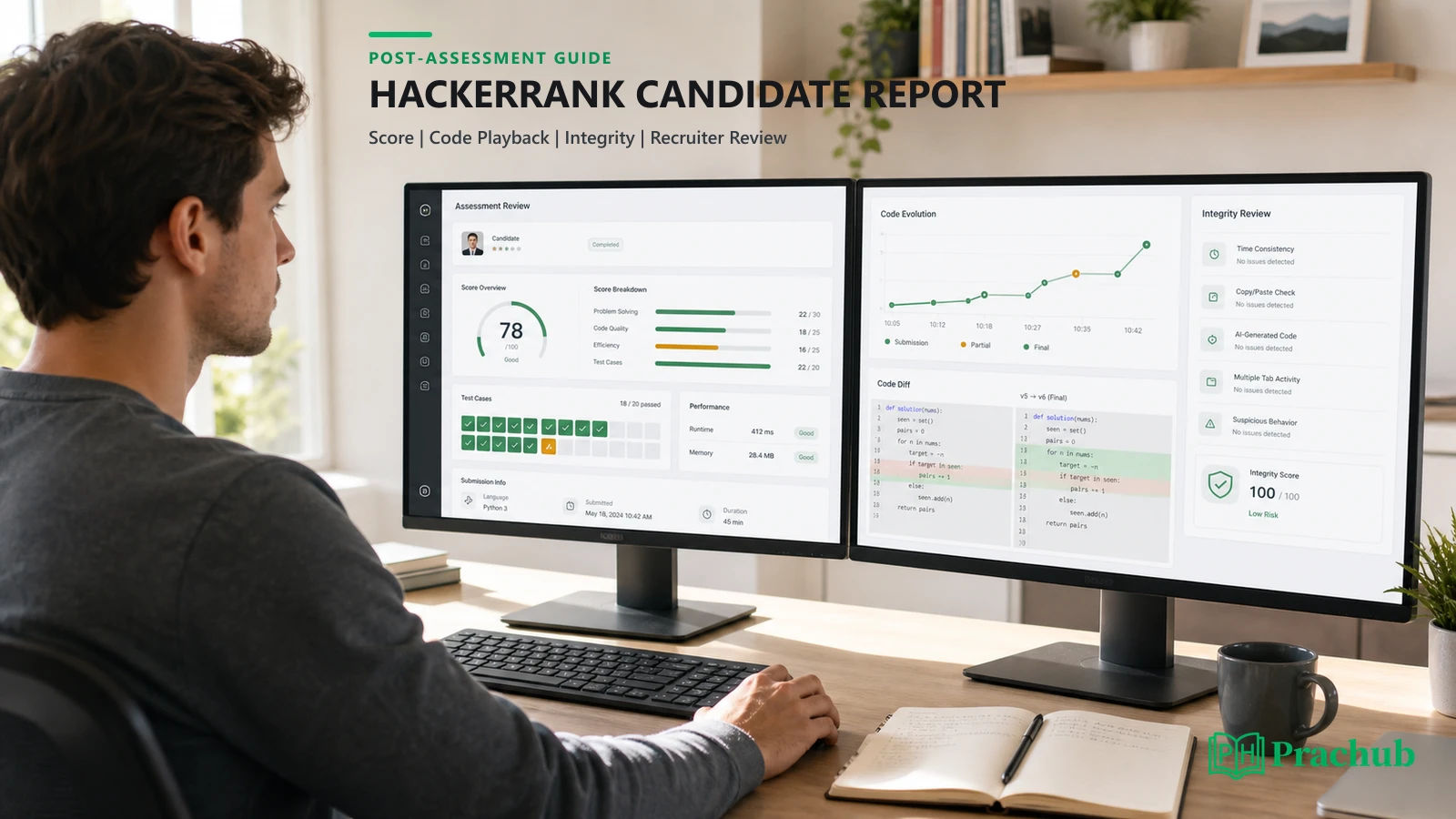
Quick answer: What does a HackerRank candidate report show?
The employer controls the assessment and owns the report. HackerRank's candidate support says HackerRank does not send test reports directly to candidates; the hiring company decides whether to share results. Recruiters, hiring managers, and other authorized reviewers can open a summary report and, when needed, drill into individual questions.
The exact report depends on the question types, the employer's plan, and which evaluation or integrity features were enabled. A current report may include the following:
| Report area | What a reviewer may see | What it means for candidates |
|---|---|---|
| Overall performance | Total score, percentage, completion time, and sometimes a benchmark | Your result can be compared with a company cutoff or other attempts. |
| Question breakdown | Question type, skills, score, status, language, and time spent | A total score can hide one strong question and one weak one. |
| Coding detail | Submitted code, test-case outcomes, runtime, memory, output differences, and compile activity | Passing samples is not the same as passing the employer's scored tests. |
| Code playback | The evolution of code during a coding question | Reviewers can inspect how the solution developed, not only the final file. |
| Integrity information | Code similarity, paste activity, tab exits, screenshots, webcam signals, or session replay when configured | Available signals vary by test; a flag is evidence for review, not a universal verdict. |
| Human evaluation | Changed scores, comments, ratings, and candidate status | Some answers and borderline attempts can receive manual review. |
HackerRank score: How is the number calculated?
There is no universal HackerRank score that means the same thing at every company. Employers choose the questions, maximum points, evaluation method, and cutoff. A 75% result on one test may represent a very different performance from 75% on another.
Coding questions usually award points by passed test cases
For a standard coding question, HackerRank evaluates the submitted solution against test cases and adds the points assigned to the cases that pass. Test cases do not have to be equally weighted. A difficult edge case or performance case can be worth more than a sample-like case.
This explains partial scores. Your algorithm may handle ordinary inputs but fail duplicates, empty input, large constraints, overflow, or time limits. Review our guide to coding assessment hidden test cases before your next OA, then test boundaries rather than stopping when the examples turn green.
Other question types can use different rules
Multiple-choice questions can use custom points, partial credit, and negative marking. Subjective, diagram, file-upload, and some project questions may require manual evaluation. HackerRank also lets reviewers modify a question score in the detailed report.
As a result, the first automatic number is not always the final hiring score. A report can remain To Evaluate while a person reviews an answer, and a manually assigned score can change the total.
The cutoff belongs to the employer
HackerRank lets a test owner configure a cutoff percentage. Candidate lists can then be filtered by total-score range or status. That makes the score useful for high-volume triage, but the cutoff does not create a guaranteed interview. A company can still review resumes, integrity information, question mix, code quality, eligibility, and headcount.
What the summary report tells a recruiter first
The summary report is the recruiter's fast view. HackerRank currently documents both old and new report experiences because availability depends on company settings. The newer view can combine overall score, benchmark information, code quality, completion time, AI-use information for supported tests, and an integrity summary.
Below that overview, reviewers can see every question with its type, associated skills, score, and status. Coding questions may also show code quality and optimality when those features are available. The recruiter can mark the attempt as passed, failed, or waiting for evaluation, add comments, share the report with authorized teammates, or open the detailed report.
This is an important correction to the common mental model: a recruiter does not have to treat your total score as the entire story. The platform is designed to let the hiring team move from a quick filter to a deeper technical review.
What the detailed report reveals about each coding question
The detailed report is where a reviewer can inspect your actual work. HackerRank says it can show the submitted answer, programming language, evaluation status, per-test-case result, points, execution time, memory use, and output difference. Reviewers can also compile or review the code, add comments, and adjust a score when appropriate.
That detail helps explain why two candidates with similar totals may not look identical. One may have a clean near-complete solution that misses a performance case. Another may have a perfect score but unusually fragile code. Whether a recruiter inspects every line depends on the employer, applicant volume, and reason for review, but the capability exists.
What HackerRank code playback actually records
HackerRank's detailed report includes Keystroke Code Playback for coding questions. The player reconstructs the candidate's coding activity over time and lets a reviewer move through the active timeline, skip inactivity, and change playback speed.
Code playback is not the same thing as a continuous recording of everything on your computer. It is focused on the work captured in the coding experience. A broader Session Replay, with test events and proctoring evidence, is a separate capability associated with Proctor Mode.
Reviewers can use playback to answer practical questions:
- Did the candidate build and test the solution incrementally?
- Did a large block of code appear at once?
- Where did the candidate change direction or repair a bug?
- Does the final solution match the visible problem-solving process?
A messy correction is not automatically suspicious. Debugging is normal. What matters is whether the activity is consistent with the test rules and whether any integrity signal has a reasonable explanation.
Plagiarism flags: Similarity is a signal, not a courtroom verdict
HackerRank's standard plagiarism system compares code similarity, while its optional AI plagiarism detection can also analyze behavior such as copy-paste activity, code evolution, timing, and tab switching. Current documentation categorizes some flagged attempts as medium or high confidence and lets reviewers inspect the supporting detail in the candidate report.
The responsible interpretation is nuanced. Similar solutions are expected for short or highly constrained problems, and automated models can make mistakes. HackerRank explicitly emphasizes human oversight, publishes limitations for short solutions, and lets authorized reviewers override an integrity flag with a recorded reason.
At the same time, a candidate should not assume that only the final code matters. A large external paste, code that strongly matches another submission, or behavior inconsistent with the stated rules can trigger deeper review.
Plagiarism, copy-paste, tab switching, and proctoring are not identical
These terms are often blended together online, but they refer to different evidence:
| Signal | What it describes | What a reviewer may do |
|---|---|---|
| Code similarity | Submitted code resembles another candidate or an external source | Compare submissions or sources side by side. |
| Copy-paste tracking | Text was copied or pasted in a supported question | Review frequency, pasted content, and timing in context. |
| Tab proctoring | The candidate left the active test window | Check exit count and out-of-window duration against the rules. |
| Image or webcam proctoring | Periodic images or automated image-analysis signals | Inspect the captured evidence when enabled. |
| Session replay | A synchronized proctored-session timeline | Jump to events and review surrounding screen or webcam context. |
Not every HackerRank test uses every feature. The invitation, consent screen, and instructions for your assessment are the source of truth. Our guide to HackerRank screen recording, tab switching, webcam, and copy-paste rules explains these test configurations in more detail.
How recruiters may review your report
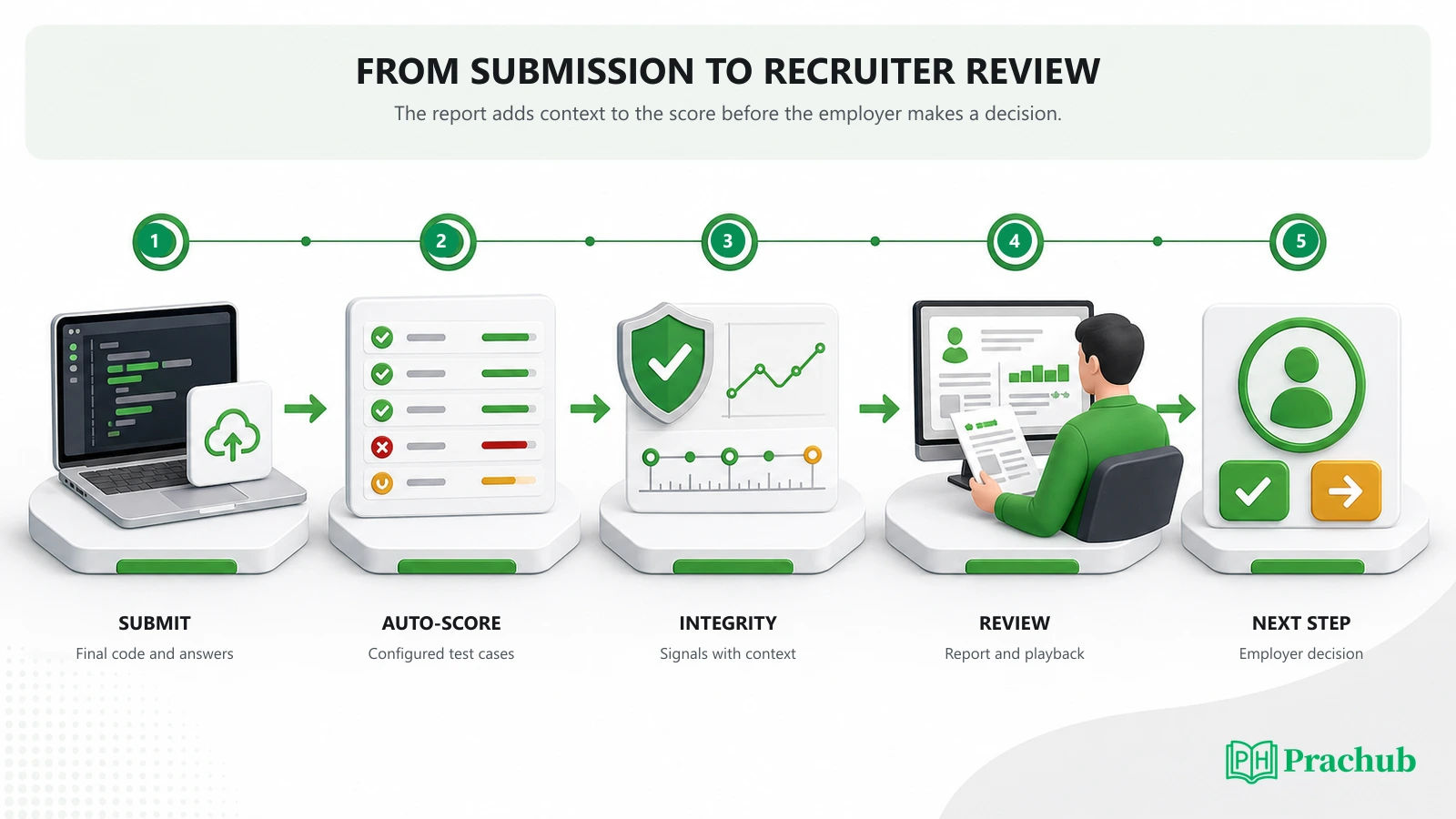
A high-volume team can start with a total-score filter or cutoff. A smaller team may inspect every passing submission. A flagged attempt, a borderline score, an unusual completion pattern, or a critical role may receive deeper review.
A reasonable review sequence looks like this:
- Check completion and score. Did the candidate finish, and did the result meet the team's initial threshold?
- Inspect the question mix. Which skills were strong, partial, unattempted, or awaiting manual evaluation?
- Review code when it matters. Look at failed cases, readability, optimality, or code playback for more context.
- Investigate integrity signals. Examine the underlying evidence instead of relying only on a label.
- Combine the report with hiring context. Revisit resume fit, eligibility, role demand, and interview capacity.
This is a possible workflow, not a promise that every recruiter follows those steps. Some companies automate more of the funnel; others involve engineers early. The HackerRank report supplies evidence, while the employer makes the hiring decision.
What score is good enough on HackerRank?
There is no universal passing score. The employer controls question difficulty and cutoff, and some tests compare candidates through benchmarks or internal ranking. A raw percentage without the test configuration is weak evidence.
A better goal is to maximize trustworthy performance. Solve the highest-value questions you can complete correctly, preserve time for edge cases, and do not sacrifice a sound implementation to chase one more rushed answer. If a question is partially solved, leave the strongest valid version in the editor because HackerRank scores the latest submitted code against the configured tests.
Also remember that a perfect score can still be followed by rejection. The company may conduct a resume re-screen, fill its interview slate, require another assessment, or review an integrity or eligibility issue. Our guide to rejection after a perfect OA score covers those non-coding gates.
How to produce a report that is easy to trust
You cannot control how often a recruiter opens the detailed report, but you can control the quality of the evidence you leave behind.
| Before and during the test | Why it improves the report |
|---|---|
| Read the resource, AI, IDE, copy-paste, and proctoring rules before starting. | Your activity stays aligned with the employer's configuration. |
| Use the language you can debug fastest and test incrementally. | The final code and its evolution show a coherent problem-solving process. |
| Test empty, duplicate, boundary, and maximum-size inputs. | You reduce partial scores caused by hidden cases. |
| Keep names and control flow readable after correctness is established. | A manual reviewer can understand the solution quickly. |
| Report a material platform issue with a timestamp and concise facts. | The recruiter has context if the report contains an unusual interruption. |
Use company-specific interview prep to identify the likely skills, then practice under the same time and resource constraints stated in the invitation. Do not memorize leaked answers or try to evade monitoring. The durable advantage is being able to solve the problem cleanly when the prompt changes.
What happens after you submit?
HackerRank evaluates auto-scored questions and generates the employer report. Manually evaluated items may keep the attempt in a review state. The hiring team can then filter, sort, inspect, comment, change status, or export reports depending on its workflow.
Candidates usually do not receive the employer-side report from HackerRank. If the company shares only a completion confirmation, that does not mean no score exists. It means result communication belongs to the employer.
After submission, save the confirmation email and move on to the next application or interview stage. If the recruiter provided a timeline and it passes, send one concise follow-up. Repeatedly trying to infer a cutoff from silence rarely gives you useful information.
Frequently asked questions
Can recruiters see my HackerRank code?
Yes. Authorized reviewers can open detailed reports that include the submitted answer and, for supported question types, options to review, compile, render, compare, or download it.
Can recruiters replay every keystroke?
For coding questions with playback available, reviewers can watch the captured code evolution in the Keystroke Code Playback. That is different from a full-device recording. Broader session replay depends on Proctor Mode and the test configuration.
Does copy-paste automatically fail a HackerRank test?
HackerRank records copy-paste activity in supported questions, but the hiring company controls its rules and decision. Pasting may be permitted in one assessment and prohibited in another. Significant external paste can also contribute to an integrity flag.
Does a plagiarism flag mean HackerRank proved I cheated?
No. It means the system detected similarity or behavior that the hiring team can review. HackerRank recommends human oversight and allows integrity flags to be overridden. The employer decides what the evidence means under its policy.
Can a recruiter change my HackerRank score?
Authorized reviewers can assign or modify scores in the detailed report, which is especially relevant for manually evaluated questions or human review of a submission.
Can I see my HackerRank candidate report?
Not automatically. HackerRank candidate support says the company owns the report and decides whether to share results. Contact the recruiter, not HackerRank, for the hiring outcome.
Does HackerRank show hidden test cases to recruiters?
The detailed report can show test-case type, result, points, execution time, memory, and output differences for question types with test cases. What a candidate sees during the assessment can be more limited.
Final takeaway: Prepare for the report, not only the score
A HackerRank score matters, but it sits inside a much richer employer report. Recruiters can move from the total to the question breakdown, code, test cases, playback, integrity evidence, and human comments. The exact combination depends on the assessment configuration.
Your best response is straightforward: follow the stated rules, solve incrementally, test hidden-case boundaries, and leave readable code that supports your score. Build that habit with PracHub interview questions with written solutions, then use PracHub company pages to focus your practice on the roles and skills that matter for your next assessment.
Sources and further reading
- HackerRank: View Candidate Test Summary Report
- HackerRank: Viewing a Candidate's Detailed Test Report
- HackerRank Candidate Support: Evaluation Methods of Your HackerRank Tests
- HackerRank Candidate Support: Results of Your HackerRank Tests
- HackerRank: Modify Evaluation Settings for Tests
- HackerRank: Test Integrity
- HackerRank: AI Plagiarism Detection
- HackerRank: Best Practices to Maintain Test Integrity
- HackerRank: Filtering and Sorting Candidate Test Reports
Research note: HackerRank features and employer settings change over time. This guide was checked against official documentation on August 20, 2026. Your invitation and test instructions control the rules for your specific assessment.
Comments (0)