Jane Street Linux Engineer Interview: Shell Scripting, Unix Internals, and Debugging
Quick Overview
Prepare for Jane Street Linux Engineer interviews with current official role context and a carefully bounded intern report. Work through an original Bash rename exercise covering awkward filenames, dry runs, collisions, and partial failure, then verify how open descriptors behave during log rotation. Connect each debugging hypothesis to observable Unix behavior.
For a Jane Street Linux Engineer interview, prepare to explain what a command changes, which operating-system mechanism makes it work, and how you would verify the result. Shell fluency matters, but so does recognizing when a short script's assumptions stop being safe.
Our preparation thesis: connect implementation to observable system behavior. This guide uses two original exercises: a carefully scoped file-renaming script and a log-rotation experiment that separates a pathname from an open file. Neither is a promised Jane Street question.
For broader CPU, memory, disk, and network triage, use PracHub's Linux troubleshooting questions. Here, follow one small automation task into the Unix behavior behind it.

Separate official requirements from an intern's report
Official role facts: Jane Street's New York Linux Engineer listing describes infrastructure work, including kernel performance, management tools, automation, and production troubleshooting. It asks for Unix internals, shell scripting, operating-system fundamentals, and systems-programming concepts such as C, sockets, virtual memory, and process lifecycle. Clear communication and willingness to learn OCaml also appear. These are role requirements, not a published interview checklist. Official Linux Engineer listing.
Candidate report: an InterviewDB post published June 27, 2026 identifies a May 26 North American Linux Engineer Intern phone screen. Its public excerpt mentions interpreting scripts, basic commands, a recursive extension-renaming task, process lifecycle, and troubleshooting. The full account requires sign-in; the excerpt does not establish a complete interview sequence. Visible candidate excerpt.
One intern account is not two independent current reports, and it should not be combined with a full-time role listing to invent a uniform bar. Our inference: practise small scripts and explain their system behavior, then confirm your own format, language options, and scope with the recruiter.
Jane Street separately describes Production Engineering as focused on application support and related tooling. If you are comparing the roles, read our Jane Street Production Engineer preparation guide. This article concentrates on shell and operating-system boundaries.
Define the rename contract before writing a loop
Our original task changes the final, case-sensitive .log suffix to .txt for regular files in one directory. Include hidden files; exclude directories, symlinks, and nested files. Preserve contents. Default to a dry run and reject any occupied destination before moving anything.
Assume a private practice directory with no concurrent writers and ordinary Bash startup settings. This is deliberately narrower than the candidate excerpt's recursive task. Extending the traversal is a follow-up, not a feature the code secretly supports.
Clarify collision policy first. If report.log and report.txt coexist, overwriting the latter is data loss. A dangling symlink at report.txt also occupies that name even though a test that follows its target may report that the target does not exist.
Ask what an empty input should do, whether uppercase .LOG counts, and whether the caller needs a resumable record of successful moves. Those answers change the implementation more than shaving characters from the loop.
Implement a preview and a complete preflight
Save this as rename-logs.sh. Run it with Bash from the disposable directory you intend to change, rather than sourcing it into your current shell.
#!/usr/bin/env bash
mode=${1:-"--dry-run"}
if [[ $# -gt 1 || ( $mode != --dry-run && $mode != --apply ) ]]; then
    printf 'usage: bash rename-logs.sh [--dry-run|--apply]\n' >&2
    exit 2
fi
unset GLOBIGNORE
shopt -u failglob nocaseglob
shopt -s nullglob dotglob
sources=()
targets=()
for source in ./*.log; do
    [[ -f "$source" && ! -L "$source" ]] || continue
    target=${source%.log}.txt
    if [[ -e "$target" || -L "$target" ]]; then
        printf 'collision: %q\n' "$target" >&2
        exit 1
    fi
    sources+=("$source")
    targets+=("$target")
done
for ((i=0; i<${#sources[@]}; i++)); do
    printf '%q -> %q\n' "${sources[i]}" "${targets[i]}"
done
[[ $mode == --apply ]] || exit 0
for ((i=0; i<${#sources[@]}; i++)); do
    source=${sources[i]}
    target=${targets[i]}
    if [[ ! -f "$source" || -L "$source" || -e "$target" || -L "$target" ]]; then
        printf 'directory changed; stopped at %q\n' "$source" >&2
        exit 1
    fi
    mv "$source" "$target" || exit 1
done
Shell reference: nullglob removes an unmatched pattern, dotglob includes hidden names, and quoted array elements preserve each filename as one argument. Bash's %q prints an escaped representation suitable for inspection. This uses Bash features, not portable /bin/sh syntax. Bash manual.
The ./ prefix keeps a leading dash inside a pathname rather than presenting it as an option. The script never parses ls output or splits filenames on whitespace. The suffix substitution changes only the trailing .log. An excluded symlink can become dangling when its target is renamed; preserving working links would require a different contract.
The first pass builds the plan and checks every destination. Only after that succeeds does it print the plan and, with --apply, execute moves. The printed lines are planned operations, not a receipt proving every move succeeded.
Test filenames that expose hidden assumptions
In a disposable fixture, create regular files named alpha.log, a b.log, -dash.log, .hidden.log, and star*.log. Add names containing an actual newline and tab. Give each file distinct contents so verification catches accidental swaps as well as missing files.
Run bash /path/to/rename-logs.sh --dry-run first. Compare the directory and contents before and after: they must be identical. The seven source names should produce seven escaped plan lines, even though one filename contains a newline.
Then run the same script with --apply. Check the exact destination names and original contents, rather than trusting the exit code alone.
| Boundary case | Required result |
|---|---|
| No matching regular files | Success without moves |
Nested file, symlink, directory, or uppercase .LOG | Unchanged under this contract |
| Existing destination file, directory, or dangling symlink | Abort preflight without moving any source |
| Second execution after success | No additional moves |
| Failure during the second move | Nonzero exit; earlier successful move remains |
Our fixture checks all these cases, including an injected move failure. The script and file experiment below were executed on macOS 26.4 with Bash 3.2.57 and Python 3.12.14. These validate the stated Unix exercises; they are not a claim that Linux-specific tracing commands were executed on this host.
Explain what preflight does not guarantee
The second check catches some directory changes, but there is still a gap between checking a destination and moving the source. Another process can create or replace a path during that gap. The script's no-overwrite behavior therefore depends on the no-concurrent-writers assumption.
Linux reference: renameat2 with RENAME_NOREPLACE can reject an occupied destination as part of the rename operation, where supported. Ordinary rename can replace a destination, and rename across mounted filesystems can fail with EXDEV. Linux rename manual.
Do not turn that into “the whole batch is atomic.” Even individually atomic renames leave earlier successful operations in place if a later operation fails. Crash durability is another requirement. A production tool may need an explicit journal, recovery policy, and stronger directory ownership guarantees.
For recursion, define the root, symlink policy, and filesystem boundary, then preserve filename boundaries during traversal. Null-delimited records can handle embedded newlines; newline-delimited text cannot represent every allowed filename unambiguously. Renaming directories as well would introduce ordering problems absent from this task.
Predict where an open writer sends its next bytes
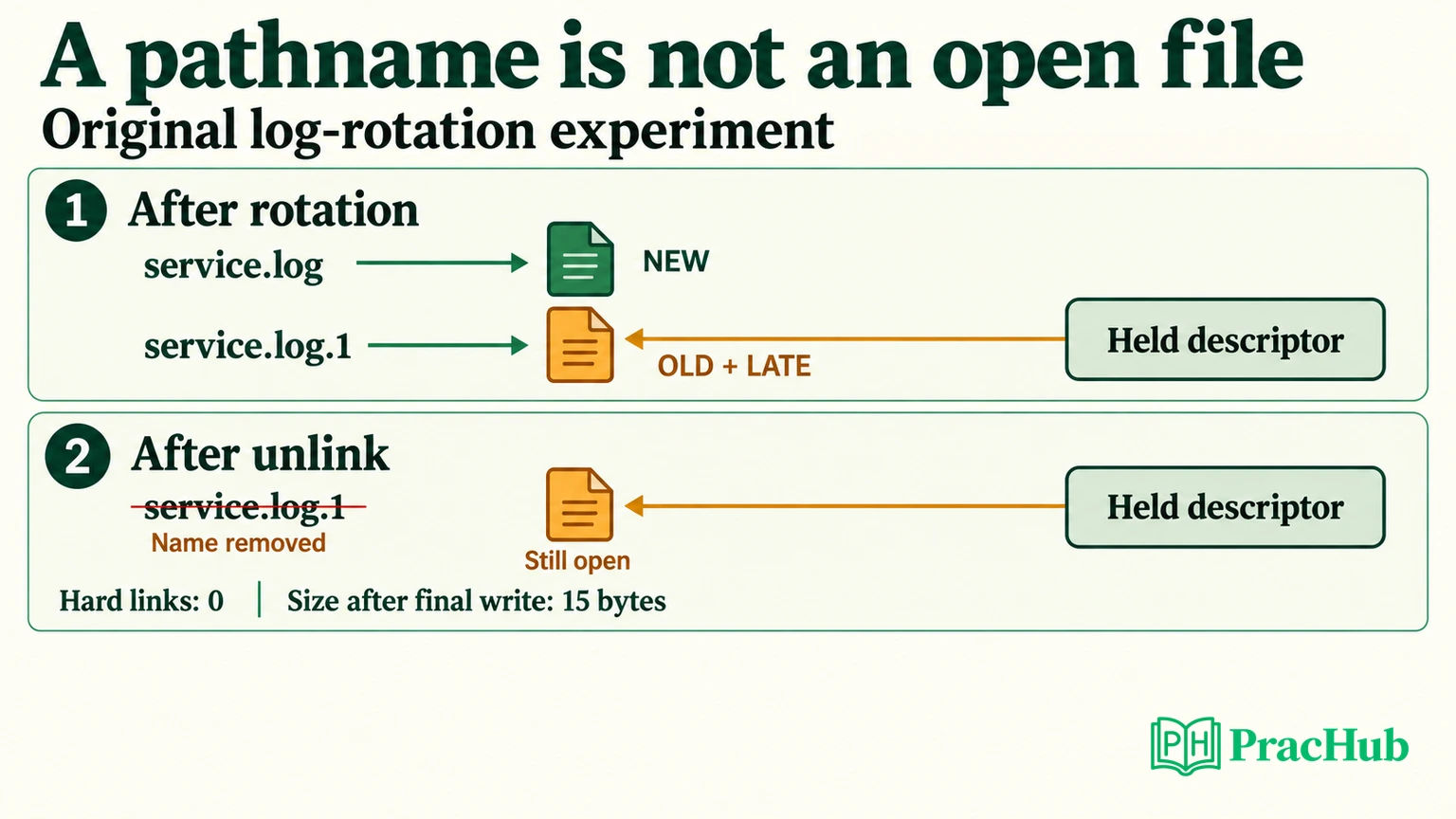
Suppose a log rotator renames service.log to service.log.1 and creates a fresh service.log. The application still holds the descriptor it opened earlier. Which file receives its next write?
Technical fact: opening a file establishes an open file description, which records state such as the offset; the process's descriptor refers to it. Changing a directory entry does not automatically redirect that descriptor to a newly created file with the old name. Linux open manual.
Use this original experiment to make the prediction observable. It creates its own temporary directory and uses unbuffered writes so a Python buffer does not obscure the result.
import os
import tempfile
from pathlib import Path

with tempfile.TemporaryDirectory() as directory:
    current = Path(directory) / "service.log"
    rotated = Path(directory) / "service.log.1"
    with current.open("xb", buffering=0) as held:
        assert held.write(b"OLD\n") == 4
        current.rename(rotated)
        current.write_bytes(b"NEW\n")
        assert held.write(b"LATE\n") == 5
        print("current:", current.read_bytes())
        print("rotated:", rotated.read_bytes())
        rotated.unlink()
        assert held.write(b"AFTER\n") == 6
        print("held link count:", os.fstat(held.fileno()).st_nlink)
        print("held size:", os.fstat(held.fileno()).st_size)
The verified output is:
current: b'NEW\n'
rotated: b'OLD\nLATE\n'
held link count: 0
held size: 15
The late write reaches the rotated file. Removing its remaining pathname does not close the held descriptor: the final six-byte write still succeeds. The file has no remaining hard links, but remains open. Linux unlink semantics.
Diagnose the symptom at the correct boundary
Imagine an operator says, “The application is healthy, but the new log file stays empty after rotation.” Start by checking whether the application is producing log events, buffering output, or writing through an old descriptor. These hypotheses require different observations.
| Observation | What to test next |
|---|---|
| New pathname is quiet; rotated file grows | Compare the writer's open file with both pathnames |
| Neither file grows, but requests succeed | Check logging level, buffering, and whether those requests should emit events |
| Pathname was deleted while storage remains occupied | Look for open references; do not assume deletion closed the writer |
| Writes return errors | Inspect the actual error and relevant permissions, limits, or filesystem state |
On Linux, /proc/PID/fd exposes descriptor entries, subject to access checks. Inspect the specific service process in the correct namespace; compare device and inode identity while the files are live rather than relying on filenames alone. Linux procfs descriptor documentation.
A bounded strace session can inspect system calls, arguments, and return values. That helps distinguish “the program called write and it failed” from “the program never attempted the write.” Tracing has overhead and may expose data, so scope it to an appropriate test process or approved diagnostic session. This is a Linux follow-up, not fabricated output from our macOS test. strace manual.
If the descriptor points to the rotated file, use the application's documented log-reopen mechanism. Do not assume every service handles the same signal. Verify that a known new event reaches the intended file and the old file stops growing. A successful reopen also needs correct ownership and permissions on the replacement.
Connect process lifecycle to the tools you use
For an external command, explain shell parsing and expansion, process creation, program execution, and collection of exit status. Avoid saying exec creates a new process: a successful execve replaces the current process image. A shell builtin such as cd must affect the shell's own state to change its working directory. Linux execve manual.
Distinguish a running process, one waiting for an event, and an exited child whose status has not yet been collected. A zombie is not still executing application instructions; waiting lets the parent collect termination information. Linux wait manual.
Tie explanations to evidence. If you suspect user-space computation, choose a profiler that can identify hot code. If you suspect blocked system calls, inspect that boundary. For deeper instrumentation choices, continue with PracHub's eBPF interview questions.
Five questions for shell and systems practice
These prompts come from other company pages. They are adjacent practice, not a Jane Street Linux question list.
| PracHub question | Practice focus |
|---|---|
| Explain and Harden Two Shell Commands | Explain arguments, redirection, races, and visible failure. |
| Explain Linux Command Execution, Filesystems, and Isolation | Trace shell, descriptor, and kernel boundaries. |
| Explain Virtual Memory, MMUs, and TLBs | Separate translation misses from page faults. |
| Diagnose I/O, Memory, and CPU Constraints | Choose evidence before proposing a resource change. |
| Troubleshoot CPU, latency, and DNS issues | Connect a symptom to the relevant system or network layer. |
Browse PracHub's Jane Street questions, checking each prompt's actual role. Rehearse one script and one system explanation until you can state the assumptions, predict the result, and demonstrate the test that would prove you wrong.
Comments (0)