Figma Software Engineer Interview Prep Guide
Everything Figma actually asks Software Engineer candidates — concept walkthroughs, worked examples, and the real interview questions, drawn from candidate reports. Free to read.
Last updated
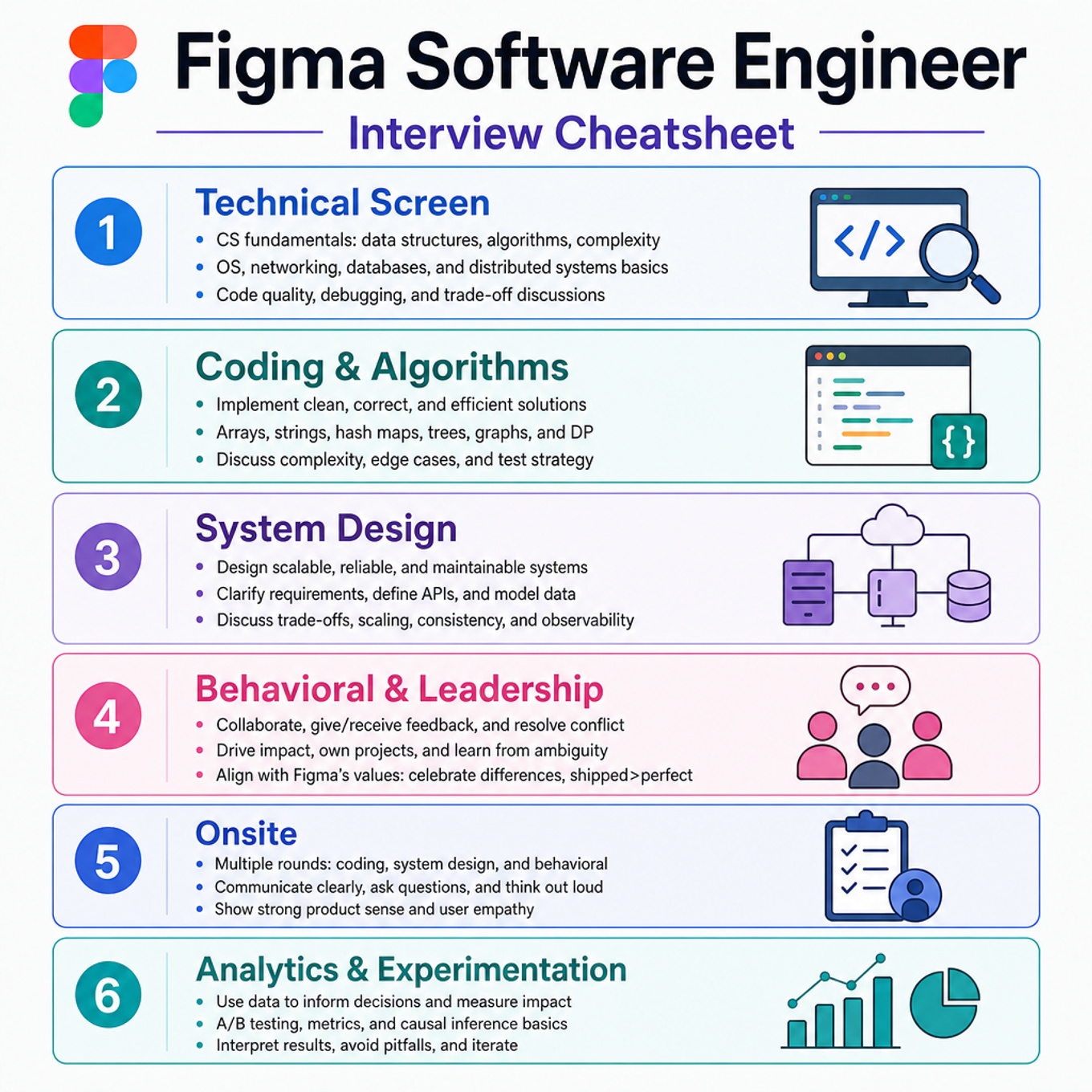
Focus most on Figma-style collaborative systems, browser/client performance, and canvas geometry/storage because your self-ratings are all 3/5, there are no solved-practice signals yet, and only two coding views are recorded. Merely review generic graph traversal, Kubernetes monolith operations, and trending feeds; they are default-solid and not called out by your selections. The Figma-specific emphasis is layered document models, undo/redo, multiplayer fanout/backfill, rendering responsiveness, spatial indexing, plugin sandboxing, and design-file persistence. With 1–2 weeks, this plan is about a 60-minute first-pass cheatsheet review, then repeat the emphasized sections with mock design and coding prompts.
Technical Screen — 14 min
Coding & Algorithms
Focus area — Figma canvas work often needs hit-testing and spatial reasoning; add this because base coding topics do not cover geometry.
What's being tested
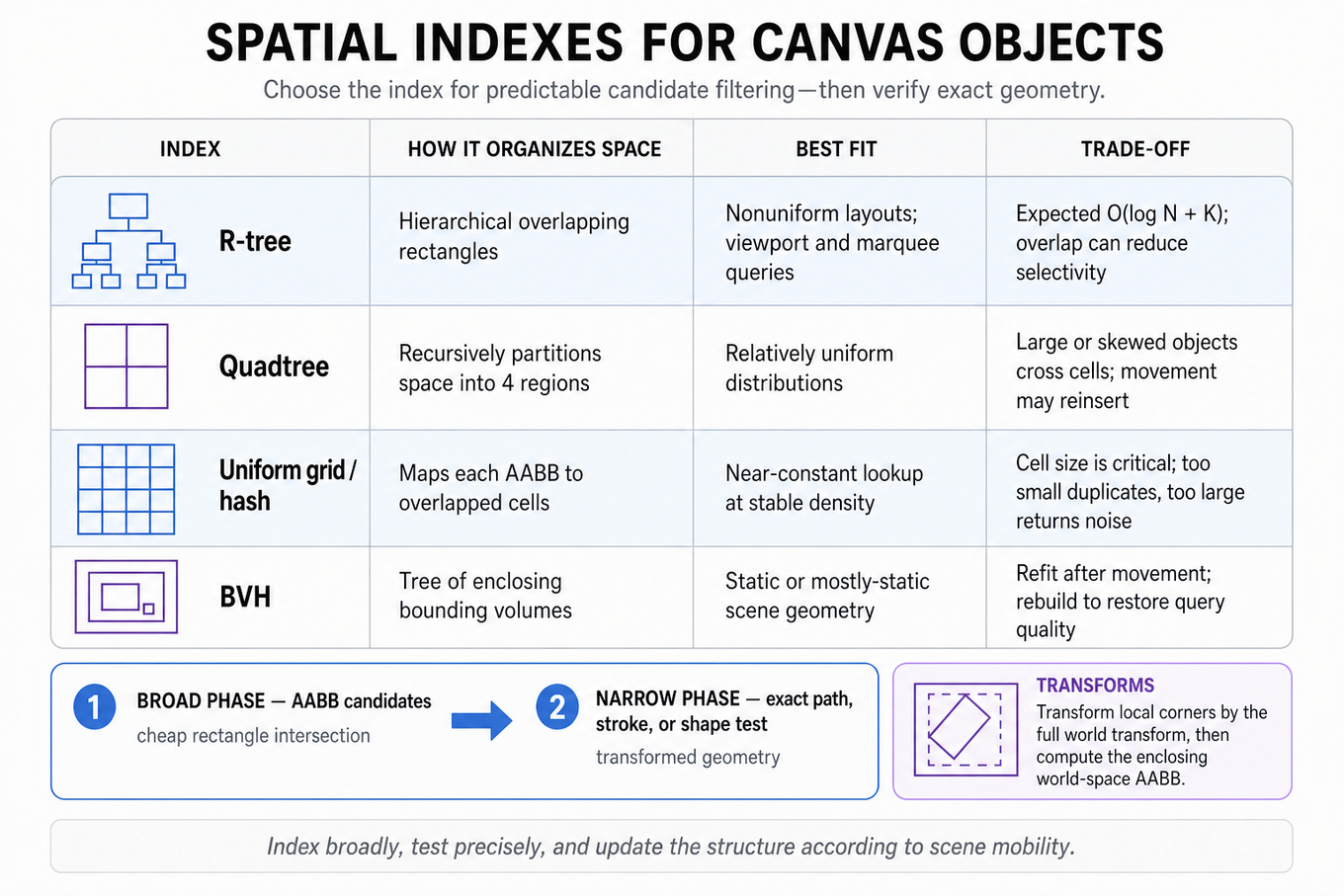
This topic tests whether you can turn geometric queries over millions of canvas objects into predictable-latency operations using the right spatial index, bounding representation, and update strategy. You should be able to distinguish broad-phase candidate filtering from exact geometric hit testing, reason about transformed and rotated objects, and explain complexity under realistic workloads. Figma cares because selection, hover, marquee operations, viewport rendering, snapping, and interaction latency all depend on finding the relevant objects without scanning the entire document.
Core knowledge
-
Axis-aligned bounding boxes (AABBs) represent an object as . Intersection requires on both axes; they are cheap but over-approximate rotated or irregular geometry.
-
A two-phase query first performs broad-phase filtering against bounding boxes, then narrow-phase testing against the actual shape, path, stroke, or transformed geometry. This avoids expensive polygon or curve calculations for obviously irrelevant objects.
-
An R-tree indexes rectangles hierarchically, typically providing expected query behavior for objects and candidates. It handles nonuniform object distributions better than a fixed grid, but overlapping nodes can degrade selectivity.
-
A quadtree recursively partitions 2D space into four regions. It works well for relatively uniform point or object distributions, but large objects crossing many cells, highly skewed layouts, and frequent movement can cause duplication or expensive reinsertion.
-
A uniform spatial hash/grid maps an AABB to every overlapped cell, producing near-constant-time lookup when object density and cell size are reasonable. Choose cell size near the common interaction or viewport scale; too small causes duplication, too large returns excessive candidates.
-
BVH (bounding-volume hierarchy) structures objects in a tree of enclosing bounds and is often effective for static or mostly-static scene geometry. Rebuilding or refitting the hierarchy is a tradeoff: refitting is cheaper after movement, while rebuilding restores query quality.
-
For a transformed object, transform its local-space corners by the full world transform and compute the enclosing world-space AABB. Testing only the untransformed local rectangle creates false negatives; testing only a center point misses large or rotated objects.
-
Coordinate-space discipline matters: convert pointer or viewport rectangles into document coordinates before querying. With zoom and viewport origin , a screen point commonly maps to .
-
For marquee selection, query the selection rectangle against object bounds, then apply the declared semantic: “touching” uses AABB intersection, while “fully contained” requires and analogous inequalities on all sides.
-
Dynamic canvases need an update protocol: remove or mark stale entries, mutate the object, recompute bounds, and reinsert or update the index. Version numbers or generation IDs prevent a delayed query from returning geometry from an older object state.
-
Rendering and hit testing usually need z-order resolution after spatial filtering. The index should return candidates, not decide visual precedence; sort candidates by stacking context or traverse the scene graph in reverse paint order.
-
Measure more than average latency: track
p50,p95, andp99query time, candidate counts, index update cost, memory overhead, and false-positive rate. A design that is but returns 100,000 candidates is not interactive.
Worked example
No concrete interview title was supplied, so use this representative prompt: “Design hit testing for objects on an infinite canvas.” In the first 30 seconds, clarify whether objects can rotate, whether strokes and transparent regions count as hits, the expected object count, mutation rate, and latency target for pointer movement. State the assumptions that the canvas may contain millions of objects, queries arrive at interactive frequency, and exact geometry checks are more expensive than bounding-box checks. Organize the answer around coordinate conversion, a broad-phase spatial index, narrow-phase geometry testing, and z-order resolution. Explain that each object maintains a world-space AABB, while the index stores an object ID plus a version or reference to detect stale bounds. A pointer query converts screen coordinates into document coordinates, retrieves nearby candidates, performs exact local-space hit testing, and chooses the topmost visible match. Explicitly flag the tradeoff between an R-tree, which handles uneven layouts well, and a grid, which can provide simpler and faster updates under stable density. Close by saying that with more time you would benchmark adversarial layouts, add caching for repeated pointer queries, and test behavior during concurrent document updates.
A second angle
The same design applies to a marquee-selection query, but the result is a set rather than one topmost object. The key semantic choice is whether an object counts when its AABB touches the rectangle or only when its actual geometry is fully contained. Large rotated objects make AABB-only containment overly permissive, so broad-phase candidates should be followed by exact polygon, path, or transformed-boundary checks. You would also consider returning results incrementally so a large selection does not block the interaction thread.
Common pitfalls
Pitfall: Treating an AABB hit as an exact hit. This produces surprising selections around rotated rectangles, transparent interiors, and thin paths; present AABBs as a broad-phase approximation and define the narrow-phase test.
Pitfall: Saying “use a quadtree” without discussing workload shape. A strong answer compares R-trees, grids, and BVHs using object distribution, movement frequency, candidate counts, memory, and rebuild/update cost.
Pitfall: Ignoring coordinate spaces and ordering. Explicitly state how screen coordinates become document coordinates, how transforms are applied, and how candidates are resolved by visibility, clipping, and z-order.
Connections
An interviewer may pivot to scene-graph traversal, affine transforms and matrix composition, retained-mode rendering, or concurrency and immutable document snapshots. They may also ask how to virtualize rendering by querying only objects intersecting the current viewport, or how to make index updates undo/redo-safe.
Practice questions
Figma interviews often model layered design documents; your 3/5 coding rating and no solved history make this a normal-priority refresher.
What's being tested
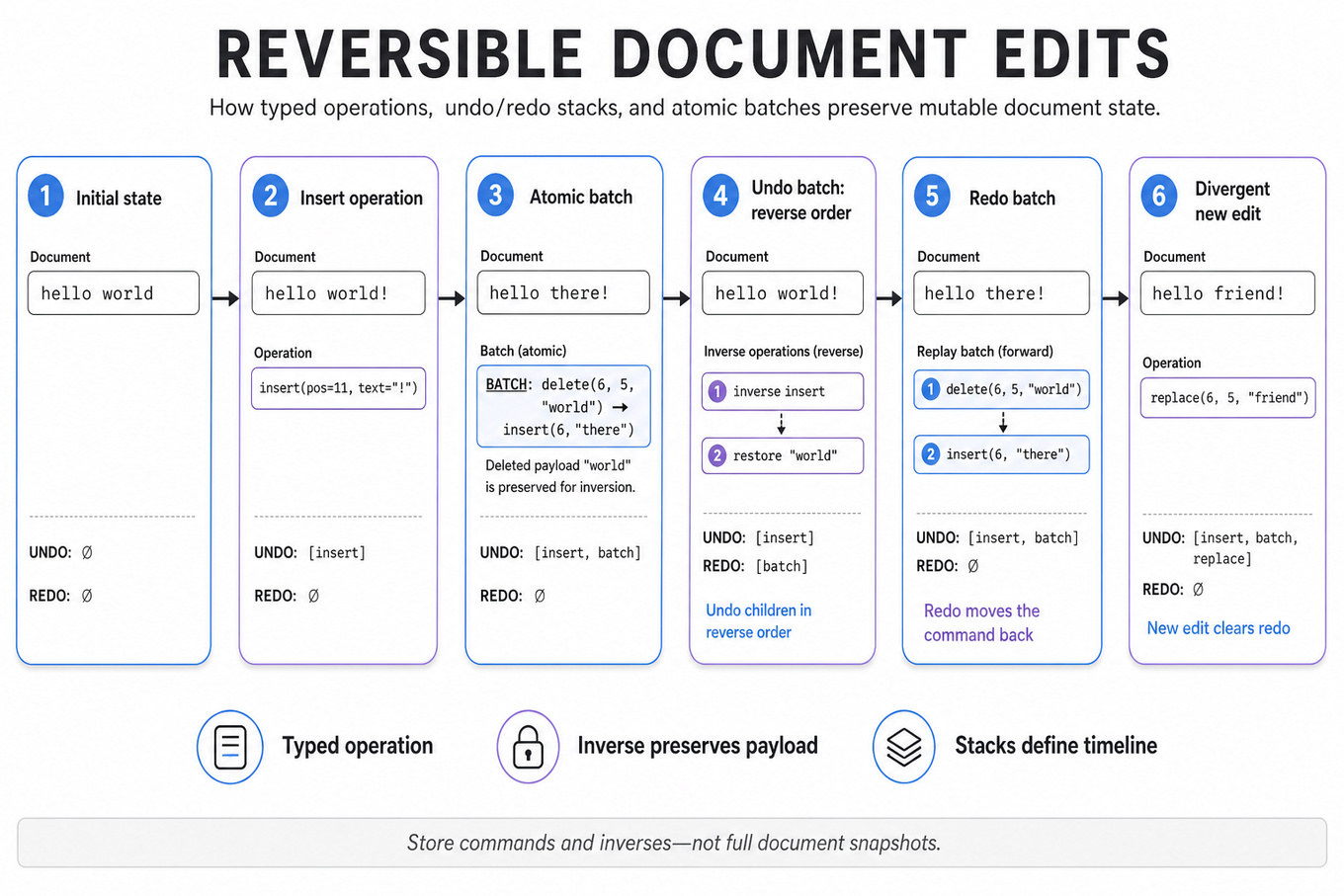
These problems test reversible state mutation over a mutable document, with correct undo/redo semantics for individual edits and transactional batches. You must choose an operation representation, generate reliable inverses, handle overlapping ranges and cursor positions, and keep history operations efficient rather than copying the entire document.
Patterns & templates
- Represent edits as typed operations (
`insert`,`delete`,`replace`) with position, payload, and metadata; define`apply`and`invert`as core primitives. - Maintain two stacks: undo and redo; a new edit clears redo, undo moves the latest command to redo, and redo moves it back.
- Batch edits transactionally by grouping child operations; undo a batch in reverse order and apply inverses in forward document coordinates.
- Prefer operation logs or command objects over full snapshots; snapshots cost
O(document size)per edit, while inverses cost proportional to changed content. - For overlapping edits, transform positions through prior operations or use a piece table/rope; never assume stale offsets remain valid.
- Make batch application atomic: validate all operations first, apply them, and roll back or leave state unchanged on failure.
- Cap history by bytes or operation count; compress adjacent inserts/deletes when safe, while preserving cursor and selection semantics.
Common pitfalls
Pitfall: Storing only deleted ranges without their original text makes deletion irreversible; inverse data must preserve every replaced or removed character.
Pitfall: Undoing a batch in insertion order corrupts positions; inverse operations must run in reverse order, with coordinate transformations when edits overlap.
Pitfall: Treating redo as an independent history after a new edit permits impossible timelines; any divergent mutation must invalidate the redo stack.
Practice these
The practice cards below cover the canonical variants — solve all of them and time yourself.
Practice questions
Command history is core to editor-style questions; keep it normal because coding signals show limited recent practice, not a stated weakness.
What's being tested
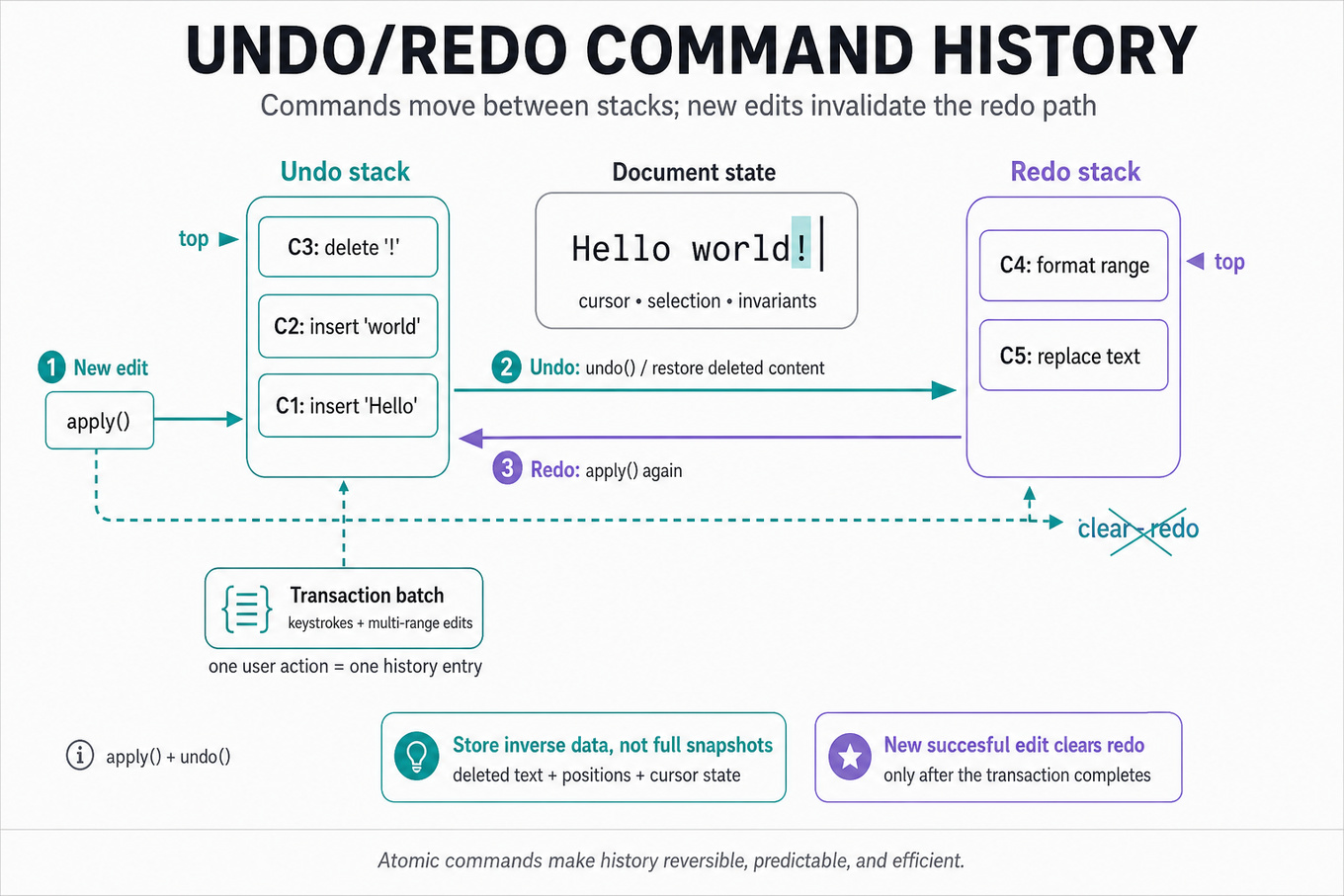
These problems test command history design: representing edits as reversible operations, maintaining undo/redo stacks, and defining exact semantics for new edits after undo. You must reason about batching, overlapping ranges, cursor/bookkeeping updates, failure handling, and performance as document size and history length grow.
Patterns & templates
-
Model each edit as a command with
apply()andundo(); store deleted text or an inverse operation rather than full document snapshots. -
Maintain undo and redo stacks: successful new edits push undo and clear redo; undo transfers one command to redo, while redo reverses that transfer.
-
Use transactional batching to group keystrokes or multi-range changes into one composite command with ordered forward and inverse operations.
-
For range edits, record coordinates and original content before mutation; process overlapping ranges consistently, often right-to-left to preserve offsets.
-
Prefer a gap buffer, piece table, or rope for large documents; snapshots are simple but cost
O(document size)per history entry. -
Compress adjacent compatible inserts/deletes, but preserve command boundaries required by explicit transactions, selection changes, or collaborative operations.
-
Make commands atomic: if applying or reversing a batch fails, restore prior state; target
O(k log n)forkedited ranges with a rope or interval structure.
Common pitfalls
Pitfall: Clearing redo after every internal operation in a batch, rather than after the completed user-level transaction.
Pitfall: Storing only positions when edits shift offsets; preserve deleted content and transform later ranges or apply them in descending order.
Pitfall: Treating undo as a raw inverse without updating selections, cursors, metadata, and invariants consistently.
Practice these
The practice cards below cover the canonical variants — solve all of them and time yourself.
Practice questions
Technical Screen — 9 min
System Design
Real-Time Collaboration Systems
Focus areaFocus area — Central to Figma multiplayer; system design is 3/5 with no platform practice signals, so give this extra space.
What's being tested
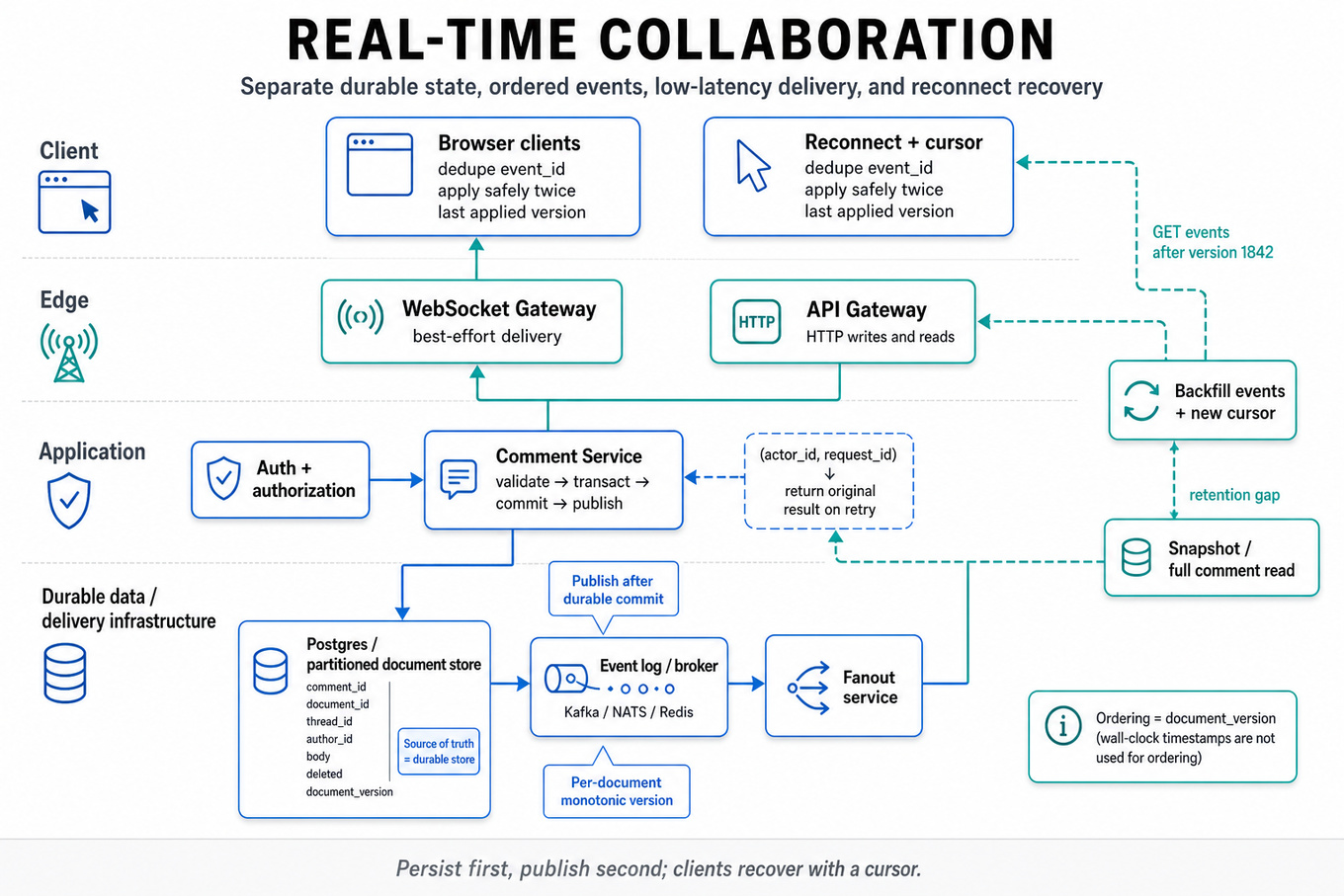
This tests whether you can design a real-time distributed system that combines durable state, low-latency delivery, reconnect recovery, and authorization without confusing those responsibilities. You need to reason about ordering, idempotency, failure handling, and hot-spot scaling rather than treating WebSockets as the entire solution. Figma cares because collaborative documents and canvases require users to observe shared state quickly and consistently while edits, comments, disconnects, and permission changes happen concurrently.
Core knowledge
-
Separate the source of truth from delivery. Persist comment mutations in a durable store such as
Postgresor a partitioned document store; use WebSockets only for best-effort notification. A client must be able to recover entirely through reads and backfill. -
Model comments with stable identifiers:
comment_id,document_id,thread_id,author_id, body, timestamps, deletion state, and an ordering token. Generate IDs client- or server-side with collision-resistant UUIDs; never use arrival time alone as identity or ordering. -
Use idempotency keys for creates and mutations. Store
(actor_id, request_id)with the resulting operation so retries after timeouts return the original result instead of creating duplicate comments. -
Choose an ordering contract explicitly. A per-document monotonically increasing sequence such as
document_versiongives clients a resume cursor; wall-clock timestamps do not guarantee order because clocks skew and requests arrive through different servers. -
A typical write path is: authenticate, authorize against the document, validate, transact the mutation and sequence assignment, commit durably, then publish an event. Publishing before commit risks phantom events; publishing after commit risks delayed fanout, so consumers must tolerate retries.
-
Reconnect backfill should accept a cursor, such as “events after version 1842,” and return events plus a new cursor. Handle retention gaps with a snapshot or full comment read; never assume a disconnected client can replay an infinite event log.
-
WebSocket delivery is usually at-least-once. Include
event_idor sequence numbers, deduplicate on the client, acknowledge or track the last applied cursor, and make applying an event safe when it is received twice. -
Use a fanout service backed by
Redis,NATS, orKafkawhen multiple application servers may hold connections. Partition events bydocument_idwhen per-document ordering matters; consumers should reject, buffer, or recover from sequence gaps. -
Scale hot documents independently from ordinary documents. Shard connection management and fanout by document, cap subscriptions or event rates, batch notifications, and use snapshot-plus-delta delivery when a document has thousands of viewers or a large backlog.
-
Permissions must be checked at write time and considered during delivery. Do not rely only on connection-time authorization: membership can be revoked, comments may have restricted visibility, and queued events must be filtered or invalidated after access changes.
-
Define failure behavior for every boundary: database timeout, publish failure, stale WebSocket, duplicate request, server restart, and client reconnect. An outbox table or transactional outbox pattern can make committed mutations reliably discoverable by the fanout pipeline.
-
Distinguish comment semantics from canvas-edit semantics. Comments may tolerate serialized per-thread or per-document mutations, while rich-text or object edits may require CRDTs or operational transformation; do not introduce CRDT complexity unless concurrent mutation semantics require it.
Worked example: Design Real-Time Collaborative Comments
For Design Real-Time Collaborative Comments, I would first clarify expected scale, whether comments are document-scoped or thread-scoped, required ordering, offline support, edit/delete semantics, and whether every collaborator can see every comment. I would declare an assumption such as durable comments with near-real-time updates, per-document ordering, authenticated users, and recovery after arbitrary disconnects. I would organize the answer around the data model and write path, WebSocket connection and fanout architecture, cursor-based reconnect/backfill, and authorization plus operational failure handling. Each mutation would receive an idempotency key, commit a comment event and sequence number transactionally, and then become available to a fanout worker. Clients would apply events by sequence, ignore duplicates, and request a snapshot or replay when they detect a gap. The key tradeoff is whether to use a single ordered stream per document, which simplifies correctness but can bottleneck hot documents, or partition more aggressively, which improves scale but complicates ordering. I would explicitly state that WebSockets are not durable storage and that reconnect reads must work even if an event was never delivered. If I had more time, I would detail the transactional outbox schema, authorization revocation behavior, metrics such as p99 fanout latency and reconnect recovery rate, and load-test behavior for a single extremely hot document.
A second angle
The same design changes substantially when users can create, edit, resolve, and delete comments while offline and then reconnect with multiple pending operations. The server should still assign authoritative sequence numbers, but it must accept idempotent retries and return conflict outcomes rather than assuming the client’s local order is globally valid. A lightweight last-write-wins policy may work for comment metadata, while concurrent text edits may need an operation-based merge strategy or a CRDT. The important boundary remains the same: durable mutation processing determines truth, while the real-time channel accelerates propagation of that truth.
Common pitfalls
Pitfall: Treating WebSocket delivery as persistence. Saying “broadcast the comment to connected users” omits disconnected clients, server restarts, and missed messages; describe a durable write path plus cursor-based recovery.
Pitfall: Claiming timestamps provide ordering. A tempting answer sorts by
created_at, but clock skew and concurrent requests make that unreliable; use a documented per-document sequence or explain the weaker consistency contract.
Pitfall: Jumping immediately to CRDTs or
Kafkawithout defining guarantees. The interviewer needs to hear the required ordering, retry, authorization, and scale assumptions first, then the minimum mechanism that satisfies them.
Connections
An interviewer may pivot to CRDTs, operational transformation, transactional outboxes, event sourcing, or presence systems. They may also ask how authorization changes, multi-region writes, or backpressure affect the consistency and latency contract.
Further reading
-
Designing Data-Intensive Applications — Martin Kleppmann’s treatment of replication, logs, consistency, streams, and distributed-system failure modes.
-
Conflict-free Replicated Data Types — foundational paper on replicated data structures for concurrent offline-capable editing.
-
Real-time collaboration with operational transformation — practical background on concurrent editing and transformation-based conflict resolution.
Practice questions
Technical Screen — 3 min
Behavioral & Leadership
Onsite — 23 min
System Design
Browser Client Performance
Focus areaFocus area — Highly Figma-specific for large canvases; emphasize rendering, memory, and responsiveness beyond generic backend design.
What's being tested
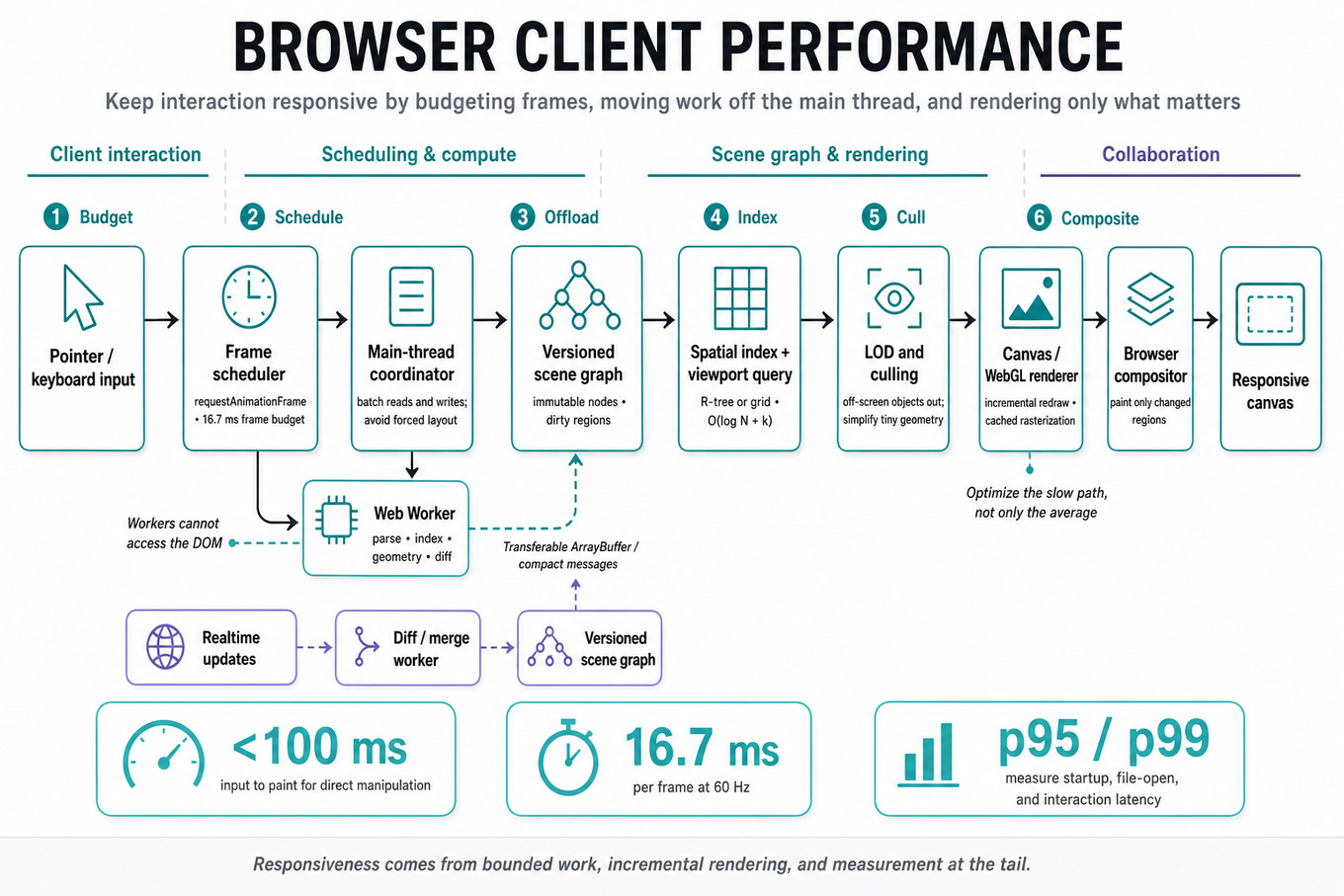
Browser client performance tests whether you can turn a vague “make the editor faster” goal into measurable latency budgets, an architecture, and an implementation plan. For a Figma-like application, the interviewer is probing your understanding of rendering pipelines, JavaScript scheduling, network and memory behavior, and how large interactive documents change those tradeoffs. Figma cares because a design file can contain millions of objects, frequent collaborative updates, and demanding interactions such as pan, zoom, selection, and text editing; a strong Software Engineer preserves responsiveness without sacrificing correctness.
Core knowledge
-
Performance budgets convert “fast” into targets: input-to-paint under 100 ms for direct manipulation, animation frames near 16.7 ms at 60 Hz, and explicit
`p95`/`p99`targets for startup, file-open, and interaction latency. Optimize the slow path, not only the average. -
The browser’s critical rendering path is roughly DOM/CSS/style/layout/paint/composite, while a canvas or
WebGLeditor can bypass much of DOM painting. Avoid forcing synchronous layout through interleaved reads and writes such as`getBoundingClientRect()`followed by style mutation in a loop. -
Frame-budget scheduling matters more than raw throughput. At 60 Hz, each frame has about 16.7 ms; reserve time for input, rendering, and browser work, then split expensive tasks across
`requestAnimationFrame`,`requestIdleCallback`, chunked timers, or workers rather than blocking the main thread. -
Use Web Workers for parsing, indexing, geometry preparation, and diff computation, transferring results with structured cloning or Transferable
`ArrayBuffer`s. Workers cannot directly access the DOM, and excessive message frequency or copying can erase the benefit. -
A scene graph should support incremental rendering: maintain spatial bounds, dirty regions, and immutable or versioned nodes so a small edit does not traverse and redraw the entire document. Spatial indexes such as an R-tree or uniform grid make viewport queries approximately rather than .
-
Level of detail prevents off-screen and tiny objects from consuming equal work. Cull objects outside the viewport, simplify geometry when zoomed out, cache rasterized results where appropriate, and avoid rendering objects whose projected area is below a meaningful pixel threshold.
-
For GPU rendering, batch compatible draw calls, reduce state changes, reuse buffers and textures, and distinguish CPU preparation time from GPU execution time. A
`WebGL`/`WebGPU`pipeline can still stutter if JavaScript spends too long building command data or if uploads repeatedly trigger synchronization. -
Virtualization applies beyond lists: keep only visible or relevant panels, layers, thumbnails, and metadata active. Be careful with accessibility, keyboard navigation, hit testing, and focus restoration; removing an element from the DOM must not make interaction state disappear.
-
Network performance requires separating critical from noncritical resources. Use compressed, versioned assets, HTTP caching, streaming where useful, request prioritization, and incremental file loading. A large document should open progressively, while edits and viewport-critical data receive higher priority than hidden thumbnails.
-
Memory management is a latency concern because excessive allocations increase garbage-collection pauses and can cause tab eviction or crashes. Reuse typed-array buffers and object pools selectively, bound caches with an LRU policy, and account for decoded images, GPU textures, worker heaps, and duplicated document representations.
-
Instrumentation should connect user actions to browser work:
`PerformanceObserver`for long tasks and layout shifts, User Timing marks around file open and first interactive frame, Chrome tracing for main-thread/GPU activity, and production`p50`/`p95`/`p99`measurements segmented by document size and device class. -
Correctness under concurrency is part of performance design in a collaborative editor. Apply remote updates incrementally, preserve ordering or version checks, make rendering tolerant of intermediate states, and ensure cancellation prevents stale worker results from overwriting newer document versions.
Worked example
Representative prompt: “Design a high-performance browser client for a large collaborative design file.” In the first 30 seconds, clarify file-size distributions, target devices, supported browsers, startup versus interaction goals, and whether visual fidelity or edit latency has priority. Declare an initial target such as “the visible viewport should remain interactive at 60 Hz on a mid-range laptop, while opening progresses incrementally.” Organize the answer around document loading, an indexed scene representation, viewport-aware rendering, main-thread scheduling, and measurement. Describe a pipeline in which the network streams chunks, a worker parses and indexes them, and the renderer consumes only visible or dirty objects. Explicitly call out the tradeoff between caching rasterized layers for lower redraw cost and consuming memory that may trigger eviction or garbage collection. Explain that collaboration updates should be versioned and coalesced without delaying local input or allowing stale worker output to render. Close with: “If I had more time, I’d define device-specific budgets, add trace-based regression tests, and test worst-case files with simultaneous remote edits.”
A second angle
Representative prompt: “Why does panning a large canvas stutter even though average CPU usage is low?” The framing shifts from architecture to diagnosis: first determine whether the bottleneck is main-thread long tasks, layout, GPU command submission, texture upload, memory pressure, or synchronization. Compare input latency, frame time, dropped-frame intervals, and visible-object counts rather than relying on overall CPU percentage. A likely fix might be viewport culling and draw-call batching, but a trace could instead reveal repeated synchronous layout or expensive worker-message copies. The answer should emphasize a measurement sequence and a reversible optimization, not immediately recommend “use WebGL.”
Common pitfalls
Pitfall: Treating average frame time as sufficient. A design editor can feel broken because of occasional 200 ms pauses even when its mean is excellent; discuss tail latency, long tasks, and interaction-specific measurements.
Pitfall: Saying “move everything to a worker” without addressing ownership and transfer costs. Workers cannot render ordinary DOM, and copying large object graphs every frame can be slower than carefully scheduled main-thread work.
Pitfall: Listing optimizations without a bottleneck model. “Use virtualization, caching, and
WebGL” is weaker than identifying the measured critical path, proposing one change, and explaining its correctness, memory, and invalidation costs.
Connections
The interviewer may pivot to distributed collaboration, conflict-free or versioned update handling, and offline recovery. They may also ask about observability, browser security and sandbox constraints, cache invalidation, or algorithmic choices for spatial indexing and hit testing.
Further reading
-
RAIL performance model — practical response, animation, idle, and load budgets for interactive browser applications.
-
Chrome DevTools Performance panel — trace main-thread, rendering, network, and GPU-adjacent behavior.
-
Web Workers API — worker isolation, messaging, and data-transfer constraints.
Practice questions
Focus area — Large collaborative design files need snapshots, deltas, and compaction; this adds persistence depth beyond in-memory document models.

What's being tested
This topic tests whether you can design a durable, low-latency storage model for large collaborative documents while preserving historical versions. The interviewer is probing your command of event logs, immutable snapshots, content-addressed storage, consistency, recovery, and garbage collection—not merely whether you can choose a database. Figma cares because design files are structured graphs edited concurrently, must load quickly, support version history and restore, and cannot lose user changes.
Core knowledge
-
Document representation should separate logical file metadata from the document graph: pages, nodes, styles, components, and binary assets. Store metadata and indexes in a transactional database, while large immutable payloads belong in object storage such as
`S3`. -
A practical design combines a materialized current state with an append-only operation log. The current state makes reads fast; operations provide auditability and replay. Replaying every edit is too slow, so create snapshots after a bounded number of operations or bytes.
-
A snapshot should be immutable and identified by a stable version ID, parent version, author, timestamp, and content hash. Immutability simplifies caching, replication, rollback, integrity verification, and concurrent readers.
-
Content-addressed storage names blobs by a cryptographic digest, typically
SHA-256:blob_id = SHA256(canonical_bytes). Identical subtrees or assets can be deduplicated, but canonical serialization must be deterministic or logically identical objects produce different IDs. -
For large files, use incremental snapshots or a Merkle-tree-like structure rather than copying the entire document. A root points to immutable chunks; updating one node rewrites only affected paths. This reduces write amplification, though reads require more indirection and garbage collection becomes harder.
-
Optimistic concurrency control prevents lost updates. Each write includes the client’s base revision; the server accepts it only if it matches the current head, or transforms/merges operations when the application supports that model. A compare-and-swap on
(file_id, revision)is a useful primitive. -
Collaborative editing usually needs an operation protocol such as OT or CRDTs, depending on semantics. CRDTs simplify convergence under reordering and retries but can consume more metadata; OT can be more compact but requires carefully designed transformation functions and server ordering.
-
Version history should distinguish an automatically generated checkpoint from a user-visible named version. A restore should normally create a new head whose parent is the current version, rather than deleting later history. This preserves auditability and makes undo operationally safe.
-
Durability and atomicity require ordering writes carefully: persist referenced blobs, commit the revision metadata and parent pointer transactionally, then publish visibility. If metadata commits before blobs are durable, readers can observe broken references; if blobs remain orphaned, a sweeper must reclaim them.
-
Use idempotency keys for retries. A request keyed by
(client_id, operation_id)should return the original result rather than append the operation twice. This matters when clients lose responses after the server has already committed. -
Reads need a clear consistency model. A file editor generally needs read-your-writes and monotonic revisions, while historical versions can be served from eventually consistent replicas. Route writes and immediately subsequent reads through a leader or session-aware mechanism.
-
Garbage collection must retain every reachable version, chunk, asset, and dependency from active files, published versions, legal holds, and restore points. Mark-and-sweep over the version graph is safer than deleting blobs by age; use a grace period for in-flight references and replica lag.
Worked example
For a representative prompt, “Design file storage, snapshots, and versioning for a collaborative editor,” I would first clarify file size, edit rate, concurrent editors, required recovery point objective, version-history retention, and whether arbitrary historical reads must be low latency. I would state an assumption such as files containing a structured node graph, frequent small edits, and a requirement that acknowledged edits survive machine failure. I would organize the answer around the data model, write path and concurrency control, snapshot and historical-read strategy, and durability plus garbage collection. The core design would append idempotent operations, periodically materialize immutable snapshots, and maintain a transactional current-head pointer referencing durable content-addressed chunks. I would explicitly compare full snapshots with Merkle-tree or incremental snapshots: full copies simplify reads and deletion, while incremental snapshots reduce storage and write amplification for large files. I would explain how a restore creates a new revision pointing to an older immutable root, rather than mutating or deleting history. I would also define failure behavior for a crash between blob upload and metadata commit, using retries and orphan sweeping. If I had more time, I would add multi-region replication, schema migration for old snapshots, and load-test targets for p95 open latency and commit throughput.
A second angle
A different framing is “How would you support browsing and restoring any version without slowing normal editing?” Here the primary concern is read amplification and indexing rather than collaborative conflict resolution. Keep immutable version manifests with parent pointers and periodic full checkpoints, then reconstruct intermediate states from a bounded operation range or precomputed historical indexes. The design should guarantee that browsing never changes the live head, while restore is a new conditional write against the current revision.
Common pitfalls
Pitfall: Treating the latest document as the only source of truth and overwriting it in place makes rollback, auditing, crash recovery, and concurrent writes difficult. Prefer immutable revisions plus a small mutable pointer to the current head.
Pitfall: Saying “use a database” without specifying what is transactional and what is blob storage leaves the critical failure modes unanswered. Identify the atomic boundary between operations, revision metadata, chunk references, and object durability.
Pitfall: Claiming snapshots solve collaboration ignores concurrent edits and retry behavior. Explain revision preconditions, idempotency keys, operation ordering, and whether the system rejects, transforms, or merges stale writes.
Connections
The interviewer may pivot to optimistic concurrency control, CRDTs versus OT, Merkle trees, object-store consistency, schema evolution, or multi-region replication. They may also ask how to test crash recovery, deduplication correctness, and garbage collection without deleting live content.
Practice questions
Plugin Sandboxing And API Security
Focus areaFocus area — Figma’s platform ecosystem makes sandboxing and permissions relevant; this adds a security/API design angle absent from the base outline.
What's being tested
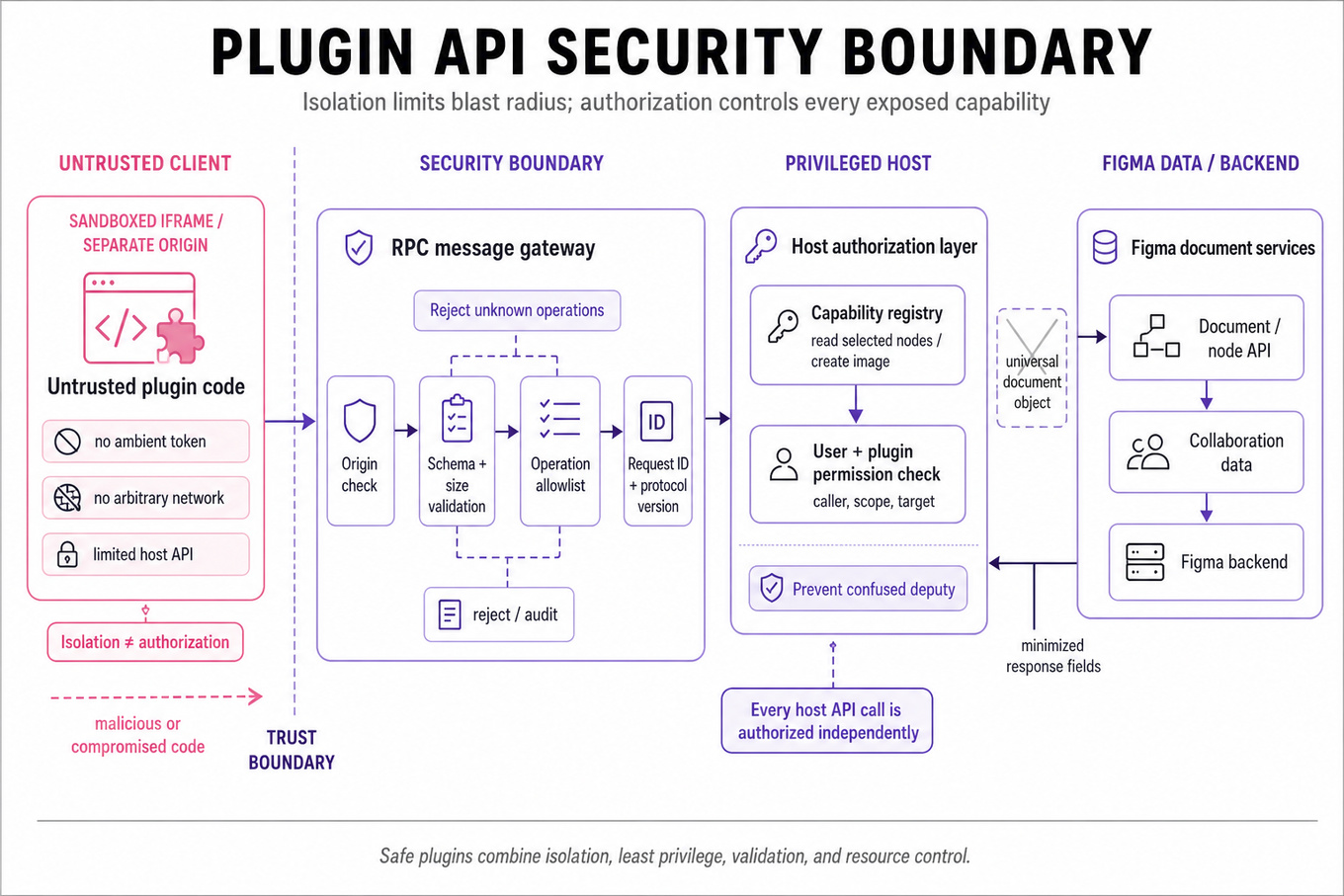
The interviewer is testing whether you can design an untrusted-code boundary, not merely hide implementation details behind an API. You should be able to distinguish isolation, authorization, input validation, and resource control, then explain how they work together when a malicious plugin attempts to read or modify Figma data. Figma cares because plugins run third-party code alongside valuable design documents, so a software engineer must preserve usability without turning every API call into unrestricted access.
Core knowledge
-
Threat modeling starts by identifying assets, principals, trust boundaries, and abuse cases: document contents, access tokens, user identity, collaboration data, plugin code, and
Figma’s backend. Treat every plugin as potentially compromised, including one whose author account or dependency was hijacked. -
A sandbox limits what code can execute and access; it is not an authorization system. Browser mechanisms such as an
iframewith a restrictivesandboxattribute, separate origins,Content-Security-Policy, and disabled network primitives reduce blast radius, but every exposed host API still needs independent authorization. -
Use capability-based security: expose narrowly scoped object capabilities rather than a universal
documentobject or ambient credentials. A capability might permit reading selected nodes or creating an image, while omitting arbitrary filesystem, network, token, or cross-document access. -
The host/plugin boundary should use an explicit RPC protocol over
postMessageor a similarly constrained channel. Validate message shape, protocol version, request identifier, operation, argument types, and payload size; reject unknown operations instead of silently ignoring them. -
Origin validation must check
event.originagainst an exact allowlist and, where applicable, verifyevent.sourceis the expected window.postMessage("*"), substring origin checks, and trusting a claimed origin inside the message enable spoofing or confused-deputy attacks. -
Prevent confused deputy behavior by making the host enforce the caller’s permissions, not by trusting plugin-supplied document IDs, user IDs, or scopes. A plugin should not cause the privileged host to perform an operation the user or plugin capability does not authorize.
-
Data minimization reduces exfiltration impact: return only fields needed for an operation, avoid sending entire documents for a single property query, redact secrets, and distinguish read, write, export, and network permissions. Consent dialogs should describe durable capabilities concretely.
-
Content Security Policy should use restrictive directives such as
default-src 'none', narrowly scopedscript-src, and explicitconnect-srcwhere network access is genuinely required. CSP is defense in depth; it does not make unsafe DOM insertion,eval, or unvalidated HTML safe by itself. -
Apply resource quotas at both the plugin and request level: CPU time, memory, message size, operation count, file/export size, and wall-clock duration. Use cancellation and backpressure so a plugin cannot freeze the editor through millions of synchronous host calls or oversized responses.
-
Serialization boundaries require defensive parsing and safe reconstruction. Prefer structured clone or a schema validator over ad hoc JSON assumptions; reject prototype-bearing objects, recursive structures, unexpected numeric ranges, and values that could trigger prototype pollution or denial of service.
-
Network access is a major exfiltration and SSRF boundary. If plugins can fetch URLs, mediate requests through a host service with destination policies, credential stripping, response-size limits, timeout controls, private-address blocking, and clear user consent; never forward editor cookies or bearer tokens automatically.
-
Revocation and lifecycle matter after installation: bind capabilities to a plugin identity and document context, expire temporary grants, invalidate them on uninstall or logout, and terminate workers or frames on navigation. Permission changes must affect already-running plugin instances, not only future calls.
-
Observability and failure handling should record plugin identity, operation name, decision, latency, quota violations, and error class without logging document contents or secrets. Fail closed on malformed requests, isolate crashes, and make retries safe through request IDs and idempotent mutations where possible.
Worked example
No titled interview prompt was supplied, so use this representative prompt: “Design a secure API for third-party Figma plugins.” In the first 30 seconds, clarify whether plugins need network access, whether they can access one document or many, whether the requirement is malicious-code isolation or mainly accidental misuse, and what latency and compatibility constraints exist. State the core assumption: plugin code is untrusted, while the editor host and authorization service are trusted but must defend against confused-deputy requests. Organize the answer around four pillars: isolated execution, a versioned capability-based RPC API, strict validation and authorization at the host boundary, and quotas plus monitoring for availability. Explicitly choose narrow capabilities over a broad document object, accepting more API design and compatibility work in exchange for a smaller blast radius and clearer permission review. Explain that postMessage origin checks alone are insufficient because a legitimate plugin origin can still issue unauthorized operations. Close by saying that, with more time, you would specify the permission model, threat-test the protocol with fuzzing, and review network mediation and revocation behavior.
A second angle
A different representative prompt is “A plugin can read document data but must not exfiltrate it; how would you design the boundary?” The framing shifts from general sandbox architecture to information-flow control and the limits of host enforcement. A capability system can restrict which data is returned, but once plaintext reaches plugin memory, a malicious plugin may encode it into an allowed network request or visible side effect. A strong answer therefore combines minimized data access with explicit network policy, user-visible consent, auditing, and a product decision about whether that plugin class should receive sensitive data at all. The key insight is that sandboxing cannot guarantee confidentiality after intentionally granting an untrusted program the secret.
Common pitfalls
Pitfall: Saying “run it in an
iframe, so it is safe” confuses execution isolation with authorization and data confidentiality. Explain the browser boundary, then separately define capabilities, origin checks, validation, network policy, and quotas.
Pitfall: Listing security controls without clarifying the threat model makes the design sound generic. State whether the attacker is a malicious plugin, a compromised dependency, a malicious document, or an attacker controlling a plugin’s server; each changes the required boundary.
Pitfall: Focusing only on XSS or CSP misses operational failures such as stale permissions, oversized messages, denial of service, token leakage, and confused-deputy calls. Discuss lifecycle, revocation, failure modes, and observability after the initial launch.
Connections
The interviewer may pivot to OAuth scopes, zero-trust authorization, browser same-origin policy, postMessage protocol design, SSRF prevention, or secure supply-chain practices. They may also ask how capability revocation interacts with distributed services and offline plugin execution.
Further reading
-
Capability-Based Security — Foundational discussion of object capabilities and authority confinement.
-
Content Security Policy Level 3 — Formal browser policy model and directive semantics.
-
Postel’s Law Is Wrong — Useful context for why strict protocol validation is safer than permissive parsing.
Practice questions
Onsite — 3 min
Analytics & Experimentation
Onsite can probe product metrics; no analytics rating was provided, so keep a normal practical review.

What's being tested
These prompts test whether you can turn an ambiguous “trending” requirement into a reliable, near-real-time ranking system. You should be able to define event contracts, select and combine time-sensitive signals, design the serving architecture, and explain how ranking quality and system health are measured. Figma cares because ranking features must be fast, explainable, resilient to noisy interaction data, and safe to evolve without degrading the user experience.
Core knowledge
-
Trending definition should be explicit: recent popularity, velocity, and breadth of engagement relative to comparable content—not simply total clicks. Specify the audience, freshness window, eligible article states, and what “trending” means operationally.
-
Event modeling needs immutable identifiers such as
article_id,user_idor anonymous session ID, event type, event timestamp, ingestion timestamp, surface, and experiment assignment. Deduplicate with an event ID and avoid counting retries twice. -
Use time decay so old interactions lose influence: , where is event age. A half-life is often easier to reason about: . Short half-lives create responsiveness; long ones provide stability.
-
A practical ranking score can combine normalized signals:
where is recent velocity, unique engaged users, breadth across segments, and reports, spam, or quality penalties. -
Normalization prevents raw counts from dominating. Log transforms such as reduce the impact of viral outliers; z-scores or percentile ranks make clicks, saves, comments, and shares comparable.
-
Velocity should compare adjacent windows, not just count events: . Guard against division by zero, tiny denominators, clock skew, and a single burst from one actor.
-
For stream processing, partition events by
article_idor a stable hash, aggregate tumbling or hopping windows, and materialize top candidates.Kafkaplus a stream processor can support high volume; a simpler scheduled job may be preferable at modest scale. -
Separate candidate generation from final ranking. Maintain a broad set of recently active articles, then apply eligibility, deduplication, penalties, and ranking. This keeps expensive scoring away from the entire corpus and makes latency predictable.
-
Serving architecture should use a precomputed top-N result in a low-latency store such as
Redis, with periodic refreshes and stale-but-safe fallback data. Do not make every feed request scan events or synchronously query the stream processor. -
Consistency and freshness are explicit tradeoffs. Eventual consistency is usually acceptable for a trending list, while the system should define an upper bound such as “results refresh within 30 seconds” and expose the timestamp of the last successful computation.
-
Abuse resistance belongs in the design: cap contribution per user or device, discount repeated actions, detect coordinated bursts, and exclude blocked or reported content. Keep the raw signal and penalty reason available for debugging rather than silently changing scores.
-
Evaluation metrics should cover ranking quality and system behavior. Track click-through or open rate, saves, meaningful engagement, hide/report rate, duplicate rate, freshness lag, ranking computation duration, cache hit rate, and
p99serving latency.
Worked example: Define and measure article trending
For “Define and measure article trending,” start by clarifying whether “trending” means fastest-growing, most popular, or most relevant to a particular audience, and ask for freshness and latency targets. Declare assumptions: articles are eligible only after publication, events may arrive late or be retried, and the list should update within roughly one minute. Organize the answer around event definitions, a time-decayed scoring function, candidate-generation and serving architecture, and evaluation plus abuse controls. Define a canonical event schema with an idempotency key, then compute per-article unique engagement and velocity over hopping windows. Explicitly choose between a simple weighted score and a more complex model; a transparent weighted score is easier to debug and launch, while a learned ranker may improve quality but requires stronger data and operational tooling. Explain that raw clicks alone reward old or sensational articles, so use decay, normalization, diversity, and negative signals such as reports. Close by saying that with more time you would validate the score against manually reviewed rankings, add dashboards for freshness and p99 latency, and run a controlled rollout with guardrails.
A second angle
For “Design a trending-articles platform,” the same ranking concept becomes a distributed-systems problem with explicit throughput, latency, fault tolerance, and recovery requirements. Frame the design as ingestion, aggregation, candidate storage, ranking, serving, and observability rather than spending the entire answer on the formula. Discuss partitioning, replaying events, checkpointing, idempotent aggregation, cache invalidation, and behavior when the stream processor or ranking job is unavailable. The key tradeoff is freshness versus cost and stability: frequent recomputation improves responsiveness but increases load and can make the list oscillate. A strong design serves the last known-good result while continuously repairing the pipeline.
Common pitfalls
Pitfall: Treating total clicks as “trending” is analytically weak because older articles accumulate exposure. Define recency, velocity, unique engagement, and negative feedback, then explain how each enters the score.
Pitfall: Jumping directly into
Kafka, caches, and databases without clarifying the product contract makes the design feel unfocused. First state the ranking semantics, freshness target, scale assumptions, and acceptable staleness.
Pitfall: Saying “use machine learning” without explaining data, fallback behavior, or debugging depth will not land well for a Software Engineer. Start with an interpretable baseline, identify its failure modes, and describe how the system can later support a more sophisticated ranker.
Connections
The interviewer may pivot to feature flags and experiment instrumentation, idempotent event processing, cache invalidation and stale reads, or backpressure and replay in stream processing. They may also ask how you would debug a sudden drop in engagement by separating ranking regressions from serving latency, missing events, or changes in exposure.
Practice questions